Construction accounting software is accounting software that tracks cost and revenue by job, withholds retainage on both sides of a contract, bills against a schedule of values and reports over and under billing on work in progress. For a contractor with a bookkeeper and a few active jobs, QuickBooks Online is usually the starting point. Contractors that run union or prevailing wage payroll, bill on AIA applications every month or need committed cost by cost code move to a construction package such as Sage 100 Contractor, Foundation Software or Trimble Viewpoint Vista, or to a cloud ERP with a construction module such as Sage Intacct or Acumatica.
We compared eight tools and sorted them by how much of the contractor money loop each one owns: cost coming in, billing going out, work in progress and the close. For each tool we read the vendor pages and published help documents, checked review sites in October 2026 and say in the text where a figure comes from a summary or a third party instead of the vendor.
- construction accounting tools compared
- 8
- publishes a list price (the other seven are quote-only)
- 1 of 8
- QuickBooks Online Plus per month, the cheapest published plan here that tracks project profitability
- $140
Our picks by situation
The best construction accounting software for most small contractors is the QuickBooks Online plan they already run, with the limits listed below. When retainage, AIA billing, certified payroll or committed cost become weekly work, pick the tool that matches that job.
 Best published price for a small contractorQuickBooks OnlinePlus at $140 a month tracks project profitability. Advanced at $340 adds phases, cost groups and change orders, but native retainage is not confirmed in Intuit's documentation.
 Best for a contractor-specific package with AIA billingSage 100 ContractorRetention is built into AP and AR, progress bills print on AIA certificates and union and certified payroll reports are included. It is installed locally and quote-only.
 Best for union and prevailing wage payrollFoundation SoftwareDavis-Bacon, union and certified payroll reports tie to job cost and the general ledger. Procore and PlanSwift sit on its partner list.
 Best cloud option with compliance tracking built inAcumatica Cloud ERPLien waivers, insurance certificates and G702 and G703 reports are part of the Construction Edition, priced by resources, not by user.
 Best for residential builders who run project management firstBuildertrendChange orders, progress invoices and retainage live in the project tool and sync to QuickBooks, which stays the ledger.
Construction accounting software compared
| Tool | Type of tool | What it gives a contractor | Pricing (USD) | G2 rating |
|---|---|---|---|---|
| QuickBooks Online | General accounting with project tracking | Projects, phases and cost groups on Advanced, budgets against actuals | Plus $140, Advanced $340 per month | 4.0 (3,898) |
| Buildertrend | Project management with financial tools | Job costing budget, change orders, progress invoices with retainage, QuickBooks sync | Quote only | 4.3 (215) |
| Sage 100 Contractor | Contractor accounting package, installed locally | Job cost, retention, AIA progress billing, union and certified payroll, equipment | Quote only | 3.8 (24) |
| Foundation Software | Contractor accounting package | Job cost, subcontracts, AIA billing, certified payroll, WIP reports | Quote only, by module | 3.7 (24) |
 Trimble Viewpoint Vista | Construction ERP | Job cost, payroll, equipment and service on one ERP (third-party description) | Quote only | 4.0 (137) |
 Sage Intacct | Cloud ERP with a Construction subscription | Project dimensions, AR and AP retainage, vendor compliance, WIP | Quote only | 4.3 (4,525) |
| Acumatica Cloud ERP | Cloud ERP, Construction Edition | Cost codes, retainage, AIA reports, compliance tracking, payroll | Quote only, resource-based | 4.4 (2,050) |
 Oracle NetSuite | Cloud ERP configured for contractors | Job costing, project billing, percent-complete revenue; a native construction product is announced | Quote only | 4.1 (4,984) |
 The Finance Lead Our product | Month-end close checklists | Tracks close tasks, evidence and preparer/reviewer sign-off | Team $39/month (up to 8 team members), Plus $79/month (no member limit, read-only MCP server); card required at checkout | No reviews yet |
Prices checked on October 31, 2026. Review figures for most tools are search-summary figures for the whole product, not construction customers only.
What is construction accounting software?
Construction accounting software is a ledger built around the job. Every bill, payroll hour and equipment charge carries a job and a cost code, so the books show whether each project is making money before it ends. General accounting software records what the company earned and spent. Construction accounting software records what each contract has earned, cost and billed, and what it still owes the contractor or the subcontractors on it.
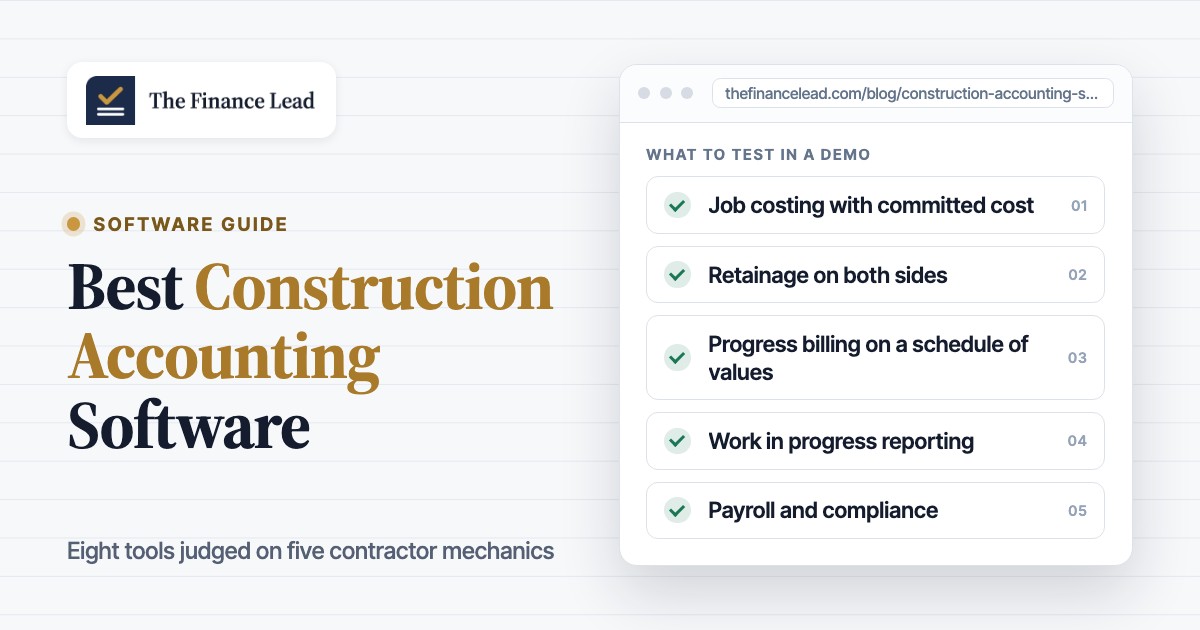
Five mechanics separate it from a general ledger, and they are the criteria we judged each tool on:
- Job costing with committed cost. Costs are coded to phases and cost codes, and purchase orders and subcontracts count as committed cost before the bill arrives.
- Retainage on both sides. A share of each payment is held until the work is complete. The contractor holds it from subcontractors in AP and the owner holds it from the contractor in AR, so both need their own balance.
- Progress billing on a schedule of values. Most commercial work is billed in monthly applications. The AIA G702 application for payment and the G703 continuation sheet list each line of the contract, the amount completed and the retainage.
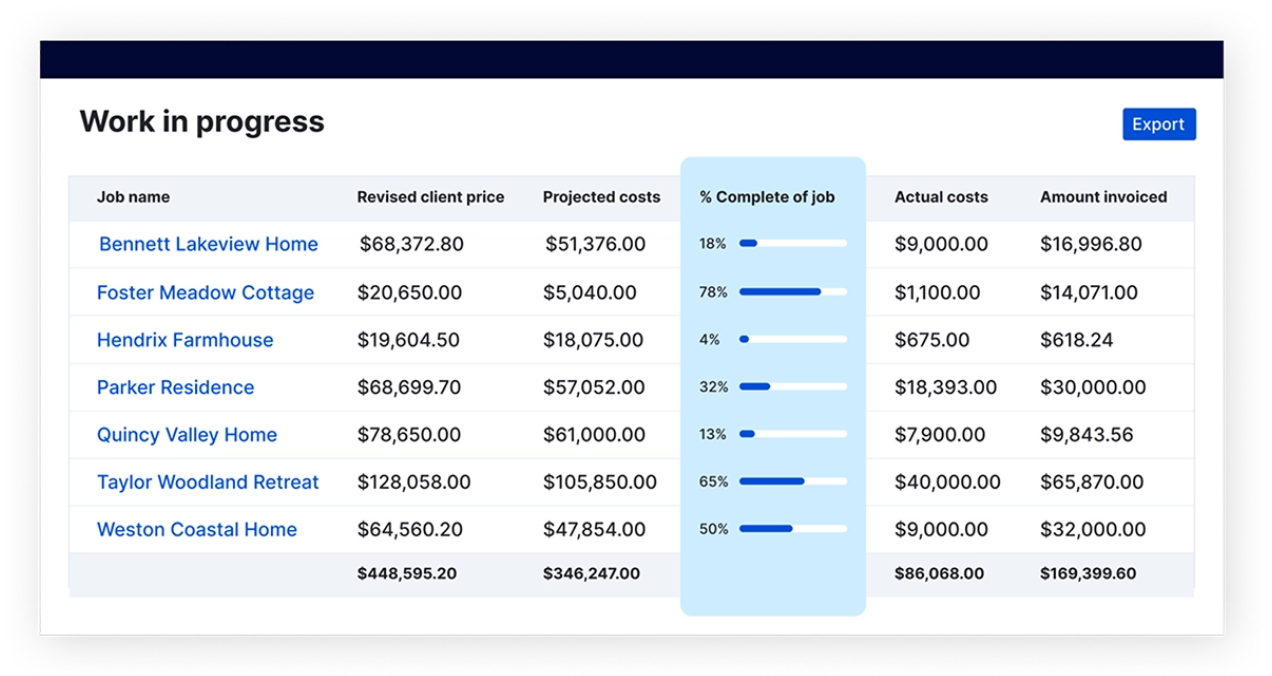
- Work in progress reporting. The WIP schedule compares contract value, cost to date, estimated cost to finish and billings to date, so over billing and under billing show up by job. Sureties and banks ask for it.
- Payroll and compliance. Certified payroll for public jobs, union fringes and subcontractor insurance and lien waiver records.
Equipment cost, change orders and field time entry matter too, but they decide fit less often. The software here covers accounting for the contractor, not estimating or scheduling. For paying subcontractors and suppliers outside construction, see our guide to accounts payable software, and for the receivables side in general, accounts receivable software.
What is construction accounting?
Construction accounting is the set of practices contractors use to track cost, billing and profit by project: job costing, progress billing, retainage, change orders and percentage-of-completion reporting. It differs from standard accounting because revenue is earned over the life of a contract, not at a single sale, and because the contractor holds retainage from subcontractors while the owner holds it from the contractor.
What software is used in the construction industry?
Software used in the construction industry usually spans several tools at once. Accounting software holds the ledger and job cost, a project management tool such as Procore or Buildertrend runs the field and change requests, estimating software produces the bid and a payroll system pays crews. The tools in this guide are the accounting layer. Several of them list integrations with Procore, PlanSwift and ProEst, so the estimate and the budget move across without retyping.
How much is QuickBooks for contractors?
QuickBooks Online Plus is $140 a month and Advanced is $340 a month at regular US rates on Intuit's pricing page, read on October 31, 2026, with 50% off for the first three months. Plus includes five users and Advanced includes 25. Phases, cost groups and change orders sit in Advanced, and Intuit's construction add-on price after its introductory period is not published. QuickBooks Desktop Enterprise with the Contractor edition is a separate annual subscription that we only found priced by resellers, between roughly $1,340 and $7,200 a year, so treat that as an estimate. Our QuickBooks Online pricing guide covers the plans in full.
How we compared construction accounting software
We picked tools that contractors with an accounting team of 2 to 50 people shortlist, from the ledger they outgrow to the ERPs they grow into. For each tool we read the pricing page, a construction or product page and a help or documentation page where one is public, and we checked review sites for rating, count and recurring themes. We scored nothing. We recorded what each vendor documents for retainage, AIA billing, change orders, subcontractor compliance, WIP, payroll and equipment, and where we found nothing we write "not found".
Five limits are worth knowing. Most rating figures are summary figures from the G2 and Capterra listings and cover the whole product, not construction customers only. Seven of the eight tools publish no price, so cost is a conversation, and any dollar range from a third party is labeled as an estimate. No Trimble product page is cited for Viewpoint Vista, so its entry rests on a third-party description and review summaries. Oracle announced a dedicated NetSuite construction product on October 26, 2026 with no release date, and we treat it as announced, not shipping. And a vendor saying a feature exists is not proof that your forms and reports come out the way your surety wants them, so ask each vendor for a demo with your own pay application.
Small contractors and builders on QuickBooks
If your accounting team is one or two people and you run a handful of jobs at once, the tools in this group keep the ledger simple. Both sit on QuickBooks, and both stop short of the deeper construction accounting that the next two groups provide.
QuickBooks Online
QuickBooks Online
QuickBooks Online is Intuit's cloud accounting ledger. Plans include 1, 3, 5 or 25 users, integrated inventory tracking on Plus and Advanced, and a closing date with an Exceptions to Closing Date report.
QuickBooks Online fits a contractor with a bookkeeper and a modest number of jobs that wants budgets against actuals by project without a construction ERP.
Team it fits: one company file, one or two people in accounting and an outside CPA, with jobs small enough that billing is a few invoices per project.
How it handles construction work: Plus lets you track project profitability, and Advanced adds the construction pieces: phases created at project level, cost groups, a change order report by status, and purchase order lines assigned to a phase so committed cost shows before the bill arrives. Intuit's subcontractor page describes AIA-style invoices tied to phases, costs and milestones, but we found no native G702 and G703 form output and no schedule of values screen. A WIP report with contract value, estimated cost, percent complete and over and under billings is available in Advanced, according to the CPA firm James Moore and Co, which also says it falls short of the accrual WIP schedules that sureties and banks ask for.
Retainage and payroll: we did not find native retainage in Intuit's documentation. James Moore and Co describes tracking it with spreadsheets posted as journal entries, while other firm blogs say the construction module handles it without giving detail, so the sources conflict and you should test it in a demo. We found nothing on certified payroll, prevailing wage or union fringes.
Where it stops: the same CPA firm puts the sweet spot at roughly $5 million to $50 million of revenue and says larger contractors move to heavier systems. Moving off QuickBooks can take about a year, so start the change before the close becomes the bottleneck. Our guide to QuickBooks alternatives covers general-purpose options.
- you run a small number of active jobs and need to see budget against actual by project
- you want a published price and a ledger your outside CPA already knows
- you hold retainage on every pay application: native retainage is not confirmed in Intuit's documentation and a CPA firm describes it as a workaround
- you run union or certified payroll or need committed cost by cost code across subcontracts
- Users like
- ease of use (254 mentions on G2)
- Users dislike
- missing features (81 mentions) and cost (70 mentions)
- Source: G2, 3,898 reviews
Price and plan notes
Intuit's pricing page lists Plus at $140 a month for 5 users and Advanced at $340 for 25 users, with 50% off the first three months. Reports of Advanced rising from $200 to $340 on August 1, 2026 come from third parties, and the construction add-on price after its introductory period is not published.
- Starting price
- Simple Start $38/mo; Essentials $85/mo; Plus $140/mo; Advanced $340/mo at US regular list rates (pricing page on 2026-10-27 showed 50% off for 3 months and a 30-day free trial)
- Users per plan
- Simple Start 1, Essentials 3, Plus 5, Advanced 25 (plus accountant seats)
- Inventory
- Available in Plus and Advanced
- Period control
- Closing date with Exceptions to Closing Date report
- Bill Pay tiers
- Basic $0 (included), Premium $15, Elite $45 per month; Elite included with Advanced from Aug 1, 2026
- Bill approvals
- Need Bill Pay Elite (or Advanced); up to 5 sequential layers and 7 approvers per group
- Bill Pay fees
- Standard ACH free (limits may apply), faster ACH $10, check $1.50, instant 1% (max $100)
- Batch size
- 20 bills on Basic, 50 on Premium and Elite
- Plans for projects
- Plus tracks project profitability; Advanced adds phases, cost groups and change orders
- Phases
- Set per project on project estimates, with Pending, In Progress and Completed statuses
- Committed cost
- Purchase order lines can be assigned to a phase
- WIP
- WIP report with over and under billings in Advanced, per CPA firm James Moore and Co
- Integrations
- Intuit lists Buildertrend, JobTread, Knowify and ServiceTitan
Buildertrend
Buildertrend
Buildertrend is a project management platform with job costing budgets, change orders, progress invoices with retainage and a QuickBooks sync. Its accounting depth is limited, so the ledger, payroll and WIP reporting stay in QuickBooks or another system.
Buildertrend fits a residential builder or remodeler that runs projects, client communication and change orders in one tool and keeps the real books in QuickBooks.
Team it fits: a builder or remodeler with five or more projects a year, or complex multi-phase builds, where the project manager and the accountant both need the same budget and change order numbers.
How it handles construction work: Buildertrend is project management first. A job costing budget with cost codes shows how much of each line is invoiced and what remains, and change orders connect to the budget. Progress invoices can withhold or release retainage per cost code, and Buildertrend's materials describe a schedule of values, cover sheets and supporting documents. We did not find G702 and G703 named explicitly, and we did not find committed cost, lien waiver tracking, certificate of insurance tracking or 1099 handling.
Accounting depth: Buildertrend is not a general ledger. Invoices and bills sync to QuickBooks after cost codes, jobs and vendors are mapped, and the books, payroll and any WIP schedule stay in QuickBooks. A third-party analysis from LiveFlow says the sync produces no construction-specific reports such as WIP, and reviewers on G2 and Capterra mention sync errors. We found no certified payroll, equipment costing or implementation timeline.
- Residential builder or remodeler with 5+ projects a year who wants PM, client portal, change orders and invoicing in one tool
- You already have QuickBooks as ledger and want job cost and retainage invoicing synced into it
- You need certified or union payroll, equipment costing or full AP/AR subledgers (not found in Buildertrend)
- You need a native WIP or over/under billing schedule; a third-party analysis says the QuickBooks sync produces no construction-specific reports
- Users like
- Communication tools and customer support
- Users dislike
- QuickBooks sync errors and limited accounting depth
- Source: G2, 215 reviews
Price and review notes
Buildertrend's pricing page shows no prices, only a quote form. Third-party estimates for its tiers disagree with each other, so we do not quote them. The G2 rating of 4.3 from 215 reviews is a search-summary figure.
- Starting price
- Quote only; unlimited users and projects; 10% off when paid annually upfront
- Ledger
- QuickBooks Online syncs automatically; QuickBooks Desktop syncs manually
- Retainage
- Withheld or released per cost code inside a progress invoice
- Builder fit
- 5+ projects a year or complex multi-phase builds, per Buildertrend
- Not found
- Certified payroll, equipment costing, native WIP schedule
- Pricing model
- Custom quote, unlimited users and projects, 10% off when paid annually upfront
- Setup
- Jobs, cost codes, users and vendors must be mapped before data transfers
Contractor-specific accounting packages
Sage 100 Contractor, Foundation Software and Trimble Viewpoint Vista were built for contractors from the start. Each puts job cost, subcontracts, retention and payroll at the center, and each is sold through a conversation, not a pricing page. They suit accounting teams that handle pay applications and compliance every month.
Sage 100 Contractor
Sage 100 Contractor
Sage 100 Contractor is a construction-specific accounting and project management package built for small to mid-size GCs, specialty trades and home builders. It is typically installed locally, and pricing is not published.
Sage 100 Contractor fits a small to mid-size general contractor, specialty trade or home builder that wants accounting, estimating and project management in one installed package.
Team it fits: a contractor whose bookkeeper or CPA can handle a longer setup and who has outgrown QuickBooks on retention, job cost or payroll.
How it handles construction work: Sage's 2025 product guide describes cost codes and cost types that compare budget to actual by job, jobs with phases and bid items, committed cost from purchase orders and cost-to-complete reports. Retention works on both sides: in AP it is withheld on payable invoices at the rate in the subcontract record and released per invoice or for the whole subcontract, and in AR the client is billed net of retention up to a maximum. Progress billing creates each application from the previous one, and the guide says most progress bills are printed on AIA certificates. We did not find the guide naming G702 and G703 by form number.
Compliance and payroll: the subcontract screen shows approved and open change orders, tracks expiration dates of workers' compensation, liability insurance and contractor licenses, and warns before you pay a subcontractor without current documents. That is an expiry warning, not a dedicated insurance certificate portal. Pre-lien and lien release management, 1099 forms, union payroll groups and certified payroll reports are in the guide, and the equipment module allocates ownership and repair cost to jobs through daily payroll.
What users report: reviewers on G2 praise ease of use and quick entry, and complain about weak, hard-to-customize reports. A third-party review describes the software as installed locally, with mobile apps limited to time entry and service dispatch.
- You want AR, AP, payroll, job cost, estimating and equipment in one integrated system, including AIA progress billing, retention and union/certified payroll
- You have a bookkeeper or CPA who can handle a longer setup and are outgrowing QuickBooks
- You need a cloud-native system with strong field/mobile accounting (third-party review: mobile apps cover time entry and service dispatch only)
- You need a published price or fast self-serve rollout (quote only, setup described as time-consuming)
- Users like
- Ease of use and quick item entry
- Users dislike
- Weak reporting and hard-to-customize reports
- Source: G2, 24 reviews
Price and review notes
Sage publishes no price. A figure of $115 per user a month circulates in a third-party article, but we could not verify it. G2 lists 24 reviews, and the 3.8 rating is a search-summary figure.
- Starting price
- Quote only through Sage or a reseller
- Deployment
- Installed locally on Windows/SQL; remote access needs hosting
- Latest documented version
- Sage 100 Contractor 2025 (SQL), March 2025
- Retention
- AP withheld per subcontract record, released per invoice or whole subcontract; AR billed net of retention with a maximum
- Payroll
- Union payrolls, paygroups, certified payroll reports
- Mobile
- Time entry and service dispatch apps only (third-party review)
- Job cost
- Cost codes and cost types compare budget to actual per job; PO-based committed cost and cost-to-complete reports
- Progress billing
- Each application builds on the previous one with its own number; most progress bills print on AIA certificates
- WIP
- Over/Under Billing (Analysis) report, plus a per-job WIP report for percentage-complete adjustments
- Sub compliance
- Warns before paying subs with expired workers' comp, liability insurance or licenses; lien release management
- Latest guide
- Sage 100 Contractor 2025 (SQL), March 2025
Foundation Software
Foundation Software
FOUNDATION is construction accounting software from Foundation Software (founded 1985, Strongsville, Ohio) covering job costing, AP, AR, payroll, POs/subcontracts and GL. Pricing is customized by module and not published.
Foundation Software fits a contractor with union, Davis-Bacon or prevailing wage payroll that wants certified payroll reports tied to job cost and the general ledger.
Team it fits: a contractor whose payroll is the hardest part of the books, with union or public-works jobs that need certified reports, and an accounting team comfortable with a Windows application.
How it handles construction work: the vendor's job costing page describes budgets by custom cost codes or CSI divisions, with cost, hours and quantities by job and alerts when a budget runs over. Change orders can be entered or imported, approved and printed or emailed, and approved changes update the budget without altering the original contract. Request-for-change items from the project management module convert to change orders. Subcontracts carry retainage and insurance expiration alerts, and lien waivers can be created and printed from AP and AR. The AR page describes AIA billing features for progress-billing jobs, with a schedule of values imported from a file or the job budget.
Payroll and reports: the payroll page covers prevailing wage, Davis-Bacon and union payrolls with multiple union and fringe rates per project, certified payroll reports printed or filed electronically, and workers' compensation tracking. WIP reports and automated over and under billing post to the general ledger. An equipment module with job cost rates, work orders and preventive maintenance is an add-on.
What users report: the G2 profile shows an average implementation of about four months. Capterra summaries praise responsive support and construction-specific tools, and complain about glitches and an outdated interface, so ask for references on stability.
- You run union, prevailing wage or Davis-Bacon payroll and need certified payroll reports tied to job cost and GL
- You want AIA billing with retainage and lien waivers plus integrations with Procore, PlanSwift, ProEst and others
- You need published pricing or a fast rollout (G2 users report about 4 months implementation)
- Review excerpts cite crashes and an outdated interface (Capterra excerpt), so check stability with references
- Users like
- Responsive support and construction-specific tools
- Users dislike
- Glitches and an outdated interface
- Source: G2, 24 reviews
Price and review notes
Foundation prices by module and publishes no figures. G2 lists a 3.7 rating from 24 reviews. We did not find committed cost reporting, G702 and G703 form names or how equipment rates are calculated.
- Starting price
- Quote only, modular pricing
- Core modules
- Job costing, payroll, purchase orders and subcontracts, accounts receivable
- Add-on modules
- Mobile time tracking, service dispatch, equipment management, project management
- Payroll
- Prevailing wage, Davis-Bacon and union payrolls with multiple fringe rates per project
- Partners
- Procore, PlanSwift, ProEst, Raken, Rhumbix, LCPtracker, Arcoro and others
- Implementation
- About 4 months per G2 users
- Job cost
- Budgets by custom cost codes or CSI divisions with overrun alerts
- AIA billing
- Printable AIA billing forms; schedule of values imported from a file or the job budget
- Retainage
- AP calculates and tracks retainage and lets you select retainage to pay; AR reports it by job
- WIP
- WIP reports and automated over and under billing, posted to the GL
Trimble Viewpoint Vista
Trimble Viewpoint Vista
Vista is Trimble's accounting-first construction ERP covering job cost, payroll, equipment and service. Third-party sources describe it as strong on certified and union payroll and job cost, but expensive and slow to implement.
Trimble Viewpoint Vista fits a mid-size or large contractor with a dedicated accounting team, multi-state union payroll and the budget for a rollout that runs for quarters.
Team it fits: a contractor with an accounting department, several unions or states and enough size that implementation cost is a rounding error against revenue.
How it handles construction work: no Trimble product or pricing page is cited, because the product URL redirects to a generic Trimble construction page, so the detail below comes from the independent review site ERP Research and from review summaries, not from the vendor. ERP Research describes a job cost ledger with budget entry, change order tracking, committed cost and cost-to-complete reporting, subcontract administration under purchasing, and native multi-state, multi-union, prevailing wage and certified payroll that it calls one of the strongest areas. Equipment management covers ownership cost, utilization, maintenance and charge-out to jobs.
What we could not confirm: AIA forms and retainage in AR rest on third-party and competitor claims. We found nothing on AP retainage, certificate of insurance tracking, lien waivers or 1099 handling.
What users report: a Capterra reviewer praises job cost and WIP functionality. Complaints are about cost against value, slow implementation and support response times, and one TrustRadius reviewer reports almost a year to roll out.
- Multi-state, multi-union or prevailing-wage payroll is core to the business (third-party sources call it a strength)
- You need job cost, committed cost, equipment and service in one ERP and can fund an implementation measured in quarters
- Small contractor with 2-8 person accounting team and no budget for module and onboarding fees; reviewers call it overpriced for small firms
- You need a fast, low-effort rollout; reviewers report year-long rollouts and long data entry up front
- Users like
- Job cost and WIP functionality
- Users dislike
- Cost against value, slow implementation and support response times
- Source: G2, 137 reviews
Price and review notes
Trimble publishes no price. ERP Research says implementation, migration and integration can match or exceed first-year license cost, which is a third-party claim. The G2 figure of 4.0 from 137 reviews and the Capterra figure of 3.8 from 264 reviews are search-summary figures.
- Starting price
- Quote only
- Built for
- Medium to large contractors (third-party: ERP Research)
- Payroll
- Multi-state, multi-union, prevailing wage and certified payroll (ERP Research)
- Implementation
- Quarters rather than weeks per ERP Research; almost a year per one TrustRadius reviewer
- Procore
- First-party Vista connector per ERP Research
- Job cost
- Job cost ledger with budgets, change orders, committed cost and cost-to-complete (ERP Research)
- Equipment
- Ownership cost, utilization, maintenance and charge-out to jobs (ERP Research)
- Integrations
- First-party Vista connector for Procore (ERP Research)
- Source note
- No Trimble product page was readable; detail is third-party
Cloud ERPs with construction modules
These three run on one database for the ledger, AP, AR and project accounting, and they are sold as ERPs with construction packaged in or configured on top. They cost more and take longer to implement than anything above, and they are the choice when the finance team also needs multiple entities, better controls or a system the next five years will not outgrow. Our guides to ERP accounting software and NetSuite vs Sage Intacct cover the general case.
Sage Intacct
Sage Intacct
Sage Intacct is a cloud financial system for scaling and mid-sized companies. Entities share one login, reporting runs on dimensions such as location and department, and books close period by period so nothing can be posted into an older period.
Sage Intacct Construction fits a mid-size contractor that has outgrown entry-level accounting and wants project accounting, native retainage and vendor compliance in a cloud ledger.
Team it fits: a mid-size contractor with a finance team that has moved past QuickBooks and wants one cloud ledger for project accounting, AP and AR.
How it handles construction work: Sage's help pages describe a work breakdown structure built from project, task and cost type dimensions. Retainage works on both customer invoices and vendor bills: you enable it per customer and vendor, set a default percentage and release it by invoice line. Bulk release, release with project contract invoices and advanced retainage need the Construction subscription. The 2026 R3 release notes add automated retainage withholding rules and a subcontractor payment application workflow.
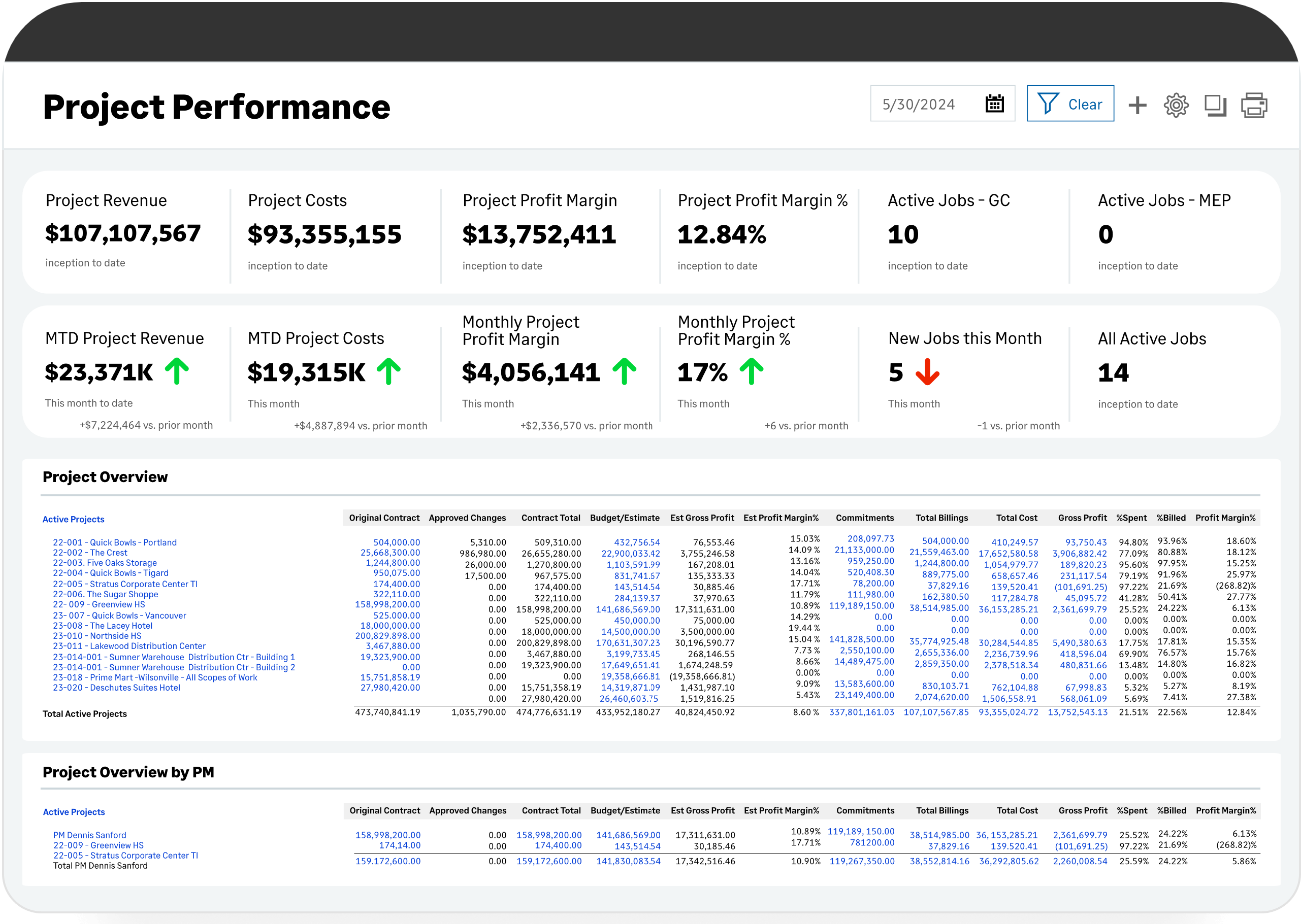
Compliance, payroll and WIP: vendor compliance rules for insurance and other requirements and lien waiver compliance records are tied to primary documents, and a prebuilt vendor compliance report exists. Construction Payroll, powered by Struxi, handles federal, state and local certified payroll and union and non-union fringes, and requires the Construction subscription. Sage's product page describes automated WIP by job and sub-job with over and under billing, and a third-party summary says some WIP features are early adopter.
What we could not confirm: native G702 and G703 output, 1099 handling and equipment costing. Third-party sources estimate 3 to 6 months for implementation.
- you want AR and AP retainage and vendor compliance records inside a cloud ledger
- you have several entities or need project, task and cost type dimensions in reporting
- you need a published price or a quick rollout: Sage lists no prices and third parties describe 3 to 6 months
- payroll and G702 and G703 output must be native: certified payroll needs the Construction Payroll add-on and native G702 and G703 output is not confirmed
- Users like
- ease of use (1,027 mentions) and reporting (508 mentions)
- Users dislike
- missing features (385 mentions) and a steep learning curve (339 mentions)
- Source: G2, 4,525 reviews
Price and review notes
Sage publishes no plan names or prices. G2 shows 4.3 from about 4,397 reviews for the whole product. Reviewers mention ease of use and reporting, and complain about missing features and a learning curve.
- Starting price
- Quote only; Sage publishes no plan names or prices
- Implementation
- As few as 60 days per Sage; about 4 months average per G2 users
- Marketplace
- 350+ integrations per Sage
- Consolidation
- Separate extended capability
- AP automation
- AI bill capture, duplicate flagging, three-way matching generally available since May 2026
- Payments
- Check, ACH or virtual card
- 1099
- Tracked in Intacct; e-filing through a Marketplace partner
- Job cost
- Project, task and cost type dimensions form the work breakdown structure
- Retainage
- AR and AP; per customer and vendor with a default percent; advanced release options need a Construction subscription
- Compliance
- Vendor compliance rules for insurance and lien waiver records tied to documents
- Payroll
- Construction Payroll powered by Struxi, certified payroll in all US states, requires a Construction subscription
- Subcontractor billing
- 2026 R3 adds a subcontractor payment application workflow
Acumatica
Acumatica Cloud ERP
Acumatica is a cloud ERP whose general ledger, subledgers and multi-company accounting sit on one platform with open APIs. Licensing is based mainly on the applications you implement and the compute resources you use, not on user seats, and no dollar prices are published.
Acumatica Construction Edition fits a small to mid-size contractor that wants compliance tracking, retainage and AIA reports in a cloud ERP priced by resources, not by seat.
Team it fits: a small to mid-size general contractor, specialty contractor or home builder that wants one database for the ledger, project accounting, billing and compliance.
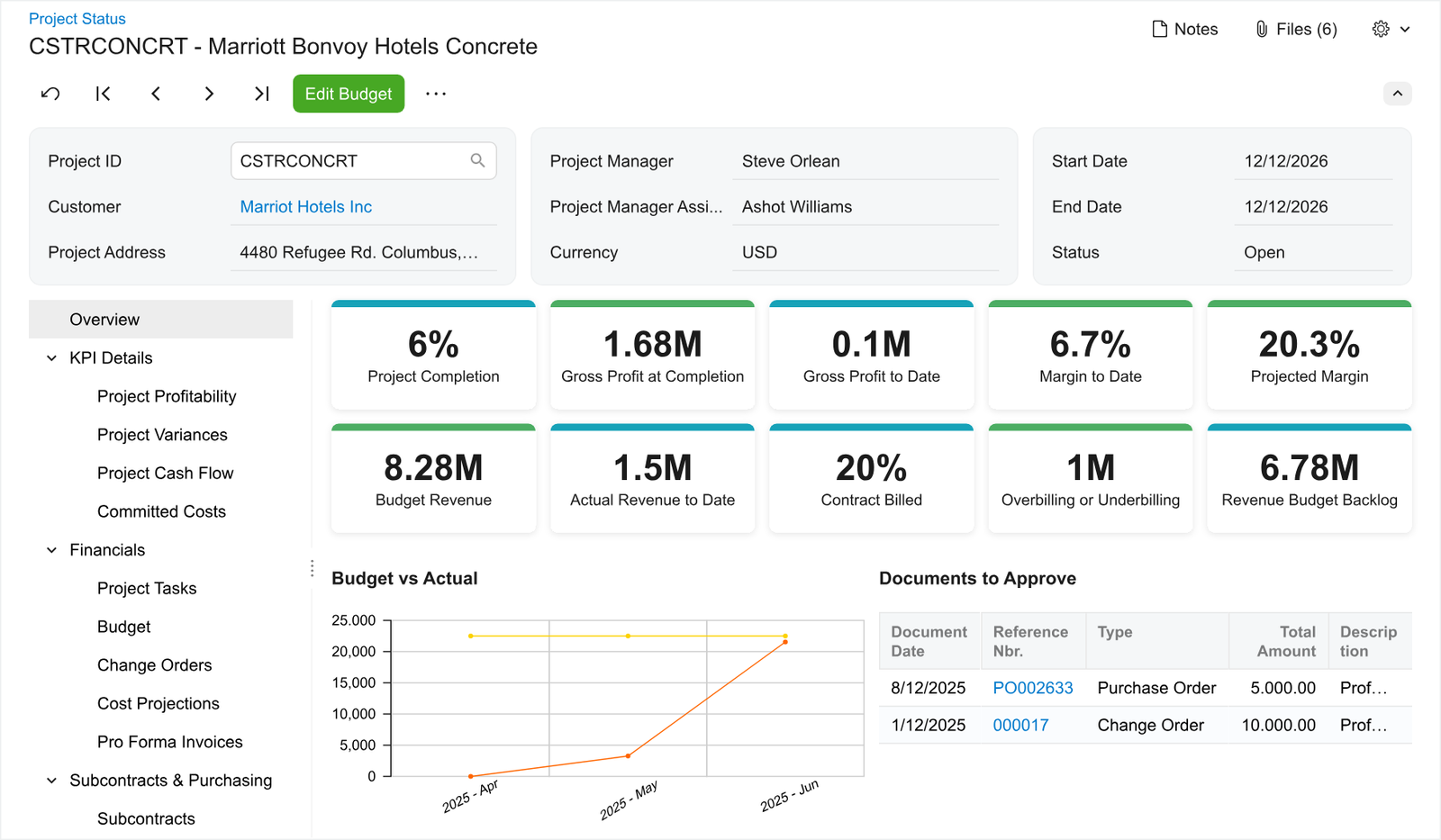
How it handles construction work: Acumatica describes cost codes as an extra classification on every transaction type, from AP bills and POs to time cards and budget lines. Subcontracts and purchase orders carry line-item committed cost and budget comparison, and change orders and change requests are tracked apart from the original budget, including negative change orders for back charges. Retainage is tracked in AR, AP, commitments and pro forma invoices, with a cap on billing. The AIA Report and AIA Report with Quantity produce the G702 application and G703 continuation sheet from a pro forma invoice, at summary or detail level. These details come from the vendor datasheet and help pages published by MYOB Acumatica, an Australian reseller, so US screens may differ.
Compliance and payroll: a compliance module lets you configure required documents per vendor and project, with expiration alerts for certificates of insurance, bonds, licenses, lien waivers and releases, and W-9 and 1099 data is kept. The vendor lists multiple unions, locals, classes and benefit packages for payroll. A cost projection report reviews over and under billing by date, but we found no report literally named a WIP schedule.
What users report: G2 praises ease of use and support quality, and complaints include setup and administration effort and missing features, which some reviewers say need tailoring.
- you want lien waivers, insurance certificates and bonds tracked in the same system as AP
- you have many people who need access and want a license that does not charge per user
- you want a published price or a short rollout: pricing is a quote and third parties describe 4 to 8 months
- you rely on certified payroll being native: the vendor says it is embedded, one third-party comparison says it comes through partners, so confirm it in writing
- Users like
- Ease of use, customization, features (G2 top positive themes)
- Users dislike
- Missing features, learning curve, difficult or complex setup (G2 top negative themes)
- Source: G2, 2,050 reviews
Price and review notes
Acumatica prices by resources, applications and deployment, not user seats, and publishes no USD price. The G2 rating of 4.4 to 4.5 covers the whole product and about 1,576 to 2,000 reviews, depending on the page. Capterra shows 4.4 from 243 reviews for Acumatica Cloud ERP.
- Starting price
- Custom quote, resource-based licensing
- Pricing basis
- Mainly number of applications implemented, not user seats; no published USD prices
- G2 average implementation time
- 7 months (user-reported average)
- G2 average ROI time
- 16 months (user-reported average)
- Period statuses
- Inactive, Open, Closed, Locked
- Cost codes
- An extra classification level on GL, AP, PO, AR, expense, time card and budget lines
- Commitments
- Subcontracts and POs with line-item committed cost and budget comparison
- Retainage
- AR, AP, commitments and pro forma invoices, with a billing cap
- AIA
- AIA Report and AIA Report with Quantity produce the G702 and G703 from a pro forma invoice
- Compliance
- Insurance certificates, bonds, licenses and lien waivers with expiration alerts
- Integrations
- Procore, ProEst, BuildingConnected, DocuSign, open APIs
NetSuite
Oracle NetSuite
NetSuite is a cloud ERP: financials, inventory, order management and multi-subsidiary accounting in OneWorld. Accounting periods can be locked per subsidiary, and a separate permission lets selected users override a locked period.
NetSuite fits a larger contractor with multiple subsidiaries that is willing to configure a general ERP, add partner software and fund a long implementation, or to wait for Oracle's announced construction product.
Team it fits: a contractor with several entities, a real implementation budget and a finance team that wants the same ERP for contracting, real estate or other lines of business.
How it handles construction work today: NetSuite's construction page describes tagging transactions by job, cost code and phase, WIP and committed cost reports, milestone-based retainage release, lien-waiver tracking and automated AIA-style progress invoices and change-order billing. The detail comes from summary descriptions only, because no vendor page is cited. ERP Research, an independent review site, is more cautious: it says NetSuite does not produce a signed-ready G702 and G703 application out of the box, that lien waivers are not native, and that retainage and stored materials need configuration or a partner SuiteApp. Percent-complete revenue runs through Advanced Revenue Management.
What is announced: on October 26, 2026 Oracle announced NetSuite for Construction Businesses, with a workbench showing budget, committed and actual cost, billed to date and estimate to complete, plus an agent that drafts AIA-style applications. It is a limited US rollout with no release date or pricing, and Oracle says features and timing may change, so do not buy on it yet.
What we could not confirm: AP-side retainage, certificate of insurance tracking, 1099 handling, equipment costing and field mobile.
- you run several entities or subsidiaries and need consolidation across contracting and other businesses
- you have a partner that has built construction billing and retainage on NetSuite before
- you are a specialty contractor under about $20 million of revenue: ERP Research calls that a weak fit
- you need AIA G702 and G703 output and lien waivers out of the box: ERP Research says neither is native
- Users like
- integrated platform and customization (search-indexed G2 summaries)
- Users dislike
- implementation cost and learning curve
- Source: G2, 4,984 reviews
Price and review notes
NetSuite quotes by deal, and the figures in this entry are ERP Research estimates, not Oracle prices: a base of about $999 a month, $99 to $129 per full user a month and partner fees of 1.5 to 3 times the first-year license. G2 shows 4.1 from about 4,376 to 4,831 reviews for the whole product. Our NetSuite pricing guide explains the general cost structure.
- Starting price
- Quote only; NetSuite describes its pricing as tailored and customer-specific
- Implementation
- 8 to 14 weeks simple single-entity; 4 to 11 months midmarket (NetSuite); about 6 months average per G2 users
- Period lock
- Per subsidiary in OneWorld; Override Period Restrictions permission
- Currencies
- 190+
- Job costing
- Transactions tagged by job, cost code and phase; WIP and committed cost reports per NetSuite
- Retainage
- Milestone-based release per NetSuite; AP-side retainage not found
- AIA forms
- NetSuite page claims AIA-style progress invoices; ERP Research says no signed-ready G702 and G703 without a SuiteApp or custom template
- New product
- NetSuite for Construction Businesses announced on October 26, 2026; limited US rollout, no release date or price
- Cost estimates
- ERP Research estimates $80,000 to $150,000 a year for about 25 users at a $30 million specialty contractor
Where each tool sits in the contractor money loop
A contractor's money loop has four jobs: code costs to the job, bill the owner against the contract, measure profit on work in progress and close the books. The tools differ in how many of the four they own, and a smaller tool that covers your two painful stretches beats a platform that covers all four.
- Step 1Code costs to the job
- Acumatica Cloud ERP
- Foundation Software
- Sage 100 Contractor
Breaks when a bill is coded to the wrong cost code and the job looks cheaper than it is - Step 2Bill with retainage
- Buildertrend
- Sage 100 Contractor
- Acumatica Cloud ERP
Breaks when a pay application uses last month's completed amounts - Step 3Measure work in progress
- Foundation Software
- Sage Intacct
- QuickBooks Online
Breaks when over billing is booked as revenue and the surety report disagrees with the ledger - Step 4Close and review
- The Finance Lead
Tracks who tied out the WIP schedule and the retainage balances, and where the evidence sits
The construction capabilities that separate these tools
| Tool | Retainage | AIA billing | Subcontractor compliance | Certified payroll | Published price |
|---|---|---|---|---|---|
| QuickBooks Online | Not confirmed | AIA-style invoices tied to phases | Not found | Not found | Yes |
| Buildertrend | Per cost code on progress invoices | Schedule of values, cover sheets | Not found | Not found | No |
| Sage 100 Contractor | AP and AR | Prints on AIA certificates | Insurance and license expiry warnings, lien releases | Yes | No |
| Foundation Software | AP and AR | AIA billing forms | Insurance alerts, lien waivers | Yes | No |
| Trimble Viewpoint Vista | Third-party claim for AR | Third-party claim | Not found | Yes, per ERP Research | No |
| Sage Intacct | AR and AP | Not confirmed | Vendor compliance rules, lien waiver records | Yes, with Construction Payroll | No |
| Acumatica | AR, AP and commitments | G702 and G703 reports | Insurance, bonds, lien waivers | Vendor says embedded | No |
| NetSuite | Milestone release, configuration | Claimed by NetSuite, not native per ERP Research | Claimed by NetSuite, not native per ERP Research | Not found | No |
Read the table as a floor, not a score. "Not found" means we found no statement on the published vendor pages, not that the feature is missing. Where a cell rests on a third party, the text says so, and vendors' own demos are the way to settle each one.
How to choose construction accounting software
Start with the paperwork that costs your team hours every month, not with the feature list.
- A few small jobs, a bookkeeper and an outside CPAQuickBooks Online Plus or Advanced, and test the retainage workflow in a demo before you rely on it
- Residential builds where the project manager drives change orders and client billingBuildertrend for the project side, with QuickBooks as the ledger
- Monthly AIA pay applications with retention on subcontractsSage 100 Contractor, Foundation Software or Acumatica, with your own pay application in the demo
- Union, Davis-Bacon or multi-state prevailing wage payrollFoundation Software, Sage 100 Contractor or Trimble Viewpoint Vista, and ask for a certified payroll report from a real job
- Several entities, tighter controls and a cloud ledgerSage Intacct or Acumatica, or NetSuite with a partner that has done construction
- Subcontractor insurance and lien waivers tracked next to APAcumatica, Sage Intacct, Foundation Software or Sage 100 Contractor, depending on how much of the record you need in the system
Three questions settle most decisions:
- Where does retainage live today? If it is a spreadsheet that someone updates after each pay application, native retainage on both AR and AP is the first feature to test.
- Who needs the WIP schedule? If a surety or bank asks for it monthly, check that the report ties to the general ledger instead of being a separate export.
- How long can the finance team spend on the switch? Implementation times run from a few weeks of self-serve setup for QuickBooks to quarters for the largest ERPs, and all of the tools above ask for clean job and cost code data first.
Where the month-end review fits
None of these tools prove that the WIP schedule and the retainage balances were reviewed by a second person before the books close. That step lives in a checklist: tie the WIP schedule to the general ledger, reconcile the retainage payable and receivable balances, review committed costs on jobs near completion, and keep the evidence. Our month-end close checklist lists the standard tasks, and the financial close software guide covers the suites that automate them.
The Finance Lead is a small tool for exactly that step. It runs recurring close checklists for accounting teams of 2 to 8, with a link or note of evidence per task and preparer and reviewer sign-off. It does not touch your ledger, your job cost or your bank data, so it sits beside the software above, not in place of it.
Frequently asked questions
What is the best accounting software for contractors?
For a small contractor with a few jobs, QuickBooks Online is the usual starting point at $140 a month for Plus or $340 for Advanced. Contractors with monthly AIA pay applications, retainage on subcontracts or certified payroll look at Sage 100 Contractor, Foundation Software, Trimble Viewpoint Vista, Sage Intacct or Acumatica. The right one depends on which of those jobs your team does each month.
Does QuickBooks handle retainage?
We did not find native retainage in Intuit's documentation. A CPA firm describes tracking it with spreadsheets posted as journal entries, and other sources disagree, so test it in a demo with one of your pay applications. Sage 100 Contractor, Foundation Software, Sage Intacct and Acumatica document retainage on the AP and AR side.
What is retainage in construction accounting?
Retainage is a share of each progress payment that is held back until the work is complete or conditions in the contract are met. The owner holds retainage from the general contractor, and the contractor holds it from subcontractors, so a contractor carries both a receivable and a payable balance for it.
What is WIP in construction accounting?
WIP in construction accounting is the work-in-progress schedule that compares each job's contract value, cost to date, estimated cost to finish and billings to date. It shows over billing and under billing by job, and sureties and banks usually ask for it each month or quarter.
What is the difference between AIA G702 and G703?
The G702 is the application and certificate for payment, which gives the totals for the period. The G703 is the continuation sheet, which lists each line of the schedule of values with the work completed, stored materials and retainage. Acumatica documents reports that produce both, and Sage 100 Contractor and Foundation Software describe AIA billing forms.
How long does construction accounting software take to implement?
Construction accounting software implementation time is not published by any vendor here. Reviewers on G2 report about four months for Foundation Software, third parties describe 3 to 6 months for Sage Intacct and 4 to 8 months for Acumatica, and one TrustRadius reviewer reports almost a year for Trimble Viewpoint Vista. QuickBooks Online is self-serve.