
Accounts payable software helps you receive vendor bills, route them for approval, pay them and record the result in your books. For most teams of 2 to 8 accountants, the right starting point is the AP features inside the ledger they already use, QuickBooks Online or Xero, and a dedicated platform such as BILL, Stampli, AvidXchange, Tipalti or Ramp becomes worth its price when approvals, supplier payments or entities outgrow the ledger.
We compared eight tools and sorted them by where accounts payable lives: inside the accounting system or in a dedicated platform. Most pages that rank for this keyword are written by a bank, card or AP vendor and put the publisher's own product first. For each tool we read the pricing page, a product page and the help or documentation pages we could open, and we checked review sites in October 2026. None of the vendors paid for a placement. Our own product doesn't process a single bill, so it sits outside the ranking as a marked row.
- accounts payable tools compared
- 8
- publish a plan price (Tipalti only a starting price)
- 5 of 8
- document three-way matching on the pages we read (BILL on Enterprise only)
- 6 of 8
Our picks by situation
The best accounts payable software for most teams of 2 to 8 people is the bill feature set of the ledger they already run. When approvals by amount, supplier payments abroad or several entities enter the picture, pick the dedicated tool in the list that matches that need.
 Best when your accountant keeps the books in QuickBooksQuickBooks OnlineFree standard ACH, AI bill capture and role-based bill entry and payment. Approval workflows need Bill Pay Elite at $45 a month, or the Advanced plan.
 Best for unlimited users and free standard ACH on a published priceXeroRole-based approval and no per-user fees, with bill entry capped at 5 a month on Early. No multi-step approval routing is documented.
 Best for multi-entity teams that need three-way matching in the ledgerSage IntacctAI bill capture, duplicate flags and three-way matching generally available since May 2026. Price on quote.
 Best for QuickBooks Online or Xero teams that want approval policies and payments in one inboxBILLFrom $49 per user per month, with automatic sync from Team and custom approval policies from Corporate.
 Best when approvers outside finance need to question an invoiceStampliEach invoice is a workspace with an auditable thread, and matching is semi-automated. Price on request.
 Best when you want a vendor to scan invoices and send the paymentsAvidXchangeAvidXchange captures paper and email invoices and pays by virtual card, direct deposit or check. Demo request only.
 Best for paying suppliers abroadTipaltiPayments in 200+ countries and territories, W-9 and W-8 collection, and plans from $99 a month with unlimited users.
 Best for a free start on QuickBooks Online or XeroRampOCR, approvals and bill payments at $0 per user on the Free plan; NetSuite and Sage Intacct sync need Plus.
 Our product · for the month-end check on APThe Finance LeadTracks who tied out the AP subledger and where the proof is. It doesn't capture or pay bills.
Accounts payable software compared
| Tool | Type of tool | How it handles a vendor bill | Pricing | G2 rating |
|---|---|---|---|---|
| QuickBooks Online | Cloud accounting ledger with inventory and closing-date controls | Email or upload a bill, approve (Elite), pay by ACH or check | Simple Start $38/mo; Essentials $85/mo; Plus $140/mo; Advanced $340/mo at US regular list rates (pricing page on 2026-10-27 showed 50% off for 3 months and a 30-day free trial) | 4.0 (3,897) |
| Xero | Accounting ledger with built-in bank reconciliation | Draft bill from AI capture, role-based approval, pay by ACH or check | Early $27, Growing $59, Established $97 per month (US plans); new customers get 90% off for 6 months until Nov 2, 2026; no per-user license fees | 4.4 (1,845) |
| Sage Intacct | Mid-market cloud financials with multi-entity | AI bill capture, three-way matching, approvals and payments in the ledger | Quote only; Sage publishes no plan names or prices | 4.3 (4,524) |
| BILL | Dedicated AP automation platform | Central bill inbox, approval policies, payments, sync to the ledger | Essentials $49, Team $65, Corporate $89 per user per month; Enterprise custom; plus per-payment fees (ACH $0.59, check $1.99) | 8.2/10 (TrustRadius, 379) |
| Stampli | Dedicated AP automation platform | Invoice workspace with discussion thread, approval, post to the ERP | Quote only; the pricing page has a Request a Quote button and no prices | 4.6 (2,084) |
| AvidXchange | Dedicated AP automation platform | Vendor captures invoices and sends the payments you approve | Not published; demo request only, the /pricing/ URL returns 404 | 4.4 (359) |
| Tipalti | Dedicated AP automation platform | Invoice capture, PO matching, supplier portal, global payments | Accounts Payable plans start at $99/month with unlimited users; per-invoice and payment fees by quote | 7.7/10 (TrustRadius, 167) |
| Ramp | Card-first spend platform | OCR, approval workflows, pay by ACH, card, check or wire | Free: $0/mo/user; Plus: $15/mo/user + platform fee based on team size (save 20% with annual billing); Enterprise: Custom | 4.8 (2,460) |
| The Finance Lead Our product | Month-end close checklists | Tracks close tasks, evidence and preparer/reviewer sign-off | Team $39/month (up to 8 team members), Plus $79/month (no member limit, read-only MCP server); card required at checkout | No reviews yet |
Prices checked on October 28, 2026. Review scores were read between October 20 and October 28, 2026; BILL and Tipalti show TrustRadius scores out of 10 because G2 and Capterra blocked our reads. Ramp's G2 score covers the whole Ramp platform, not only Bill Pay.
What is accounts payable software?
Accounts payable software is a program that receives the bills your suppliers send, lets the right people approve them, schedules the payment and records the result in your accounting system. It replaces the part of the job people do with email threads, spreadsheets and typed-in bank details: finding the invoice, asking who approved it, keying the amount and remembering to pay on the due date.
The tools split into two kinds, and the split matters more than any feature checklist.
| Kind | Where AP happens | Typical user | Examples here |
|---|---|---|---|
| Ledger-native | Bills, approvals and payments inside the accounting system | Small teams whose ledger is also their AP system | QuickBooks Online, Xero, Sage Intacct |
| Dedicated AP platform | A separate product that captures invoices, runs approvals and pays, then posts to the ledger | Teams with many vendors, several approvers, entities or supplier payments abroad | BILL, Stampli, AvidXchange, Tipalti, Ramp |
Accounts payable software isn't expense management and it isn't procurement. Expense tools handle employee card spend and reimbursements, and our guide to expense management software covers that job. AP software handles bills from suppliers, which may or may not start with a purchase order.
What one invoice goes through
An accounts payable invoice passes through the same four stages in every tool on this page. The tools differ in how many of those stages they automate and who does the rest.
| Stage | What happens | Where the work usually stays manual |
|---|---|---|
| Capture | The bill arrives by email, upload or mail and its fields are read | Odd formats, handwritten or paper invoices |
| Approve | The right person confirms the bill is valid and within their limit | Chasing approvers who don't log in |
| Pay | The payment is scheduled and sent by ACH, check, card or wire | New vendors and changed bank details |
| Record | The bill and payment post to the ledger | The month-end tie-out between the AP subledger and the general ledger |
Can AI process accounts payable?
AI can process accounts payable only in part: it reads an invoice and proposes the entries, but a person still approves the payment. QuickBooks Online says AI pulls the details and creates pre-filled bills, Xero says its AI extracts the key details to create draft bills, and Sage Intacct says Sage AI extracts details from an uploaded or emailed bill and flags duplicates. Stampli's assistant, Billy, follows the approval rules you set, and Stampli states that authorized people keep control of approvals. The vendor accuracy claims we saw, such as 99% field accuracy from BILL and Ramp, are the vendors' own figures and we haven't tested them.
Is BILL accounting software or AP software?
BILL is for accounts payable, but it isn't accounting software, so you still need a ledger. It sits beside that ledger: bills, approvals and payments live in BILL, and the results sync to QuickBooks Online or Xero automatically from the Team plan, or to NetSuite, Sage Intacct and other ERPs on Enterprise.
How do you control accounts payable?
You control accounts payable by splitting who enters, approves and pays a bill, setting approval limits, matching what you pay against what you ordered, catching duplicates and checking the subledger against the books every month. Software can enforce some of these. Others stay a process your team owns.
- Different people enter a bill, approve it and release the payment
- Approval limits by bill amount, with a second approver above a threshold you set
- A callback to a phone number you already hold before paying any vendor whose bank details changed
- Matching of the invoice to the purchase order and, for goods, the receipt before payment
- A duplicate check on vendor, invoice number and amount before every payment run
- A month-end tie-out of the AP subledger to the general ledger, plus a search for bills received but not yet recorded
| Control | What to do | What the tools document |
|---|---|---|
| Split the duties | Enter, approve and pay with different people | QuickBooks Online has bill clerk, approver and payer roles; Xero assigns who can create and approve bills; Stampli supports segregation of duties with roles |
| Approval limits | Route by amount, vendor or location | BILL policies by bill amount (custom policies on Corporate); QuickBooks Online multi-condition workflows (Elite); Xero documents none |
| Vendor bank-detail changes | Verify by callback before paying | A process step you own; the pages we read describe no change-verification step |
| Matching | Invoice to PO, and to receipt for goods | Three-way matching: Sage Intacct, Stampli, AvidXchange, Tipalti and Ramp document it; BILL ties it to Enterprise; none found for QuickBooks Online or Xero |
| Duplicates | Check vendor, invoice number and amount | Flagged by BILL, Stampli, Xero and Sage Intacct per their product pages |
| Month-end | Tie the AP subledger to the GL and search for unrecorded bills | Reports differ by tool; the tie-out itself is yours (see the last section) |
Segregation of duties is the one control that no price list will fix. A three-person team where the same person enters a bill and pays it has the same exposure in every tool on this page. Decide the roles first, then check which plan lets you enforce them.
How we compared accounts payable software
We compared accounts payable software by picking tools that finance teams of 2 to 8 people actually shortlist, covering the ledgers that ship with AP features and the dedicated platforms that sit beside them. For each tool we read the pricing page, a product or feature page, and the help center or documentation where one was open to us. We used the review site we could read: G2 where its page loaded, TrustRadius for BILL and Tipalti, and we say so next to each score. Search-result snippets were never used for ratings or prices.
Three limits are worth knowing. Stampli and AvidXchange publish no prices, and we don't print the figures third-party sites show for them because those figures conflict. Intuit's and Sage's pages block automated readers, so some of their details come from page summaries and are dated. And a vendor's own accuracy or time-saved claims are reported as claims, never as results.
Accounts payable inside your accounting system
If you pay a few dozen bills a month, the cheapest AP system is the one you already own. The three tools below keep bills and ledger in one place, which removes the sync step and the second login.
QuickBooks Online
QuickBooks Online
QuickBooks Online is Intuit's cloud accounting ledger. Plans include 1, 3, 5 or 25 users, integrated inventory tracking on Plus and Advanced, and a closing date with an Exceptions to Closing Date report.
QuickBooks Online is enough when you pay a modest number of bills a month and your accountant already keeps the books in it.
Controls: bills live under Expenses and Bills, where you can email or upload an invoice and let AI pre-fill the bill for you to review. Approvals are the catch. Intuit's help center says a bill approval workflow needs Bill Pay Elite, which costs $45 a month as an add-on and is included with the Advanced plan from August 1, 2026. With Elite you can build a multi-condition workflow that triggers by amount, vendor or location, with up to 5 sequential layers and up to 7 approvers per group, and a bill nobody reviews within 30 days is denied automatically. Separate roles exist for a bill clerk who enters bills, a bill approver and a bill payer, so one person doesn't have to do all three. We found no three-way matching on any Intuit AP page we read.
Payments and sync: you schedule payments by ACH or a check that Intuit mails. Intuit's Bill Pay page lists free standard ACH, faster ACH at $10, checks at $1.50 and instant payment at 1%, but a pricing page footnote gives Simple Start $0.50 per standard ACH over a monthly allotment, so confirm the allotment for your plan. Basic users can pay 20 bills at a time and Premium and Elite users 50. The ledger and the bills are the same system, so there is nothing to sync.
- Your accountant already works in QuickBooks Online and you pay a modest number of bills a month
- You want free standard ACH and AI bill capture without another subscription
- You'll move to Advanced anyway, which now includes the Elite approval workflows
- You need approval workflows on Simple Start, Essentials or Plus without paying $45 a month for Elite
- You need matching of purchase orders, receipts and invoices: we found none on Intuit's AP pages
- You want approvals in a tool that isn't tied to the ledger's plan and user caps
- Users like
- ease of use (254 mentions on G2)
- Users dislike
- missing features (81 mentions) and cost (70 mentions)
- Source: G2, 3,897 reviews
How it works in practice
QuickBooks Online lists Simple Start at $38, Essentials at $85, Plus at $140 and Advanced at $340 per month. Intuit has announced new renewal prices for Essentials, Plus and Advanced from August 1, 2026 without publishing them in the pages we read, so check a live checkout. Bill Pay has its own tiers: Basic at $0, Premium at $15 and Elite at $45 per month. G2 reviewers rate QuickBooks Online 4.0 out of 5 from 3,897 reviews. For plan detail, read our QuickBooks Online pricing guide and our QuickBooks Online review.
- Starting price
- Simple Start $38/mo; Essentials $85/mo; Plus $140/mo; Advanced $340/mo at US regular list rates (pricing page on 2026-10-27 showed 50% off for 3 months and a 30-day free trial)
- Users per plan
- Simple Start 1, Essentials 3, Plus 5, Advanced 25 (plus accountant seats)
- Inventory
- Available in Plus and Advanced
- Period control
- Closing date with Exceptions to Closing Date report
- Bill Pay tiers
- Basic $0 (included), Premium $15, Elite $45 per month; Elite included with Advanced from Aug 1, 2026
- Bill approvals
- Bill Pay Elite, $45 per month or included with Advanced
- Bill Pay fees
- Standard ACH free (limits may apply), faster ACH $10, check $1.50, instant 1% (max $100)
- Batch size
- 20 bills on Basic, 50 on Premium and Elite
- Plans
- Simple Start $38, Essentials $85, Plus $140, Advanced $340
Xero
Xero
Xero is a cloud accounting ledger whose bank feeds flow into a reconcile screen. Its JAX feature reconciles transactions automatically using four methods (Rule, Match, Memory, Prediction) and asks you to review only what it is unsure about.
Xero is enough when you want unlimited users, free standard ACH and a simple approver role rather than multi-step routing.
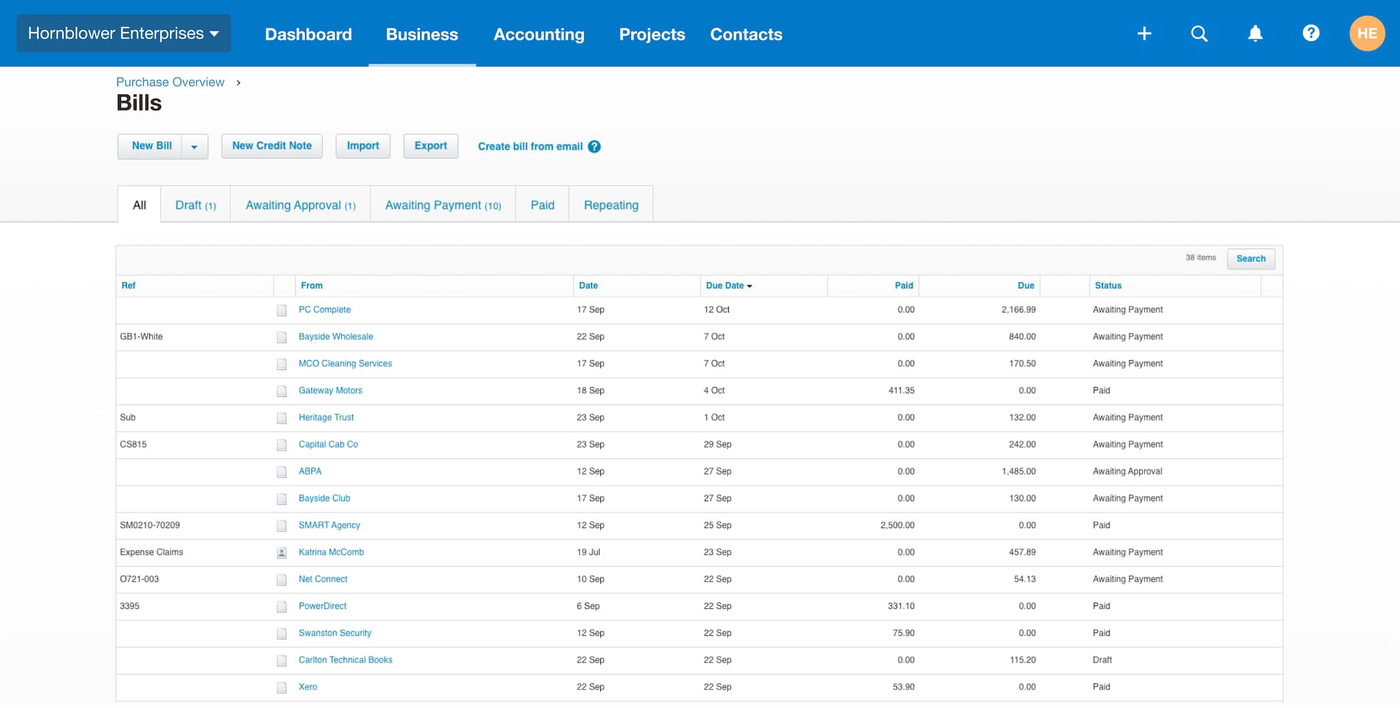
Controls: Xero's pages describe role-based control: roles and permissions decide who can create and who can approve bills, and Xero says it can spot duplicate bills. We found no multi-step, rule-based approval routing documented for AP, and approval chains by amount usually mean an add-on app. Smart Document Capture is listed on all three plans, and Xero says its AI extracts the key details to create draft bills. On the Early plan, bill entry is capped at 5 bills a month, while Growing and Established list unlimited bills. We found no three-way matching on the Xero pages we read.
Payments and sync: bill payments are powered by Melio, which Xero says it has acquired, and Xero says free standard ACH bill payments are included on its plans. Checks cost $1.50 a bill, same-day ACH and instant bank transfers cost 1% up to $75 per bill, and funding a payment with a card costs 2.9%. Cross-border USD payments cost $20 each, and international payments in other currencies need the Established plan. W-9 collection and a 1099 report come with every plan. Xero is the ledger, so nothing needs syncing.
- You want a published price per plan, unlimited users and free standard ACH
- Your approval rule is one person drafts and another approves
- You pay vendors in more than one currency (Established plan)
- You need approval steps that depend on the bill amount: Xero documents role-based approval only
- You need matching of purchase orders, receipts and invoices: we found none on Xero's pages
- You're on the Early plan and enter more than 5 bills a month
- Users like
- Ease of use; reviewers often single out automatic bank reconciliation as fast and accurate (G2 comparison pages as indexed by search)
- Users dislike
- Missing features and limited options (G2 comparison pages as indexed by search)
- Source: G2, 1,845 reviews
How it works in practice
Xero lists Early at $27, Growing at $59 and Established at $97 per month after the introductory offer, which gave new US customers 90% off for 6 months until November 2, 2026. Xero lists no per-user license fees, and its bill-payment FAQ says there are no fees for additional users. G2 reviewers rate Xero 4.4 out of 5 from 1,845 reviews. For the plan-by-plan detail, read our Xero pricing guide, and see QuickBooks vs Xero for the head-to-head.
- Starting price
- Early $27, Growing $59, Established $97 per month (US plans); new customers get 90% off for 6 months until Nov 2, 2026; no per-user license fees
- JAX methods
- Rule, Match, Memory, Prediction
- Plan gating
- Reconcile bank transactions on every plan; auto-reconcile transactions listed on Growing and Established
- Per-user fees
- None
- Plan limits
- Early: 20 invoices and 5 bills per month; multi-currency on Established only
- Lock dates
- Advisor role required to set or change them
- Payroll
- Add-on, $36 per month plus $6 per employee
- Bills
- Early: 5 bills per month; Growing and Established: unlimited
- Bill pay
- Free standard ACH on all plans (Melio-powered); check $1.50; same-day ACH 1% (max $75); cross-border USD $20
- Approvals
- Role-based (who can create and approve bills); no multi-step routing documented
- 1099
- W-9 collection and 1099 report on all plans
- Plans
- Early $27, Growing $59, Established $97 per month
Sage Intacct
Sage Intacct
Sage Intacct is a cloud financial system for scaling and mid-sized companies. Entities share one login, reporting runs on dimensions such as location and department, and books close period by period so nothing can be posted into an older period.
Sage Intacct fits a multi-entity finance team that wants three-way matching and AP automation inside the ledger.
Controls: Sage says its AP Automation agent creates draft bills, matches them to purchase orders and routes approval, and that AI extracts details from an uploaded or emailed bill and flags duplicate invoices. A May 2026 Sage announcement says three-way matching, which links invoices, purchase orders and receipts and flags line-level discrepancies, is generally available. Custom multi-condition approval rules for purchasing, using fields such as vendor, amount and department, were an early-adopter program in that announcement. Sage's AP page says you manage the process from bill creation through approvals, payments and reconciliation in one solution, with an audit trail and multi-entity bills in one account.
Payments and sync: Sage Intacct pays by check, ACH or virtual card. It tracks 1099 vendors, but its documentation says you e-file through an approved vendor in the Sage Intacct Marketplace. Sage publishes no bill-pay fees or bill limits.
- You run several entities and want one AP process across them
- You need three-way matching inside the ledger
- You want bills, approvals, payments and reconciliation in the system that holds the books
- You want a published price or a small-business-priced AP tool
- You need native 1099 e-filing: it goes through a Marketplace partner
- You can't spend about four months on an implementation, the average G2 users report
- Users like
- ease of use (1,027 mentions) and reporting (508 mentions)
- Users dislike
- missing features (385 mentions) and a steep learning curve (339 mentions)
- Source: G2, 4,524 reviews
How it works in practice
Sage publishes no plan names or prices for Intacct. The pricing page says it builds a plan around your industry and size. G2 users report an average implementation of about four months, and G2 reviewers rate Sage Intacct 4.3 out of 5 from 4,524 reviews. If you're weighing it against a smaller ledger, read our ERP accounting software guide.
- Starting price
- Quote only; Sage publishes no plan names or prices
- Implementation
- As few as 60 days per Sage; about 4 months average per G2 users
- Marketplace
- 350+ integrations per Sage
- Consolidation
- Separate extended capability
- AP automation
- AI bill capture, duplicate flagging, three-way matching generally available since May 2026
- Payments
- Check, ACH or virtual card
- 1099
- Tracked in Intacct; e-filing through a Marketplace partner
- Pricing
- Quote only
- 3-way matching
- Generally available since May 2026
Dedicated accounts payable automation platforms
A dedicated platform earns its fee when approvals, supplier payments or entities outgrow the ledger. Each of the five below posts back to your accounting system, so the ledger stays the book of record.
BILL
BILL
BILL is an accounts payable platform with a central bill inbox, approval policies, AI bill coding and payments by ACH, check, virtual card and wire. Automatic two-way sync with QuickBooks Online and Xero starts on the Team plan; NetSuite, Sage Intacct and other ERPs sync on Enterprise only.
BILL fits a QuickBooks Online or Xero team that wants approvals and bill payments in one inbox and is happy to pay per user.
Controls: every plan has approval workflows, and an administrator can switch approvals on or off. BILL's help center says approval policies are based on the bill amount, that every approver on a bill must approve it, and that approvers act in the listed order. Custom approval policies start on the Corporate plan; Essentials and Team get standard policies only. Two-way matching is listed from Corporate, three-way matching is tied to Enterprise on the pricing page, and dual control is Enterprise only. The product page says the app flags a possible duplicate before you pay the same bill twice, and that bill conversations are logged with time stamps from entry to payment.
Payments and sync: you can pay by ACH, check, virtual card, instant payment and international wire, and the product page says up to 2,000 bills can be paid at a time. QuickBooks Online and Xero sync automatically from the Team plan; on Essentials you move data by CSV. NetSuite, Sage Intacct, Microsoft Dynamics and Acumatica sync on Enterprise only. AI coding of multi-line bills starts on Team.
- You run QuickBooks Online or Xero and want bills, approvals and payments in one tool (automatic sync starts on Team)
- You need approval steps that depend on the bill amount (custom policies start on Corporate)
- You pay many vendors by ACH or check and want 1099 e-filing in the same tool
- You need three-way matching: BILL's pricing page ties it to Enterprise
- You run NetSuite or Sage Intacct and don't want Enterprise pricing, because those syncs are Enterprise only
- You want one price for the whole team: BILL charges per user plus a fee on each payment
- Users like
- Accounting integrations, one repository for vendor invoices with document storage, reporting
- Users dislike
- Support, ACH fund holds and missing features in a handful of reviews that read, mostly about receivables
- Source: TrustRadius, 379 ratings
How it works in practice
A team of 2 on Essentials pays $98 a month at list prices, and a team of 8 on Corporate pays $712 a month, before payment fees. BILL's pricing page did not state whether those prices assume annual billing, so ask before you compare. BILL also covers the money coming in, which our guide to accounts receivable software compares against dedicated collections tools. Per-transaction fees apply on every plan: ACH $0.59, check $1.99, a USD international wire $19.99, and 1099 e-filing $2.99 per form. We could not open G2 or Capterra for BILL on October 28, 2026, so the rating comes from TrustRadius: 8.2 out of 10 from 379 reviews. Reviewers praise the accounting integrations and the single place for vendor invoices; the complaints we could read were mostly about receivables, support and ACH fund holds.
- Starting price
- Essentials $49, Team $65, Corporate $89 per user per month; Enterprise custom; plus per-payment fees (ACH $0.59, check $1.99)
- Matching
- Two-way on Corporate and Enterprise; three-way tied to Enterprise on the pricing page
- Custom approval policies
- Corporate and Enterprise
- QuickBooks Online and Xero sync
- Automatic from Team; CSV only on Essentials
- Dual control
- Enterprise only
- Payment fees
- ACH $0.59, check $1.99, virtual card free, USD wire $19.99
- Plans
- Essentials $49, Team $65, Corporate $89 per user per month
- ACH / check fee
- $0.59 / $1.99 per payment, on every plan
Stampli
Stampli
Stampli is an AP platform built around the invoice as a workspace: approvers and vendors discuss each invoice in one thread with an auditable log, and the approved record is posted back to the ERP, which stays the system of record.
Stampli fits a team whose approvers live outside finance and answer questions about an invoice in the invoice itself.
Controls: Stampli treats each invoice as a workspace. Approvers and vendors discuss the invoice in one thread, and Stampli says the thread keeps an auditable log. Roles and permissions support segregation of duties. Its AI assistant, Billy, follows the approval rules you configure, and Stampli states that authorized people keep control of approvals. The pricing page lists semi-automated two- and three-way matching as included, and the product page says duplicate invoices are flagged.
Payments and sync: Stampli names more than 70 ERPs on its integrations page, including NetSuite, Sage Intacct, QuickBooks Online and Desktop, Microsoft Dynamics 365 and SAP. It says it learns each entity's posting rules, validates a record before posting and returns it to the ERP, which stays the system of record. Payments run through the Direct Pay add-on (ACH, check, virtual card and international payments), or you can pay from your own systems.
- Approvers outside finance need to ask questions about an invoice and see the answer on the invoice
- You run an ERP from Stampli's list of 70 or more and want unlimited vendors and entities in the plan
- You want semi-automated two- and three-way matching included
- You want a published price before a sales call
- Your accounting system isn't on Stampli's integration list
- You want payments to stay entirely in your bank's own tools: Stampli's own payments are the Direct Pay add-on
- Users like
- Ease of use, invoice processing, customer support (G2 aggregated themes)
- Users dislike
- Invoicing problems, missing features, approval problems (G2 aggregated themes)
- Source: G2, 2,084 reviews
How it works in practice
Stampli publishes no price. The pricing page offers a Request a Quote button, and G2 lists one edition on request with month-to-month or optional annual pricing. We don't quote the dollar figures that third-party sites print, because they conflict. Stampli says teams deploy in weeks, and G2 users report an average implementation of one month. G2 shows 4.6 from 2,084 reviews; the praise and complaint themes below are G2's own summaries, not reviews we read one by one: ease of use and support on the plus side, invoicing, missing features and approval problems on the minus side.
- Starting price
- Quote only; the pricing page has a Request a Quote button and no prices
- Matching
- Semi-automated 2-3 way matching included (pricing page)
- ERPs
- 70+ named, including NetSuite, Sage Intacct, QuickBooks Online and Desktop, Dynamics 365
- Payments
- Direct Pay add-on: ACH, check, virtual card, international
- Implementation
- Vendor says weeks; G2 users average 1 month
- Contract
- G2 lists month-to-month or optional annual
- Pricing
- Request a Quote; no prices published
- Entities and vendors
- Unlimited on the pricing page
AvidXchange
AvidXchange
AvidXchange is a middle-market AP platform. Suppliers send invoices to an address or PO box it sets up, its team and AI capture the data, and it sends payments by virtual card, direct deposit or check once you approve them. Your accounting system stays the system of record.
AvidXchange fits a middle-market team that wants a vendor to receive the invoices, capture the data and send the payments.
Controls: AvidXchange builds workflows with you around the approval practices you already follow, reroutes approvals when someone is absent and keeps invoice approval and payment approval separate. For purchase orders it says it applies two-way and three-way matching with tolerance policies by supplier. Its security page lists Positive Pay and describes AvidXchange as a licensed money transmitter.
Payments and sync: suppliers email invoices to an address AvidXchange sets up or mail paper to a PO box it sets up, and AvidXchange scans and captures them. You approve what gets paid, and AvidXchange sends the payments by Mastercard virtual card, AvidPay Direct deposit or paper check. Your accounting system remains the system of record: you mark payments in it, files go to the payment application, and reconciliation files come back. The integrations page lists many ERPs and industry systems, but we could not read the full list.
- You want a vendor to scan invoices, including paper ones, and send supplier payments for you
- You run an industry ERP from its long list, such as property management or construction systems
- You want separate invoice and payment approvals with Positive Pay
- You want published pricing or a quick self-serve start
- You want to keep paying suppliers from your own bank files: AvidXchange sends the payments
- You are a very small team: the vendor describes the product as built for middle-market businesses
- Users like
- Ease of use, time saving, approval process (G2 aggregated themes)
- Users dislike
- Customer support, delays, invoicing issues (G2 aggregated themes)
- Source: G2, 359 reviews
How it works in practice
AvidXchange publishes no price: the /pricing/ address on its site returns a 404 error and every call to action is a demo request. G2 lists one edition on request. Implementation takes as little as six weeks according to one vendor page and 45 days according to another; G2 users report an average of three months. G2 shows 4.4 from 359 reviews. G2's own summaries praise ease of use, time saved and the approval process, and criticize customer support, delays and invoicing issues.
- Starting price
- Not published; demo request only, the /pricing/ URL returns 404
- Matching
- Two-way and three-way with tolerance policies by supplier
- Payments
- AvidXchange sends: virtual card, direct deposit, check
- Implementation
- Vendor: as little as 6 weeks; G2 users average 3 months
- Security
- Licensed money transmitter; Positive Pay
- Pricing
- Demo request only
Tipalti
Tipalti
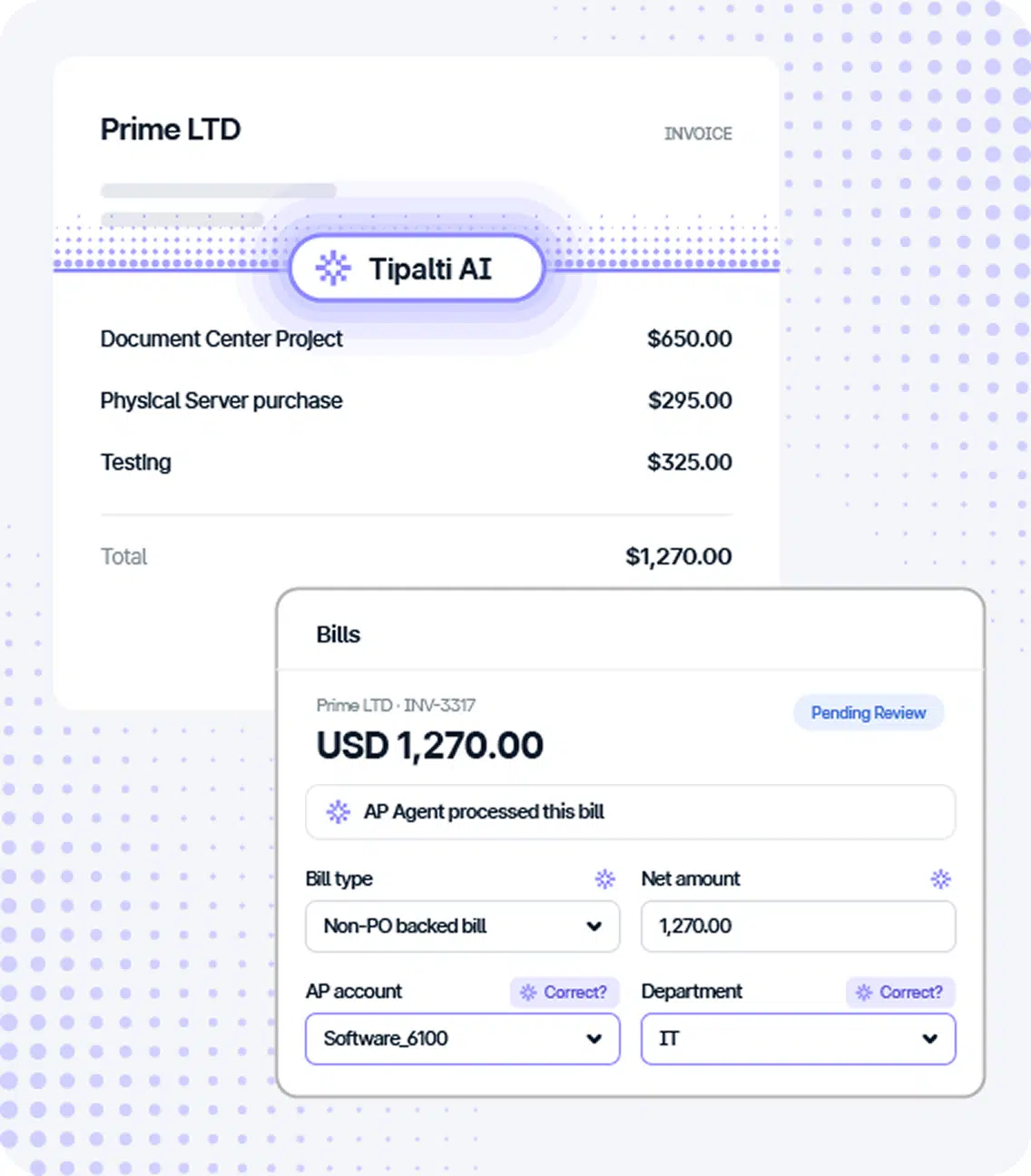
Tipalti is an AP platform with invoice capture, two- and three-way PO matching, a supplier portal that collects W-9 and W-8 forms, and payments in 200+ countries and territories by ACH, wire, check or the Tipalti Card.
Tipalti fits a team that pays suppliers in many countries and needs tax forms, local payment rails and a native ERP link.
Controls: Tipalti lists approvals, auto invoice capture with GL coding in 146 languages, and two- and three-way PO matching on its pricing page. It doesn't say which plan includes the matching. Suppliers onboard themselves in a portal that collects W-9 and W-8 tax forms and validates tax IDs across 62 countries. Tipalti's help center sits behind a login, so we could not check approval mechanics in its documentation.
Payments and sync: Tipalti says it pays in 200+ countries and territories by ACH, wire, check, the Tipalti Card and local payment methods. Its pricing page names NetSuite, Sage Intacct, QuickBooks, Microsoft Dynamics and SAP as integrations, and a dropdown on its demo form also lists Xero. Reviewers on TrustRadius flag unclear sync error messages and a gap with QuickBooks Online.
- You pay suppliers abroad and need tax forms, local rails and several currencies in one tool
- You run NetSuite, Sage Intacct, SAP Business One or Dynamics and want a native integration
- You want no per-user or per-approver fee
- QuickBooks Online is your only ledger: reviewers describe integration gaps there
- You only pay a few domestic vendors by ACH or check
- You want every fee published: the per-payment fees are quote-only
- Users like
- End-to-end AP automation, AI coding and approvals, global payments, NetSuite integration
- Users dislike
- Unclear sync errors, editing and reprocessing invoices, credit memos
- Source: TrustRadius, 167 ratings
How it works in practice
Tipalti's pricing page says Accounts Payable plans start at $99 per month with unlimited users and a supplier portal, and that it charges no per-user or per-approver fees. Transaction fees per invoice and payment are quote-only, there is no free tier, and standard implementation is included. Another review site prints $149, so confirm the platform fee in your quote. G2 and Capterra blocked our automated reads on October 28, 2026, so the rating is from TrustRadius: 7.7 out of 10 from 167 reviews. Reviewers praise end-to-end automation, AI coding and global payments, and criticize editing or reprocessing invoices and credit memos.
- Starting price
- Accounts Payable plans start at $99/month with unlimited users; per-invoice and payment fees by quote
- Matching
- 2 and 3-way PO matching listed; plan placement not published
- Payments
- 200+ countries and territories; ACH, wire, check, Tipalti Card
- Fees
- Per invoice and per payment by quote
- Free tier
- None
- Pricing
- AP plans from $99 per month, unlimited users
Ramp
Ramp
Ramp is a US corporate card and spend management platform that bundles expense management, reimbursements, AP and accounting sync. The Free tier covers cards, receipts and QuickBooks Online/Xero sync; mid-market ERPs and accruals need Plus.
Ramp fits a small team on QuickBooks Online or Xero that wants approvals and bill payments at no per-user cost.
Controls: the Free plan includes invoice extraction by OCR, configurable approval workflows and automated fraud checks. Ramp says approvals can route by vendor, department, accounting field or payment type, and the Plus plan adds payment release approvals and AI approval recommendations. Its AP page says Ramp performs two-way and three-way matching, with purchase orders imported from NetSuite or QuickBooks or created in Ramp; which plan includes matching against imported purchase orders isn't clear from the comparison table, and matching against Ramp's own purchase orders needs the Procurement add-on.
Payments and sync: you can pay by ACH, card, check or wire. Ramp's help center explains that each payment starts two transfers: Ramp pulls the money from your bank, then pays the vendor. The Free plan syncs with QuickBooks Online and Xero; NetSuite, Sage Intacct, Acumatica and Dynamics 365 Business Central need Plus.
- You're on QuickBooks Online or Xero and want OCR, approvals and bill payments on a free plan
- You want bill payments next to corporate cards and expenses in one product
- You want approval routing by vendor, department or payment type
- You need deep international supplier tax compliance: Tipalti documents more of it
- You run NetSuite or Sage Intacct and want a free tool, because those ERPs need Plus
- You don't want to link a bank account to Ramp: payments pull funds from your bank first
- Users like
- Ease of use; expense reports described as fast and intuitive
- Users dislike
- Duplicate-expense bugs and missing card features such as transaction PINs or competitive rewards; some cite rigid approval workflows
- Source: G2, 2,460 reviews
How it works in practice
Ramp's pricing page shows Free at $0 per user per month and Plus at $15 per user per month plus a platform fee based on team size, which it doesn't publish. Bill payment fees are standard ACH $0.59, standard check $1.99, same-day ACH $10, domestic wire $15 and international wire $20, and Ramp says it waives eligible fees when you pay from a Ramp Checking account. The G2 rating of 4.8 from 2,460 reviews covers the whole Ramp platform, mostly cards and expenses, so it says little about the AP module. Ramp's own TrustRadius reviewers mention approval routing that's easy to change, and one calls the accounting side glitchy.
- Starting price
- Free: $0/mo/user; Plus: $15/mo/user + platform fee based on team size (save 20% with annual billing); Enterprise: Custom
- Month end
- Auto-reversing accrual for unsynced card spend (Plus)
- ERPs on Free
- QuickBooks Online, Xero
- Reimbursement
- Within 3 business days of approval (help center)
- AP payment fees
- Standard ACH $0.59, check $1.99, same-day ACH $10, domestic wire $15, SWIFT USD $20; waived when paying from Ramp Checking
- AP on Free
- OCR invoice extraction, approval workflows, fraud checks, pay by ACH, card, check or wire
- 1099
- $0.65 per IRS filing, free state filing
- Matching
- Two-way and three-way match; imported-PO matching by plan not confirmed
- Plans
- Free $0; Plus $15 per user per month plus a platform fee
- 1099 filing
- $0.65 per IRS filing, free state filing
From invoice to payment to close: where each tool stops
Every tool on this page covers capture, approval and payment to some degree. None of them performs your month-end check that the payables balance in the ledger is the right number. The columns below show which tools cover each stage and what tends to break.
- Stage 1Capture the bill
- QuickBooks Online
- Xero
- Sage Intacct
- BILL
- Stampli
- AvidXchange
- Tipalti
- Ramp
What breaks paper and odd formats; Xero Early caps bill entry at 5 a month - Stage 2Approve it
- BILL
- Stampli
- AvidXchange
- Tipalti
- Ramp
- QuickBooks Online
What breaks approvers who don't log in; QuickBooks Online needs Elite and Xero documents only roles - Stage 3Pay it
- QuickBooks Online
- Xero
- Sage Intacct
- BILL
- AvidXchange
- Tipalti
- Ramp
- Stampli
What breaks changed vendor bank details; per-payment fees add up - Stage 4Prove it at close
- The Finance Lead
Catches who tied out the AP subledger, with the evidence link
Which accounts payable software fits your team?
Pick by the bottleneck that costs you the most time this month, then check the plan that fixes it.
| If this describes you | Start with | Why |
|---|---|---|
| You pay a few dozen bills a month and the books are in QuickBooks Online | QuickBooks Online Bill Pay | Free standard ACH and AI capture; add Elite only when you need approval workflows |
| The books are in Xero and one person approves | Xero | Free standard ACH, no per-user fees, role-based approval |
| You want approvals and payments in a free tool on QuickBooks Online or Xero | Ramp Free | OCR, approval workflows and payments at $0 per user; mind the platform fee on Plus |
| Bills need amount-based approval steps and you stay on QuickBooks Online or Xero | BILL | Custom policies from Corporate and automatic sync from Team |
| Approvers outside finance keep asking questions about invoices | Stampli | The question and answer stay on the invoice |
| You want someone else to scan paper invoices and send the payments | AvidXchange | The vendor captures invoices and sends virtual card, direct deposit or check |
| You pay suppliers in many countries and need tax forms | Tipalti | 200+ countries and territories, W-9 and W-8 collection |
| You run several entities and need three-way matching in the ledger | Sage Intacct | Matching, approvals and payments in one system |
If none of those rows fit, you probably don't need dedicated software yet. Use the ledger's bill features, set the roles from the controls checklist above and revisit when the volume or the number of approvers changes.
Which AP tools sync with QuickBooks Online and Xero?
BILL syncs with both QuickBooks Online and Xero automatically from its Team plan, and Ramp lists both on its Free plan. Stampli lists QuickBooks Online and QuickBooks Desktop among its more than 70 ERPs. Tipalti names QuickBooks on its pricing page, but reviewers describe gaps with QuickBooks Online, and Xero appears only in a dropdown on its demo form. We couldn't read AvidXchange's full integration list, so ask for your system by name before a demo. QuickBooks Online, Xero and Sage Intacct are ledgers, so they hold the bills themselves.
What does accounts payable software cost?
Accounts payable software prices vary in three ways: a plan price, a per-user price, and a fee on each payment. Only five of the eight publish a number you can plan on, and Tipalti publishes only its starting price.
| Tool | Published price (USD) | What decides the bill |
|---|---|---|
| QuickBooks Online | Simple Start $38, Essentials $85, Plus $140, Advanced $340 per month at list; Bill Pay Premium $15 and Elite $45 per month | Plan, users (1, 3, 5 or 25) and Bill Pay tier; check $1.50, faster ACH $10 |
| Xero | Early $27, Growing $59, Established $97 per month | Plan; check $1.50, same-day ACH 1% up to $75 per bill |
| Sage Intacct | Quote only | Entities, modules and users, not published |
| BILL | Essentials $49, Team $65, Corporate $89 per user per month | Users and plan; ACH $0.59, check $1.99 per payment |
| Stampli | Quote only | Not published |
| AvidXchange | Demo request only | Not published |
| Tipalti | AP plans from $99 per month with unlimited users | Payments processed, entities, modules; per-invoice and payment fees by quote |
| Ramp | Free $0 per user; Plus $15 per user per month plus a platform fee | Plan, team size and payment method; ACH $0.59, check $1.99 |
Prices were checked on October 28, 2026. Introductory offers change quickly: Xero's 90% offer for new US customers ran until November 2, 2026, and Intuit's renewal prices for several QuickBooks Online plans change from August 1, 2026. For quote-only tools, ask for the price at double your current bill count, and ask which payment fees are included.
After the payment: tie out AP and keep the proof
An AP tool tells you what you owe vendors. It doesn't tell you that the payables balance in your general ledger is the right number, and that check belongs in your month-end close. A typical sequence has an owner and a day for each step, so the review doesn't depend on someone remembering it.
- AP preparerRun the AP aging report from the AP tool and the accounts payable balance from the general ledger as of period end Business day 1
- AP preparerExplain every difference between the two, such as bills entered after period end, unapplied credits and payments in transit Business days 1 to 2
- AP preparerSearch for bills received but not yet entered, such as invoices in the inbox and goods received without an invoice, and book accruals for them Business days 2 to 3
- ReviewerReview the tie-out, the accrual list and the supporting evidence, then approve or send it back with a comment Business days 3 to 4
The tie-out and the accrual search are the steps most teams keep in a spreadsheet. The Finance Lead runs recurring month-end close checklists with preparer and reviewer sign-off, and each task carries its evidence as a link or a note, so the AP tie-out becomes a task with an owner, a due date and the saved report linked. It doesn't capture bills, pay vendors or connect to your bank or ledger, and it doesn't host files. Plans start at $39 per month for up to 8 team members, and a card is required at checkout. Our month end close checklist lists the tasks around it, and our month end close process shows who owns each step. If your tie-out uses bank data, read bank reconciliation software too.
FAQ
What is accounts payable software?
Accounts payable software receives supplier bills, routes them for approval, schedules payment and records the result in your accounting system. Some tools do this inside the ledger, such as QuickBooks Online, Xero and Sage Intacct. Others are separate platforms such as BILL, Stampli, AvidXchange, Tipalti and Ramp.
Does QuickBooks have AP automation?
QuickBooks Online has AP automation in part. It lets you email or upload invoices and uses AI to pre-fill bills, and Bill Pay schedules payments by ACH or mailed check. Bill approval workflows need Bill Pay Elite, which costs $45 a month or is included with the Advanced plan. We found no three-way matching on Intuit's AP pages.
Is BILL accounting software?
No. BILL is a payables platform that works next to a ledger such as QuickBooks Online or Xero, and that ledger still holds your books.
Can AI process accounts payable?
Partly. AI drafts the bill from the invoice, and a person approves the payment. Treat the accuracy figures vendors publish as their own claims.
How do you control accounts payable?
Separate who enters, approves and pays a bill. Set approval limits by amount, call vendors back when bank details change, match invoices to purchase orders, check for duplicates and tie out the AP subledger each month.
Do I need AP software if I use QuickBooks Online or Xero?
You don't always need AP software if you use QuickBooks Online or Xero. If you pay a modest number of bills and one person approves them, the bill features in QuickBooks Online or Xero are enough. Add a dedicated tool when you need approval steps by amount, payments to suppliers abroad, matching to purchase orders or several entities.