A month end close template is a reusable task register that tells your accounting team what to finish, when it's due, who prepares it, what evidence proves completion, and who approves it. Download the workbook or copy the table below into Excel or Google Sheets. It includes dependencies, a working-day schedule, exception handling, and a final release gate. Unlike a simple checklist, it separates work completed from work reviewed.
This template is designed for a US controller or accounting manager running a recurring monthly close. The example covers a single legal entity with accounts payable, accounts receivable, payroll, and a general ledger. Remove workstreams that don't apply, then add inventory, intercompany, lease accounting, or other material processes before your first live close. The task order and day targets are illustrative planning choices. They aren't accounting requirements or industry benchmarks.
- A task register with owner, reviewer, dependency, evidence and exception fields.
- A sample close calendar based on working days after period-end.
- A rule for reopening approved tasks when late postings change the ledger.
- A controller sign-off checklist that prevents premature reporting release.
What should a month end close template include?
A useful month end close template includes a task, accountable preparer, independent reviewer, due date, prerequisite, evidence link, status, and review timestamp. That's the difference between a reminder list and a record of what the team actually did. An account reconciliation shouldn't become Approved just because its preparer checked a box. The reviewer needs current support that agrees with the final ledger, and it shouldn't be last week's file.
Use the same template every month, but create a separate period-specific copy. That preserves prior approvals and exceptions instead of overwriting the evidence trail. You'll want last month's copy when a reviewer asks what was approved and when. Keeping every copy in one shared location also lets the controller identify a late task without asking every preparer for a status update.
Here's what each field does in the working register. Don't add columns the reviewer won't use.
| Field | How to use it |
|---|---|
| ID | Stable task identifier, such as CASH-01. Don't reuse IDs for unrelated work. |
| Workstream | Cash, AP, AR, payroll, adjustments, review, or release. |
| Task | One testable deliverable with a clear completion condition. |
| Depends on | The upstream task ID that must finish first, if any. |
| Preparer | Named person who performs the work. |
| Reviewer | Named person who accepts the evidence and conclusion. |
| Target WD | Planned working day after the accounting period ends. |
| Due date | Calendar date calculated from the period end and holiday list. |
| Status | Not started, In progress, Blocked, Ready for review, Approved, or Not applicable. |
| Evidence | Link to a dated reconciliation, report, journal, or approval record. |
| Blocker | Missing input, unresolved difference, owner, and next decision. |
| Reviewed at | Timestamp of approval against the final evidence version. |
Preparer and reviewer are different roles. A small team may need the controller, an external accountant, or another authorized person to review a high-risk task. If independent review isn't feasible, record the compensating review procedure and who approved that exception. Don't silently mark self-reviewed work as independent.
Copy the month end close template into your spreadsheet
Download the workbook, or copy the table below into a new worksheet named Close tasks. The example role labels, target working days, and task dependencies are suggested defaults, and they aren't statements about any specific company. Replace the role labels with named people. Set the accounting period end in a separate Settings tab before calculating dates.
Month End Close Task Register
One row per close task. Role labels, target days and tasks are illustrative; replace them with your own people and policies.
| ID | Workstream | Task | Depends on | Preparer | Reviewer | Target WD | Due date | Status | Evidence | Blocker | Reviewed at |
|---|---|---|---|---|---|---|---|---|---|---|---|
| PRE-01 | Pre-close | Confirm cutoff rules and source owners | None | Controller | CFO | 1 | Not started | Cutoff memo | None | ||
| AP-01 | AP | Confirm AP bills and accrual input cutoff | PRE-01 | AP lead | Controller | 1 | Not started | AP cutoff log | None | ||
| AR-01 | AR | Reconcile invoice register and revenue source | PRE-01 | AR lead | Controller | 2 | Not started | Billing tie-out | None | ||
| CASH-01 | Cash | Reconcile bank and card accounts to GL | PRE-01 | Accountant | Controller | 2 | Not started | Signed bank recs | None | ||
| AP-02 | AP | Tie AP aging to GL and resolve differences | AP-01 | AP lead | Controller | 2 | Not started | AP aging tie-out | None | ||
| AR-02 | AR | Tie AR aging to GL and review open credits | AR-01 | AR lead | Controller | 3 | Not started | AR aging tie-out | None | ||
| PAY-01 | Payroll | Tie payroll expense and liabilities to source | PRE-01 | Payroll lead | Controller | 3 | Not started | Payroll reconciliation | None | ||
| ADJ-01 | Adjustments | Prepare and approve accruals and prepaids | AP-02 | Senior accountant | Controller | 3 | Not started | Journal support | None | ||
| FA-01 | Fixed assets | Post depreciation and review asset rollforward | PRE-01 | Accountant | Controller | 3 | Not started | Fixed asset schedule | None | ||
| GL-01 | GL | Reconcile remaining material balance sheet accounts | ADJ-01 | Senior accountant | Controller | 4 | Not started | GL reconciliation pack | None | ||
| REV-01 | Review | Investigate P&L and balance sheet variances | GL-01 | Controller | CFO | 4 | Not started | Flux commentary | None | ||
| REV-02 | Review | Confirm all material journals and recs approved | REV-01 | Controller | CFO | 5 | Not started | Approval register | None | ||
| REL-01 | Release | Approve statements and distribution version | REV-02 | Controller | CFO | 5 | Not started | Signed reporting pack | None | ||
| REL-02 | Release | Protect period and archive final evidence | REL-01 | Controller | CFO | 5 | Not started | Period lock log | None |
The Due date column is empty in the preview because it's calculated from your period end. The downloadable workbook already contains the working-day formula from the next section. For tasks with several prerequisites, list the IDs separated by commas. The preparer shouldn't move a dependent task to Ready for review until all upstream tasks are approved.
Treat this as a starter register, because it isn't a universal chart of accounts. A company with inventory needs count and valuation controls. A multi-entity group may need intercompany matching, currency translation, and consolidation. A subscription business may need contract liability and revenue recognition schedules. Add a task only when it has an owner, evidence, and a review test. Otherwise you're adding status noise that doesn't improve the close.
How do I turn the template into a working-day close calendar?
Set your period end date in Settings!B2, and put company-observed holidays in Holidays!A2:A50. For each row, use its Target WD value to calculate a due date. In Excel, the formula for a row whose Target WD is in column G is:
=WORKDAY(Settings!$B$2,G2,Holidays!$A$2:$A$50)
Copy it down, adjusting the row number. Excel's WORKDAY function excludes weekends and dates in the supplied holiday range. Microsoft documents that syntax as WORKDAY(start_date, days, [holidays]). If your finance team has a different weekend pattern, use WORKDAY.INTL instead. The formula sets a planned deadline. It isn't the date on which accounting work is legally required to finish.
Let's define WD1 as the first working day after period-end, WD2 as the second, and so on. For example, a September 30, 2026 period end produces the following illustrative schedule when the only excluded days are Saturdays and Sundays:
| Close day | Calendar date | Example acceptance test |
|---|---|---|
| WD1 | October 1, 2026 | AP cutoff confirmed and missing-source list assigned. |
| WD2 | October 2, 2026 | Bank, card, and AP tie-outs submitted for review. |
| WD3 | October 5, 2026 | Payroll, AR, and material adjustment support submitted. |
| WD4 | October 6, 2026 | Remaining reconciliations and flux explanations reviewed. |
| WD5 | October 7, 2026 | Controller release gate and period protection completed. |
If your accounting team can't reasonably hit these targets, move the dates. A calendar with honest dependencies beats an aggressive target nobody believes. Treat each due date as a commitment to deliver a reviewable artifact. It doesn't mean you'll declare an unreconciled account clean.
Set the period and owners
Enter the accounting period end, holiday dates, entity, controller and final approver. Replace every role label with a person.
Choose the relevant tasks
Keep required reconciliations and adjustments; add inventory, intercompany or other workstreams only when relevant.
Calculate working-day deadlines
Populate Due date from Target WD and the approved holiday calendar. Check that upstream tasks finish before dependent reviews.
Require evidence before review
A preparer submits a dated workpaper or system report, notes unresolved differences and changes status to Ready for review.
Review and protect the period
The reviewer accepts the final version, records the timestamp and sends unresolved material exceptions to the controller.
What belongs in the evidence and exception log?
A task can be on time but it's still incomplete. Evidence should let a reviewer reproduce the conclusion without guessing which report version was used. For a cash reconciliation, that usually means the statement, ledger balance, reconciling items, and documented resolution of differences. For an accrual, it means the calculation, source support, journal identifier, and approval. The exact files depend on the company's policies and accounting system.
Here's the rule: keep the Evidence column as a link to a controlled location. Don't paste sensitive balances or payroll details into the checklist. Use access controls appropriate to the underlying records. Add an Exceptions tab with the following columns, keeping the issue and its financial impact in separate cells:
| Exception ID | Related task | Issue | Financial impact | Owner | Decision needed | Target resolution | Evidence link |
|---|---|---|---|---|---|---|---|
| EX-01 | CASH-01 | Deposit in transit hasn't cleared | Timing difference between bank and ledger | Accountant | Confirm bank timing or correction | WD3 | Bank follow-up email |
| EX-02 | AP-02 | Vendor invoice received after cutoff | Expense may belong to the closed period | AP lead | Controller to approve accrual or next-period booking | WD3 | Approved accrual memo |
| EX-03 | REV-01 | Unexplained expense variance above internal threshold | Variance not yet explained | Controller | Obtain department explanation | WD5 | Variance commentary |
An exception isn't permission to ignore a difference; it won't resolve itself if nobody owns it. Record the amount, proposed treatment, approving person, and the effect on financial statements when applicable. A controller can approve a documented immaterial exception under company policy, but the checklist shouldn't lose that decision. Set materiality thresholds from your own policy instead of copying a number from another company.
Oracle Financials documentation on closing the general ledger illustrates why this matters: an accounting period can be prevented from closing when relevant subledger periods remain open or transactions are unposted. The practical lesson for a spreadsheet is to keep a visible upstream-completion gate. A green task count can't prove the general ledger is ready when source transactions remain incomplete.
What if a journal entry arrives after a reconciliation was approved?
Don't treat the late entry as routine, because it's a change event. Record its journal identifier, posting time, affected accounts, and approval. Then identify every downstream artifact that relied on the previous ledger balance. Reopen those tasks, refresh their workpapers, and obtain new review timestamps. The original approval stays in the audit history, but it doesn't certify the revised balance anymore. Don't delete it.
For example, a late accounts payable accrual can change the expense line in the P&L, the accrued-liability reconciliation, and the variance explanation. A controller shouldn't release the same reporting pack without considering each impact. Oracle's guidance on accounting periods during reconciliation warns that new activity during reconciliation can change the details used to support a summary. The close template therefore needs an explicit version and re-review rule.
How should preparers and reviewers use status fields?
Use statuses with clear entry and exit rules. The controller shouldn't allow a task to jump directly from Not started to Approved without evidence and review. In a spreadsheet, the status dropdown is useful for visibility, but it doesn't enforce segregation of duties. Protect reviewer columns or maintain a separate approval record if your organization needs stronger control.
| Status | Entry rule | Next action |
|---|---|---|
| Not started | Task exists; no work submitted | Preparer begins after prerequisites are met. |
| In progress | Work started; evidence not final | Preparer completes and self-checks support. |
| Blocked | Missing source, unresolved difference, or dependency | Name the blocker, owner, decision and date. |
| Ready for review | Evidence submitted and preparer confirms completion | Reviewer tests the current version. |
| Approved | Reviewer accepts support and timestamps the decision | Downstream tasks may rely on this result. |
| Not applicable | Controller documents why the task doesn't apply | Preserve rationale and approval in notes. |
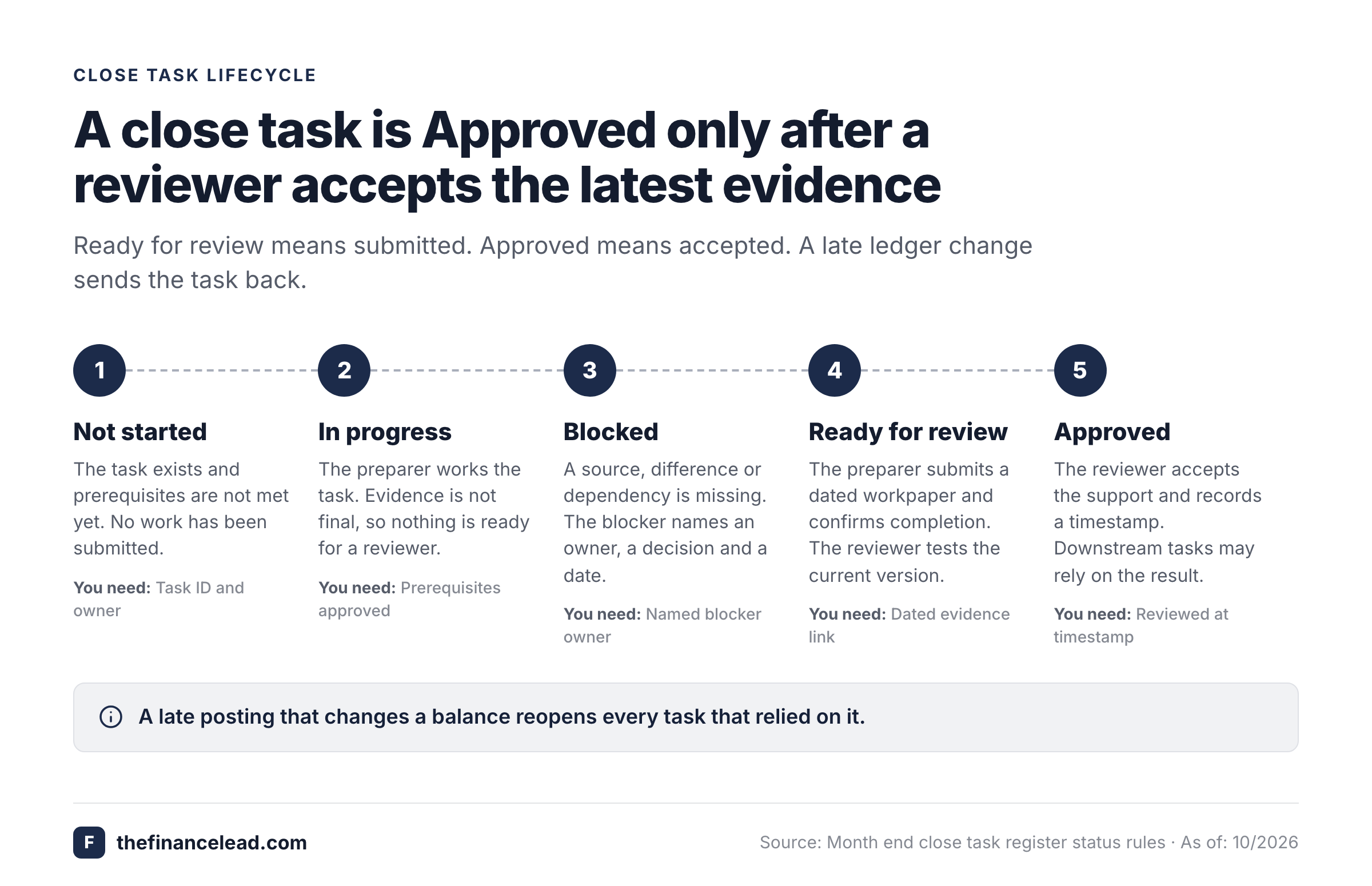
If a reviewer rejects a workpaper, return the task to In progress or Blocked. Don't overwrite the original evidence or erase the earlier reviewer comment. When the preparer replaces a file, use a versioned name or system history so the next reviewer knows what changed.
- Every material source system and subledger has a final cutoff or documented exception.
- All material balance sheet reconciliations agree with the final ledger version.
- Late postings have been assessed and affected tasks re-reviewed.
- Material journals and variance explanations have independent approval.
- The reporting package has a named approver, version and distribution record.
- The period is protected, and any future reopening requires an approved change record.
How do I adapt the template for a small business or a multi-entity close?
Start with the smallest set of tasks that produces supportable statements; you'll add more as the business needs them. A small business without inventory or intercompany activity may need cash, AP, AR, payroll, accruals, prepaids, balance sheet review, and release. Its controller may be the business owner or external accountant. You don't need every row, but you do need a named preparer and reviewer. A small team still can't skip knowing who approved material adjustments. What changes is how it assigns the review role.
For a multi-entity group, add entity and currency identifiers, entity-specific cutoff owners, intercompany confirmations, elimination entries, and consolidated statement review. Consider a separate register per entity feeding a central group close calendar. Otherwise a single Approved flag can hide one subsidiary that's still posting. The group controller should have a way to distinguish entity close complete from consolidation complete.
A company with subscription revenue should add a revenue source-to-ledger tie-out and contract liability rollforward where relevant. A company with inventory shouldn't skip inventory count, costing, and valuation support. A company with fixed assets should retain the depreciation rollforward and additions/disposals review. These are examples of scope decisions. They aren't a claim that all entities must perform every task every month.
When is a spreadsheet no longer enough?
A spreadsheet can work well, but only when one controller can reliably track owners, evidence versions, and approvals. It gets fragile when multiple teams edit status fields without preserving who approved what, or when late postings require many manual reopenings. If you're chasing status by chat every day, it's time to look at a workflow tool. The decision is less about company size than about the cost of missed handoffs and the reliability of the evidence trail.
A dedicated close checklist workflow can coordinate recurring tasks, attach proof, assign preparers and reviewers, and send reminders. It doesn't replace the accounting system's reconciliations, journal entries, or period-close controls. Compare any proposed tool against the same acceptance tests in this template. Ask whether it preserves the evidence version reviewed, identifies overdue dependencies, and records approval after a late change.
What mistakes make a month end close template unreliable?
A frequent design error is recording activity instead of acceptance. “Review cash” is vague; “Reconcile every material cash account to the final ledger and statement” is testable. Another is letting one owner mark a task approved without independent review. A third is giving every task the same due date even though a GL reconciliation may depend on a posted accrual or a finished subledger, so the dates can't all hold.
Another failure is treating the reporting package as a static PDF. If a material journal changes after the controller approves it, the approval no longer describes the current ledger. Use a version identifier and reopen affected tasks; that's what keeps an approval true. The same principle applies when a source report is regenerated after a reviewer signed a tie-out.
Finally, don't mistake a closing-date setting for the entire close process. QuickBooks Online's help documentation covers closing dates and password protection, but a system setting alone can't prove that reconciliations and reviewer sign-offs were completed. Keep the checklist evidence separate from the accounting application's lock controls, because they're two different safeguards.
Frequently asked questions about month end close templates
Can I use this month end close template in Excel or Google Sheets?
Yes. Copy the Close tasks table into a worksheet, add Settings and Holidays tabs, and calculate due dates from the period end. Check that the formula and date formats survive the paste, since they're easy to break.
How many tasks should a monthly close template contain?
Use the tasks you'll need for your accounting policies, systems, and material accounts. Start with the sample register, remove inapplicable rows, and add entity-specific controls. There's no universal required task count.
What is the difference between a close checklist and a close template?
A checklist names activities. A template that's built for reuse also captures owners, deadlines, prerequisites, evidence, exceptions, and review decisions for each accounting period.
Who should sign off on the month end close?
Assign a named final approver under your company's delegation policy, and that's commonly a controller or CFO. Keep preparer and reviewer roles separate for material tasks where feasible.
Should I lock the accounting period before or after sign-off?
Lock the period after sign-off, not before it. Confirm that source transactions, reconciliations, adjustments, and reporting review are complete, approve the release, then protect the period, as REL-02 does in the register. Follow the accounting system's period-close controls and your company's approval policy.
What happens when an approved reconciliation changes?
Record the late change, identify impacted accounts and reports, refresh the evidence, and obtain a new review timestamp before relying on the revised balance.
Review the Exceptions tab every close day, not only at the end. For the full sequence behind these tasks, see the month end close process. For a task-by-task companion, use the month end close checklist.