Bank reconciliation software compares the lines on your bank statement with the entries in your general ledger, confirms that they agree and flags the ones that don't. For most teams of 2 to 20 people, the best choice is the reconcile screen inside the accounting ledger they already use: Xero, QuickBooks Online or Zoho Books. Dedicated matching platforms such as FloQast, BlackLine, HighRadius and ReconArt only pay off once volume, bank count or audit pressure outgrows the ledger.
We compared seven tools and sorted them by where the matching happens: inside the ledger or in a separate platform. Most pages that rank for this keyword are written by a vendor about its own product, or cover balance sheet account reconciliation, which is a different job. For each tool we read the pricing page, a product page and the help or documentation pages we could open, and we checked G2 data in October 2026. None of the vendors paid for a placement. Our own product doesn't reconcile anything, so it sits outside the ranking as a marked row.
- bank reconciliation tools compared
- 7
- publish a price on their website
- 3 of 7
- adjusted balance both sides reach in our worked example
- $51,274.50
Our picks by situation
 Best for reviewing exceptions instead of matching every lineXeroJAX matches automatically when it is confident and asks you to review only what it is unsure about. Auto-reconcile starts on the Growing plan.
 Best when your accountant already keeps the books in QuickBooksQuickBooks OnlineA checkbox reconcile screen that ends at a $0.00 difference, with AI-powered reconciliation on Plus and above.
 Best for matching one bank line to several records at a low priceZoho BooksSelect the bills or invoices that add up to the deposit and match them in one step. A free plan lists bank reconciliation.
 Best for controllers who want matching rules written in plain languageFloQastAI Transaction Matching sits beside the close checklist on the same platform. Price on request.
 Best for very high volumes on an enterprise ERPBlackLineOne-to-many and many-to-many matching with exception suggestions, sold as a module of a close suite.
 Best for mid-market and enterprise teams on SAP, Oracle, NetSuite or Sage IntacctHighRadiusA matching pipeline from bank data to GL matching to exceptions, with configurable tolerances.
 Best for bank files in formats such as BAI and SWIFT MT, with a fixed-scope rolloutReconArtLists the bank formats it ingests and sells a 60 or 80 hour implementation package.
 Our product · for the sign-off after the matchThe Finance LeadTracks who reviewed each reconciliation and keeps the proof attached. It does not match transactions.
Bank reconciliation software compared
| Tool | Type of tool | How it reconciles the bank | Pricing | G2 rating |
|---|---|---|---|---|
| Xero | Accounting ledger with built-in bank reconciliation | Bank feed into a reconcile screen, JAX auto-matching | Early $27, Growing $59, Established $97 per month (US plans); new customers get 90% off for 6 months until Nov 2, 2026; no per-user license fees | 4.4 (1,844) |
| QuickBooks Online | Cloud accounting ledger with inventory and closing-date controls | Bank feed, match or categorize, then a statement reconcile to a $0.00 difference | Simple Start $38/mo; Essentials $85/mo; Plus $140/mo; Advanced $340/mo at US regular list rates (pricing page on 2026-10-27 showed 50% off for 3 months and a 30-day free trial) | 4.0 (3,894) |
| Zoho Books | Low-cost cloud accounting with tiered plans | Bank feed or file import, one-to-many matching, statement reconcile | Free $0; Standard $20, Professional $50, Premium $70, Elite $150, Ultimate $275 per month billed monthly (annual billing: $15, $40, $60, $120, $240) | 4.4 (330) |
| FloQast | Close platform with SOX controls | AI Transaction Matching between the GL and bank data | Quote only (no per-user fees) | 4.6 (1,417) |
| BlackLine | Enterprise close and reconciliation platform | Rule-based transaction matching inside a close suite | Price not published (quote only) | 4.5 (1,068) |
| HighRadius | Agent-led record-to-report suite | AI and rule matching, GL matching, exception queue | Price not published (quote only); outcome-based model, no fees until go-live | 4.0 (2) |
| ReconArt | Reconciliation and close platform | Rule matching on bank files with exception routing | Price not published; licensed by edition (Essentials, Plus, Certify, Close) on an annual subscription, plus a one-time 60 or 80 hour implementation package | 3.8 (6) |
| The Finance Lead Our product | Month-end close checklists | Tracks close tasks, evidence and preparer/reviewer sign-off | Team $39/month (up to 8 team members), Plus $79/month (adds MCP agent integration); 14-day free trial, no credit card required | No reviews yet |
Prices checked on October 27, 2026. G2 ratings and review counts were checked between October 19 and October 24, 2026. HighRadius (2 reviews) and ReconArt (6) have very small review bases.
What is bank reconciliation software?
Bank reconciliation software is a program that takes the transactions your bank reports, compares them with the entries in your accounting records, and helps you confirm that both sides tell the same story. It replaces the part of the job people do in a spreadsheet: exporting the statement, exporting the ledger, and ticking off lines one by one. What remains for a person is the judgment: why a line has no partner, whether a fee should be booked, and whether a difference is real.
The tools split into two kinds, and the difference matters more than any feature checklist.
| Kind | Where the match happens | Typical user | Examples here |
|---|---|---|---|
| Ledger-native | On the bank feed screen inside your accounting software | Small teams whose ledger is also their reconciliation system | Xero, QuickBooks Online, Zoho Books |
| Dedicated matching platform | In a separate product that ingests bank data and your ledger, then sends exceptions to a queue | Finance teams with many accounts, high transaction counts or audit requirements | FloQast, BlackLine, HighRadius, ReconArt |
Bank reconciliation is not the same as account reconciliation. Bank reconciliation matches cash records to a bank statement. Account reconciliation certifies that any ledger balance agrees with its support, and our guide to account reconciliation software covers that job. If your problem is processor payouts from Stripe, PayPal or Shopify, read payment reconciliation software instead.
What a bank reconciliation looks like
A reconciliation proves that two balances differ only for reasons you can name. Here is an assumed month for one checking account.
| Line | Amount (USD) | Why it exists |
|---|---|---|
| Ending balance per bank statement | $52,400.00 | What the bank reports |
| Plus deposits in transit | $3,150.00 | Recorded in the ledger, not yet credited by the bank |
| Less outstanding checks | $4,275.50 | Recorded in the ledger, not yet cashed |
| Adjusted bank balance | $51,274.50 | Calculated |
| Ending balance per ledger | $51,310.50 | What the books show |
| Less bank service fee | $36.00 | On the statement, not yet in the books |
| Adjusted ledger balance | $51,274.50 | Calculated |
| Difference | $0.00 | Must be zero before sign-off |
Software does the matching that gets you to this table, but you still decide what each leftover item means. Deposits in transit and outstanding checks are timing differences that clear on their own next month. The service fee is a real entry someone has to book.
Can ChatGPT do bank reconciliation?
ChatGPT and similar AI chat assistants can help with a small, exported data set: they can compare two CSV files, suggest likely pairs and draft an explanation of a difference. But a chat assistant isn't a controlled reconciliation system. It has no bank feed, it doesn't post entries to your ledger, and it leaves no record of who reviewed and approved the result. Statements also contain data that your own policy may not allow you to paste into a chat tool.
Can you automate bank reconciliation in Excel?
You can automate bank reconciliation in Excel up to a point. Practitioners in bookkeeping forums describe the same method: export the bank statement as CSV, export the matching ledger report, put both side by side and match with lookup formulas or Power Query. It works for one or two accounts with a few hundred lines. It breaks down when volume grows, when one deposit covers several invoices, and when a reviewer needs proof of what was matched and by whom.
How we compared bank reconciliation tools
We compared each tool on the same questions, because a feature list tells you little about month-end work.
- How bank data gets in: a live bank feed, a file upload, or both, and which file formats the vendor names.
- How matching works: fixed rules, suggestions, tolerances, and whether one bank line can match several records.
- What happens to exceptions: whether unmatched items go to a queue, who works them and what the tool suggests.
- How the reconciliation ends: the difference check, the saved report and what undoing a finished reconciliation costs.
- Where the plan or edition gates it: which paid plan includes feeds, auto-matching or the platform.
- What it costs: published price or quote only.
- What reviewers say: G2 rating and review count, with the size of the review base stated.
For each entry below we label the three beats of one statement line: data in, matching and close-out. Where a vendor page doesn't document something, we say so instead of guessing.
Bank reconciliation inside your accounting ledger
Xero, QuickBooks Online and Zoho Books reconcile inside the ledger, so the match, the journal entry and the report live in one place. They fit teams whose accounting software is already the system of record and whose volume a person can review.
Xero
Xero
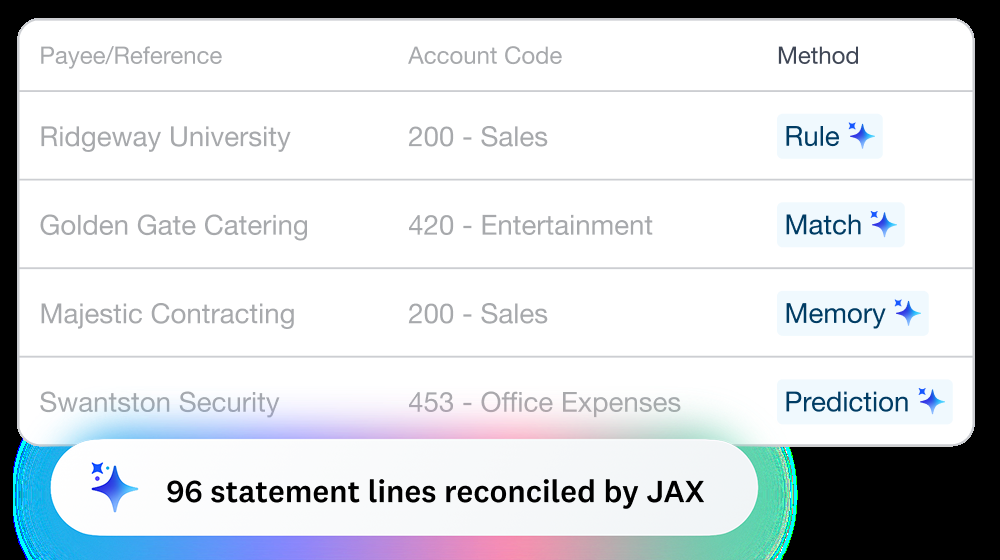
Xero is a cloud accounting ledger whose bank feeds flow into a reconcile screen. Its JAX feature reconciles transactions automatically using four methods (Rule, Match, Memory, Prediction) and asks you to review only what it is unsure about.
Xero fits a team whose bank accounts feed straight into Xero and whose job is to approve matches, not make them.
Data in: Xero says it connects to thousands of US banks for automatic feeds, names American Express, Bank of America, Capital One and Citibank, and imports transactions daily. Banks without a direct feed can use a third-party connector, and Stripe and PayPal can also act as feeds. Manual import accepts OFX, QIF, QBO, QFX and CSV files, plus PDF statements from supported banks.
Matching: the JAX feature reconciles automatically with four methods, Rule, Match, Memory and Prediction. Xero's wording is that when JAX is highly confident it goes ahead and matches, and otherwise it suggests a match for you to review. Bank rules and bulk coding still work alongside it. Xero's help center also describes a Find & Match screen for statement lines that need several items or a fee adjustment.
Close-out: you reconcile statement lines and then the period. Unreconciling removes only the link between the statement line and the transaction, and both remain. Xero's developer documentation says its Accounting API does not support reconciling bank statement lines, so reconciliation stays a manual job in the app.
- Xero is already your ledger and the job is matching bank and card lines to the books
- You want to review exceptions rather than match every line
- You want a published per-plan price with no per-user fee
- You reconcile across several systems or entities: Xero reconciles against its own ledger
- You're on the Early plan and want JAX: automatic reconciliation starts on Growing
- You need to reconcile through the API: Xero's documentation says its Accounting API doesn't support it
- Users like
- Ease of use; reviewers often single out automatic bank reconciliation as fast and accurate (G2 comparison pages as indexed by search)
- Users dislike
- Missing features and limited options (G2 comparison pages as indexed by search)
- Source: G2, 1,844 reviews
How it works in practice
Xero lists no per-user fees. The US plans are Early at $27, Growing at $59 and Established at $97 per month after the introductory offer, which gave new US customers 90% off for 6 months until November 2, 2026. Early caps invoices and bills, and multi-currency is on Established only. G2 reviewers rate Xero 4.4 from 1,844 reviews. For a plan-by-plan breakdown, read our guide to Xero pricing.
- Starting price
- Early $27, Growing $59, Established $97 per month (US plans); new customers get 90% off for 6 months until Nov 2, 2026; no per-user license fees
- JAX methods
- Rule, Match, Memory, Prediction
- Plan gating
- Reconcile bank transactions on every plan; auto-reconcile transactions listed on Growing and Established
- Per-user fees
- None; prices are per plan
- Plan limits
- Early: 20 invoices and 5 bills per month; multi-currency on Established only
- Lock dates
- Setting or changing them needs the Advisor role
- Payroll
- Add-on, $36 per month plus $6 per employee
- JAX plan
- Growing and Established (Xero: you need the Growing plan or above to use JAX)
QuickBooks Online
QuickBooks Online
QuickBooks Online is Intuit's cloud accounting ledger. Plans include 1, 3, 5 or 25 users, integrated inventory tracking on Plus and Advanced, and a closing date with an Exceptions to Closing Date report.
QuickBooks Online fits a team, or an outside accountant, that already runs the books in QuickBooks and wants a plain statement reconcile that ends at a zero difference.
Data in: Intuit describes a secure, token-based connection to the bank that typically downloads new transactions once a day, although the frequency varies by bank. Manual import accepts .qbo, .qfx, .ofx and .csv files. Downloaded items wait in a For review list.
Matching: for each item you either match it to a record that already exists or categorize it to create a new one. QuickBooks suggests a match when the amount is the same and the date falls between 90 days before and 20 days after the transaction date. Intuit's own help article says no suggestion appears when bank fees or discounts change the total, when several payments were deposited as one group, or when the record sits outside the date range. Bank rules can assign a category and payee from the amount, description or vendor name, and you choose whether a rule applies automatically or flags the item for review first.
Close-out: on the reconcile screen you enter the statement ending balance and date, tick the matching transactions and finish when the difference shows $0.00. The saved report is kept under History by account. Intuit warns that undoing an entire reconciliation can't be reversed and removes the report and its attached files. The AI-powered reconciliation, which reads an uploaded statement and enters the ending balance and date for you, is limited to Plus, Advanced and Intuit Enterprise Suite.
- Your accountant already works in QuickBooks and expects its reconcile report
- You want a plain statement reconcile that ends at a $0.00 difference
- You'll use bank rules to categorize recurring items
- Deposits often bundle several payments: Intuit's own article says no suggestion appears for grouped deposits
- You want AI-powered reconciliation on a lower plan: it's limited to Plus, Advanced and Intuit Enterprise Suite
- You want the lowest base price: list prices start at $38 per month, above Zoho Books and Xero's entry plans
- Users like
- ease of use (254 mentions on G2)
- Users dislike
- missing features (81 mentions) and cost (70 mentions)
- Source: G2, 3,894 reviews
How it works in practice
List prices are Simple Start $38, Essentials $85, Plus $140 and Advanced $340 per month. On October 27, 2026 the pricing page showed 50% off for 3 months and a 30-day free trial. G2 reviewers rate QuickBooks Online 4.0 from 3,894 reviews, and the most frequent complaints are missing features and cost. Our QuickBooks Online review and QuickBooks Online pricing guides go deeper, and QuickBooks vs Xero compares the two ledgers directly.
- Starting price
- Simple Start $38/mo; Essentials $85/mo; Plus $140/mo; Advanced $340/mo at US regular list rates (pricing page on 2026-10-27 showed 50% off for 3 months and a 30-day free trial)
- Users per plan
- Simple Start 1, Essentials 3, Plus 5, Advanced 25 (plus accountant seats)
- Inventory
- Available in Plus and Advanced
- Period control
- Closing date with Exceptions to Closing Date report
- AI reconciliation
- Plus, Advanced and Intuit Enterprise Suite only
- Closing date
- Intuit advises reconciling up to the lock date before locking
Zoho Books
Zoho Books
Zoho Books prices per organization, not per seat: Standard includes 3 users, Professional 5, Premium and Elite 10, Ultimate 15, and extra users cost $3 per month. Inventory and multi-currency start on Professional.
Zoho Books fits a team that wants a QuickBooks-style ledger at a lower price and regularly matches one bank line to several bills or invoices.
Data in: Zoho Books can connect banks and credit cards and fetch statements through third-party providers, forward statements from email, or import files in CSV, TSV, XLS, OFX, QIF and CAMT.053 formats. A February 2026 Zoho post says feeds can now reach back up to one year through Plaid, subject to availability, replacing the earlier 90-day limit.
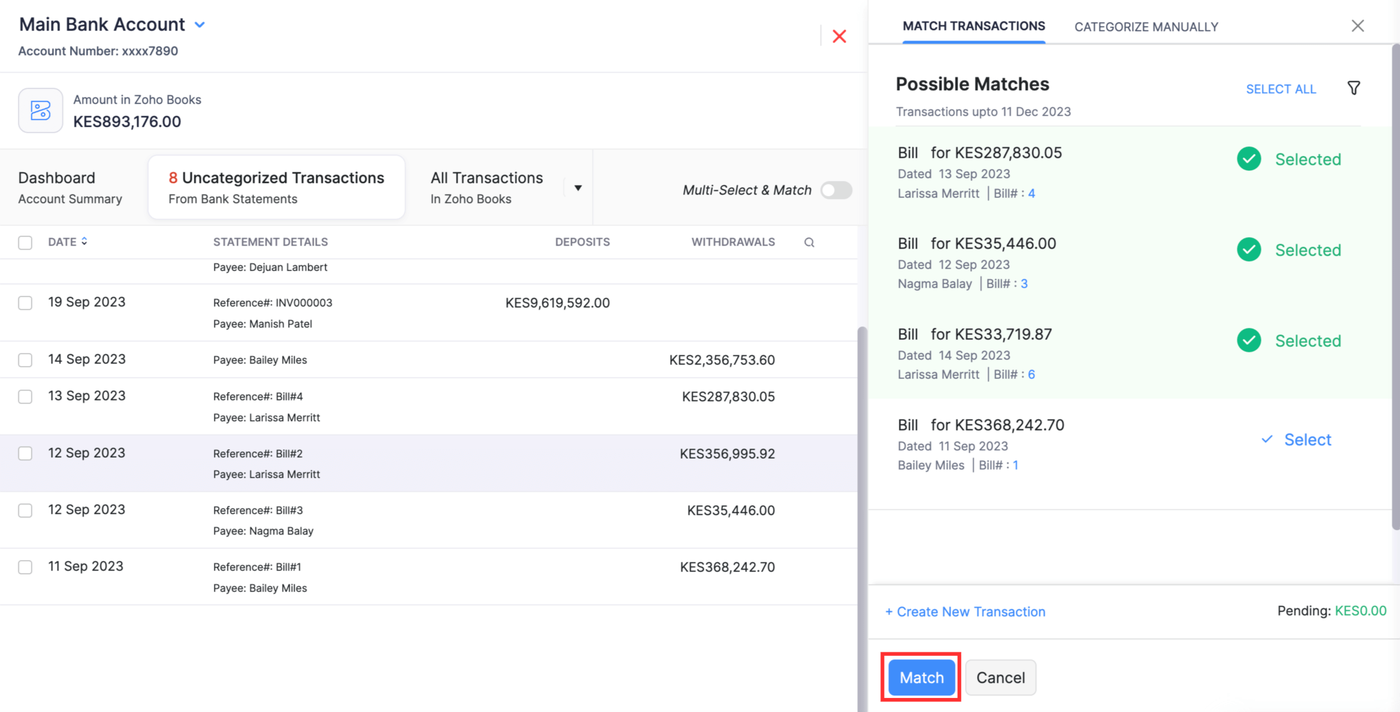
Matching: a transaction with a likely partner carries a Match found tag. For one-to-many matches you open the possible matches, select each bill or invoice, and the Match button works once the selected amounts equal the bank amount. You can filter candidates by amount range, date range, vendor or customer, type and reference number. A bank fee that has no partner is recorded as a new transaction from the same panel, and rules can create entries for bank charges, utility payments, transfers and subscriptions.
Close-out: you start a reconciliation from the account, enter the start date, end date and statement ending balance, select the transactions and finish when the difference is zero. You can also save it and come back later. To undo a reconciliation you hover over the period and choose Undo Reconciliation, and if it is not the latest one, the later ones must be deleted first. Zoho says PDF reconciliation reports can be exported.
- You often match one bank line to several bills or invoices
- You want a lower per-organization price with users included
- You want to test bank reconciliation on a free plan first
- You need a documented auto-reconcile or rules limit by plan: we couldn't confirm it from the pages we read
- You need a published list of supported US banks: we found no named list
- You need native US payroll or multi-entity consolidation: the pages we read list neither
- Users like
- ease of use
- Users dislike
- support quality and pricing at higher tiers (Capterra reviewers)
- Source: G2, 330 reviews
How it works in practice
Zoho Books bills per organization, not per seat: Free $0, then Standard $20, Professional $50, Premium $70, Elite $150 and Ultimate $275 per month billed monthly, or $15, $40, $60, $120 and $240 billed annually. We could not confirm from the pages we read which plan includes auto-reconcile or bank rules, so check the plan comparison before you buy. G2 reviewers rate Zoho Books 4.4 from 330 reviews.
- Starting price
- Free $0; Standard $20, Professional $50, Premium $70, Elite $150, Ultimate $275 per month billed monthly (annual billing: $15, $40, $60, $120, $240)
- Users per plan
- Free 1 plus accountant; Standard 3; Professional 5; Premium 10; Elite 10; Ultimate 15
- Gates
- Bank feeds from Standard; multi-currency, inventory and custom roles from Professional
- Transaction lock
- By module or all at once; transactions dated on the lock date can still be edited
- QuickBooks import
- Chart of accounts, contacts, items and bills
- Feed history
- Up to one year via Plaid, subject to availability (Zoho blog, February 2, 2026); manual import of CSV, TSV, XLS, OFX, QIF and CAMT.053
- Plan gating
- Bank reconciliation is listed on the Free plan; bank feeds are listed from Standard
- Users
- Free 1 plus accountant; Standard 3; Professional 5; Premium and Elite 10; Ultimate 15
Dedicated bank reconciliation matching platforms
Dedicated bank reconciliation platforms ingest bank data and ledger data into one place, match them by rules and queue the leftovers. They're built for more accounts and more lines than a 2 to 8 person team handles, and each entry says plainly when that is a mismatch. None of the four publishes a price.
FloQast
FloQast
A close management platform that runs the month-end checklist and balance sheet reconciliations on top of the Excel workbooks a team already uses. Its Risk & Compliance suite adds SOX controls on the same platform.
FloQast fits a controller who already runs, or wants to run, the close checklist on FloQast and wants bank and credit card matching on the same platform.
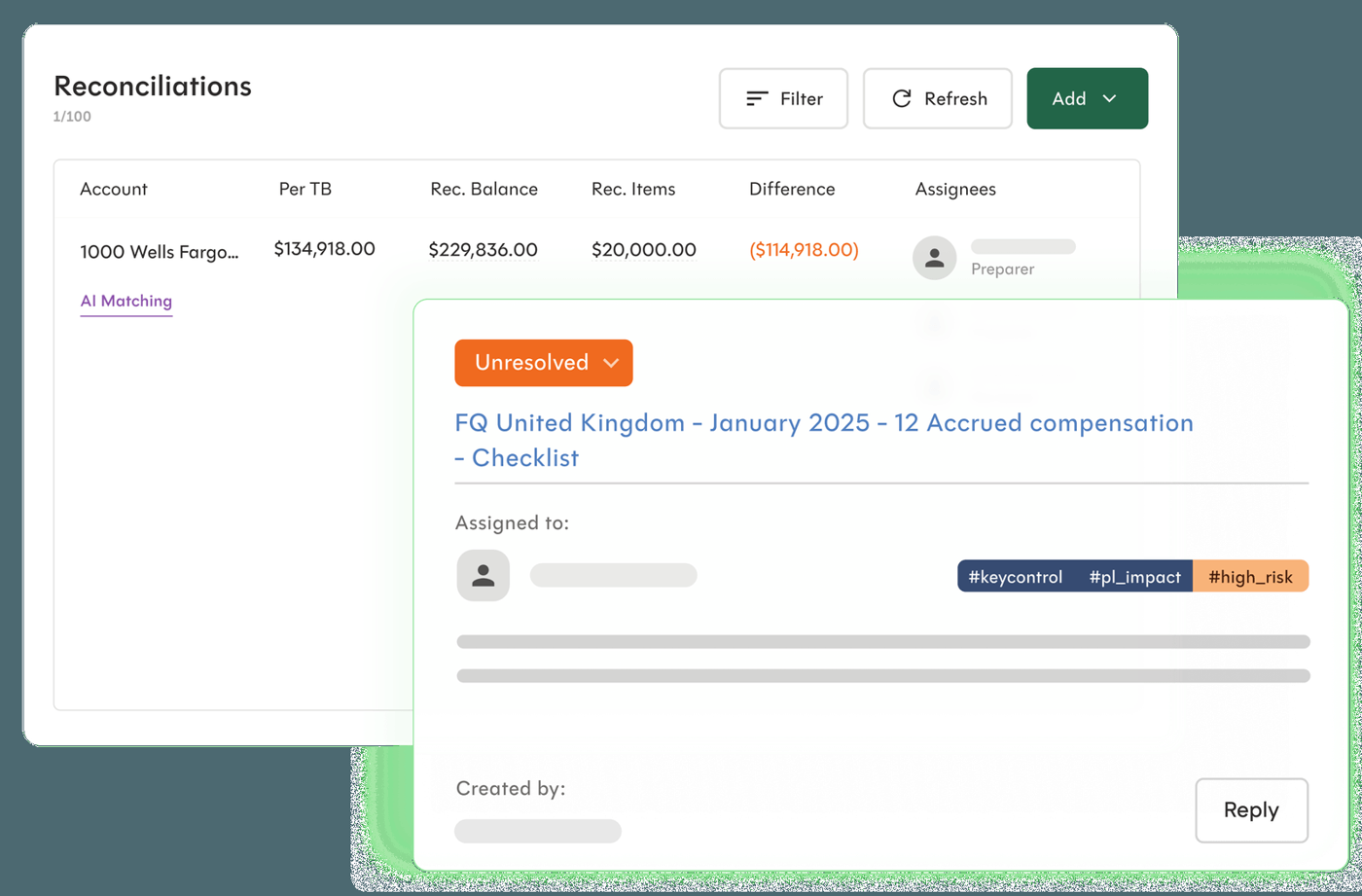
Data in: FloQast says AI Transaction Matching automates the matching between the general ledger and a bank or credit card processor, across multiple data sources. A separate Bank Connector page says it connects directly to your bank and supports hundreds of banks. The pages we read do not say whether the connector feeds the matching product, and they name no bank file formats.
Matching: you describe the rules in natural language, and FloQast's product page also describes three-way matching across three data sources. Tolerances and one-to-many matching are not mentioned on the pages we read. Capital Area Food Bank, a customer story on FloQast's site, reports a match rate of about 95% in its test month.
Close-out: FloQast says automated alerts and workflows flag issues and bring in the right people, and that matching activity leaves an audit trail. In the same customer story the controller says the close went from 10 business days to four or five. That is a vendor-published result, not an independent benchmark.
- You already run the close checklist on FloQast and want matching on the same platform
- You want to write matching rules in natural language
- You're a controller with a few high-volume bank and card accounts
- You need documented tolerances or one-to-many matching: the pages we read state neither
- You need a published price: FloQast sells by quote
- You need to know the supported bank file formats: none are named
- Users like
- Ease of use and a more organized, visible month-end close (G2 summary themes as indexed by search; the on-page pros/cons widget did not render)
- Users dislike
- Limited report customization and slow performance on bulk edits or at peak times (G2 summary themes and review snippets as indexed by search)
- Source: G2, 1,417 reviews
How it works in practice
FloQast publishes no price: its pricing page sends you to the sales team. G2 reviewers rated FloQast 4.6 from 1,417 reviews when we checked on October 19, 2026.
- Starting price
- Quote only (no per-user fees)
- ERPs
- NetSuite, Sage Intacct, Workday, SAP, Microsoft, Xero
- Packages
- Close Management, Close AI, Risk & Compliance
- Workpapers
- Excel or Google Sheets in your own cloud storage
- ERPs on FloQast's site
- NetSuite, SAP, Workday, Microsoft, Sage Intacct, Xero (navigation links, not specific to matching)
- Customers
- 3,500+ companies (FloQast)
BlackLine
BlackLine
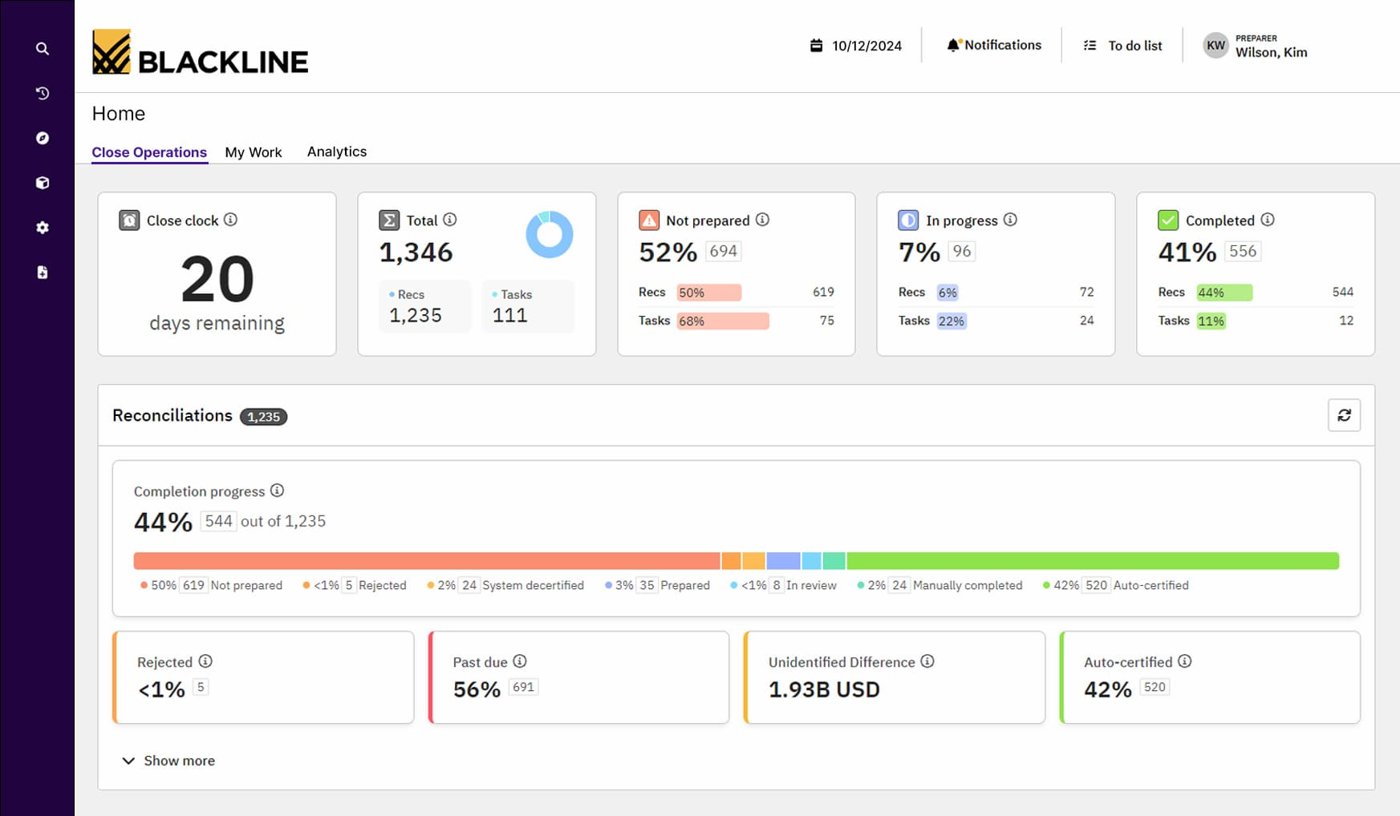
BlackLine is a cloud financial close and consolidation suite with separate modules for task management, account reconciliations, transaction matching, journal entry, reporting and analysis, consolidation and compliance. Its Verity AI layer adds agents such as Verity Prepare for reconciliation prep and Verity Flux for variance analysis.
BlackLine fits a finance team on an enterprise ERP that matches millions of lines and wants matching, account reconciliations and journal entries in one close suite.
Data in: BlackLine says you ingest detailed data from multiple sources, match automatically and use logic to identify repeat exceptions. Its Transaction Matching page names no bank file formats. A January 2021 implementation blog by a BlackLine partner describes uploading unreconciled ledger items and daily bank statement files on a schedule, so treat that as one example, not a current specification.
Matching: BlackLine says it matches millions of transactions in minutes, including one-to-many and many-to-many relationships, with configurable rules. Exceptions are flagged and matches are suggested to users for review. The partner blog reports that the rules automatically reconciled 90% of perfect matches and left the rest as partial matches with variances, such as commissions and bank charges, or unmatched items. BlackLine also reports that one customer, SiriusXM, matches over 7 million transactions a month.
Close-out: users can create reconciling items as part of an account reconciliation, because Transaction Matching connects to BlackLine's Account Reconciliations and Journal Entry modules. The product page promises dashboards of unreconciled and open items and a detailed audit trail. The partner blog describes adjustment journals that move to an SFTP site after authorization and are then uploaded to the ledger.
- You match millions of lines and need one-to-many and many-to-many rules
- You're on SAP, Oracle or NetSuite and want matching tied to account reconciliations and journals
- You need dashboards and an audit trail across the whole close
- You're a small team: BlackLine publishes no price, no implementation time and no minimum size, and G2 reviewers cite a steep learning curve
- You need documented bank file formats: the product page names none
- Users like
- Centralizes close activities and automates reconciliations, cutting manual work
- Users dislike
- Steep learning curve and complex implementation and configuration
- Source: G2, 1,068 reviews
How it works in practice
BlackLine publishes no price and offers a demo request. We could not verify an implementation time or a minimum customer size. G2 reviewers rated BlackLine 4.5 from 1,068 reviews on October 19, 2026, and the most common complaints are a steep learning curve and a complex implementation.
- Starting price
- Price not published (quote only)
- Close modules
- Task Management, Account Reconciliations, Transaction Matching, Journal Entry, Reporting and Analysis, Consolidation
- ERPs named by BlackLine
- SAP, Oracle, NetSuite
- AI
- Verity Prepare drafts reconciliations, Verity Flux supports variance analysis
- ERPs named
- SAP, Oracle, NetSuite
- Modules
- Transaction Matching is one of several close modules
HighRadius
HighRadius
HighRadius sells a record-to-report suite (close checklist, balance sheet reconciliation, journal entries, intercompany, consolidation, reporting) built around prebuilt AI agents that prepare accruals, post journals and flag anomalies. HighRadius says it was named a Challenger in the 2026 Gartner Magic Quadrant for Financial Close and Consolidation Solutions (it also announced a Challenger placement in the 2025 edition).
HighRadius fits a mid-market or enterprise team on SAP, Oracle, NetSuite or Sage Intacct that wants AI-assisted matching and an approval chain around the journal entries it suggests.
Data in: HighRadius says it integrates directly with all major banks and imports statements automatically. Its Transaction Matching page adds that the software connects to ERPs, bank feeds and payment gateways to pull raw data in real time. We found no file formats on either page.
Matching: the bank reconciliation page says AI matches entries on historical behavior, amounts, timing and supporting documentation, and that customizable matching rules are available. The Transaction Matching page describes threshold-based logic with configurable tolerances, and one-to-many and many-to-many matching. HighRadius claims its agents auto-clear up to 90% of the volume, which is a vendor figure.
Close-out: unmatched items land in a centralized view, and the software suggests corrective journal entries for human review. Multi-level approval workflows with role-based access and segregation of duties are on the page. HighRadius also offers a free Excel bank reconciliation template on the same page.
- You're mid-market or enterprise on SAP, Oracle, NetSuite or Sage Intacct
- You want AI-assisted matches plus configurable tolerances
- You need multi-level approvals around suggested journal entries
- You want independent review evidence: G2 shows only 2 reviews
- You need a published price: HighRadius publishes none
- You reconcile in QuickBooks: we couldn't verify a QuickBooks connector on the pages we read
- Users like
- Journal entry automation and configurable matching rules, easy to use
- Users dislike
- Upload delays and Business Central compatibility; all tasks must be closed before a new month or checklist can open
- Source: G2, 2 reviews
How it works in practice
HighRadius says it is built for mid-market and enterprise finance teams and goes live in weeks with prebuilt ERP connectors, with 3 to 6 months for SAP and Oracle environments. It publishes no price. G2 shows 4.0 from only 2 reviews, which is too few to judge.
- Starting price
- Price not published (quote only); outcome-based model, no fees until go-live
- Gartner
- Challenger, 2026 Magic Quadrant for Financial Close and Consolidation Solutions (vendor claim)
- ERPs named
- SAP, Oracle, Microsoft Dynamics, NetSuite, Sage; mid-market connectors for NetSuite, Sage Intacct and Dynamics 365
- Bank data
- Direct integration with major banks, bank feeds and imports (HighRadius pages, 2026-10-27)
- Scale
- Automates reconciliation across 100+ bank accounts (HighRadius FAQ)
ReconArt
ReconArt
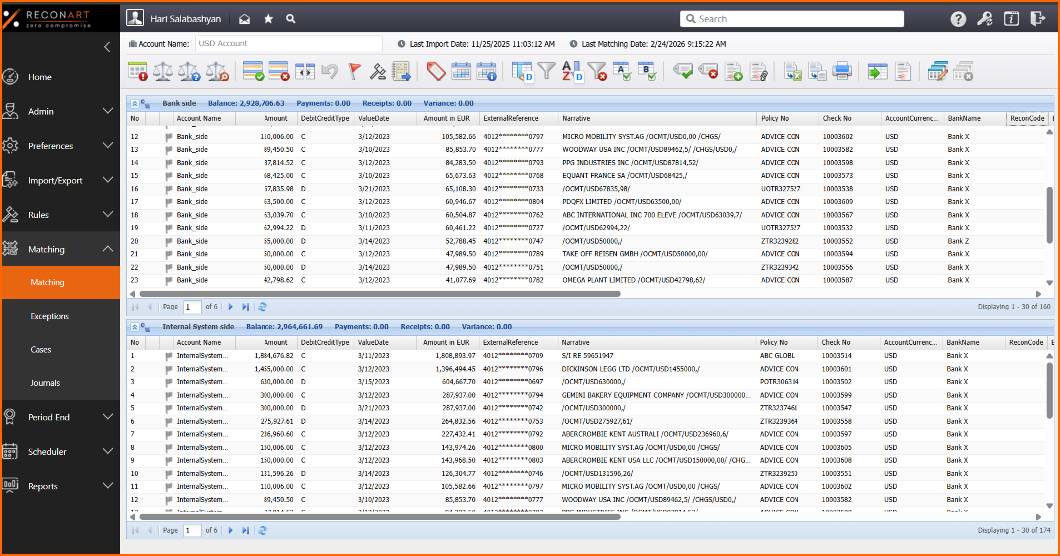
ReconArt is a reconciliation platform that imports data from ERPs, banks, spreadsheets and SFTP, matches transactions on visual no-code rules with tolerances, and then certifies balance sheet accounts with approval workflows. An AI Assistant lets users write matching rules in plain language.
ReconArt fits a finance team that matches high volumes of bank lines every month and wants rules it configures itself, with a rollout scoped to a fixed number of hours.
Data in: ReconArt is the only dedicated platform here that lists its bank formats. Its bank reconciliation page names CSV, XLSX, TXT, XML, BAI, ACH, SWIFT MT, camt.053 and FIRD, plus custom formats, and says statements can arrive from core banking systems, SWIFT, SFTP or direct feeds.
Matching: rule-driven auto-matching handles one-to-many and many-to-many relationships. ReconArt's homepage says you set rules visually with tolerances, date ranges and multi-field criteria, and can describe rules in natural language.
Close-out: exceptions are classified and routed to an owner automatically, with bank fees and taxes, deposits in transit, delays and reversals given as examples. Finance teams review, sign off and export audit-ready reconciliation reports. Journal entry approval chains are a separate ReconArt product.
- You receive bank files in formats such as BAI, ACH or SWIFT MT
- You want rules you configure yourself with tolerances and date ranges
- You want a fixed-scope rollout of 60 or 80 hours
- You need a published price or a large review base: G2 shows 6 reviews at 3.8
- You're a small team whose bank reconciliation fits inside the ledger: this is an annual license plus an implementation project
- Users like
- Rule-based matching that clears one-to-one matches quickly, exception reporting and vendor support (G2 summary as indexed by search)
- Users dislike
- Confusing interface and a learning curve (G2 summary as indexed by search)
- Source: G2, 6 reviews
How it works in practice
ReconArt sells editions on an annual license and publishes no dollar amounts. G2 shows 3.8 from 6 reviews, and the reported cons include a confusing interface and a learning curve, so treat the rating as a weak signal.
- Starting price
- Price not published; licensed by edition (Essentials, Plus, Certify, Close) on an annual subscription, plus a one-time 60 or 80 hour implementation package
- Editions
- Essentials up to 25 million transactions a year; Plus up to 50 million, adds Certify
- Implementation
- One-time 60 or 80 hour package; a customer example on its site reports a 6-week project
- Data sources
- ERP, core banking, cloud storage, SFTP, spreadsheets via ReconArt Data Factory
- Security
- ISO/IEC 27001:2022 (stated on reconart.com)
- Bank file formats
- CSV, XLSX, TXT, XML, BAI, ACH, SWIFT MT, camt.053 (ISO 20022), FIRD
Who does what in a month-end bank reconciliation?
A month-end bank reconciliation needs a named preparer, a different reviewer and a saved report, because software changes how fast the matching goes but not who owns the result. Without those three, an auditor will find it hard to accept. The schedule below is an example, so adjust the days to your own close calendar.
- PreparerSync or import the bank feed for every account and check that the statement period is complete Business day 1
- PreparerMatch feed lines to ledger entries and book entries for fees and interest Business days 1 to 2
- PreparerList deposits in transit and outstanding checks, enter the statement ending balance and confirm the difference is zero Business day 2
- ReviewerReview the saved report, every manual adjustment and any item that has stayed open for more than a month Business day 3
- ReviewerApprove the reconciliation and keep the report as evidence Business day 3
- ControllerLock the period once every account is approved After the last approval
Which bank reconciliation software fits your team?
The right bank reconciliation software depends on where your ledger lives and how many lines a person can review, so start there and move up only when one of those limits bites.
| If this describes you | Start with | Why |
|---|---|---|
| One to five bank accounts, books in Xero | Xero on Growing or above | JAX handles the confident matches and you review the rest |
| Books in QuickBooks, an outside accountant reconciles | QuickBooks Online | The reconcile screen and report are what your accountant already uses |
| Deposits often cover several bills or invoices | Zoho Books | One-to-many matching is documented step by step |
| You run your close checklist on FloQast | FloQast AI Transaction Matching | Matching sits next to the close tasks |
| Several banks, an enterprise ERP and audit pressure | BlackLine or HighRadius | Exception queues, approval chains and ERP connectors |
| You receive bank files in formats such as BAI, ACH or SWIFT MT | ReconArt | It names those formats on its bank reconciliation page |
If your ledger has no feed for a bank, or its matching suggestions keep missing grouped deposits, that's the signal to look at a dedicated platform. If you still reconcile mostly by eye and it takes an afternoon, the ledger tool is enough.
Is there free bank reconciliation software?
There is free bank reconciliation, but it is rarely free software at the same quality as a paid tool.
- Zoho Books Free: the pricing page lists bank reconciliation on the Free plan for 1 user plus an accountant. Bank feeds are listed from the Standard plan, so on Free you would import statement files by hand.
- Free trials: QuickBooks Online's pricing page showed a 30-day free trial on October 27, 2026, and Zoho's product page shows a 14-day trial. A trial lets you test one real month, which is the best way to judge a tool.
- Spreadsheet templates: HighRadius and others publish free Excel templates. They organize the work, but they don't match anything or leave an audit trail.
- AI chat assistants: useful for a one-off comparison of two exports, with the limits described above.
Free works for a solo bookkeeper with one account, but it doesn't scale to a reviewed close. Once a second person reviews the work, you need a saved report and an approval step, and that is where paid plans begin.
What does bank reconciliation software cost?
Only the three ledger tools publish prices. The four dedicated platforms sell by quote.
| Tool | Published price (USD) | What decides the bill |
|---|---|---|
| Xero | Early $27, Growing $59, Established $97 per month | Plan tier; JAX needs Growing or above |
| QuickBooks Online | Simple Start $38, Essentials $85, Plus $140, Advanced $340 per month list | Plan tier and user count; AI reconciliation needs Plus or above |
| Zoho Books | Free; $15 to $240 per month billed annually | Plan tier per organization; bank feeds from Standard |
| FloQast | Quote only | Products and size, not published |
| BlackLine | Quote only | Modules and volume, not published |
| HighRadius | Quote only | Scope and volume, not published |
| ReconArt | Quote only | Edition and annual transaction volume, plus a one-time 60 or 80 hour implementation package |
Prices were checked on October 27, 2026. Introductory offers change quickly: Xero's 90% offer for new US customers ran until November 2, 2026, and QuickBooks showed 50% off for three months. Ask each quote-only vendor for the price at double your current line count.
After the match: keep proof of the review
The reconciliation tool is the book of record for the match, but the close still needs to know who reviewed it and where the report is. The Finance Lead runs recurring month-end close checklists with preparer and reviewer sign-off, and each task carries its evidence as a link or a note, so a bank reconciliation becomes a task with an owner, a due date and the saved report attached. It doesn't reconcile transactions, connect to your bank or ledger, or store files. Plans start at $39 per month for up to 8 team members. Our month end close checklist, the month end close process guide and the overview of financial close software cover the rest of the close.
FAQ
What is bank reconciliation software?
Bank reconciliation software compares the transactions on a bank statement with the entries in your accounting records, matches the ones that agree and flags the rest. Some tools do this inside the accounting ledger, such as Xero, QuickBooks Online and Zoho Books. Others are separate platforms such as FloQast, BlackLine, HighRadius and ReconArt.
What is the best accounting software for bank reconciliation?
The best accounting software for bank reconciliation is usually the ledger you already use, because Xero, QuickBooks Online and Zoho Books all reconcile inside it. Xero's JAX matches automatically when it is confident and needs the Growing plan or above. Zoho Books documents one-to-many matching step by step, and QuickBooks Online ends in a $0.00 difference check. The right choice usually follows the ledger you already use.
What is the best free software for bank reconciliation?
Zoho Books lists bank reconciliation on its Free plan for 1 user plus an accountant, though bank feeds are listed from the Standard plan. QuickBooks Online and Zoho Books also offer free trials. Spreadsheet templates cost nothing but match nothing and leave no audit trail.
Can ChatGPT do bank reconciliation?
ChatGPT can help compare two exported lists and suggest likely pairs, so it's useful for a small one-off check. However, it isn't a controlled reconciliation system: it has no bank feed, doesn't post to your ledger and leaves no approval record. Check your data policy before pasting statements into any chat tool.
How can I automate bank reconciliation in Excel?
Export the bank statement and the ledger report as CSV files, then match them side by side with lookup formulas or Power Query. This works for a few hundred lines on one or two accounts. It becomes fragile when one deposit covers several invoices or when a reviewer needs proof of who matched what.
When do I need a dedicated platform instead of my accounting software?
Look at a dedicated platform when you reconcile many bank accounts, when volume is too high for a person to review exceptions, or when auditors expect approval chains and a full audit trail. Below that point the reconcile screen in your ledger is usually enough.