Payment reconciliation software matches the money a payment processor reports (sales, fees, refunds, disputes and the payout itself) to the deposit that lands in your bank account and to the entries in your ledger. It exists because the deposit rarely equals the sales total, although it should reconcile to it. A processor deducts its fees, refunds and disputes before it pays you, and one deposit usually bundles many orders. Most pages that rank for this keyword are written by one of the vendors they rank, yet others describe account reconciliation suites that never touch a payout.
We compared six tools that handle this job at different scales: Synder, A2X, Ledge, Modern Treasury, BlackLine and Adra by Trintech. We grouped them by where the payout becomes journal lines in the ledger, because that decides who does the work each month. For each tool we read the pricing page, a product page, help or documentation pages where they were public, and its G2 reviews in October 2026. None of the vendors paid for a placement. Our own product doesn't reconcile anything, so it sits outside the ranking as a marked row.
- payment reconciliation tools compared
- 6
- publish a price on their website
- 2 of 6
- fees between $425 of sales and a $411.77 deposit in our example
- $13.23
- US card settlement time at Stripe
- 2 business days
Our picks by situation
 Best for Stripe, PayPal, Square and Shopify payouts into QuickBooks or XeroSynderBooks every payout as one transfer from a clearing account to the bank, so the bank feed has a single line to match.
 Best for Amazon, Shopify and Etsy sellersA2XTurns each marketplace settlement into one summarized journal that matches the bank deposit.
 Best for high volumes on SAP, Oracle or NetSuiteBlackLineRule-based matching with a preparer and reviewer audit trail, sold as a module of a close suite.
 Best for payment-heavy companies on NetSuiteLedgeMany-to-many matching across banks, payment processors and billing systems, with journal entries posted after approval.
 Our product · for the evidence after the matchThe Finance LeadTracks who tied out each processor balance and keeps the proof attached. It does not match payments.
Payment reconciliation software compared
| Tool | Type of tool | What it hands to the ledger | Pricing | G2 rating |
|---|---|---|---|---|
| Synder | Payment and ecommerce sync with clearing-account reconciliation | Posts each sale, fee and refund to a clearing account, then books the payout as a transfer to the bank | Basic $65/mo billed monthly ($52/mo billed yearly); Essential from $129 ($103 yearly); Pro from $299 ($240 yearly); Pro Max from $599 ($480 yearly); Premium by quote; 15-day free trial, no credit card | 4.7 (249) |
| A2X | Ecommerce settlement accounting | Turns each marketplace or processor settlement into one journal that matches the bank deposit | Amazon plans: Mini $29/mo (200 orders), Starter $59 (1,000 orders), Standard $79 (5,000 orders), Standard 10k $159 (10,000 orders); Shopify, Etsy, eBay, TikTok Shop and PayPal from $29/mo, Walmart from $79/mo; prices rise on November 14, 2026 except Mini | 4.9 (318) |
| Ledge | AI close and payment reconciliation platform | Many-to-many matching of payments across banks, PSPs and billing systems, posted to the ERP after approval | Quote only (single platform fee, unlimited users; tiers Track, Execute, Enterprise); demo request, no free trial listed | 4.5 (6) |
 Modern Treasury Modern Treasury | Payment operations API with reconciliation and ledger | Matches bank transactions to expected payments your engineers create through the API | Quote only, usage-based (volume, payment rails and account structure); annual terms | 4.7 (13) |
| BlackLine | Enterprise close and reconciliation platform | Balance sheet reconciliations and high-volume transaction matching | Price not published (quote only) | 4.5 (1,068) |
 Adra by Trintech Adra by Trintech | Mid-market close and reconciliation suite | Threshold auto-reconciliation plus close checklist | Price not published (quote only) | 4.5 (333) |
| The Finance Lead Our product | Month-end close checklists | Tracks close tasks, evidence and preparer/reviewer sign-off | Team $39/month (up to 8 team members), Plus $79/month (adds MCP agent integration); 14-day free trial, no credit card required | No reviews yet |
Pricing checked on October 25, 2026 (BlackLine and Adra on October 19). G2 data read in the built-in browser on October 25, 2026 (BlackLine and Adra on October 19). Ledge (6 reviews) and Modern Treasury (13) have small review bases.
What is payment reconciliation software?
Payment reconciliation software is a program that compares the payment records from a processor or marketplace with your bank deposits and your accounting entries, confirms that they agree and flags the items that don't. Stripe describes the process as comparing the transactions you recorded with payment data from gateways and banks, then correcting the differences. Software replaces the part of that work people do in a spreadsheet: downloading the payout report, splitting a net deposit into its parts, and matching each part to an invoice or sale.
The tools in this list split into three kinds, and the difference matters more than any feature checklist, as the three points below show.
- Ledger posting tools take the processor's data and write the journal lines (sales, fees, refunds, taxes, the payout) into QuickBooks Online, Xero or NetSuite. Synder and A2X do this.
- Matching platforms sit between the bank, the processor and the ERP, match records by rules, and send exceptions to a queue. Ledge and Modern Treasury work this way.
- Close suites with a matching module match large transaction sets as one step of a wider financial close. BlackLine and Adra belong here.
Payment reconciliation also overlaps with account reconciliation, but that discipline certifies that a general ledger balance agrees with its supporting records. If your hard problem is balance sheet accounts rather than payouts, read our guide to account reconciliation software instead. This page stays with payouts, deposits and processor balances.
What are the main types of reconciliation?
Reconciliation types have no official list. Vendor guides most often name bank reconciliation (your cash records against the bank statement), customer reconciliation (receivables against the general ledger), vendor reconciliation (payables against supplier statements), intercompany reconciliation and balance sheet reconciliation. Payment reconciliation cuts across the first two: it ties a processor's settlement report to the bank deposit and then to the invoices or sales it paid.
| Type | What it compares | Where payment data comes in |
|---|---|---|
| Bank reconciliation | Cash records against the bank statement | A payout is one deposit line on the statement |
| Customer (receivables) reconciliation | Open invoices against the general ledger | A payout closes several invoices at once |
| Vendor (payables) reconciliation | Bills against supplier statements | Outgoing payment files and returns |
| Balance sheet reconciliation | A ledger balance against its support | Processor clearing balances at month end |
Why does a payout never match the sales total?
A processor pays you the available balance, not the sales total. Stripe builds a payout from balance transactions such as charges, refunds and fees, so one deposit can contain many orders. Refunds are debited from the balance, and the processing fee on the original charge is not returned when you refund. A dispute debits the disputed amount plus a fee and holds it for the length of the dispute, which Stripe says can run two to three months. Shopify Payments bundles captures from Friday to Sunday into a single payout, and its US settlement takes at least three business days.
A small example shows the gap. We assumed a 2.9% + $0.30 card fee for illustration. It isn't a quote of anyone's current rate.
| Order | Gross sale | Fee (2.9% + $0.30) | Net to the bank |
|---|---|---|---|
| Order A | $100.00 | $3.20 | $96.80 |
| Order B | $250.00 | $7.55 | $242.45 |
| Order C | $75.00 | $2.48 | $72.52 |
| Total | $425.00 | $13.23 | $411.77 |
Your ledger shows three invoices worth $425.00. Your bank shows one deposit of $411.77. The $13.23 difference is fees, and it has to be booked to a processor fees expense account, or the two sides never agree. Now carry the example into next month: order C is refunded. The refund reduces a later payout by $75.00, the $2.48 fee stays with the processor, and the bank deposit that month no longer equals that month's sales net of fees. If order B is disputed instead, $250.00 plus a dispute fee leaves the balance until the dispute closes, so the reversal lands in a later period than the sale.
Why a clearing account makes this auditable
A clearing account is a temporary holding account in your ledger. Xero's guidance for bulk online-sales payments uses one per payment type: each customer payment is applied to the clearing account, and the bulk bank receipt is later allocated to the same account, so the two cancel to zero. Processor fees are recorded as a bank fees adjustment when you reconcile the statement line. In the example above, the entries are: debit clearing $425.00 and credit sales $425.00 when the payments are applied, then debit bank $411.77 and debit processor fees $13.23 against a $425.00 credit to clearing. If the clearing balance is not zero at month end, either an invoice is unpaid or the bank received money whose individual payments have not been imported yet. That balance is the single number a controller should check first.
How does payment reconciliation software work?
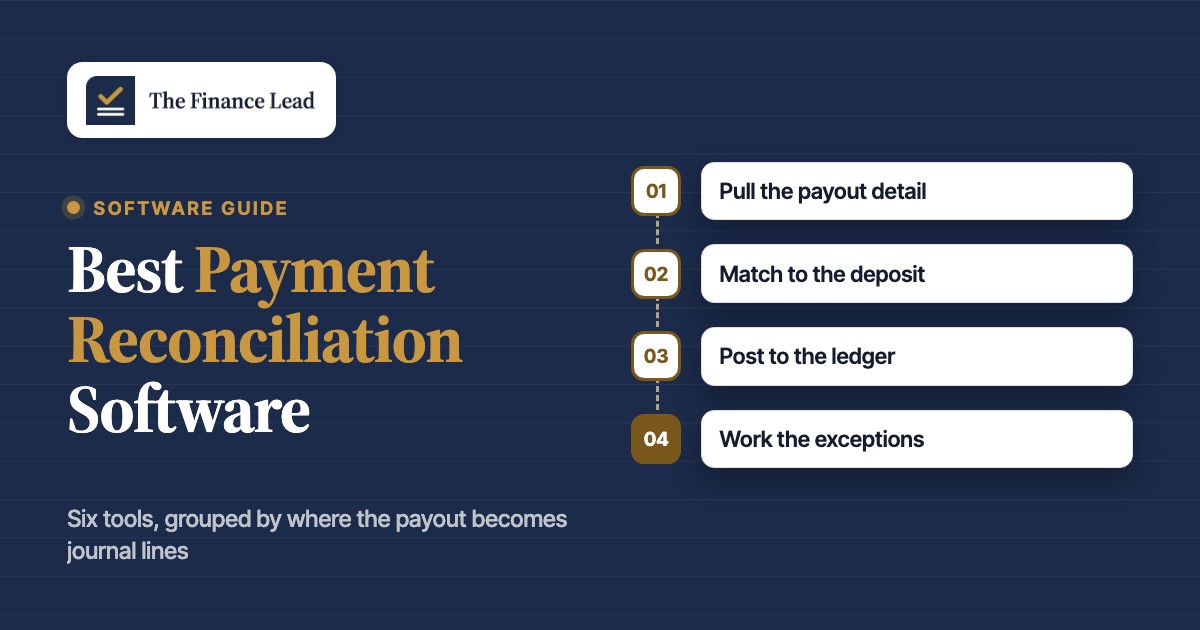
Every tool in this list runs some version of four steps. They differ in who does each step and where the result lands. The invoices those payments settle are sent and chased with accounts receivable software, covered in a separate guide.
- Step 1Pull the payout detail
- Synder
- A2X
What breaks a payout arrives before its report data, or a manual payout hides which transactions it contains - Step 2Match to the deposit
- Ledge
- BlackLine
- Adra by Trintech
What breaks one deposit covers many orders, or several deposits cover one batch - Step 3Post to the ledger
- Synder
- A2X
- Modern Treasury
What breaks fees and refunds land in the wrong account or the wrong month - Step 4Work the exceptions
- Ledge
- Modern Treasury
- BlackLine
What breaks unmatched items sit in a queue nobody owns
For a Stripe payout into QuickBooks Online, the sequence looks like this:
- Stripe builds the payout from the available balance and lists its charges, refunds and fees in the payout reconciliation report.
- The bank receives the net amount, and the bank feed in QuickBooks shows one deposit line.
- The tool, or an accountant, books the sales, fees and refunds and records the payout as a transfer or deposit that the bank line can match.
- Anything that does not tie, such as a refund from a prior month or a dispute on hold, goes to an exception list for a reviewer.
Source data decides how much a tool can do, though not how well it matches. Stripe's payout reconciliation report works only for automatic payouts: with manual payouts, Stripe cannot tell which transactions a payout contains, and you must reconcile by hand. PayPal's Balance Reconciliation Report ties each payout to its line items through a Transfer ID that also appears on your bank statement. Shopify's payout details page lists the charges, refunds, adjustments, fees and reserves behind a payout, while its activity report summarizes a period and does not match payouts to orders. A tool is only as complete as the report it can read.
Two matching levels exist. Payout-level matching ties the net deposit to one batch and checks that the batch total equals the bank line. Transaction-level matching ties every order, refund and fee inside the batch to a sale or invoice. Posting tools such as Synder and A2X work mainly at the payout level and keep the detail underneath. Matching platforms and close suites, however, work at the transaction level and handle one-to-many and many-to-many cases.
Tools that post payouts to your ledger
Synder and A2X write the journal lines for you, so they suit teams that keep their books in QuickBooks Online or Xero and sell through processors and marketplaces.
Synder
Synder
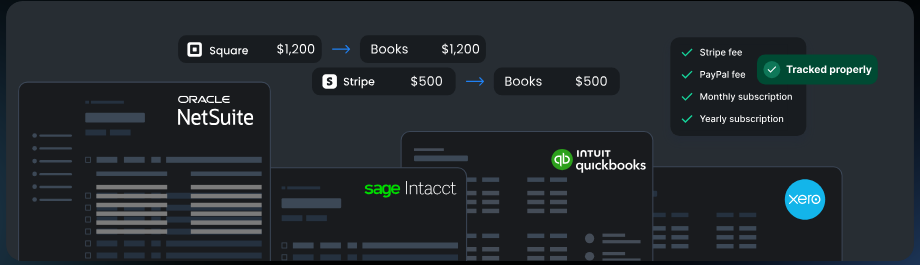
Synder syncs sales, fees, refunds and taxes from Stripe, PayPal, Square, Shopify, Amazon and 30+ other channels into QuickBooks Online, Xero and (on higher plans) NetSuite and Sage Intacct. Payouts are recorded as clearing-to-bank transfers that the ledger's bank feed then matches, either per transaction or as daily summary journal entries.
Synder fits a team that books sales from Stripe, PayPal, Square or Shopify into QuickBooks Online or Xero and wants each payout to arrive as one transfer the bank feed can match.
What it looks like in practice: each sale from the processor is synced into the ledger and recorded in a clearing account that mirrors the balance the processor holds. The fee goes into the same clearing account when the sale happens, so in Synder's own example a $100 sale with a $3 fee leaves $97 waiting to be paid out. Refunds and taxes are synced alongside. Once payouts are switched on and a checking account is chosen in the Payouts tab, Synder waits until the processor has actually sent the money and then books a transfer from the clearing account to the bank account for the net amount. In QuickBooks Online the bank feed deposit is highlighted against that transfer, and a person confirms the match. Because the payout is a transfer rather than a deposit, fees never show up on it. If a payout fails, the amount stays in the clearing account until a successful payout arrives. Synder's guide reads a negative clearing balance as payouts or fees without matching sales, and a positive one as missing or unsynced payouts or fees.
- You run QuickBooks Online or Xero and your clients or company take payments through Stripe, PayPal, Square or Shopify, and you want payouts to land as one matchable transfer against the bank feed instead of hand-built deposits.
- You need a choice between per-transaction detail and daily summary journal entries, for example to keep the ledger small on high-volume Stripe or Shopify accounts.
- You manage several entities or client books and can use the partner discounts (10% at 3+ clients, 15% at 7+, 20% at 15+) or need hourly imports on Essential and above.
- Your volume is large: the entry plans include only 500 to 1,000 synced transactions per month and extra volume is billed separately with no published rate, so cost is hard to predict.
- Your main channel is Authorize.Net, Walmart or Afterpay: the help center says payouts and fees must be recorded manually for Authorize.Net and are sales-focused for the others, which defeats payout reconciliation.
- You need NetSuite, Sage Intacct or a custom ERP on a small budget: those ledgers start on Pro or Pro Max, and a Capterra reviewer reports the TikTok Shop integration did not work for a US account.
- Users like
- Reviewers say the Stripe and PayPal to QuickBooks sync runs in the background, saves hours at month end and that support answers quickly
- Users dislike
- Initial setup takes trial and error with mapping and tax rules, and several reviewers call it expensive next to other apps
- Source: G2, 249 reviews
Capabilities, limits and reviews
Synder's pricing page lists tax tracking, multicurrency and balance reconciliation on every plan. The page lists included synced transactions of 500 on Basic and 1,000 on Essential, and a separate row of sales-transaction limits of 500 and 3,000, so ask Synder which count triggers overage. Extra volume is billed separately at a rate Synder does not publish. Basic imports daily, while hourly import starts on Essential. The help center says payouts and fees for Authorize.Net must be recorded manually, so check your processor against the integration list before you buy.
On G2, reviewers say the sync runs in the background and saves hours at month end. The recurring complaints are a setup that needs trial and error with mapping and tax rules, and a price some call high next to other apps. Billed monthly, plans run from $65 (Basic) to $599 (Pro Max); the yearly price is 20% lower, and a 15-day free trial needs no card.
- Starting price
- Basic $65/mo billed monthly ($52/mo billed yearly); Essential from $129 ($103 yearly); Pro from $299 ($240 yearly); Pro Max from $599 ($480 yearly); Premium by quote; 15-day free trial, no credit card
- Free trial
- 15 days, no credit card
- Entry plan limits
- Basic: 500 included synced transactions a month and 2 integrations; Essential: 1,000 and unlimited integrations (the pricing page also lists sales-transaction limits of 500 and 3,000)
- Ledgers by plan
- QuickBooks Online, Xero and Puzzle on every plan; NetSuite and Intuit Enterprise Suite from Pro; custom ERP from Pro Max
- Sync modes
- Per Transaction or Summary Sync (daily journal entries)
- Authorize.Net
- Payouts and fees must be entered manually
A2X
A2X
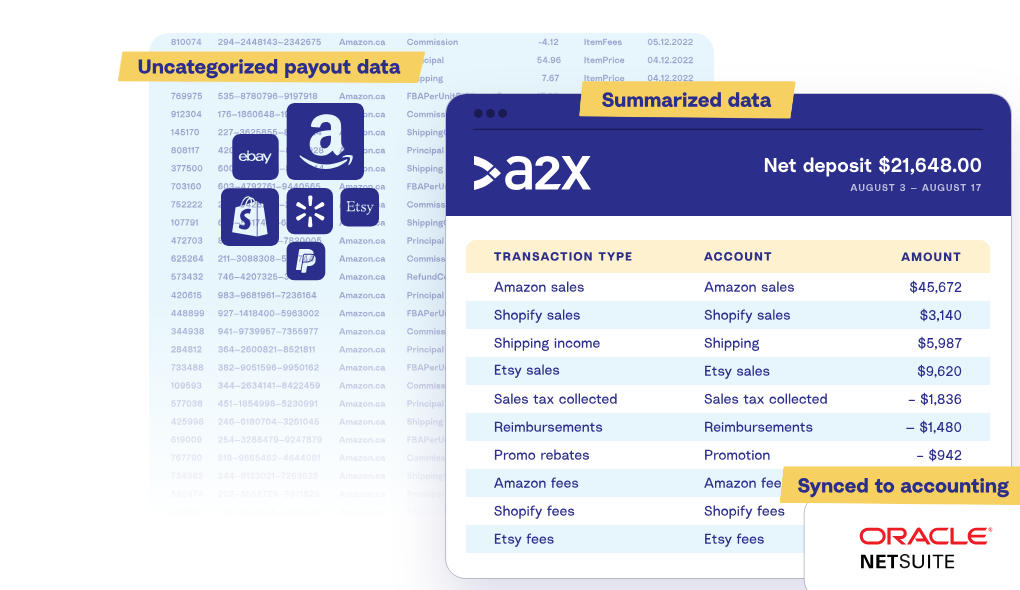
A2X pulls settlement data from Amazon, Shopify, Etsy, eBay, Walmart, TikTok Shop and PayPal, splits it into sales, fees, refunds and taxes, and posts it to the general ledger as one summarized entry per settlement. It is built for ecommerce bookkeeping rather than general-purpose bank or card reconciliation, which makes it a narrow but deep fit for firms with marketplace sellers as clients.
A2X fits an accounting team or bookkeeper whose clients sell on Amazon, Shopify, Etsy, eBay, Walmart or TikTok Shop and who is tired of importing payout files or posting thousands of order lines.
What it looks like in practice: A2X fetches the settlement from the marketplace. You can send it to the ledger by hand or turn on auto-posting in settings. In QuickBooks Online each settlement arrives as a single journal, with the raw payout data categorized into sales, fees, taxes and more, and tax rules assigned by country. The journal's last line is the deposit into your bank account. In the Banking tab, a journal whose amount equals the bank deposit is usually matched automatically and you click Match. QuickBooks only auto-matches about three months back, so older items need Find Match. When a settlement period spans two months, A2X posts one journal per month so sales and fees land in the right period, yet you still reconcile the deposit against one entry. If the marketplace currency differs from the deposit currency, QuickBooks will not auto-match, and you use Find Match with the foreign currency option.
- Your team keeps books for Amazon, Shopify, Etsy, eBay, Walmart or TikTok Shop sellers in QuickBooks Online, Xero or NetSuite and is tired of importing payout CSVs or posting thousands of order lines.
- You want each marketplace payout to land as one journal that matches the bank deposit, with sales, fees, refunds and taxes already separated into ledger accounts.
- A client's settlements straddle month-end and you need sales and fees to land in the correct month while the deposit still reconciles to a single entry.
- Your reconciliation work is bank-to-GL, card, AP or intercompany matching across many sources: A2X only handles ecommerce and payments channel settlements, not general transaction matching.
- You need a ledger other than QuickBooks Online, Xero or NetSuite: the supported accounting platforms listed on the site are those three.
- Your client is a very low-volume side business: reviewers on Capterra said the price is hard to justify at low volume (older reviews, mostly 2018 to 2019).
- Users like
- Reviewers say Amazon, Shopify and PayPal payouts land in Xero or QuickBooks already categorized, setup is straightforward and support is excellent
- Users dislike
- Account mapping for fees takes effort to set up, some reviewers call it expensive for what it does, and foreign currency amounts do not always match after export
- Source: G2, 318 reviews
Plans, limits and reviews
Pricing is per channel and per order tier. The Amazon plans run from Mini at $29 a month (200 orders) through Starter at $59 (1,000 orders) and Standard at $79 (5,000 orders) to Standard 10k at $159 (10,000 orders). Shopify, Etsy, eBay, TikTok Shop and PayPal start at $29, and Walmart at $79. A2X says Amazon prices rise on November 14, 2026, except for Mini. The free trial includes all features and lets you post three settlements.
A2X is narrow by design: it handles ecommerce and payment channel settlements, not general bank, card or AP matching. G2 reviewers rate it highly for easy setup and support. Their complaints are the effort of mapping each fee to an account, a price some call high for what it does, and foreign currency amounts that do not always match after export.
- Starting price
- Amazon plans: Mini $29/mo (200 orders), Starter $59 (1,000 orders), Standard $79 (5,000 orders), Standard 10k $159 (10,000 orders); Shopify, Etsy, eBay, TikTok Shop and PayPal from $29/mo, Walmart from $79/mo; prices rise on November 14, 2026 except Mini
- Ledgers
- QuickBooks Online, Xero, NetSuite
- Channels
- Amazon, Shopify, Etsy, eBay, Walmart, TikTok Shop, PayPal
- Free trial
- All features; three settlements can be posted
- Entry plan limits
- Amazon Mini covers 200 orders a month and 3 months of history, with no COGS or FBA inventory locations
- Month-end
- A settlement that spans two months posts as one journal per month
- Entry limits
- Amazon Mini covers 200 orders a month and 3 months of history, with no COGS or FBA inventory locations
Matching platforms for high payment volume
These platforms match records from banks, payment processors and billing systems and post the result to an ERP. They are built for companies with far more payments than a 2 to 8 person accounting team handles, and the entries below say plainly when that is a mismatch.
Ledge
Ledge
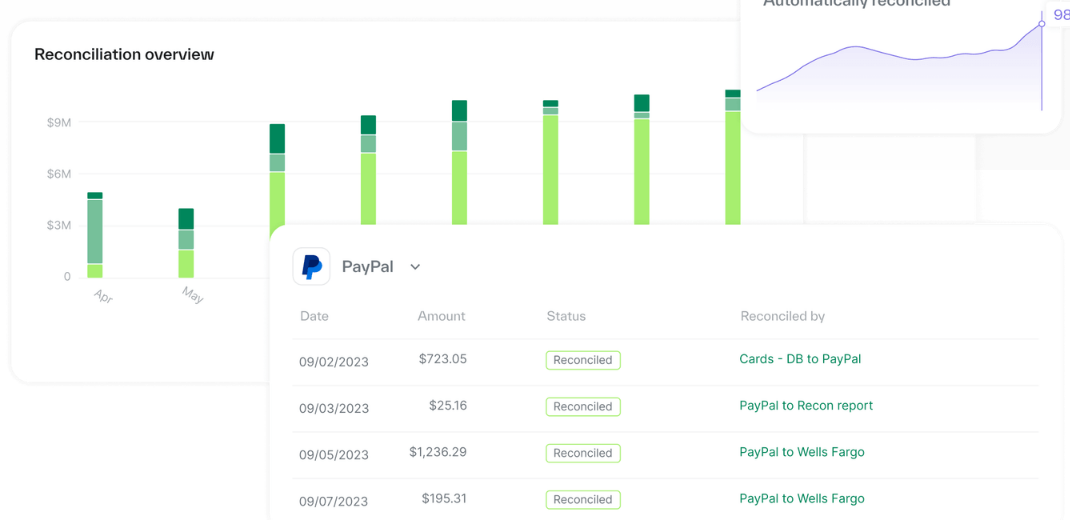
Ledge is a close-management platform with AI accounting agents that prepare reconciliations, working papers and journal entries for review, with a payment reconciliation product covering banks, PSPs, billing systems and the ERP. Matching supports one-to-one, one-to-many, many-to-one and many-to-many, and nothing posts without approval.
Ledge fits a finance team at a payment-heavy company on NetSuite that matches payments from thousands of customers and wants exceptions, not every line, in front of a person.
What it looks like in practice: Ledge's getting-started docs describe four stages. Data from banks, payment processors and other financial systems is ingested into one place. Transactions are then matched one-to-one or many-to-one with pre-built or custom rules, and Payment Flows handle multi-step reconciliations that span several data sources and institutions. Ledge's product page adds one-to-many and many-to-many matching for batch payments and payments that settle several invoices, and says fees, taxes, refunds, chargebacks and multiple currencies are accounted for. Discrepancies such as partial payments, failed payments and name mismatches between bank and invoice go to an exception queue where users drill to the transaction and resolve them. Last, reconciliation results, including journal entries and cash applications, are posted back to the ERP. Ledge says nothing posts without approval and that an immutable log tracks each payment.
- You reconcile payments from thousands of customers (pay-ins, payouts, partial payments, refunds, chargebacks) and need many-to-many matching rather than simple one-to-one.
- Your ERP is NetSuite and you want reconciled results and journal entries posted back automatically after approval.
- You want an audit trail from reports back to source data and are comfortable planning upfront which workflows to automate.
- Your ERP is QuickBooks, Xero or Sage Intacct: only NetSuite is named on the site, so fit is unproven.
- You need a published price or a self-serve trial: pricing is quote-only and the only next step is a demo.
- You need a vendor with a deep public review base: G2 shows only 6 reviews, so peer validation is thin.
- Users like
- Reviewers say it reconciles payments from thousands of customers well, surfaces exceptions fast and support is responsive
- Users dislike
- Setup needs upfront planning about what to automate, and six reviews is a thin sample
- Source: G2, 6 reviews
Pricing, gaps and reviews
Ledge sells a single platform fee that depends on the workflows automated and the complexity of the environment, with unlimited users and no separate implementation fee, in tiers named Track, Execute and Enterprise. No price or free trial is published, and the next step is a demo. We could not confirm from the site which payment processors beyond Stripe are supported, or whether QuickBooks, Xero or Sage Intacct work. The site's wording on AI is inconsistent: the docs describe rules, while marketing pages mention AI-driven matching.
G2 shows 4.5 out of 5 from six reviews, so treat it as an early signal. Reviewers praise how it surfaces exceptions quickly and the responsive support, and caution that setup needs upfront planning about what to automate.
- Starting price
- Quote only (single platform fee, unlimited users; tiers Track, Execute, Enterprise); demo request, no free trial listed
- Reconciles
- Banks, PSPs, ERPs, billing systems, databases, CSV/file exchange; pay-ins, payouts, AP, AR
- Matching
- One-to-one, one-to-many, many-to-one, many-to-many; pre-built or custom rules; continuous
- ERP posting
- NetSuite is the only ERP named on the site
- Named integrations
- Banks: Chase, Wells Fargo, Bank of America, SVB, Mercury. Billing: Stripe, Chargebee, Zuora
- Security
- SOC 2 and ISO 42001 badges claimed; trust center at trust.ledge.co
- Offices
- New York and Tel Aviv
- Banks named
- Chase, Wells Fargo, Bank of America, SVB, Mercury
- Billing systems named
- Stripe, Chargebee, Zuora
Modern Treasury
Modern Treasury
Modern Treasury is an API-first platform for originating payments (ACH, wires, RTP, FedNow, checks, stablecoins), reconciling them against bank transactions, and keeping a real-time ledger. Its reconciliation engine matches bank transactions to Expected Payments using configurable rules, and flags ambiguous matches for manual review.
Modern Treasury fits a platform, marketplace or fintech that originates and receives payments at volume and has engineers who can integrate an API. It is not a bank-feed matching app for a small accounting team.
What it looks like in practice: for a payment you expect to receive, such as an invoice, you create an Expected Payment through the API. It holds an amount or range, an expected date or date range, the counterparty and custom identifiers. An organization needs at least one reconciliation rule, and each rule can apply to one or more internal accounts. When a transaction arrives from your financial institution, the matching engine checks it against your Expected Payments, and a payment reconciles only if all of its defined conditions match. Conditions include account, currency, direction and amount, plus date bounds, counterparty and custom identifiers matched against remittance data in the transaction description. If exactly one Expected Payment matches, the transaction is reconciled automatically. If several match, nothing is reconciled automatically and the transaction becomes an exception for manual review.
- Your company is a platform, marketplace or fintech that originates or receives high volumes of payments and has engineers who can integrate an API.
- You need reconciliation tied to payment orders and a real-time ledger, not just a bank-to-books match at month end.
- You need one-to-many (batch settlement) or many-to-one (installment) matching rules that you can define per internal account.
- You are a 2 to 8 person accounting team matching bank lines to invoices in QuickBooks or Xero: the product is built around API integration and expected payments you must create programmatically, so it needs developer time you likely do not have.
- You need transparent, published pricing or a self-serve trial: pricing is quote-only and usage-based with no free tier listed.
- You want a finance-team UI with bank feeds and ERP matching out of the box: the documented ERP sync is for pushing Modern Treasury data to the GL, and the vendor notes the QuickBooks API cannot import bank transactions.
- Users like
- Too few reviews to name a recurring theme; the one review we could read praised the support team's responsiveness
- Users dislike
- No recurring complaint can be named from 13 reviews; the same reviewer mentioned a few bugs
- Source: G2, 13 reviews
Pricing, fit and reviews
Modern Treasury's pricing page says all pricing is usage-based and depends on volume, the payment rails used and account structure, with annual terms and lower per-unit costs as volume rises. There is no public rate card and no free tier. Beyond reconciliation it originates payments over ACH, wires, RTP, FedNow and checks and keeps a real-time ledger. The documented accounting sync pushes Modern Treasury data to the ledger, and the vendor notes that the QuickBooks API cannot import bank transactions.
G2 lists 13 reviews with a 4.7 average, too few to name a recurring complaint. The one review we could read praised the support team and mentioned a few bugs.
- Starting price
- Quote only, usage-based (volume, payment rails and account structure); annual terms
- Pricing model
- Usage-based, quote only, annual terms
- Built for
- Platforms, fintechs, lenders and embedded-payments companies
- Reconciliation inputs
- Bank transactions matched against Expected Payments; Payment Orders sent through Modern Treasury reconcile automatically
- Match strategies
- One-to-one, one transaction to many expected payments, many transactions to one expected payment
- Accounting sync
- QuickBooks Online and NetSuite described in vendor material
Enterprise matching suites with payment data
BlackLine and Adra match very large transaction sets as one step of a wider close. Both accept bank, card and other files, and neither vendor's pages name a payment processor or an ecommerce settlement workflow, so treat them as general-purpose matching engines you would configure for payout files.
BlackLine
BlackLine
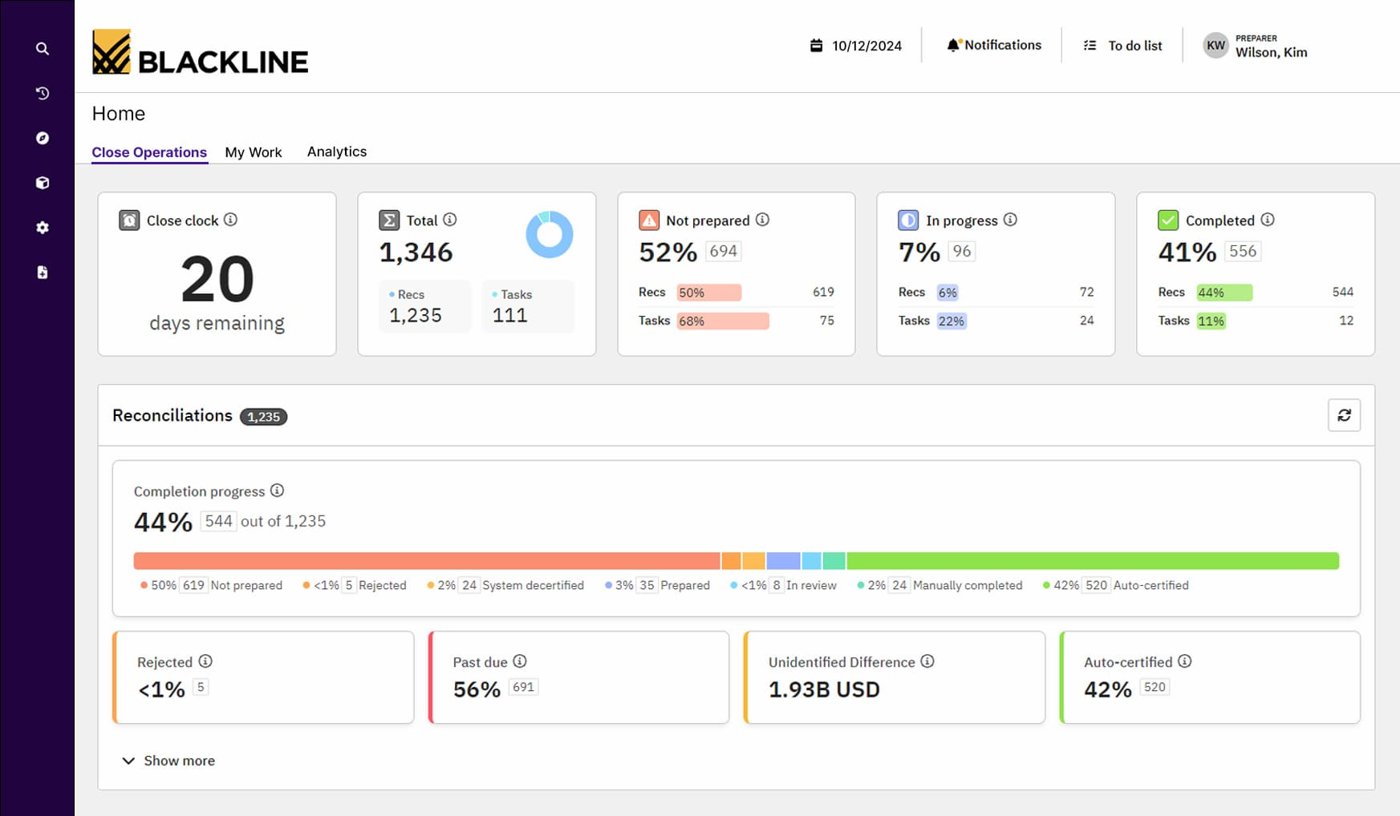
BlackLine is a cloud financial close and consolidation suite with separate modules for task management, account reconciliations, transaction matching, journal entry, reporting and analysis, consolidation and compliance. Its Verity AI layer adds agents such as Verity Prepare for reconciliation prep and Verity Flux for variance analysis.
BlackLine's Transaction Matching module fits a controller at a large company on SAP, Oracle or NetSuite who needs to match very high volumes of bank, card and intercompany records with a full audit trail.
What it looks like in practice: BlackLine's module overview describes importing data from any file format or source, then building match scenarios from rules that business users own. Matching can be one-to-one, many-to-one or many-to-many, and the module suggests matches or applies them automatically. Items that do not match go to exception handling: email alerts, role-based workflow, user-defined reason codes, and saved views for filtering. Timing differences and reconciling items can move into an account reconciliation, and adjusting journal entries can be created in bulk from user-defined logic. For a payout file, that means a batch settlement can be matched against the individual deposits or sales it covers, and fees or differences can be booked by rule. BlackLine's pages we read do not name a payment processor or a payout workflow, so the processor-specific setup is yours to design.
- You reconcile hundreds or thousands of balance sheet accounts across several entities and want rule-based auto-certification of low-risk accounts plus a full preparer and reviewer audit trail
- You run SAP, Oracle or NetSuite and have high transaction volumes (bank, card, intercompany) that need automated one-to-many and many-to-many matching feeding straight into reconciliations and adjusting journals
- You expect to add consolidation, intercompany and SOX control testing later and want them on the same platform as the close
- You are a 2 to 5 person team on QuickBooks Online or Xero: BlackLine is sold module by module on quote, Vendr's buyer data puts the median contract around $40,125 per year, and no QuickBooks or Xero connector is documented on BlackLine's pages
- You need to be live this month with little admin capacity: G2 reviewers repeatedly cite a steep learning curve and complex setup, and reviewers note it benefits from a dedicated admin
- Users like
- Centralizes close activities and automates reconciliations, cutting manual work
- Users dislike
- Steep learning curve and complex implementation and configuration
- Source: G2, 1,068 reviews
Pricing, scale and reviews
BlackLine does not publish prices. It sells module by module on quote, and Vendr's buyer data puts the median BlackLine contract around $40,125 a year, a small-sample estimate and not a list price. On the product page, SiriusXM reports 99.9% of transactions matched automatically each period, a customer claim published by the vendor.
On G2, BlackLine holds 4.5 out of 5 from 1,068 reviews. Reviewers say it centralizes the close and automates reconciliations. The recurring complaint is a steep learning curve and complex implementation. We found no QuickBooks or Xero connector documented on its pages.
- Starting price
- Price not published (quote only)
- Close modules
- Task Management, Account Reconciliations, Transaction Matching, Journal Entry, Reporting and Analysis, Consolidation
- ERPs named by BlackLine
- SAP, Oracle, NetSuite
- AI
- Verity Prepare drafts reconciliations, Verity Flux supports variance analysis
- Module
- Transaction Matching, one of several modules in the close suite
- Vendor volume claim
- Hundreds of millions of transactions matched each month across clients (BlackLine's own figure)
Adra by Trintech
Adra by Trintech
Adra is Trintech's financial close suite for mid-market finance teams, made up of Adra Task Manager, Adra Balancer (balance sheet reconciliations), Adra Matcher (transaction matching), Adra Journal Entry and Adra Analytics. It connects to ERPs such as NetSuite and Microsoft Dynamics and can also work from uploaded spreadsheets.
Adra fits a mid-market finance team on NetSuite or Microsoft Dynamics that has high-volume bank, card and point-of-sale data to match before the balance sheet reconciliation.
What it looks like in practice: Adra Matcher reads data in its raw form from sources Trintech lists as bank statements, credit card statements, point of sale, merchant and third-party delivery services, so there is no spreadsheet clean-up first. It supports multi-way matching (three-way, four-way and higher) as well as one-to-one, one-to-many, many-to-one and many-to-many. Intelligent rules review matches automatically so fewer transactions need investigation, and the exceptions that remain are researched and documented by the team. Matching feeds Adra Balancer for balance sheet reconciliations with variance thresholds, and Adra Journal Entry creates, posts and reports journals. Trintech says Adra has two-way communication with any ERP and features NetSuite and Dynamics 365 connectors. The pages we read do not mention payment processors or merchant settlement reports, so test your own payout files in a trial.
- You are a mid-market team on NetSuite or Microsoft Dynamics 365 Finance or Business Central and want certified connectors that pull balances in and post journals back
- You want to start from your existing Excel reconciliations: Balancer lets you tag and upload spreadsheets and still auto-reconcile, track changes and keep an audit trail
- You have high-volume bank, card, point-of-sale or delivery-platform transactions that need multi-way (3-way, 4-way) matching before the reconciliation
- You are a very large, global or listed group with heavy consolidation needs: Trintech positions its other product, Cadency, for large enterprises, and Adra has no consolidation module of its own (Trintech pairs it with Planful for consolidation and reporting)
- You run QuickBooks Online, Xero or Sage Intacct and want a documented native connector: Trintech's pages name NetSuite, Dynamics, SAP, Oracle and Workday connectors but none for these ERPs
- Users like
- Streamlines the month-end close by automating account reconciliations and transaction matching
- Users dislike
- Some reviewers feel ease of use and setup could improve
- Source: G2, 333 reviews
Pricing, ERP fit and reviews
Adra has no published price. Trintech sells it by quote, and its larger sibling Cadency targets large enterprises. The pages name NetSuite, Dynamics, SAP, Oracle and Workday connectors but none for QuickBooks Online, Xero or Sage Intacct.
G2 shows 4.5 out of 5 from 333 reviews. Reviewers say it streamlines the month-end close by automating reconciliations and transaction matching, and some feel ease of use and setup could improve.
- Starting price
- Price not published (quote only)
- Modules
- Task Manager, Balancer, Matcher, Journal Entry, Analytics
- Certified connectors
- NetSuite (incl. OneWorld), Dynamics 365 Finance and Business Central
- Sister product
- Cadency, Trintech's close platform for large enterprises
- Vendor claim
- 70% less time spent matching transactions (Trintech's figure)
Which payment reconciliation tool fits your team?
Start from where your payments land and which ledger you use. Then check the volume, because that sets the price tier and decides whether a person can still work the exception queue.
- Stripe, PayPal, Square or Shopify payouts into QuickBooks Online or XeroSynder
- Amazon, Etsy, eBay, Walmart or TikTok Shop settlements into QuickBooks Online, Xero or NetSuiteA2X
- Payments from thousands of customers, NetSuite, and an exception queueLedge
- You originate payments through an API and need a ledger tied to payment ordersModern Treasury
- Hundreds of balance sheet accounts plus very high-volume bank and card matchingBlackLine or Adra
- A single processor and a small team, with no budget for a toolThe processor's own reports and your ledger's batch deposit feature
- A US online store with Shopify Payments and PayPal, books in QuickBooks OnlineSynder
- A bookkeeping firm with several Amazon seller clientsA2X
- A SaaS company with a payments team, NetSuite and tens of thousands of monthly paymentsLedge
- A global group on SAP with bank and card volumes in the millionsBlackLine
What does payment reconciliation software cost?
Two of the six tools publish a price. The rest are sold by quote, and the quote usually scales with transaction volume or modules.
| Tool | Published price (USD) | What drives the price |
|---|---|---|
| Synder | Basic $65, Essential from $129, Pro from $299, Pro Max from $599 per month billed monthly; 20% lower billed yearly | Synced transactions per month, ledger and premium integrations |
| A2X | Amazon plans from $29 (200 orders) to $159 (10,000 orders) per month; other channels from $29, Walmart from $79 | Orders per month and number of channels |
| Ledge | Quote only | Workflows automated and environment complexity; unlimited users |
| Modern Treasury | Quote only | Volume, payment rails used and account structure |
| BlackLine | Quote only | Modules licensed; Vendr's buyer data puts the median contract near $40,125 a year |
| Adra by Trintech | Quote only | Modules and edition |
Check the plan limits before you compare monthly prices. Synder's entry plans list 500 and 1,000 included synced transactions a month (and a separate sales-transaction row of 500 and 3,000), with extra volume billed at an unpublished rate, and A2X's Amazon Mini stops at 200 orders. A2X says prices on its Amazon plans rise on November 14, 2026, except for Mini.
Is there free payment reconciliation software?
No tool in this list is free, but you may not need one. Four routes use software you already have and cover a single processor with moderate volume, as the four points below show.
- The processor's own reports: Stripe's payout reconciliation report lists the charges, refunds, disputes and fees in each automatic payout and exports an itemized CSV with the payout ID, gross, fee and net, plus your own metadata keys. Stripe also offers a bank reconciliation report that pairs each payout with its bank deposit, but only for direct US accounts on automatic payouts. For the bank side of the same match, see our guide to bank reconciliation software. PayPal's Balance Reconciliation Report and Shopify's payout details page do the same job for their own payouts.
- Your ledger's deposit feature: in QuickBooks Online, payments held in Undeposited Funds are grouped into a bank deposit that matches the bank record. Xero has batch deposits for several invoices paid in one deposit.
- The processor connector: Intuit documents a Stripe connector that creates a bank deposit linked to the individual sales and fees, with disputes and adjustments added to the deposit. Check Intuit's pricing for what the connector costs on your plan.
- A clearing account and a spreadsheet: follow the method described above and tie the processor balance out each month.
Free routes break down when you use several processors, when payouts are manual, or when volume grows past what one person can tie out in an afternoon. That is the point at which Synder or A2X pays for itself in hours.
Does AI help with payment reconciliation?
AI helps with suggestions, not with the decision. Matching one payout to one deposit is a rules problem, and every tool here does it with rules. Where AI shows up is in three of the harder parts, listed below.
- Suggested matches: QuickBooks Online's AI-powered reconciliation sorts bank lines into Matched, Needs review and Extra in QuickBooks, and it is available on Plus, Advanced and Intuit Enterprise Suite plans.
- Preparation: BlackLine's Verity layer includes an agent that drafts reconciliations for review.
- Exception triage: Ledge markets AI agents for close tasks, although its documentation describes rule-based matching. Ask which parts of matching are rules and which are models before you rely on an AI claim.
Whatever the tool suggests, a preparer and a reviewer still need to sign off, and the evidence has to be retrievable. A model's guess isn't audit evidence.
How do you choose payment reconciliation software?
Pick the problem first, then test the tool on your own payouts. Seven questions cover the demo or trial.
- Which payouts and which ledger: get the named connector for your processor and your ledger in writing. A tool that lists your ledger but not your processor, such as Synder with Authorize.Net, leaves the hard part manual.
- Payout level or transaction level: a posting tool that books each payout as one transfer is enough if you only need the bank line to match. If you must trace every order and fee, you need transaction-level matching.
- How fees, refunds and disputes are booked: ask to see a payout with a refund and a dispute in it. Check which accounts the fee lands in and which month the refund hits.
- Which currencies: if the marketplace currency differs from the deposit currency, QuickBooks Online will not auto-match A2X's journal, and you match it by hand. Ask how any tool you test handles that case.
- What happens to exceptions: find out who works the queue, how a reviewer closes an item and whether the decision is logged with a user and time.
- What volume does to the price: ask for the cost at double your current transaction count.
- Evidence for your auditor: check that the match, the reviewer and the date can be exported for each period.
Month-end processor balance tie-out
A processor balance tie-out is the control that makes any of these tools auditable. Run it once a month for each processor, and keep the report and the ledger balance together as evidence.
| Line | Source | Example (month 1 above) | Ledger account |
|---|---|---|---|
| Opening processor balance | Prior month tie-out | $0.00 | Clearing |
| Plus gross sales | Processor report | $425.00 | Sales |
| Less refunds | Processor report | $0.00 | Sales returns |
| Less disputes and chargebacks | Processor report | $0.00 | Disputes receivable or expense |
| Less fees | Processor report | $13.23 | Processor fees |
| Equals closing balance per processor | Processor report | $411.77 | Clearing |
| Less payouts sent to the bank | Bank statement | $411.77 | Bank |
| Clearing balance per ledger | Trial balance | $0.00 | Clearing |
| Difference (should be zero) | Calculated | $0.00 | None |
- Download the payout report for every processor and every payout that arrived in the month
- Match each payout to one bank statement line and note any payout that crosses the month end
- Confirm fees, refunds and disputes in each payout are booked to their own accounts
- Check that the clearing account balance equals the processor's ending balance
- List open disputes and expected release dates
- Investigate any difference above your threshold before sign-off
- Attach the processor report and the bank line to the close task
- Have a second person review and approve the tie-out
A tie-out like this is evidence work, but evidence is what teams chase every month. The Finance Lead runs recurring month-end close checklists with evidence attached to each task and preparer and reviewer sign-off, so the tie-out above is a task with an owner, a due date and its proof. It doesn't match payments, post journals or connect to your bank or ledger. Our month end close checklist and the guide to financial close software cover the rest of the close.
FAQ
What is payment reconciliation with an example?
Payment reconciliation matches a processor's payout to your bank deposit and your ledger. In our example, three orders of $100, $250 and $75 at an assumed 2.9% + $0.30 fee produce a $411.77 deposit against $425.00 of invoices. The $13.23 difference is fees, which you book to a processor fees account so both sides agree.
What is the best payment reconciliation software for QuickBooks Online?
For payouts from Stripe, PayPal, Square or Shopify, Synder books each payout as a transfer from a clearing account that the bank feed can match. For Amazon, Shopify, Etsy, eBay, Walmart or TikTok Shop settlements, A2X posts one journal per settlement. Both publish prices, and both offer a free trial.
Can I reconcile Stripe payouts without extra software?
Yes, for moderate volume. Stripe's payout reconciliation report breaks each automatic payout into its charges, refunds, disputes and fees, and the itemized CSV can carry your own metadata. It doesn't work for manual payouts, and the bank reconciliation report covers only direct US accounts on automatic payouts.
Why doesn't my bank deposit match my sales report?
The processor pays the balance after fees, refunds and disputes, and one deposit usually bundles many orders. Timing also differs: a payout can cross a month end, and a dispute can stay on hold for weeks.
Is payment reconciliation the same as account reconciliation?
No. Payment reconciliation ties processor settlements to bank deposits and sales. Account reconciliation certifies that a general ledger balance agrees with its supporting records. A processor clearing account is one of the balances that account reconciliation then covers.
Does payment reconciliation software use AI?
Some tools add AI suggestions, such as QuickBooks Online's matched and needs review sorting, but the core matching is rule-based. Ask the vendor which parts use models, and keep a human reviewer on the exceptions.