Fraud detection software monitors payments, vendor records, expense reports, journal entries and customer transactions, scores each item with rules, anomaly tests or machine learning, and sends the suspicious ones to a person before or after the money moves. Most lists in the search results are written by fraud vendors for banks and fintechs, and they rank their own platform first. A controller has a different problem: a fake bank detail change from a "supplier", a duplicate invoice, an inflated expense report, a journal entry nobody can explain, or card fraud on the company's own checkout.
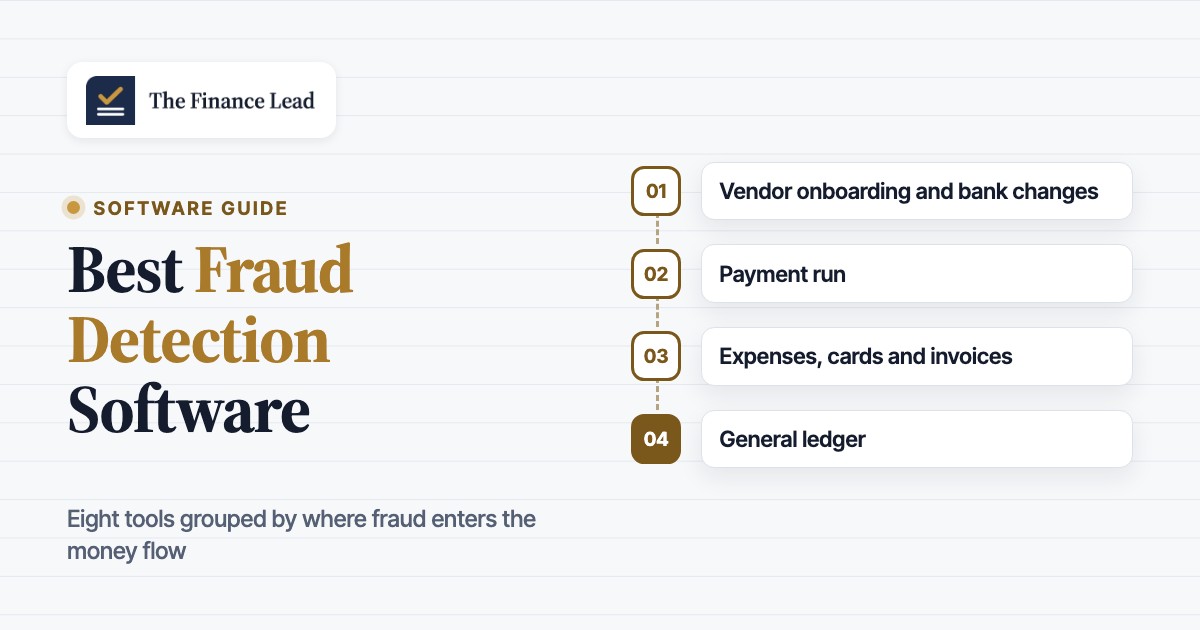
We compared eight tools that cover those jobs: Trustpair, Eftsure, AppZen, Oversight, MindBridge, Stripe Radar, Sift and SEON. We grouped them by where fraud enters the money flow, because a tool that guards the payment file does nothing about expense fraud, and the reverse is just as true. For each tool we read the pricing page, a product page, help or documentation pages where they were public, and its G2 reviews in October 2026. None of the vendors paid for a placement, and our own product is not a fraud detection tool, so it sits outside the ranking as a marked row.
- fraud detection tools compared
- 8
- of occupational frauds are caught by a tip (ACFE 2026)
- 43%
- of organizations faced payments fraud in 2025 (AFP)
- 76%
- tool publishes a full plan price
- 1
Our picks by where fraud hits
 Best for ACH and wire payment runsEftsureChecks every line of the payment file for account name, bank details and TIN, and runs bank detail changes through the same verification.
 Best for SAP, Oracle and Coupa shops paying worldwideTrustpairVendor check before onboarding, a vendor master audit that re-evaluates suppliers, and a payment file check through native connectors.
 Best for auditing every expense and invoiceAppZenAI agents read each receipt and invoice before reimbursement or payment and flag duplicates, fake receipts and ghost vendors.
 Best single monitor for T&E, cards and APOversightScores travel, card and payables transactions in one data set and routes findings before and after payment.
 Best for journal entry and ledger testingMindBridgeScores every posted journal entry with rules, statistics and machine learning and shows which tests fired.
 Best if you take card payments on StripeStripe RadarScreening is built into Stripe Payments, with rules, a review queue and risk scores on the paid tiers.
 Best for high-volume online sales with a fraud teamSiftReal-time scores, no-code workflows and review queues across several payment processors.
 Best published entry price for payment screeningSEONStarter costs $699 per month for 2,500 checks, with email, phone, IP and device signals.
 Our product · close evidence, not fraud detectionThe Finance LeadKeeps preparer and reviewer sign-off and evidence for each close task, a control auditors ask about.
Fraud detection software compared
| Tool | Type of tool | Fraud it catches | Pricing | G2 rating |
|---|---|---|---|---|
| Trustpair | Vendor bank account validation | Checks vendor bank details at onboarding, in a vendor master audit and on the payment file | Quote only (Platform Access and Custom Access plans, no prices published) | 4.8 (17) |
| Eftsure | Vendor verification and payment file screening | Verifies the payee at onboarding, on bank detail changes and on each ACH or wire file | Quote only, priced on annual spend and new vendors per month; all features in one package | 4.9 (113) |
| AppZen | AI expense and invoice audit | Audits every expense report, card transaction and AP invoice before reimbursement or payment | Quote only (no pricing page) | 4.4 (72) |
| Oversight | Spend, card and AP risk monitoring | Monitors T&E, P-card and AP transactions for duplicates, fake receipts and misuse | Quote only (no pricing page) | 4.4 (50) |
| MindBridge | General ledger and journal entry risk analytics | Scores every journal entry and GL line for anomalies after posting | Quote only (no pricing page) | 4.5 (62) |
| Stripe Radar | Payment fraud screening inside Stripe | Scores every Stripe payment and blocks, flags or queues risky ones | Radar Lite included with standard Stripe payments pricing; Standard, Plus and Pro billed monthly or per screened transaction (US dollar rates not verified here; per-screen billing starts January 22, 2027) | 4.4 (19) |
| Sift | Enterprise fraud decisioning for online payments | Real-time risk scores for payments, accounts and promotions, with workflows and review queues | Quote only (no pricing page) | 4.6 (610) |
| SEON | Fraud prevention with digital footprint data | Scores customers and orders from email, phone, IP and device data with your rules | Starter $699 per month (2,500 fraud checks, 10 users, 50 custom rules, no case management); Premium custom | 4.6 (380) |
| The Finance Lead Our product | Month-end close checklists | Tracks close tasks, evidence and preparer/reviewer sign-off | Team $39/month (up to 8 team members), Plus $79/month (adds MCP agent integration); 14-day free trial, no credit card required | No reviews yet |
Pricing and G2 data checked on October 22, 2026. G2 blocks automated reads, so ratings and review counts are as shown in G2's search-indexed listings and can move by a few reviews. Trustpair (17) and Stripe Radar (19) have small review bases.
What is fraud detection software?
Under the hood, a fraud detection tool is a set of checks that runs on data your finance team already produces: vendor records, payment files, expense reports, invoices, ledger entries or customer orders. Each check compares an item with something it should match, or with a normal pattern, and returns a score or a pass/fail. The exceptions go to a reviewer. The software doesn't prove fraud, though. It narrows thousands of transactions down to the few a person should look at, and the reviewer still makes the call.
Three detection methods show up in almost every product, often in combination:
- Rules test a known condition: the bank account on the payment file doesn't match the account on file, the same invoice number and amount appear twice, or an expense falls just under the approval limit.
- Anomaly detection compares an item with history: a vendor that suddenly bills a rare account, an amount far outside the usual range, or a journal entry posted at an odd time by an unusual user.
- Machine learning learns from labeled outcomes across many customers. Stripe Radar and Sift train on their payment networks, and AppZen and Oversight train on expense and payables data.
For a finance team, though, the more useful split is where the fraud enters. A supplier's "new bank details" email attacks the payment run. A padded taxi receipt attacks expense reimbursement. A manipulated accrual attacks the ledger. A stolen card attacks your checkout. Each tool in this list guards one or two of those steps, and none guards all of them.
- Step 1Vendor onboarding and bank changes
- Trustpair
- Eftsure
What slips through a fraudster's account is saved as the vendor's real one - Step 2Payment run
- Eftsure
- Trustpair
What slips through a changed account or a duplicate line leaves in the ACH or wire file - Step 3Expenses, cards and invoices
- AppZen
- Oversight
What slips through fake receipts, split purchases and duplicate invoices get approved - Step 4General ledger
- MindBridge
What slips through an unusual manual entry hides a loss or inflates a result - Step 5Customer payments
- Stripe Radar
- Sift
- SEON
What slips through stolen cards become chargebacks and dispute fees - Across the closeSign-off and evidence
- The Finance Lead
Tracks who prepared and who reviewed each close task, with the support attached
Fraud detection vs fraud prevention vs fraud management
Vendors use the three labels loosely. Detection finds suspicious items, and prevention stops them before money moves. A fraud management system, sold as fraud management software or a fraud management tool, adds the case work around both: alert queues, assignment to investigators, investigation notes, outcomes fed back into the rules, and reporting on losses and false positives. Payment file checks such as Eftsure's are prevention, because a red line can be held before release. MindBridge is detection, because it reads entries after they are posted. Sift and SEON sell both, plus case tools on their larger plans.
How is fraud detected?
Most occupational fraud is still found by people, and that hasn't changed much as software improved. The ACFE's Occupational Fraud 2026: A Report to the Nations, based on 2,402 cases, found that 43% of frauds were first detected through a tip, nearly three times the next method. Automated transaction or data monitoring found only 3%.
That 3% doesn't mean monitoring is useless, however. In the same report, organizations with proactive data monitoring and analysis had a median loss of $70,000 against $150,000 without it, and their frauds ran 9 months instead of 16 before they were caught. Software rarely finds the fraud first, but it shortens how long a scheme runs and how much it costs. The typical case in the 2026 report lasted 12 months, with a median loss of $104,000, and the surveyed fraud examiners estimate that organizations lose 5% of revenue to fraud each year.
The schemes that hit a finance team most directly have their own numbers in the ACFE data:
| Scheme | Share of cases (%) | Median loss (USD) | Median duration (months) | Fraud detection tools in this list |
|---|---|---|---|---|
| Billing schemes (fake or inflated invoices, shell vendors) | 21% | $90,000 | 14 months | AppZen, Oversight, Trustpair, Eftsure |
| Expense reimbursement schemes | 13% | $36,000 | 18 months | AppZen, Oversight |
| Check and payment tampering | 10% | $114,000 | 13 months | Eftsure, Trustpair, Positive Pay at your bank |
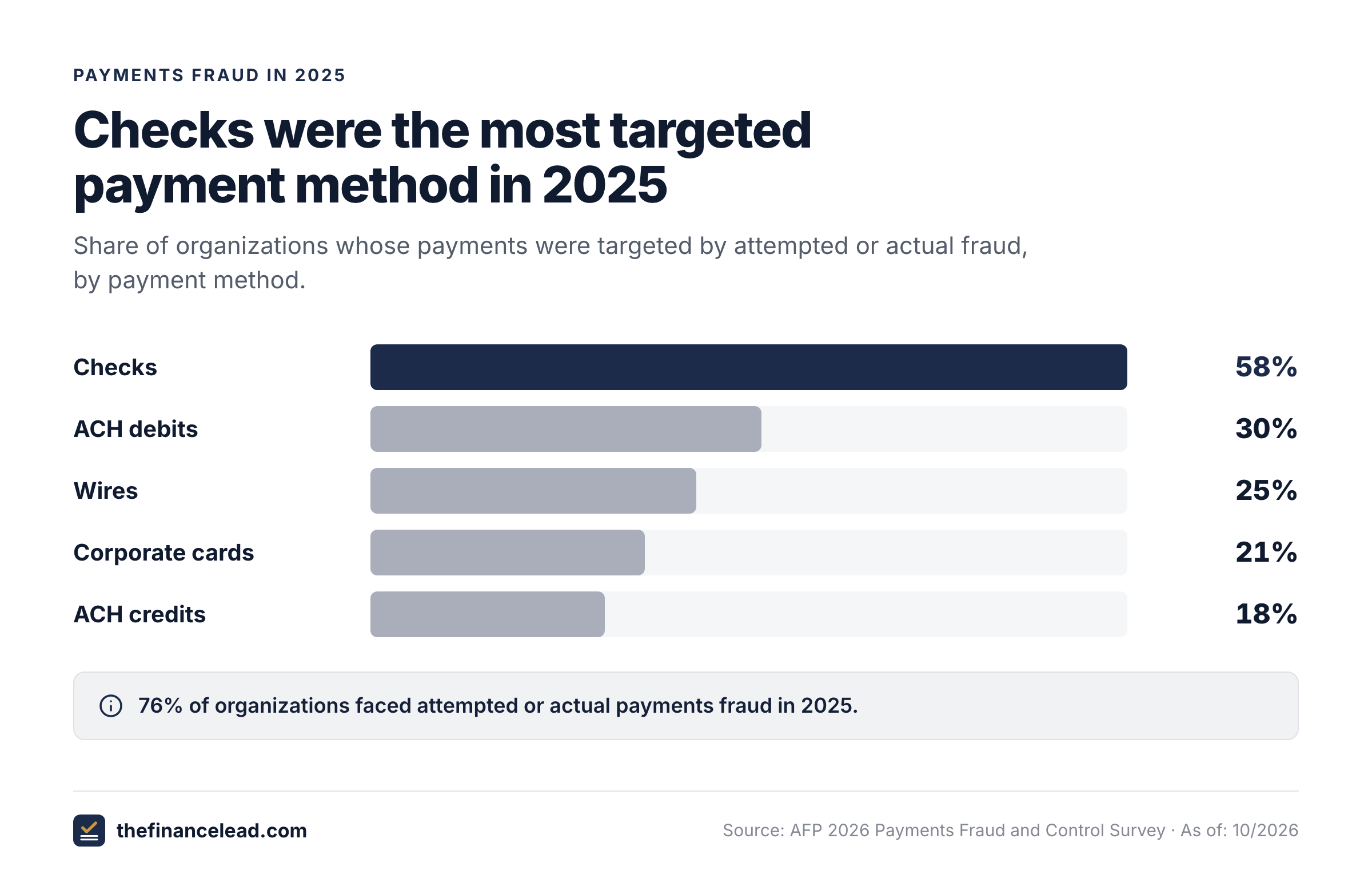
External attacks add to that. In the AFP's 2026 Payments Fraud and Control Survey, 76% of organizations reported attempted or actual payments fraud in 2025, checks were the most targeted method at 58% of organizations, ahead of ACH debits (30%), wires (25%), corporate cards (21%) and ACH credits (18%). Business email compromise affected 74%. Only 17% said they use AI against payments fraud. The FBI's IC3 recorded 21,442 business email compromise complaints in 2024 with reported losses of about $2.77 billion.
Vendor and payment fraud in accounts payable
Business email compromise usually ends in accounts payable: a convincing email asks AP to update a supplier's bank account, and the next payment run pays the fraudster. Both tools in this group check that the account on the payment belongs to the vendor you think you're paying. They do it at onboarding, when bank details change, and on the payment file before release.
Eftsure
Eftsure
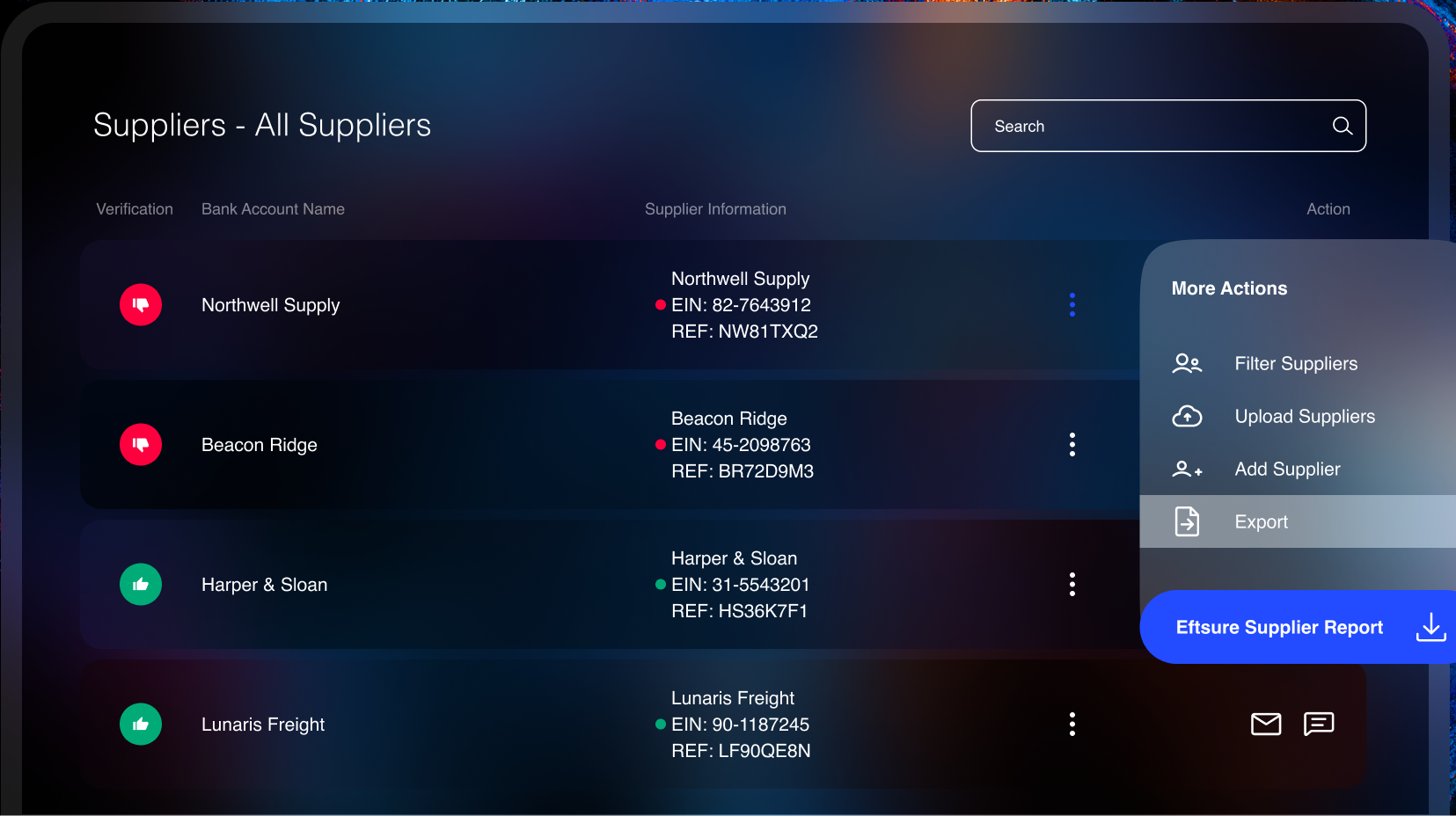
Eftsure verifies vendor identity and bank account ownership in a vendor portal, runs bank detail change requests through the same verification, screens vendors against OFAC and marks every line of an ACH or wire payment file green or red before release.
Eftsure fits a US mid-market or enterprise AP team that pays vendors by ACH and wire and wants every payment file checked before release.
What it looks like in practice: a vendor emails new bank details. Instead of editing the vendor record, AP clicks a change request in the Eftsure portal, which sends the vendor a form and restarts verification of identity, account ownership and TIN. Before the payment run, the ACH or wire file goes through Eftsure, and each line gets a green thumb when account name, bank details and TIN match, a red thumb on a mismatch, or a dollar-sign warning for a possible duplicate payment. Amounts above a preset threshold get their own warning. When automated checks can't settle a case, Eftsure's analysts call the supplier back on an independently verified number.
The vendor portal also collects onboarding forms and documents, screens vendors against OFAC before and after onboarding and keeps a full action log with 20+ user roles. Eftsure started in Australia and now sells in the US from a Dallas office, and Nacha lists it as a Preferred Partner for account validation and fraud monitoring.
- You pay vendors by ACH and wire and want each payment file line checked for account name, bank details and TIN before release
- You run Coupa, SAP, Workday, NetSuite, Acumatica or Kyriba and want verification inside that system
- You need expense or invoice auditing: Eftsure checks who gets paid, not what the invoice says
- Your suppliers are slow to respond: G2 reviewers report verification delays when suppliers lag or distrust the verification emails
- Users like
- Easy interface and effective fraud prevention
- Users dislike
- Verification is slow when suppliers are slow to respond
- Source: G2, 113 reviews
How it works in practice
Integrations named on Eftsure's site include SAP, SAP Ariba, Coupa, Workday, Oracle NetSuite, Acumatica and Kyriba; on Coupa it verifies at supplier onboarding and again at invoice approval. Pricing scales with annual spend and the number of new vendors per month, and every feature is in one package, so you can't buy only the payment check. Customers who signed after March 10, 2025 get the Eftsure Guarantee of up to $1 million for verified payments lost to social engineering.
- Starting price
- Quote only, priced on annual spend and new vendors per month; all features in one package
- Payment check
- Green or red per line on ACH and wire files, plus duplicate payment warning
- Bank changes
- Change request form sent to the vendor, verification restarts
- Guarantee
- Up to $1 million for verified payments lost to social engineering (customers signed after March 10, 2025)
- Integrations
- SAP, SAP Ariba, Coupa, Workday, Oracle NetSuite, Acumatica, Kyriba
- Go-live
- Vendor master health check in 48 hours to 1 week, anomaly clean-up in 1 to 3 weeks
Trustpair
Trustpair
Trustpair checks that a supplier's bank account belongs to that supplier before the vendor enters the ERP, re-evaluates the vendor master file when vendor data changes, and screens payment files before they go to the bank. Unclear cases go to an in-house anti-fraud team.
Trustpair fits a larger company on SAP, Oracle ERP Cloud or Coupa that pays suppliers in many countries and wants vendor checks inside those systems.
What it looks like in practice: procurement adds a new supplier, and before the record reaches the ERP, Trustpair checks the company's identity, its bank account details and whether the two belong together, using bank and company databases plus its own network data. A second module audits the whole vendor master file and re-evaluates a supplier automatically when its data changes, for example after a bankruptcy. The third module checks the treasury payment file (CSV or XML) against those evaluations before it goes to the bank. Cases with missing or contradictory data go to Trustpair's anti-fraud team, which contacts the third party through a verified channel.
Trustpair was founded in France, lists a New York office and has Nacha compliance and ACH account verification pages. It doesn't name its US data sources, so ask for US coverage on your own vendor file during the trial.
- You run SAP, Oracle ERP Cloud, Coupa, Ivalua, Jaggaer or Kyriba and want the checks inside that system through a native connector
- You pay suppliers in many countries and need bank account validation outside the US
- You run NetSuite, Dynamics, QuickBooks or Xero: none of them is on Trustpair's connector list
- You are a small team: plans are quote only with a fixed number of vendor evaluations per year, and Trustpair targets companies with 51 or more employees
- Users like
- Easy to use, with responsive support
- Users dislike
- Results can be slow for some vendors
- Source: G2, 17 reviews

How it works in practice
Trustpair sells two quote-only plans. Platform Access includes the web app, API and SFTP connections, SSO and a fixed number of vendor evaluations per year. Custom Access adds a dedicated consultant, flexible integration modes and liability coverage of up to $1 million. The SAP, SAP Ariba and Sage X3 connectors are sold as add-ons, and the others are built by partners. Trustpair checks who gets paid and to which account. It doesn't read invoices or expense reports.
- Starting price
- Quote only (Platform Access and Custom Access plans, no prices published)
- Checks
- Company identity, bank account details and whether they match
- Modules
- Vendor check, vendor master file audit, payment file check
- Integrations
- SAP S/4HANA and ECC6, SAP Ariba, Oracle ERP Cloud, Coupa, Ivalua, Jaggaer, Kyriba, Sage X3; API, webhooks, SFTP
- Connectors
- SAP S/4HANA and ECC6, SAP Ariba, Oracle ERP Cloud, Coupa, Ivalua, Jaggaer, Kyriba, Sage X3, plus API and SFTP
Eftsure and Trustpair both need clean vendor data to start, so plan a vendor master clean-up in the first weeks either way. If your volume is low, your bank's Positive Pay service and a callback rule for every bank detail change cover much of the same risk without software (see the controls section below).
Expense, invoice and ledger anomalies
The ACFE's numbers say billing and expense schemes are the most common internal frauds a finance team sees. They're also the hardest to catch by sampling, because one inflated receipt among thousands looks normal. These three tools review the whole population instead: AppZen and Oversight before and after payment, MindBridge after posting.
AppZen
AppZen
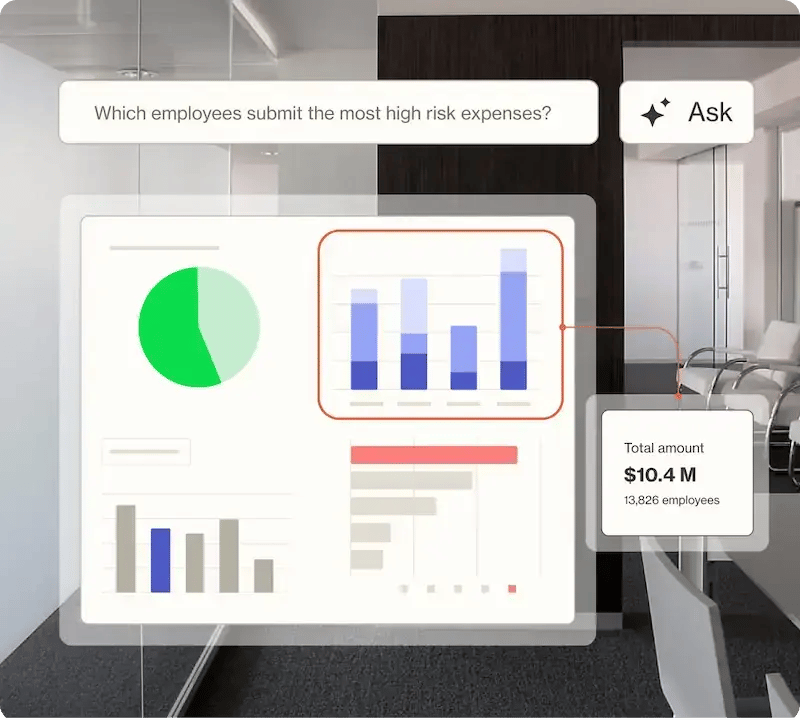
AppZen runs AI agents that read every expense report, receipt, card transaction and AP invoice, approve clean items and flag duplicates, fake or AI-generated receipts, split expenses and ghost vendors with an explanation before money goes out.
AppZen fits a large company with high expense and invoice volume that wants every item audited before money goes out.
What it looks like in practice: an employee submits an expense report in SAP Concur. AppZen's agent reads each receipt, compares it with the line item, company policy and merchant data, and checks for duplicates, threshold splitting, personal spend and blocklisted merchants. It also looks for receipts and invoices generated with AI, partly by reading embedded metadata. Clean reports are approved automatically. A risky one is flagged with an explanation and routed to a manager or auditor, or the agent asks for documentation or rejects the line. On the AP side the same approach catches duplicate invoices, ghost vendors and amount manipulation before payment.
Each agent logs its reasoning and the policy it applied, which gives internal audit a trail instead of a sample. Expense audit covers 42 languages and 97 countries, with VAT, FCPA and Sunshine Act checks.
- You have high expense and invoice volume and want 100% audited instead of a sample
- Your exposure is document fraud: fake or AI-generated receipts, duplicate expenses, personal spend, threshold splitting
- Your risk is vendor bank account fraud: AppZen's pages describe no bank account ownership check
- You are a small or mid-sized team: the named customers are large enterprises and there is no published price
- Users like
- Accurate AI audit that cuts manual review
- Users dislike
- Learning curve to configure policies and reports, plus some false positives
- Source: G2, 72 reviews
How it works in practice
AppZen publishes no prices and its customer stories are large organizations such as Airbus and Takeda. Its pages describe no bank account ownership check, so it doesn't replace Eftsure or Trustpair for bank detail fraud. G2 reviewers praise accuracy and time saved and mention a learning curve when configuring policies and reports.
- Starting price
- Quote only (no pricing page)
- Checks
- Duplicates, ghost vendors, amount manipulation, fake or AI-generated receipts, expense splitting
- Timing
- Before reimbursement or payment
- Integrations
- SAP Concur, Oracle EBS and Fusion, Workday, Coupa, Oracle NetSuite, SAP S/4HANA, Emburse, JAGGAER; Visa, Mastercard and Amex card data
Oversight
Oversight
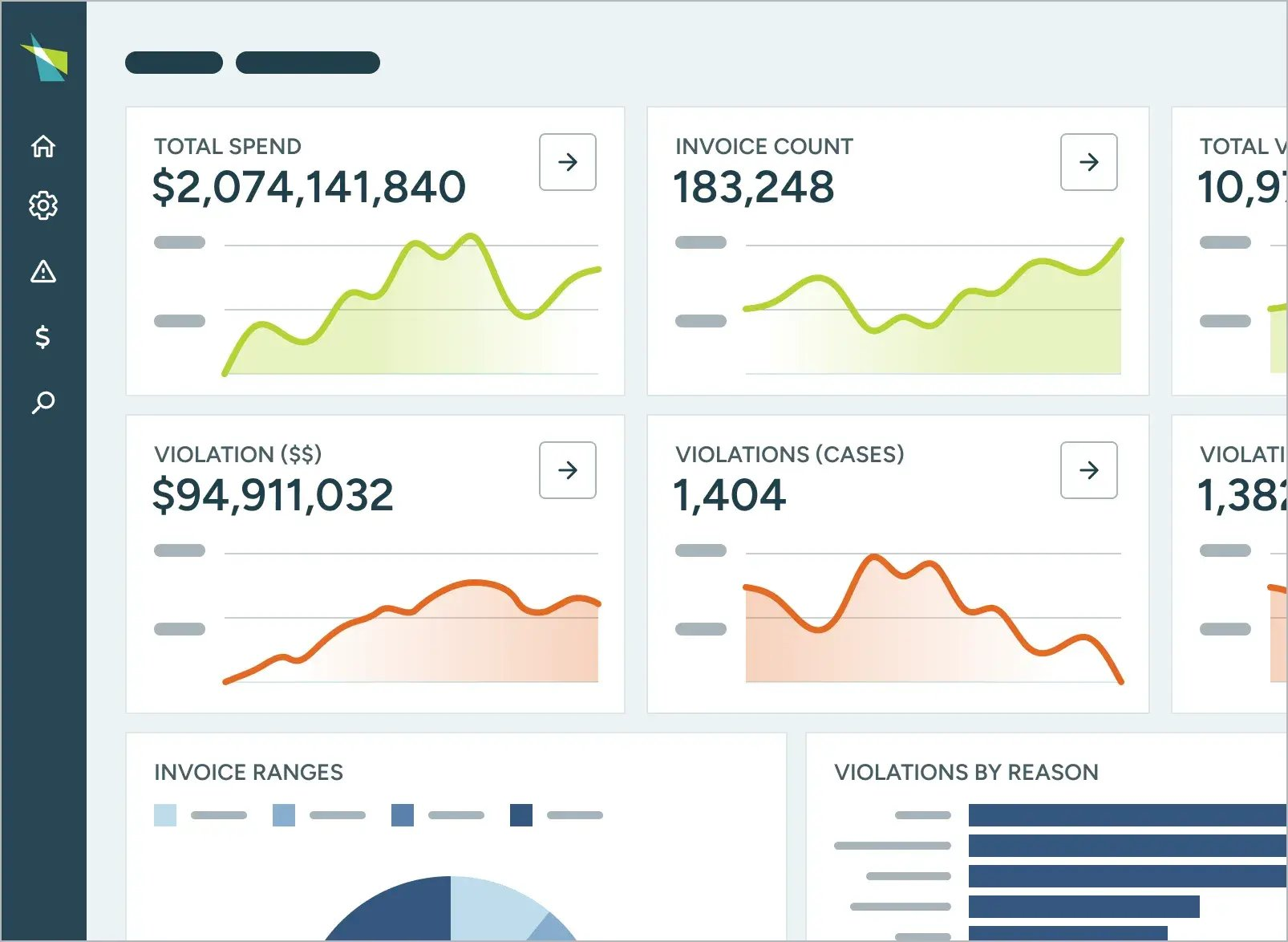
Oversight sits on top of the ERP, expense, card and AP systems, pulls reports, receipts, approvals and payments into one data set, scores every transaction for risk and routes findings to reviewers before and after payment.
Oversight fits a larger finance, audit or shared services team that wants one risk monitor across travel and expense, P-cards and payables.
What it looks like in practice: Oversight connects to the systems that already move money (the expense tool, card feeds, AP and the ERP) and pulls reports, receipts, approvals and payments into one normalized data set. Risk models score every transaction, so a duplicate reimbursement, a manipulated receipt image, a split card purchase or a duplicate supplier payment comes up with its risk indicators. Findings are prioritized and routed to reviewers, and low-risk items can be closed automatically under a policy you set. Checks run before payment where the systems allow it and after payment for recovery.
The cross-channel view is the point: the same employee or vendor pattern can show up in expenses, card spend and AP, and separate tools would see each piece alone. Oversight also reconciles vendor statements to find credits you never took.
- You have heavy travel, expense and P-card spend and want receipts checked for manipulation plus duplicate and split transactions
- You want one monitor across AP, cards and expenses that links the same pattern across channels
- You need journal entry testing: Oversight covers spend, not the general ledger
- You want a self-serve tool: no published price, and the named customers are large enterprises
- Users like
- Customizable risk models and strong support
- Users dislike
- Alerts can overlap and the interface feels dated (older reviews)
- Source: G2, 50 reviews
How it works in practice
There is no pricing page, and the named customers are large organizations such as BNSF Railway, Delta and Caterpillar. Oversight doesn't test journal entries. On review sites, the praise is for customizable risk models and support, and the complaint is overlapping alerts and a dated interface. Many of the critical reviews date from when the product was called Insights on Demand.
- Starting price
- Quote only (no pricing page)
- Data
- T&E, P-card and AP activity
- Timing
- Before and after payment
- Integrations
- SAP Concur, Workday, Emburse, Mastercard and bank card issuers
MindBridge
MindBridge
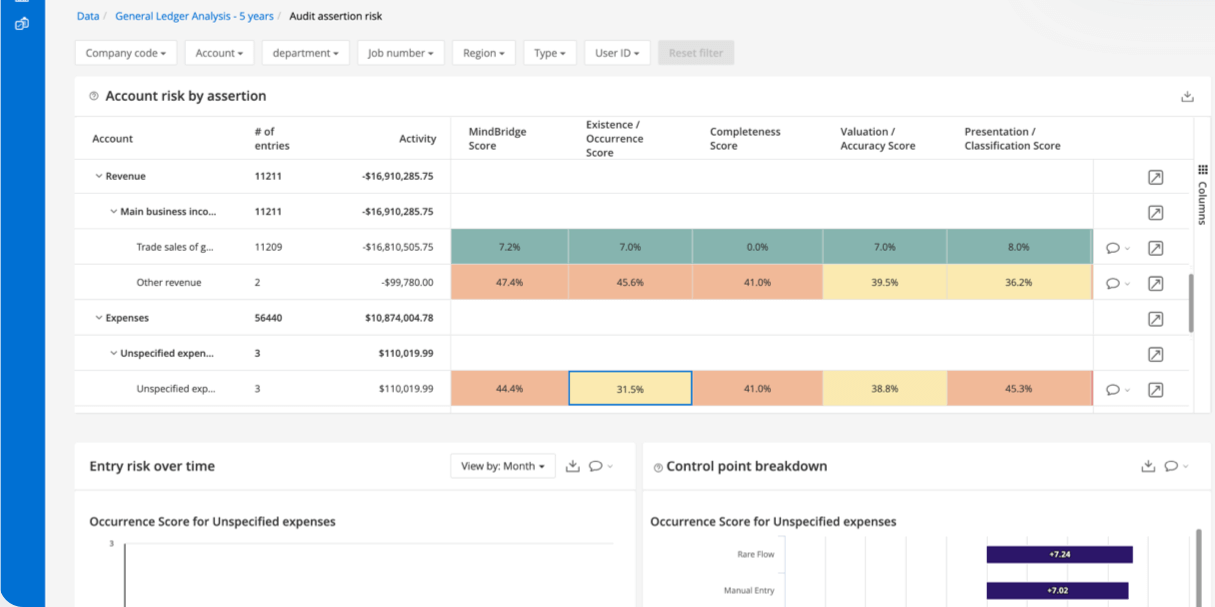
MindBridge analyzes all general ledger and journal entry data with rules, statistical tests and unsupervised machine learning, gives each entry a risk score and shows which tests fired, so reviewers test the riskiest entries instead of a random sample.
MindBridge fits a controllership or internal audit team that wants every journal entry tested instead of a sample, with a documented score per entry.
What it looks like in practice: after the period closes, you load the general ledger through a connector, a data platform feed or the API. MindBridge runs rules, statistical tests and unsupervised machine learning over every line, up to 1 billion transactions per analysis, and scores each entry from the control points that fired. Typical indicators are a suspicious keyword, an atypical change in amount for a customer, a rare account for a vendor or a Benford's law deviation. Reviewers pick the high and medium-risk entries, investigate them and export the triggered tests to Excel for the audit file.
Because it reads posted data, MindBridge is a detective control. It won't stop a payment, but it will surface the accrual someone booked to hit a target or the vendor that suddenly bills an unusual account. CPA firms use the same product to scope audits, so your external auditor may already know it.
- You want every journal entry tested for unusual accounts, amounts, keywords and duplicates, with an explainable score per entry
- Your internal audit or controllership team documents testing for auditors
- You need to stop a payment before it leaves: MindBridge reads posted ledger data, so it detects after the fact
- You run NetSuite or SAP and want a plug-and-play connector: the vendor names Xero and data-platform feeds, so expect data preparation
- Users like
- Fast analysis of large datasets with clear anomaly flags
- Users dislike
- Onboarding is hard at times, and uploaded data can't be edited in the platform
- Source: G2, 62 reviews
How it works in practice
MindBridge publishes no prices. Its integrations page names Xero and data platforms but no NetSuite, SAP or Oracle connector, so plan for GL exports or a data feed. G2 reviewers like the speed on large datasets and the clear anomaly flags, and say onboarding a project can be hard and that uploaded data can't be edited in the platform.
- Starting price
- Quote only (no pricing page)
- Coverage
- All journal entries, up to 1 billion transactions per analysis
- Methods
- Rules, statistical tests and unsupervised machine learning
- Integrations
- Xero; Snowflake, Databricks, Microsoft Fabric, Azure Data Factory; API with more than 100 endpoints
Customer payment fraud
If your company sells online, card fraud and chargebacks land in finance too: as dispute fees, lost revenue and a chargeback rate your processor watches. These tools screen customer payments, not your payables. They sit next to the AP tools above instead of replacing them.
Stripe Radar
Stripe Radar
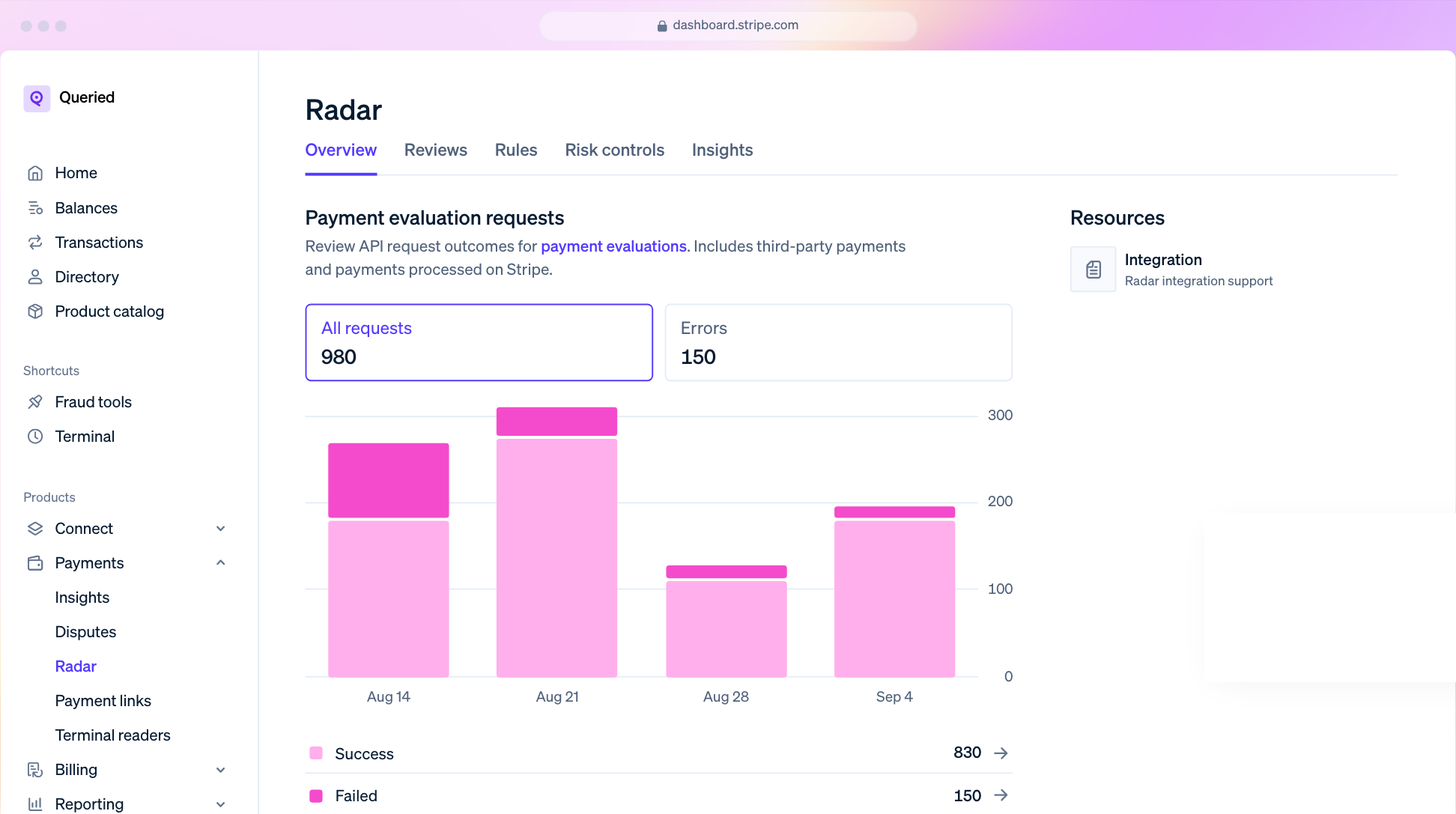
Stripe Radar is the fraud layer in Stripe Payments. It scores each payment with machine learning trained on Stripe's network and, on higher tiers, adds custom rules with backtesting, a manual review queue and numeric risk scores.
Stripe Radar fits any company that already takes card payments through Stripe and wants screening without another vendor.
What it looks like in practice: every payment on Stripe gets a machine learning risk evaluation trained on Stripe's network. Radar Lite comes at no extra cost on standard Stripe pricing and covers card fraud, card testing and alerts. On Standard you get a risk level of normal, elevated or highest and fraud analytics. Plus and Pro add numeric scores from 0 to 99, custom rules, allow and block lists and rule backtesting against past payments, plus a review queue where a team member can approve a payment, refund it, or refund it and report it as fraud. The last action adds the card and email to block lists. Smart Refunds suggest refunding payments that are likely to turn into disputes.
Stripe changed the lineup in 2026: Radar for Fraud Teams moved into Radar Plus on July 29, 2026, and per-screened-transaction billing starts on January 22, 2027.
- You already take card payments through Stripe and want screening without another vendor
- You want a review queue where a payment can be refunded and reported as fraud before it turns into a dispute (Plus or Pro)
- Your payments run through another processor: standard Radar plans screen Stripe payments only
- You need to stop fraud against your own payables or expenses: Radar screens customer payments
- Users like
- Simple setup and effective protection
- Users dislike
- False positives decline some legitimate payments
- Source: G2, 19 reviews
How it works in practice
Stripe's pricing page served us its German version with euro prices, so we couldn't verify the current US dollar rates; check them in your Stripe Dashboard. Every payment Radar evaluates is billed, including recurring and invoice payments, although Stripe Billing lets you limit screening to the first renewals. On G2, users like the setup and protection and mention false positives that decline legitimate customers.
- Starting price
- Radar Lite included with standard Stripe payments pricing; Standard, Plus and Pro billed monthly or per screened transaction (US dollar rates not verified here; per-screen billing starts January 22, 2027)
- Tiers
- Lite, Standard, Plus, Pro
- Rules
- Custom rules and backtesting on Plus and Pro
- Review queue
- Approve, refund, or refund and report as fraud
- Payments covered
- Stripe payments only on the standard plans
Sift
Sift
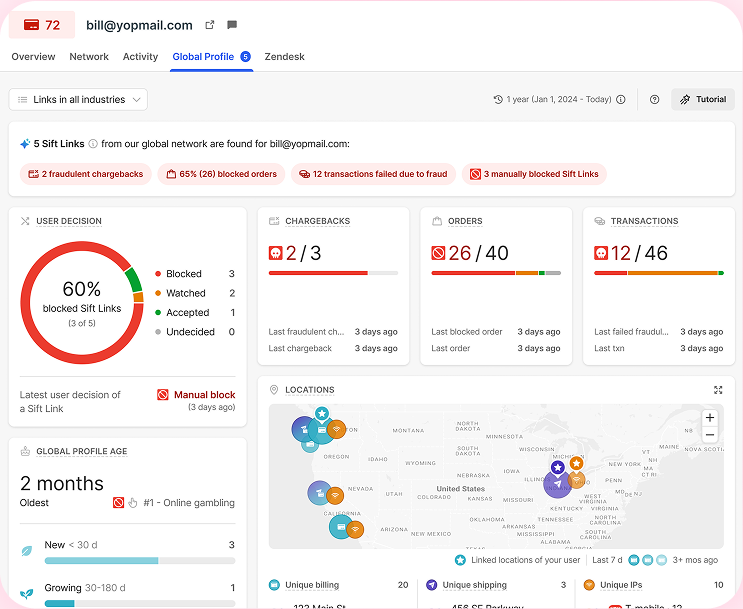
Sift scores payments, logins and account events in real time from its network of signals and lets fraud teams turn the score into automated accept, block or review decisions through a no-code workflow engine.
Sift fits an online business with high order volume and an in-house fraud or risk team that wants to tune its own decisions.
What it looks like in practice: your checkout sends each order event to Sift, which returns a score from 0 to 100 for payment fraud in under 150 milliseconds, with separate scores for account takeover and promotion abuse. A workflow then decides: auto-accept below one threshold, auto-block above another, and send the middle band to a review queue. Fraud managers edit the workflows without developers and can simulate a change on past traffic before it goes live. Analysts work cases in an investigator console with the top signals and a network view, and Score Explainability shows which signals drove each decision.
Chargebacks flow back into Sift through its chargeback event or a bulk import, which improves the model and gives finance a cleaner view of which decisions cost money.
- You process high volumes of card-not-present orders and have fraud analysts to run workflows and review queues
- You use several payment processors and want one score in your own risk logic
- You want a published price and light setup: Sift is quote only and G2 reviewers mention complex setup
- You need chargeback representment: Sift ingests chargeback data but doesn't describe a dispute-filing product
- Users like
- Easy to use, with customizable workflows
- Users dislike
- Complex setup
- Source: G2, 610 reviews
How it works in practice
Sift has no pricing page and sells by quote. It works across processors through its API, so it suits a company with more than one payment provider. G2 reviewers praise ease of use and customizable workflows, and the recurring complaint is complex setup. Sift doesn't describe its own dispute-filing product.
- Starting price
- Quote only (no pricing page)
- Score
- 0 to 100 per abuse type
- Speed
- Under 150 milliseconds per transaction
- Workflows
- Auto-block, auto-accept or review queue, with simulation on past traffic
SEON
SEON
SEON scores signups, logins and payments from more than 1,100 signals, including email and phone footprint checks and device fingerprinting, and returns approve, review or decline based on rules you control. It is the only tool in this list with a published entry price.
SEON fits an ecommerce, fintech or marketplace team that wants a published entry price and data on the customer behind each order.
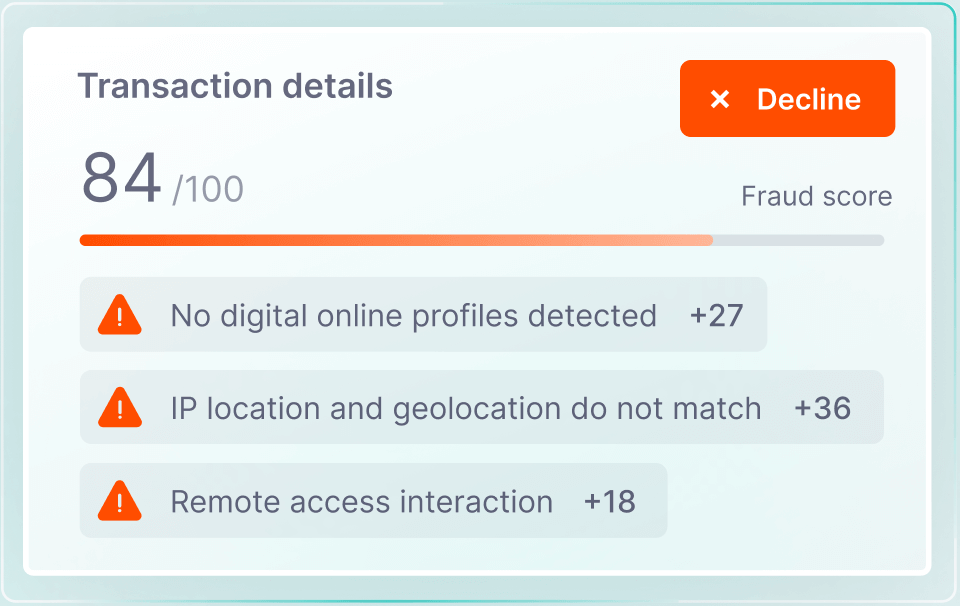
What it looks like in practice: when a customer signs up or pays, SEON checks the email and phone number against more than 350 online profiles, the IP for VPN or proxy use and the device for emulators and spoofing, among 1,100+ signals. Default rules, your custom rules and machine learning produce a score, and the score maps to approve, review or decline at thresholds you set. Blacklists auto-decline and whitelists auto-approve. On Shopify the app scores each order and can capture payment, hold fulfillment or cancel automatically.
The same platform does AML and sanctions screening on the Premium plan, which matters to fintechs that onboard customers.
- You want a published entry price: Starter is $699 per month for 2,500 checks
- You sell on Shopify and want orders scored, held or cancelled automatically
- You need more than 2,500 checks a month or case management: both push you to custom-priced Premium
- You want a no-integration add-on to your processor: SEON runs through its API or the Shopify app
- Users like
- Intuitive interface and flexible rules
- Users dislike
- Limited customization for advanced teams
- Source: G2, 380 reviews
How it works in practice
SEON is the only tool in this list with a published plan price: Starter is $699 per month. Case management, AML screening, unlimited checks and 24/7 support sit in the custom-priced Premium plan. There's no native Stripe connector, so outside Shopify you integrate through the API. For chargeback disputes SEON points to its partner Chargeflow. G2 reviewers like the interface and rules, and advanced teams mention limited customization.
- Starting price
- Starter $699 per month (2,500 fraud checks, 10 users, 50 custom rules, no case management); Premium custom
- Signals
- 1,100+ including email, phone, IP and device data
- States
- Approve, review or decline from your rules
- Also
- AML and sanctions screening on Premium
- Starter limits
- 2,500 checks per month, 10 users, 50 custom rules, no case management
Fraud detection tools in banking
Several top-ranking pages for this search are about bank platforms such as Nasdaq Verafin, NICE Actimize and Feedzai. Those products monitor a bank's own customers across thousands of account holders. Verafin's fraud detection product, for example, is organized by channel: deposit, check, wire, ACH, faster payments, online account takeover, card and loan fraud, with anti-money-laundering cases alongside. Verafin describes itself as anti-financial crime software for large banks, and NICE Actimize sells financial crime and compliance software to financial institutions. If you run finance at a bank or credit union, start there and with dedicated AML software. A corporate finance team is the customer of a bank, not the operator, and the tools above are the ones it can buy and run.
What a corporate team can use from the bank side is the bank's own fraud services, mainly Positive Pay for checks and ACH. They cost far less than software and address the payment method that the AFP survey found most targeted.
Which fraud detection tool fits your company?
The right first tool depends on where your money moves and which systems you run. This table maps common setups to the tool group that fits first.
| Your situation | Fraud detection tool to start with | Why |
|---|---|---|
| Mid-market or enterprise AP paying by ACH and wire | Eftsure | Payment file check per line plus a bank change workflow |
| Global supplier base on SAP, Oracle ERP Cloud or Coupa | Trustpair | Native connectors and international bank account validation |
| High expense and invoice volume on SAP Concur, Workday or Oracle | AppZen or Oversight | Every expense and invoice audited instead of a sample |
| Internal audit or controller testing journal entries | MindBridge | Score per journal entry with the tests that fired |
| Card payments on Stripe | Stripe Radar | Built in, Radar Lite at no extra cost |
| High-volume online sales across processors with a fraud team | Sift | Workflows, review queues and one score across processors |
| Ecommerce or fintech that needs a published price | SEON | Starter at $699 per month |
| Small team on QuickBooks or Xero with few vendors | Bank controls first | Positive Pay, callback rule, dual approval (no tool here targets you) |
None of the eight tools targets a team of five on QuickBooks Online, though. MindBridge connects to QuickBooks Online and Xero, but it's priced and built for audit work. If that's your setup, use the controls in the next sections and the approval workflow in your expense management software before buying a fraud platform.
What does fraud detection software cost?
Fraud detection software is mostly sold by quote: of the eight tools here, only SEON publishes a full plan price. Everything else is quote-based, and the price usually scales with transaction volume, spend or the number of vendors.
| Fraud detection tool | Published price (USD) | What drives the quote |
|---|---|---|
| Trustpair | Quote only, two plans | Number of vendor evaluations per year, connectors as add-ons |
| Eftsure | Quote only, one package | Annual spend and new vendors per month |
| AppZen | Quote only | Expense and invoice volume (no public detail) |
| Oversight | Quote only | Not published |
| MindBridge | Quote only | Not published |
| Stripe Radar | Radar Lite included with standard Stripe pricing; paid tiers billed per screened transaction from January 22, 2027 | Number of payments screened |
| Sift | Quote only | Not published |
| SEON | Starter $699 per month; Premium custom | Number of checks, users and modules |
Third-party purchasing data exists for some of these tools (Vendr data puts MindBridge contracts at roughly $22,000 to $50,000 a year, and Toolradar, citing Vendr, reports a median Sift contract of about $145,000), but those figures come from small samples and vary widely, so treat them as a reason to ask for a quote early, not as a budget. For payment tools, add the indirect costs: every false positive is a lost sale, and every dispute carries a processor fee whether you win or lose.
What are anti-fraud controls?
Anti-fraud controls are the policies and checks that make fraud harder to commit and quicker to spot: segregation of duties, approvals, reconciliations, management review and a way to report concerns. Software automates some of them, but several of the most effective ones cost nothing. In the ACFE 2026 report, management review was linked to a 55% lower median loss ($84,000 with the control against $186,000 without), and tips remain the top detection method, which makes a reporting channel a control in its own right.
These controls belong in place before or alongside any of the tools above:
- Verify every vendor bank detail change by calling a number already on file, never one from the email
- Require two people to approve new vendors and changes to the vendor master
- Use Positive Pay for checks and an ACH debit block or filter at your bank
- Separate who enters, approves and releases payments
- Review duplicate invoice and duplicate vendor reports before each payment run
- Reconcile bank and card accounts monthly and investigate unexplained items
- Review manual journal entries above a threshold, and entries posted after hours
- Keep reviewer sign-off and supporting evidence for each close task
- Offer an anonymous way to report concerns, and tell employees and vendors it exists
Positive Pay deserves a separate note. With check Positive Pay, your company sends the bank a list of issued checks, and the bank compares each presented check's payee name, check number and amount with that list and sends an exception notice on a mismatch. ACH Positive Pay or a debit block lets you block all ACH debits or allow only approved companies to debit the account. Ask your bank which of the two it offers and what it charges.
Reconciliations and close sign-off are controls too, and they're the part of this list our own product touches. The Finance Lead runs recurring month-end close checklists with evidence attached to each task and preparer and reviewer sign-off, and it enforces segregation of duties so nobody approves their own task. It doesn't detect fraud and doesn't connect to your bank or ledger. Our month end close checklist and the guide to account reconciliation software cover those steps in more detail.
How do you choose fraud detection software?
Start with the fraud you actually face, not the longest feature list, because a tool that's strong at one step can be blind at the next. Then check these points during the demo:
- The step it guards. Ask the vendor to show the exact moment it stops or flags an item: vendor onboarding, bank detail change, payment file, expense approval, journal posting or checkout. A tool that only reports after payment is a detection tool, and recovery is then your problem. The AFP survey found that 20% of organizations hit by payments fraud recovered nothing.
- Your systems. Get the named connector for your ERP, expense tool or processor in writing. "API available" means your team builds the connection.
- Your data, in the trial. Run the tool on your own vendor master file, a month of expense reports or a quarter of journal entries. Coverage claims such as Trustpair's 190 countries or Eftsure's 200+ countries and territories say little about your suppliers.
- False positives and who reviews them. Ask how many items the tool flagged for a similar customer, who works the queue and how a reviewer closes an alert. Several G2 complaints in this list are about noisy or overlapping alerts.
- Evidence for the auditor. Check that every decision is logged with the user, time and reason, and that you can export it. That log is what turns a fraud tool into a control your auditor can rely on, and it matters if you're working through SOX compliance.
- Total cost. Ask for the price at your volume, implementation fees and what happens when you exceed the plan, for example SEON's 2,500-check Starter cap.
FAQ
What is the world's largest anti-fraud organization?
The Association of Certified Fraud Examiners (ACFE) describes itself as the world's largest anti-fraud organization. It publishes the Report to the Nations on occupational fraud; the 2026 edition covers 2,402 cases and is the source of the detection figures in this article.
How is fraud detected in most companies?
Most fraud is detected by people, not software. In the ACFE 2026 report a tip was the first signal in 43% of cases, internal audit in 15% and management review in 13%. Account reconciliation and document examination each caught 5%, which is why a reconciliation that gets reviewed every month is a fraud control and not only an accuracy check.
What is the best AML software for banks?
Banks and credit unions use dedicated anti-money-laundering and fraud platforms such as Nasdaq Verafin and NICE Actimize. Those products monitor a bank's own customers and are not built for a corporate finance team, so they are not ranked in this list.
Do small businesses need fraud detection software?
Most small businesses don't need fraud detection software as a first step. A callback rule for bank detail changes, dual approval of payments, Positive Pay at your bank and monthly reconciliations cover the most common schemes. Software pays off once payment volume, vendor count or expense volume makes manual checks unreliable.
Can fraud detection software stop business email compromise?
It can stop the payment that BEC aims for. Vendor verification tools such as Eftsure and Trustpair check that the bank account on a payment belongs to the vendor, so a changed account from a fake email shows up as a mismatch before release.