The best BlackLine alternative depends on what you're leaving. If the problem is cost and a rollout that takes months,  Numeric,
 FloQast and
 CloseCore run the checklist and reconciliations for smaller teams. If you still need rule-based matching at volume,
 Adra by Trintech and
 ReconArt are the specialists. If you're leaving for consolidation and enterprise scope,
 HighRadius and
 OneStream are the suites to look at.
This page compares seven BlackLine competitors for finance teams that close on QuickBooks Online, Xero, NetSuite or Sage Intacct, with notes for teams on SAP, Oracle or Dynamics. We read vendor pricing, product and help pages and G2 data and didn't run these products. Where a vendor publishes no price, we say so instead of estimating. For a head-to-head with the closest rival, see our FloQast vs BlackLine comparison.
- BlackLine alternatives compared
- 7
- G2 reviews of BlackLine
- 1,079
- BlackLine G2 rating
- 4.5
- median BlackLine contract a year, Vendr
- $40,125
Our picks by reason for leaving
- Best for a fast setup on a modern ERPNumericG2 users report a setup of under one month, with checklist, reconciliations and AI-drafted flux in one workspace.
- Best closest swap for a mid-size teamFloQastThe same close-management job, built around the Excel workpapers your team already uses, with no per-user fees.
- Best published priceCloseCoreThe only close tool here with a public price: $187.50 a month billed annually for 5 users and 1 entity.
- Best for matching on NetSuite or DynamicsAdra by TrintechTrintech's mid-market suite keeps threshold auto-reconciliation and multi-way matching with certified ERP connectors.
- Best matching-first alternativeReconArtRule-based matching with tolerances plus balance sheet certification, bought by edition with a fixed implementation package.
- Best when consolidation is the reasonOneStreamConsolidation, reconciliations and matching on one data model for multi-entity groups.
 For the evidence gap, not reconciliationsThe Finance LeadNot a BlackLine replacement. It tracks close tasks, evidence links and sign-off for teams of 2 to 8.
BlackLine and its alternatives compared
| Tool | What it is | What it owns | Starting price | G2 rating |
|---|---|---|---|---|
 BlackLine | Enterprise close and reconciliation platform | Balance sheet reconciliations and high-volume transaction matching | Price not published (quote only) | 4.5 (1,079) |
| Numeric | Close management and flux platform | Checklist, GL-tied reconciliations and AI-drafted flux | Price not published (quote only); pricing depends on transaction volume and seats | 4.8 (66) |
| FloQast | Close platform with SOX controls | SOX controls and testing tied to the month-end close | Quote only (no per-user fees) | 4.6 (1,424) |
| CloseCore | Close checklist and reconciliation tool | Close checklist and reconciliation tie-outs to the ERP | $187.50/month billed annually ($250 monthly) for 5 users and 1 entity; Enterprise Close Automation by quote | 4.8 (11) |
| Adra by Trintech | Mid-market close and reconciliation suite | Threshold auto-reconciliation plus close checklist | Price not published (quote only) | 4.5 (333) |
| ReconArt | Reconciliation and close platform | High-volume transaction matching and balance sheet certification | Price not published; licensed by edition (Essentials, Plus, Certify, Close) on an annual subscription, plus a one-time 60 or 80 hour implementation package | 3.8 (6) |
| HighRadius | Agent-led record-to-report suite | Accruals, journal posting and matching inside the close checklist | Price not published (quote only); outcome-based model, no fees until go-live | 4.0 (2) |
| OneStream | Enterprise CPM platform with close and consolidation | Consolidation and reporting, with recs and matching on the same data | Price not published (quote only) | 4.6 (161) |
| The Finance Lead Our product | Month-end close checklists | Tracks close tasks, evidence and preparer/reviewer sign-off | Team $39/month (up to 8 team members), Plus $79/month (no member limit, read-only MCP server); card required at checkout | No reviews yet |
BlackLine first. Prices are as published on vendor pages between October 19 and November 18, 2026; quote only means no price is public. G2 ratings and counts as read on each tool's G2 page.
Why do people leave BlackLine?
People leave BlackLine mostly over limited functionality in its admin and import tools, implementation difficulty, missing live help and training, and a steep learning curve. Those are the five most mentioned complaint themes among the 1,079 reviews on G2, where BlackLine holds a 4.5 rating. The same reviewers praise ease of use more than anything else (81 mentions) and the centralized close (55 mentions), so the product works for the teams that get through setup.
Three concrete things sit behind those numbers, and they're worth reading before you shortlist anything.
The rollout takes months. G2 reviewers report an average implementation time of about 6 months. BlackLine says onboarding is often completed within weeks, so ask which of the two describes a company of your size, and ask for a reference customer who's about the same. One reviewer at a company with over 1,000 employees wrote that the implementation is costly because IT staff have to be available, and that it's usually at least three months.
The bill includes services. BlackLine publishes no prices and sells modules separately. Vendr's buyer data reports a median of $40,125 a year across 74 purchases, with a range of $13,154 to $101,000, and notes that implementation fees on complex deployments can equal or exceed the first-year subscription. Those are third-party figures, not BlackLine rates.
The fit's enterprise-shaped. BlackLine's close pages name SAP, Oracle and NetSuite, and there's no documented QuickBooks or Xero connector on them. A team of five on QuickBooks Online isn't the customer those pages describe.
What are people replacing BlackLine with?
BlackLine's main competitors are FloQast, Trintech, OneStream and HighRadius, and a newer group of close tools such as Numeric and CloseCore. Most teams that leave BlackLine for cost or speed move to a close management platform such as FloQast, Numeric or CloseCore, which keep the checklist, reconciliation sign-off and audit trail but drop the heavy matching and consolidation engine. Teams that leave because they need more, not less, move to a suite like OneStream or HighRadius. Teams that need to keep high-volume matching but not the rest of BlackLine look at Adra or ReconArt.
The sections below follow that split: close management platforms for small and mid-size teams, reconciliation and matching specialists, then suites for large groups. If you want the wider category first, our financial close software roundup and account reconciliation software guide cover more tools.
Close management platforms for small teams
Numeric
Numeric
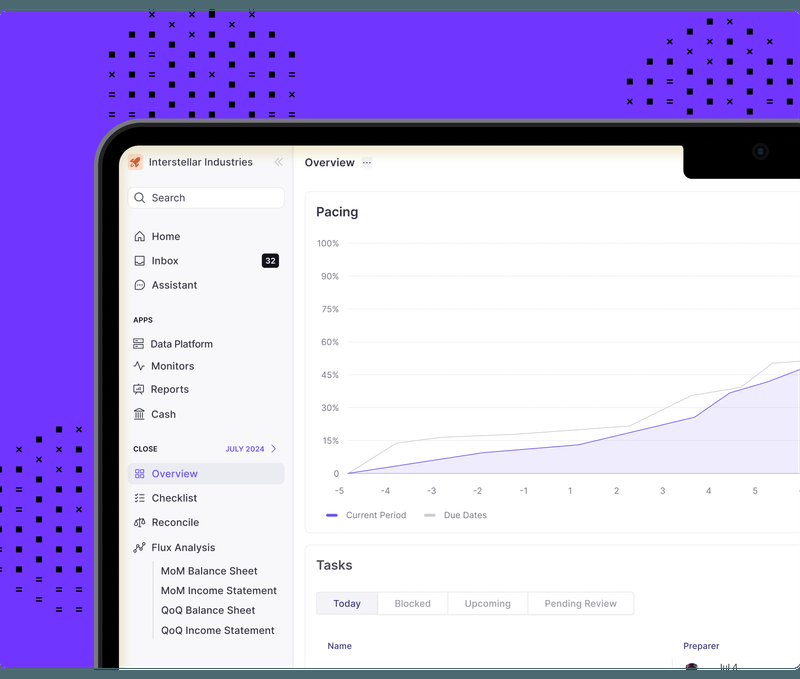
Numeric is a close management platform that syncs GL data from the ERP (transaction-line level for NetSuite, trial balance level for QuickBooks Online, Xero, Sage Intacct and, per its blog, Workday) and runs the checklist, reconciliations, flux analysis and transaction monitoring in one workspace. It also ships an MCP server so Claude, ChatGPT and other AI clients can read and update close tasks, reports and flux explanations.
Numeric replaces BlackLine's task management and reconciliation workflow with a lighter setup, and adds AI-drafted flux and an MCP server.
Numeric's close starts from a saved template: each period generates its tasks with owners, business-day due dates, dependencies and last month's instructions attached. Numeric pulls GL data from the ERP, at transaction-line level for NetSuite and at trial balance level for QuickBooks Online, Xero and Sage Intacct. Reconciliation balances come from workpapers in cloud storage, a data warehouse or NetSuite saved searches. Accounts that tie and stay under a set materiality threshold are submitted automatically, and if a later GL transaction breaks a reconciled account, the owner is notified with the transaction.
For flux, you build reports grouped the way the business reads them and AI drafts the variance explanations from transaction detail, which the reviewer edits and approves. G2 users report a setup of under one month. Numeric publishes no price: its pricing page lists modules and says pricing depends on factors such as transaction volume and seats.
Numeric also ships an MCP server, so Claude, ChatGPT and other AI clients can read open close tasks and draft flux explanations with the same access as the logged-in user.
- You close on NetSuite and want transaction-level drill-down, live alerts when a reconciled account stops tying, and batch-posted cash journal entries back to NetSuite
- You are a QuickBooks Online, Xero or Sage Intacct team that wants a fast setup (G2 users report under 1 month) with checklist, recs and AI flux in one place
- Your team already works in Claude or ChatGPT and wants agents to read the checklist, draft flux explanations or post accruals through a documented MCP server
- You run SAP, Oracle or Microsoft Dynamics: no direct sync for these is named on Numeric's site, and its own comparison content says such teams need a different fit.
- You need a published price to budget against: the pricing page is quote only, and the $30 per user Essentials figure seen on Numeric's blog is not confirmed on the pricing page.
- You need deep journal entry automation outside NetSuite or full consolidation: JE batch posting is described for NetSuite, and Numeric does not present itself as a consolidation tool.
- Users like
- G2 reviewers mention ease of use (20 mentions) and organization of the close (15 mentions)
- Users dislike
- G2 reviewers mention limited functionality (8 mentions) and limitations (5 mentions)
- Source: G2, 66 reviews
What you give up compared with BlackLine
Numeric doesn't name a direct sync for SAP, Oracle or Microsoft Dynamics, so those teams need a different fit. Journal batch posting is described for NetSuite only, and Numeric doesn't present itself as a consolidation tool or a many-to-many matching engine. G2 lists 66 reviews at 4.8, a much smaller base than BlackLine's 1,079.
- Starting price
- Price not published (quote only); pricing depends on transaction volume and seats
- ERP sync
- NetSuite at transaction-line level; QuickBooks Online, Xero and Sage Intacct at trial balance level
- Auditor access
- Read-only auditor logins with a timestamped audit trail
- MCP server
- 20+ tools for close tasks, reports and flux, for Claude, ChatGPT and other clients
- G2 setup time
- Under 1 month (G2 user average)
FloQast
FloQast
A close management platform that runs the month-end checklist and balance sheet reconciliations on top of the Excel workbooks a team already uses. Its Risk & Compliance suite adds SOX controls on the same platform.
FloQast is the most direct BlackLine competitor for a mid-size team: the same checklist and reconciliation job, built on the Excel workpapers your accountants already keep.
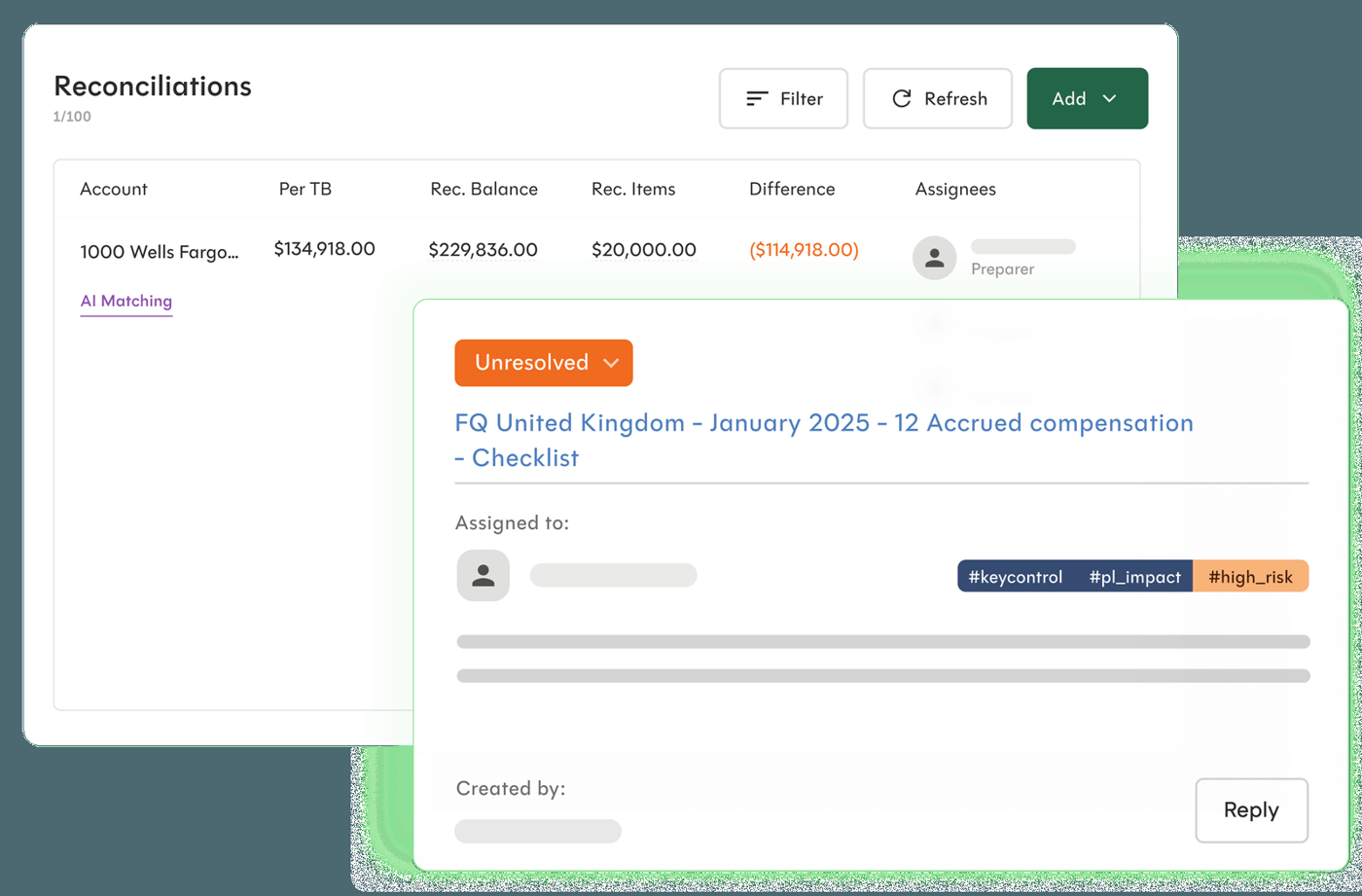
In FloQast's checklist, each item has a preparer, a reviewer and a due date, and checklists roll forward to the next period. FloQast pulls each GL balance from the ERP while the preparer keeps working in an Excel or Google Sheets workpaper stored in Box, OneDrive, SharePoint, Google Drive or Dropbox. A small tag next to the ending balance lets FloQast read the reconciled balance and compare it with the trial balance. When the two tie within the materiality threshold the preparer signs off, and anything that doesn't tie becomes a tracked reconciling item with an owner and an age.
Packaging matters here, and it's easy to miss. Close Management, Close AI and Risk & Compliance are separate packages. AI matching, journal entry management and AI variance analysis sit in Close AI, not in the base package. FloQast states there are no per-user fees. Vendr's buyer data reports a median of $24,663 a year across 316 purchases, against $40,125 for BlackLine, but those deals don't share a scope. For package detail, see our FloQast pricing guide.
- your accounting team runs, or will run, the close in FloQast and you want control evidence captured from close tasks
- SOX is owned by the controller rather than a separate GRC or internal audit team
- you need broad IT and security GRC (SOC 2, ISO 27001) with identity and ticketing connectors: the integrations list is mostly ERPs, storage and chat
- you don't use FloQast for the close: much of the SOX value comes from evidence flowing out of close workflows
- Users like
- G2 lists ease of use and a more organized, visible month-end close
- Users dislike
- G2 reviewers mention limited report customization and slow performance on bulk edits or at peak times
- Source: G2, 1,424 reviews
What you give up compared with BlackLine
FloQast's close pages list no consolidation module, and its matching is part of the higher Close AI package instead of a standalone module. QuickBooks Online isn't on its integrations page, although a help center article refers to QuickBooks Online balances. G2 reviewers mention limited report customization and slow performance on bulk edits.
- Starting price
- Quote only (no per-user fees)
- ERPs
- NetSuite, Sage Intacct, Workday, SAP, Microsoft, Xero
- Packages
- Close Management, Close AI, Risk & Compliance
- Workpapers
- Excel or Google Sheets in your own cloud storage
- ERPs named
- NetSuite, SAP, Workday, Microsoft, Sage Intacct and Xero
- G2 setup time
- About 2 months (G2 user average)
CloseCore
CloseCore
CloseCore is a Seattle-based SaaS close management platform that combines a recurring close checklist, balance sheet reconciliations tied to live ERP trial balances, and cloud file storage, with AI automation (variance explanations, accruals, an AI agent, Excel add-in) in a custom-priced enterprise tier. It is one of the few close tools with published self-serve pricing.
CloseCore is the only BlackLine alternative here that prints its price, which makes it the easiest to test for a team of 2 to 15.
Close Management costs $187.50 a month billed annually, or $250 on monthly billing, and includes 5 full users, 1 active entity and 1 auditor. Extra users cost $50 a month each for users 6 to 10, and extra entities cost $100 a month each. There's a 14-day free trial with no credit card. For scale, a year on the annual plan is $2,250, while Vendr's BlackLine median is $40,125. The two aren't the same scope, but they show how far apart the price points sit.
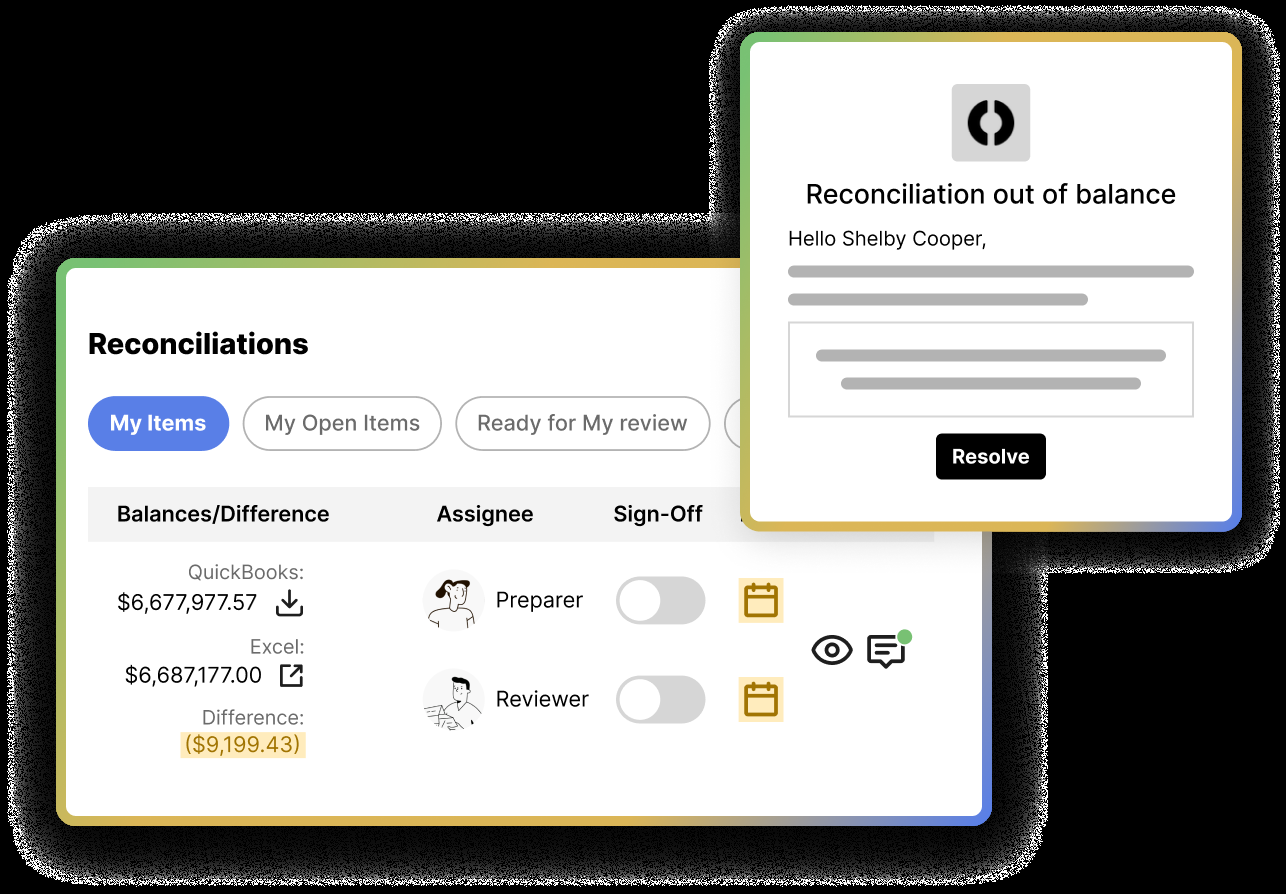
CloseCore's admin sets up the close once: tasks, owners, working-day due dates, dependencies and any fiscal calendar. CloseCore connects read-only to the ERP for the chart of accounts and monthly trial balances, and rolls the folder structure in your cloud storage forward each month. Preparers complete reconciliation workpapers in Excel, and CloseCore ties the workpaper balance to the ERP balance and allows sign-off only when the difference is within the materiality threshold. If a reconciliation stops tying later, the team is alerted.
- You are a 2 to 15 person accounting team on QuickBooks Online, Xero, NetSuite, Sage Intacct or Business Central and want a FloQast-style checklist plus reconciliation tie-outs at a published price
- Your workpapers live in Excel on SharePoint, OneDrive, Google Drive, Box or Dropbox and you want the folder structure rolled forward automatically each month
- You want to start self-serve in days and add flux analysis, accruals and AI later
- You need high-volume transaction matching, AI flux commentary or accrual and prepaid schedules on the self-serve plan: those sit only in the custom-priced Enterprise Close Automation tier
- You need statutory consolidation with intercompany eliminations and currency translation: CloseCore offers consolidated reporting across subsidiaries but documents no elimination or FX translation engine
- Users like
- Responsive support; quick view of ERP balances next to reconciliations and one-click monthly rollforward
- Users dislike
- Occasional syncing issues with task updates; one reviewer reported report dates resetting after logout
- Source: G2, 11 reviews
What you give up compared with BlackLine
High-volume transaction matching, AI variance explanations and accrual schedules sit in the custom-priced Enterprise Close Automation tier, not in the self-serve plan. CloseCore shows consolidated reporting across subsidiaries but documents no elimination or currency translation engine. Support is by email, and G2 shows only 11 reviews.
- Starting price
- $187.50/month billed annually ($250 monthly) for 5 users and 1 entity; Enterprise Close Automation by quote
- Starting price
- $187.50/month billed annually for 5 users, 1 entity and 1 auditor
- Trial
- 14-day free trial, no credit card, no free plan
- Setup
- Typically live within a week (vendor)
- Price
- $187.50 per month billed annually for 5 users, 1 entity and 1 auditor
Is FloQast better than BlackLine?
FloQast is better for teams whose problem is coordination, and BlackLine is better where the problem is volume and consolidation. It's not a close call in either direction. On G2, FloQast holds 4.6 from 1,424 reviews and BlackLine 4.5 from 1,079, a gap too small to decide anything. The themes do: FloQast reviewers praise ease of use and an organized close, while BlackLine reviewers credit it with centralizing the close and automating reconciliations but cite a steep learning curve.
If your accountants reconcile a few hundred accounts in Excel and your main pain is ownership, review notes and evidence scattered across email, FloQast's narrower scope is enough. If you reconcile thousands of accounts and match bank, card or intercompany files with many lines, BlackLine's standalone Transaction Matching and Consolidation modules are aimed at that. The full comparison is in our FloQast vs BlackLine guide.
Reconciliation and matching specialists
Some teams leave BlackLine because of the whole suite, not because they've stopped needing matching. These two tools keep the reconciliation and matching core and drop most of the rest. For bank-only matching, our bank reconciliation software guide covers more options.
Adra by Trintech
Adra by Trintech
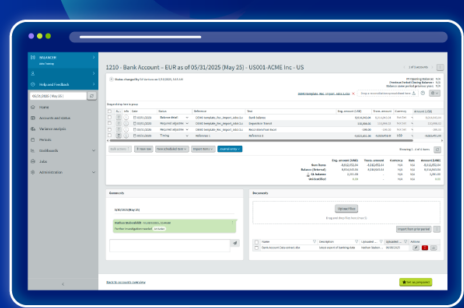
Adra is Trintech's financial close suite for mid-market finance teams, made up of Adra Task Manager, Adra Balancer (balance sheet reconciliations), Adra Matcher (transaction matching), Adra Journal Entry and Adra Analytics. It connects to ERPs such as NetSuite and Microsoft Dynamics and can also work from uploaded spreadsheets.
Adra is Trintech's mid-market close suite and the most direct replacement for BlackLine's reconciliation and matching modules on NetSuite or Microsoft Dynamics.
Adra's suite is made of Task Manager for the checklist, Balancer for balance sheet reconciliations, Matcher for transaction matching, Journal Entry and Analytics. Balancer connects to the ERP general ledger and auto-reconciles low-risk accounts when no error is found within a defined deviation. If a balance changes after certification, the preparer and approver are alerted to re-validate.
Matcher reads raw data without cleanup and supports 3-way and 4-way matching plus one-to-many, many-to-one and many-to-many scenarios, with predefined rules such as Same Day Same Value and AI-suggested matches for exceptions. Adjustments go through Journal Entry, which posts to the ERP through a two-way integration. The NetSuite and Dynamics 365 connectors are certified, and Balancer also has a tag-and-upload mode for teams that stay in Excel. Trintech publishes no price.
- You are a mid-market team on NetSuite or Microsoft Dynamics 365 Finance or Business Central and want certified connectors that pull balances in and post journals back
- You want to start from your existing Excel reconciliations: Balancer lets you tag and upload spreadsheets and still auto-reconcile, track changes and keep an audit trail
- You have high-volume bank, card, point-of-sale or delivery-platform transactions that need multi-way (3-way, 4-way) matching before the reconciliation
- You are a very large, global or listed group with heavy consolidation needs: Trintech positions its other product, Cadency, for large enterprises, and Adra has no consolidation module of its own (Trintech pairs it with Planful for consolidation and reporting)
- You run QuickBooks Online, Xero or Sage Intacct and want a documented native connector: Trintech's pages name NetSuite, Dynamics, SAP, Oracle and Workday connectors but none for these ERPs
- Users like
- Automates account reconciliations and transaction matching in the month-end close
- Users dislike
- Some reviewers feel ease of use and setup could improve
- Source: G2, 333 reviews
What you give up compared with BlackLine
Adra has no consolidation module of its own: Trintech pairs it with Planful for consolidation and reporting. Trintech sells a second product, Cadency, for large enterprises, so confirm which one is in your quote. No QuickBooks Online, Xero or Sage Intacct connector is documented on Trintech's pages. G2 lists 333 reviews at 4.5, and some reviewers say ease of use and setup could improve.
- Starting price
- Price not published (quote only)
- Modules
- Task Manager, Balancer, Matcher, Journal Entry, Analytics
- Certified connectors
- NetSuite, Microsoft Dynamics 365 Finance and Business Central
- Sister product
- Cadency, Trintech's close platform for large enterprises
ReconArt
ReconArt
ReconArt is a reconciliation platform that imports data from ERPs, banks, spreadsheets and SFTP, matches transactions on visual no-code rules with tolerances, and then certifies balance sheet accounts with approval workflows. An AI Assistant lets users write matching rules in plain language.
ReconArt is matching first: rules you configure with tolerances, then balance sheet certification, bought as separate editions.
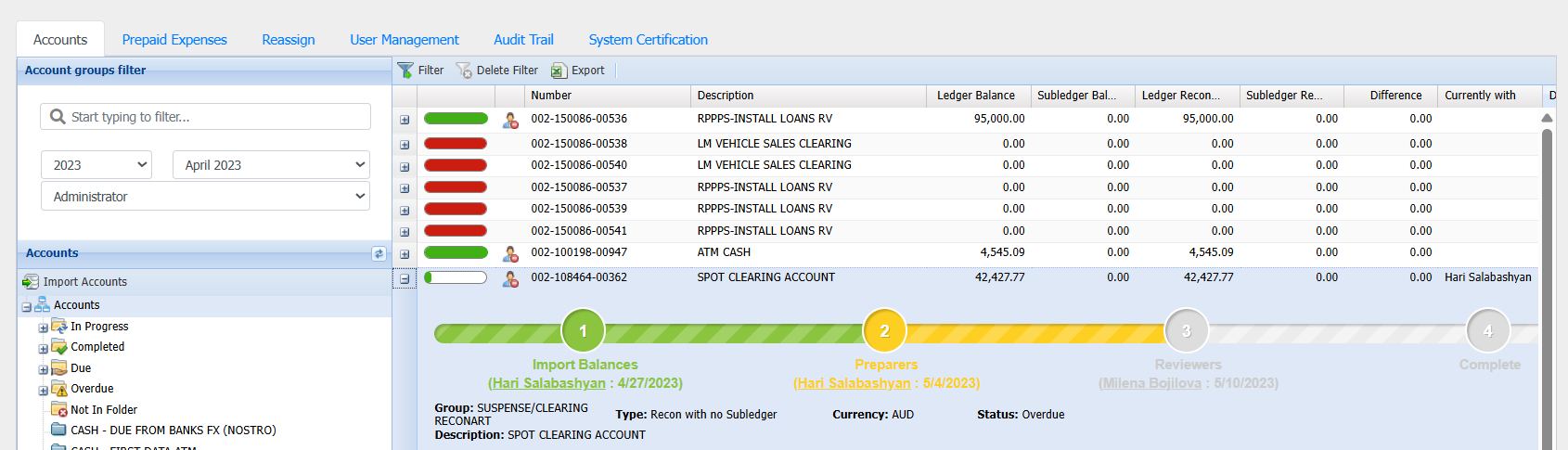
ReconArt's engine imports data from ERPs, banks, spreadsheets and SFTP, normalizes it and matches transactions on no-code rules with tolerances. It supports one-to-one, one-to-many, many-to-many and fuzzy matching, and routes exceptions such as duplicate invoices, overpayments and payments in transit into workflows. The balance sheet side follows four steps: aggregate, reconcile, attest and certify, with multi-level approvals and period locks. Journals can be generated from a reconciliation group, approved by amount or account risk, and posted to the ERP.
Editions are Essentials (matching, up to 25 million transactions a year), Plus (50 million, adds Certify), Certify and Close. Implementation is a one-time package of 60 or 80 hours, and ReconArt says most teams go live within weeks. No dollar prices are published. An AI Assistant lets users write matching rules in plain language and explains existing rules.
- You match high volumes of bank, card, payment or AP/AR lines every month and want rules you configure yourself with tolerances and exception categories
- You want matching and balance sheet certification in one product and prefer an edition you can buy for just that job (Essentials covers transaction matching up to 25 million transactions a year, Certify covers period-end certification)
- You want a fixed-scope implementation: ReconArt sells a 60 or 80 hour package and says most teams go live within weeks
- You need a dollar figure upfront: ReconArt lists editions but no amounts
- You are a small team whose bank reconciliation fits inside the accounting ledger: this is an annual subscription plus implementation project, not a self-serve add-on
- Users like
- Rule-based matching that clears one-to-one matches quickly, exception reporting and vendor support (G2)
- Users dislike
- Confusing interface and a learning curve (G2)
- Source: G2, 6 reviews
What you give up compared with BlackLine
NetSuite is the only ERP ReconArt names with native journal posting. Other systems connect through API, SFTP or file pulls, so QuickBooks, Xero and Sage Intacct teams should ask what a real connection looks like. It has no consolidation module. G2 lists 6 reviews at 3.8, with a confusing interface and a learning curve among the cons, so peer evidence is thin.
- Starting price
- Price not published; licensed by edition (Essentials, Plus, Certify, Close) on an annual subscription, plus a one-time 60 or 80 hour implementation package
- Editions
- Essentials, Plus, Certify, Close
- Implementation
- One-time 60 or 80 hour package
- Data sources
- ERP, core banking, cloud storage, SFTP, spreadsheets via ReconArt Data Factory
- Security
- ISO/IEC 27001:2022 (stated on reconart.com)
- Bank file formats
- CSV, XLSX, TXT, XML, BAI, ACH, SWIFT MT, camt.053 (ISO 20022), FIRD
Suites for large groups
HighRadius and OneStream aren't smaller BlackLine substitutes. They're suites with consolidation, intercompany and agents, and they suit teams that left BlackLine because they need more scope in one platform. Our financial consolidation software roundup and intercompany accounting software guide go deeper on that side.
HighRadius
HighRadius
HighRadius sells a record-to-report suite (close checklist, balance sheet reconciliation, journal entries, intercompany, consolidation, reporting) built around prebuilt AI agents that prepare accruals, post journals and flag anomalies. HighRadius says it was named a Challenger in the 2026 Gartner Magic Quadrant for Financial Close and Consolidation Solutions (it also announced a Challenger placement in the 2025 edition).
HighRadius sells a record-to-report suite where prebuilt agents prepare accruals and post journals inside the close checklist.
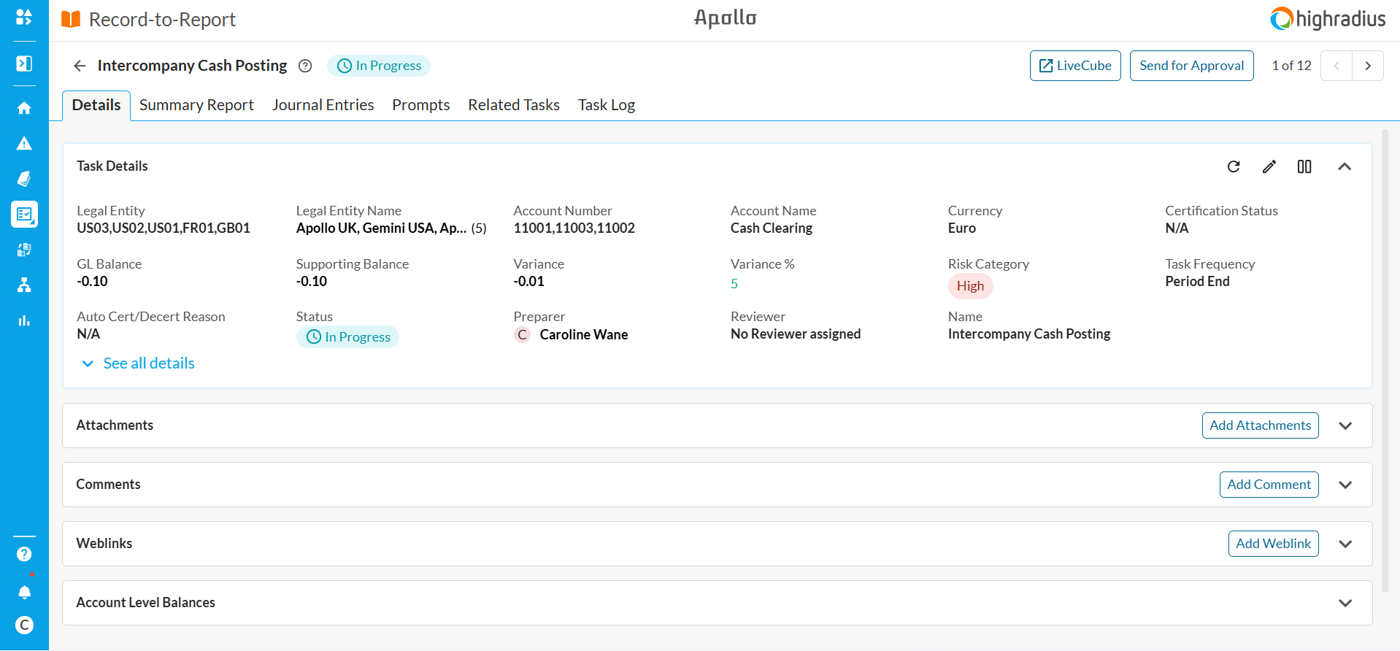
HighRadius's close starts from a checklist of tasks grouped by legal entity, each with an owner, deadline, preparer, reviewer and approver. Data comes from the ERP, from banks through BAI, BAI2, MT940 or API, and from systems such as payroll through API, SFTP or file upload. Agents then calculate and draft accruals, shared cost allocations and reserve journals in an Excel-like workspace called LiveCube. Reconciliations auto-match on amount, date and reference, flag missing or duplicate items and generate adjusting journals, and approved journals post back to the ERP.
HighRadius advertises outcome-based pricing with no setup or subscription fees until go-live, and it names SAP, Oracle, NetSuite, Dynamics 365, Sage Intacct, Workday and QuickBooks among its ERPs. It says it was named a Challenger in the 2026 Gartner Magic Quadrant for Financial Close and Consolidation Solutions, which is a vendor claim we could not verify against the report itself.
- You run high transaction volumes (cash, AP accruals, intercompany) on SAP, Oracle, NetSuite or Dynamics and want agents to prepare and post recurring accruals and journals
- You already use HighRadius for order-to-cash or treasury and want the close on the same vendor and data
- You want outcome-based pricing where fees start only after go-live
- You are a 2 to 5 person team on QuickBooks Online or Xero with a simple close: the suite is sold to enterprises (vendor cites 1,100+ to 1,500+ enterprise customers) and has no published price or self-serve plan
- You need detailed rollforward or flux commentary workflows documented up front: the public pages describe variance agents but not rollforward schedules
- Users like
- Journal entry automation and configurable matching rules
- Users dislike
- Upload delays and Business Central compatibility; all tasks must be closed before a new month or checklist can open
- Source: G2, 2 reviews
What you give up compared with BlackLine
HighRadius publishes no implementation timeline, only a target of ROI within 3 to 6 months. Its dedicated G2 listing for close and reconciliation has 2 reviews at 4.0, so there is little independent evidence for this module. Rollforward and flux commentary workflows are described less fully than the agents.
- Starting price
- Price not published (quote only); outcome-based model, no fees until go-live
- Gartner
- Challenger, 2026 Magic Quadrant (vendor claim)
- ERPs named
- SAP, Oracle, NetSuite, Dynamics 365, Sage Intacct, Workday, QuickBooks
- Bank data
- Direct integration with major banks, bank feeds and imports (HighRadius pages, 2026-10-27)
- Pricing model
- Quote only, outcome-based (no fees until go-live)
OneStream
OneStream
OneStream is an enterprise CPM platform that runs consolidation, account reconciliations, transaction matching, journal entries, reporting and planning in one application on a single data model. It says it was named a Leader in the 2026 Gartner Magic Quadrant for Financial Close and Consolidation Solutions (report dated 9 March 2026).
OneStream replaces BlackLine when the hardest part of your close is consolidation across entities and currencies.
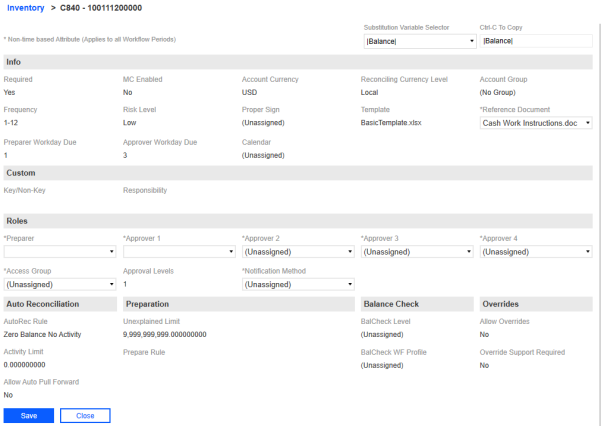
OneStream's trial balances load once from the ERP through prebuilt connectors, and that data feeds reconciliation, close, consolidation and reporting. Task Manager organizes close tasks and enforces segregation of duties so the same user can't complete and approve a task. In Account Reconciliations, an admin builds the inventory from GL source accounts, assigns risk levels and templates, and sets a preparer and up to four approvers per reconciliation. AutoRec rules based on zero balance, activity or an expression prepare or fully approve low-risk accounts.
Transaction Matching runs one-sided or three-way matches several times a day and feeds items into reconciliations. Consolidation handles intercompany eliminations, currency translation and acquisitions under US GAAP and IFRS. OneStream says it was named a Leader in the 2026 Gartner Magic Quadrant for Financial Close and Consolidation Solutions, which is also a vendor claim. It publishes no price.
- You run a multi-entity, multi-currency group (intercompany eliminations, currency translation, acquisitions, US GAAP and IFRS) and consolidation is the hardest part of the close
- You want to replace several finance tools (for example Hyperion or SAP BPC plus a separate rec tool) with one platform for close, consolidation, reporting and planning
- You have SAP, Oracle, Dynamics, JD Edwards, PeopleSoft or Infor and an internal admin or partner to configure workflows and business rules
- You are a 2 to 15 person team on QuickBooks Online, Xero or Sage Intacct that needs a close checklist and recs within weeks: OneStream does not name these ERPs as connectors and it is sold and implemented as an enterprise CPM project
- You want a lightweight close tool your accountants can configure themselves: G2 reviewers most often cite a steep learning curve and ease of setup is its lowest G2 sub-score
- You need a published price or a short trial before deciding: pricing is quote only
- Users like
- One platform for consolidation, planning and reporting; strong business rules, governance and support
- Users dislike
- Steep learning curve and harder setup (ease of setup is the lowest sub-score)
- Source: G2, 161 reviews
What you give up compared with BlackLine
OneStream is sold and implemented as an enterprise performance management project, and its ease of setup is its lowest G2 sub-score. It doesn't name QuickBooks, Xero or Sage Intacct as connectors. G2 lists 161 reviews at 4.6, and the most frequent complaint is a steep learning curve. It publishes no implementation timeline.
- Starting price
- Price not published (quote only)
- Gartner
- Leader, 2026 Magic Quadrant for Financial Close and Consolidation Solutions (vendor page)
- Close modules
- Consolidation, Account Reconciliations, Transaction Matching, Journal Entry Manager, Task Manager
- ERPs named
- SAP, Oracle, Microsoft Dynamics, Infor
How do the alternatives handle the month-end close?
No alternative covers every close phase the way BlackLine's module list does, so match each tool to the phase where your close breaks. The table shows what each vendor's own pages list for each phase, and that's the fairest basis for comparison.
| Tool | Checklist | Reconciliations | Transaction matching | Journal entries | Consolidation |
|---|---|---|---|---|---|
| BlackLine | Task Management | Account Reconciliations | Transaction Matching module | Journal Entry module | Consolidation module |
| Numeric | Templated checklist | Auto-submit under materiality | Cash matching for bank accounts | Batch posting to NetSuite | Not presented as a consolidation tool |
| FloQast | Checklist with rollforward | Excel workpaper tie-out | AI Matching in Close AI | Journal entry management in Close AI | None listed on close pages |
| CloseCore | Recurring checklist | ERP tie-out with sign-off | Enterprise tier only | Linked to tasks; AI drafts on Enterprise tier | Consolidated reporting, no elimination engine documented |
| Adra by Trintech | Task Manager | Balancer | Matcher, including 3-way and 4-way | Journal Entry with ERP posting | Paired with Planful |
| ReconArt | Task management in the Close edition | Certify edition | Essentials edition | Approval workflow, auto-post | None listed |
| HighRadius | Close checklists by entity | Rule-based auto-match | Many-to-many match clusters | Journal posting agents | Part of the suite |
| OneStream | Task Manager | Account Reconciliations with AutoRec | Transaction Matching | Journal Entry Manager | Consolidation with eliminations |
Auditor access matters as much as the phases. Numeric gives auditors read-only logins with a timestamped trail, CloseCore includes a read-only auditor and OneStream has an auditor role that sees only fully approved reconciliations. Ask every vendor to show the auditor view of a closed period on your own data. Our month-end close checklist lists the evidence an auditor asks for.
How much do the alternatives cost?
BlackLine costs a median of $40,125 a year in Vendr's buyer data, and of the seven alternatives only CloseCore publishes a price, so most of this comparison comes down to what you can learn before a sales call. Treat every figure below as an input to a quote request, not a budget, because it's the scope that sets the price.
| Tool | What's public | What drives the quote |
|---|---|---|
| BlackLine | No price. Vendr median $40,125 a year (74 purchases, $13,154 to $101,000) | Modules, entities, transaction volume, users, term and services |
| Numeric | No price; pricing page lists modules | Transaction volume and seats |
| FloQast | No price; no per-user fees. Vendr median $24,663 a year (316 purchases, $10,199 to $68,404) | Package, entities and term |
| CloseCore | $187.50 a month billed annually for 5 users and 1 entity, $250 monthly | Extra users and entities; Enterprise tier by quote |
| Adra by Trintech | No price | Modules and ERP |
| ReconArt | No price; annual subscription by edition | Edition and transaction volume, plus a one-time 60 or 80 hour package |
| HighRadius | No price; outcome-based model, no fees until go-live | Modules and agents |
| OneStream | No price | Modules, entities and users |
Vendr's figures come from deals it saw and don't share a scope, and BlackLine implementation fees on complex deployments can equal or exceed the first-year subscription. Compare quotes on three-year cost with services included, and ask each vendor what the renewal increase is. The same buyer data notes that renewal increases are typically a few percentage points a year.
How do you move off BlackLine?
To move off BlackLine, cut over at a period boundary, export your templates and closed-period history, rebuild the templates and matching rules in the new tool, run both systems for one close and check the contract end date. Keep the closed-period evidence, because that's what an auditor will ask for: the reconciliation history, certifications and review notes in BlackLine cover the years you already closed, so decide what you need before the contract ends.
Pick the cut-over period
Start on the first day of a quarter or fiscal year so no period is split across two systems.
Export what you must keep
Save templates, account lists, risk ratings and the certification history for closed periods.
Rebuild templates and rules
Recreate the checklist and reconciliation templates in the new tool, and rebuild matching rules from your exception history.
Run both for one close
Prepare the first close in the new tool while BlackLine stays live, and compare balances and sign-offs.
Check the contract end date
Compare the notice period and renewal date with your cut-over, so you don't pay a renewal for a tool you stopped using.
How do you choose a BlackLine alternative?
Choose by what breaks in your close today, not by the vendor's feature list. Five checks cover most of what you'll need to decide.
- ERP fit. Confirm the connector for your exact ERP. Numeric, FloQast and CloseCore name QuickBooks Online or Xero in some form; Adra, ReconArt, HighRadius and OneStream lean toward NetSuite, SAP, Oracle and Dynamics.
- Reconciliation volume. A few hundred accounts reconciled in Excel point to a close management platform. Thousands of accounts or high-volume bank and payment files point to a matching specialist or a suite.
- Who administers it. BlackLine and OneStream reviewers describe setup and configuration effort. If nobody on the team can own an admin role, favor a tool you can configure yourself.
- What the quote includes. Ask which modules, entities, users and services are in the number, and what the renewal increase is.
- Auditor view. Ask to see a closed period from the auditor's side before you sign.
What do you still need after you switch?
Most BlackLine alternatives manage reconciliations and the checklist. The gap many small teams still report is evidence, and it's easy to overlook: whether every task before the lock was done, who reviewed it and where the proof is. The Finance Lead covers only that piece, and it isn't a replacement for any tool above.
What's the best BlackLine alternative for a small team?
For a team of 2 to 15 on QuickBooks Online, Xero, NetSuite or Sage Intacct, start with Numeric, FloQast or CloseCore. CloseCore is the only one that publishes a price, at $187.50 a month billed annually for 5 users and 1 entity. Numeric and FloQast are quote only.
Who are BlackLine's main competitors?
The names that appear most often are FloQast, Trintech (Adra and Cadency), OneStream, HighRadius and Workiva. FloQast competes on close management, Trintech and ReconArt on reconciliation and matching, and OneStream and HighRadius on suites with consolidation.
Is FloQast better than BlackLine?
FloQast is better for teams whose problem is coordination and who work in Excel. BlackLine is better for high-volume matching, consolidation and journal automation. G2 rates them 4.6 from 1,424 reviews and 4.5 from 1,079 reviews, which is too close to decide on.
Is BlackLine accounting software?
No. BlackLine sits beside the ERP: it ingests ledger, bank and subledger data, reconciles it, and posts adjusting journals back. It's a close tool, not a ledger. It doesn't replace the general ledger. Its pages name SAP, Oracle and NetSuite as ERPs.
How much does BlackLine cost?
BlackLine publishes no prices and sells modules on quote. Vendr's buyer data reports a median of $40,125 a year across 74 purchases, with a range of $13,154 to $101,000. Those are third-party figures, and implementation fees on complex deployments can equal or exceed the first-year subscription.
How long does it take to replace BlackLine?
It depends on the tool. G2 users report about 6 months for BlackLine itself, under 1 month for Numeric and about 2 months for FloQast. CloseCore says it's typically live within a week, and ReconArt sells a 60 or 80 hour implementation package. Plan to run both systems for one close.