Intercompany accounting software records transactions between legal entities of one group, books both sides of each transaction, and removes the matching balances when the group reports as one set of numbers. The tools below differ in how much of that they do for you: some post the mirror entry automatically, some leave drafts for a person to post, and one only matches balances on top of an ERP.
We compared ten tools and grouped them by where the intercompany work happens. We read vendor documentation and pricing pages for each tool and checked review ratings in November 2026. We read vendor material and did not run these products, and none of the vendors paid for a placement. Our own product tracks the month-end close and does not book intercompany entries, so it appears only as a marked row.
- intercompany tools compared
- 10
- tools that publish a dollar price
- 4
- vendor whose docs call eliminations a manual process
- 1
What is intercompany accounting software?
Intercompany accounting software is accounting software that records a transaction between two legal entities of the same group on both sides, keeps the two balances in step, and eliminates them when the group consolidates. Every intercompany transaction leaves a receivable in one entity and a payable in the other, and the two must cancel out in the group's numbers.
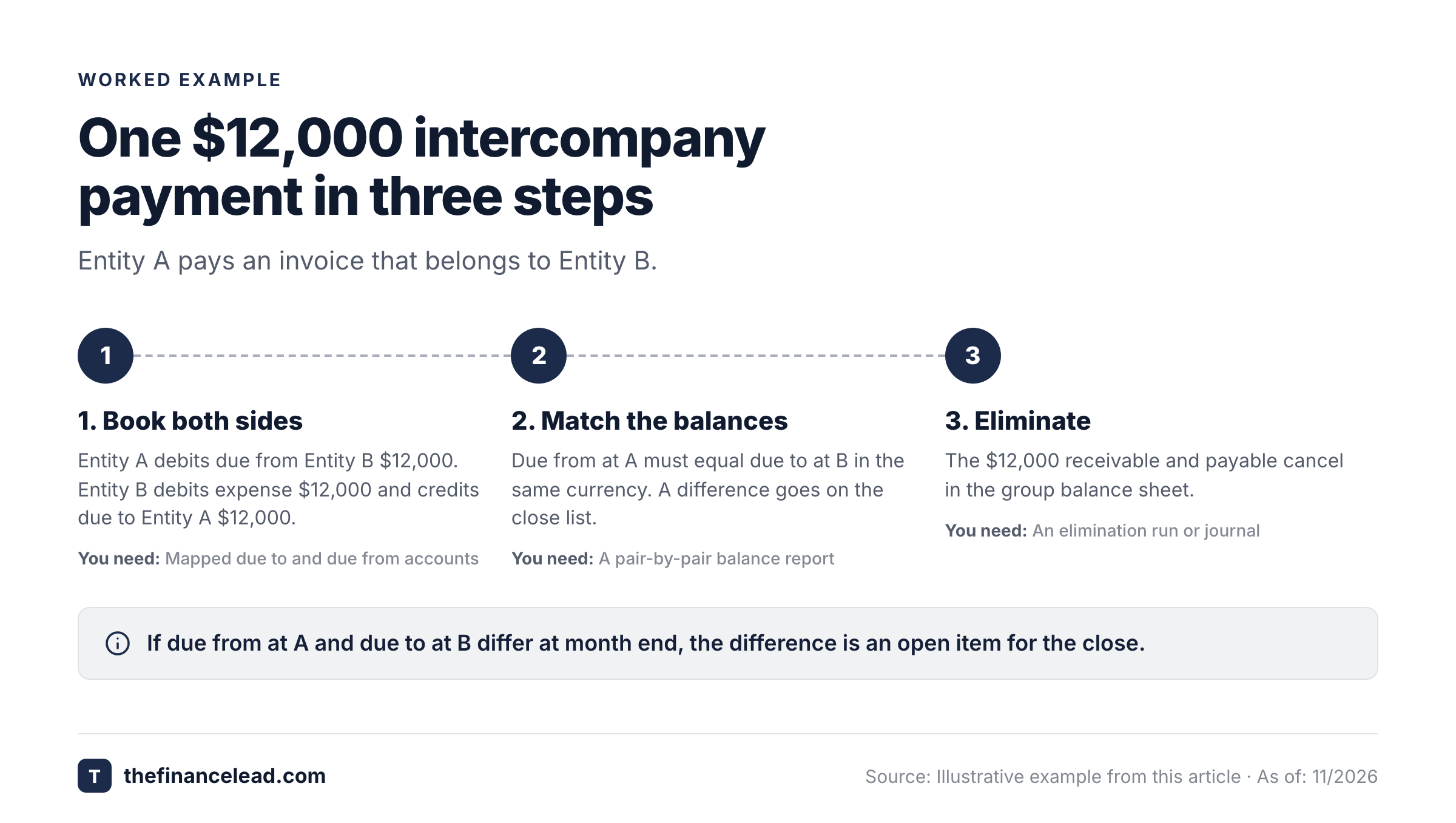
A short example shows the three steps. Entity A in the US pays a $12,000 software invoice that belongs to Entity B.
- Book both sides. Entity A debits a "due from Entity B" account for $12,000 and credits cash. Entity B debits software expense for $12,000 and credits a "due to Entity A" account. Good software creates the second entry for you, so nobody has to remember it.
- Keep the balances in step. At month end, due from at A must equal due to at B, in the same currency or at an agreed rate. A difference is an open item for the close.
- Eliminate on consolidation. The $12,000 receivable and payable cancel in the group balance sheet, because the group doesn't owe itself money.
Intercompany accounting is not the same as consolidation. Consolidation combines the entities' books, and eliminations are one step inside it. Our guides to multi-entity accounting software and financial consolidation software cover those two parts, and several tools below cover all three.
Our picks by situation
The right tool depends on how many entities you run, whether they share one database and how much of the matching you want automated.
 Best for entities with different base currencies in one ledgerSage IntacctOne inter-entity journal creates the offsetting entries in each entity, and entries auto-balance across base currencies.
 Best for orders that move between subsidiariesOracle NetSuiteIntercompany purchase orders generate paired sales orders, and an elimination run sits in the period close checklist.
 Best for Microsoft shops with a published per-user priceMicrosoft Dynamics 365 Business CentralPartner companies get a matching document through an inbox, and the price is listed at $80 per user per month.
 Best for QuickBooks teams that outgrew one company fileIntuit Enterprise SuiteAn intercompany invoice creates a linked bill in the receiving company for approval.
 Best for a published price by entity countSoftLedgerPlans from $300 a month for 3 entities, with mirrored journal lines and a separate elimination switch.
 Best for matching and netting on top of several ERPsBlackLineRules-based matching and multilateral netting across entities and currencies, without replacing your ledger.
 Our product · for the sign-off on matched balancesThe Finance LeadTracks the close task, the evidence and the reviewer sign-off for intercompany balances. It books no entries.
Intercompany accounting software compared
| Tool | Type | How intercompany is booked | Price (USD) | G2 rating |
|---|---|---|---|---|
| Sage Intacct | Mid-market cloud financials with multi-entity | One journal adds offsetting entries in each entity; auto-elimination in the paid Consolidation module | Quote only; Sage publishes no plan names or prices | 4.3 (4,536) |
| Oracle NetSuite | Cloud ERP with financials | Paired intercompany orders and journals; elimination run at period close | Quote only; NetSuite publishes no list prices | 4.1 (5,253) |
 Acumatica Cloud ERP | Mid-market cloud ERP with full financial management | Due-to and due-from entries created between related companies; elimination claimed by the vendor | Custom quote, resource-based licensing | 4.4 (2,055) |
| Microsoft Dynamics 365 Business Central | Cloud ERP for small and midsize businesses (finance, supply chain, sales, service) | IC partner documents through an inbox and outbox; eliminations are manual | Essentials $80, Premium $110, Team Members $8 per user per month, paid yearly (USD, informational; bought through Microsoft or a partner) | 4.0 (918) |
 Microsoft Dynamics 365 Finance | Enterprise cloud ERP finance application | Entity pairs post vouchers in both companies; eliminations by rule in Consolidations | $210 per user per month for Finance and $300 for Finance Premium, paid yearly (Microsoft list price, informational) | No reviews yet |
| Intuit Enterprise Suite | Multi-entity cloud ERP from QuickBooks maker | Invoice creates a linked bill for approval; eliminations at the parent | Quote only (custom bundle after a discovery call); Intuit publishes no list price | 4.5 (68) |
 Gravity | Multi-entity accounting on the Microsoft Power Platform | Voucher lines assigned to entities create due-to and due-from entries | Starter from $375 per month for the first user, $275 per additional user, $100 per month per 5-entity pack (annual subscription, USD) | 4.5 (41) |
| SoftLedger | General ledger with a native crypto module | Journal with an IC Location mirrors the lines; document entries are drafts | Starter $300 a month (up to 3 entities), Standard $750 (up to 10), Plus $1,125 (unlimited), Enterprise custom; billed annually | 4.6 (54) |
 Odoo Accounting | Modular ERP with an accounting app | Per-company switches create the counterpart bill, order or stock move; no automatic elimination described | EUR 24.90 per user per month (Standard) and EUR 44.90 (Custom); One App Free EUR 0; multi-company needs Custom; Odoo lists euro prices only, so no USD price | 4.3 (78) |
| BlackLine | Enterprise close and reconciliation platform | Matching, netting and settlement layer on top of your ERP | Price not published (quote only) | 4.5 (1,073) |
| The Finance Lead Our product | Month-end close checklists | Tracks close tasks, evidence and preparer/reviewer sign-off | Team $39/month (up to 8 team members), Plus $79/month (no member limit, read-only MCP server); card required at checkout | No reviews yet |
Prices read from vendor pages on November 14, 2026. Quote means the vendor publishes no price. Odoo lists euro prices only. BlackLine: G2 lists 4 reviews of its Intercompany product, too few for a rating.
How do you choose intercompany accounting software?
Choose in this order, because each step removes tools from the list.
- Entity structure. Count your legal entities and check whether the tool keeps them in one database or in separate companies. Business Central links separate companies through partner codes and an inbox, and most of the other ledgers here keep entities in one system.
- Who creates the second entry. Ask whether the tool posts the mirror entry itself, creates a draft, or leaves it to a person. SoftLedger creates bill and invoice intercompany entries as drafts that a user posts. In Intuit Enterprise Suite the receiving company's AP manager reviews the linked bill before it posts.
- Currency. If entities report in different currencies, check how the two sides are balanced. Sage Intacct says it auto-balances inter-entity journals across entities with different base currencies. Business Central's general journal has no currency field and converts at the current rate. SoftLedger requires a clearing account for exchange-rate differences, and the period will not close without it.
- Eliminations. Check whether eliminations are automatic, rule-based or manual, and whether they belong to a separately priced module. Sage Intacct's auto-elimination sits in the Consolidation module. Dynamics 365 Finance eliminates through rules in its Consolidations module. Microsoft calls consolidation eliminations in Business Central a manual process.
- Matching and control. NetSuite's Intercompany Reconciliation Report flags unlinked and mismatched amounts. Business Central lists intercompany entries in an Intercompany Transactions report. BlackLine matches balances by rule across entities and ERPs.
- Price and extras. Entity packs, extra modules and implementation services decide the real cost. The cost section below lists what each vendor publishes.
- Does one posting create both sides of the transaction, or does someone post the second entry?
- Which accounts hold due to and due from, and who maps them for each entity pair?
- How are two entities with different currencies balanced, and where do exchange differences go?
- Are eliminations automatic, rule-based or manual, and are they in the base price?
- Which report shows unmatched intercompany balances before we close?
- Is there a cap on entities, or an entity pack that changes the price?
Intercompany in the ledger: automatic mirrored entries
The five systems below book intercompany transactions inside the general ledger. They suit a group that wants one system of record and can fund a partner-led implementation.
Sage Intacct
Sage Intacct
Sage Intacct is a cloud financial system for scaling and mid-sized companies. Entities share one login, reporting runs on dimensions such as location and department, and books close period by period so nothing can be posted into an older period.
Sage Intacct fits a group with several entities, some in other currencies, that wants one journal to post both sides.
Team it fits: a controller running a multi-entity group who wants the ledger to create the offsetting entries and eliminate them at consolidation.
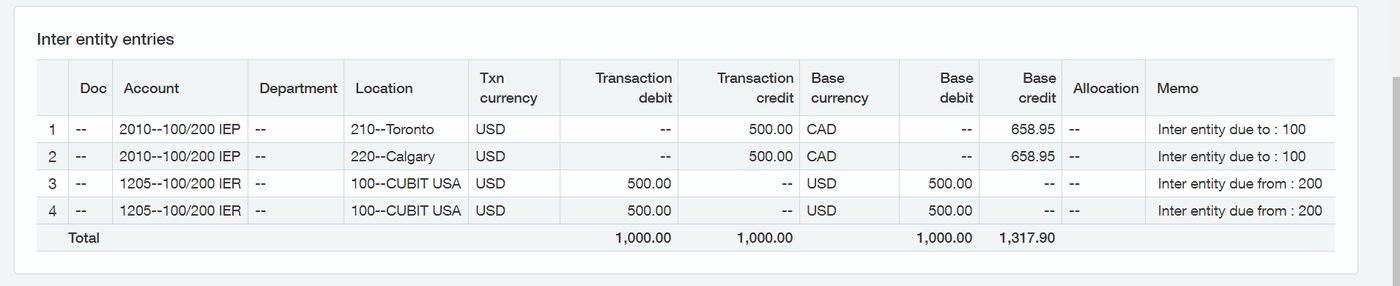
How intercompany works: Sage calls it inter-entity transactions. You can book one in a single journal entry, and Intacct adds the offsetting entries to each affected entity. An administrator maps the inter-entity accounts once. The Basic plan uses two accounts per entity, and the Advanced plan uses separate accounts for each entity pair so you can settle pairs individually. Entries auto-balance across entities with different base currencies. In the Consolidation module, the auto-elimination option eliminates the inter-entity receivable and payable accounts in the mapping and posts the offsets to an elimination entity.
Limits: only the Location dimension flows through an inter-entity transaction, so other dimensions have to balance by hand. Sage's help pages describe no separate intercompany matching screen. Consolidation is a separately subscribed capability, and moving to Global Consolidation for several base currencies costs extra.
- You run several entities and want one journal to create both sides
- Some entities report in other base currencies and you want entries to auto-balance
- You need consolidation and eliminations included in the base subscription
- You need an intercompany matching screen, which Sage does not document
- Users like
- ease of use and reporting
- Users dislike
- steep learning curve, limited customization and missing features
- Source: G2, 4,536 reviews
How it works in practice
G2 reviewers rate Sage Intacct 4.3 out of 5 from about 4,500 reviews and praise ease of use and reporting. They name a steep learning curve and limited customization.
- Starting price
- Quote only; Sage publishes no plan names or prices
- Implementation
- As few as 60 days per Sage; about 4 months average per G2 users
- Marketplace
- 350+ integrations per Sage
- Consolidation
- Separate extended capability
- AP automation
- AI bill capture, duplicate flagging, three-way matching generally available since May 2026
- Payments
- Check, ACH or virtual card
- 1099
- Tracked in Intacct; e-filing through a Marketplace partner
- Dimensions
- Location, department, project, customer, vendor, employee, item plus user-defined dimensions
- Journals
- Draft, submit for approval, attachments, allocations and automatic reversal
- Period control
- Close books by period with a Close books permission; closed statutory periods can be locked
- Entities
- Shared multi-entity company; inter-entity lines create balancing entries in both entities
- Audit trail
- Standard Audit Trail on records and transactions with an Audit History report
- Fixed assets: depreciation methods
- Straight-line, daily, 150% and 200% declining, custom declining balance with and without true-up; full-month, half-year and full-year conventions
- Fixed assets: workflow
- Assets are created manually or from AP bills and purchasing; gain or loss is calculated on disposal (Sale, Casualty loss, Theft, Other); bulk disposal through import
- Intercompany booking
- One inter-entity journal entry adds offsetting entries in each affected entity; admin maps inter-entity accounts once
- Intercompany mapping
- Basic plan: two accounts per entity. Advanced plan: separate accounts per entity pair
- Intercompany eliminations
- Auto-elimination of inter-entity receivable and payable in the Consolidation module, a separately subscribed capability
- Booking
- One journal, offsetting entries in each entity
- Eliminations
- Auto-elimination in the Consolidation module
- Price
- Quote only
Oracle NetSuite
Oracle NetSuite
NetSuite is a cloud ERP: financials, inventory, order management and multi-subsidiary accounting in OneWorld. Accounting periods can be locked per subsidiary, and a separate permission lets selected users override a locked period.
NetSuite OneWorld fits a group where goods and services move between subsidiaries and the close needs an elimination run.
Team it fits: a mid-market group on OneWorld with several subsidiaries that trade with each other and want orders, invoices and eliminations in one system.
How intercompany works: Automated Intercompany Management pairs an intercompany purchase order with a sales order generated from it, and invoices and vendor bills post to intercompany accounts with their lines flagged for elimination. For everything else, an advanced intercompany journal entry has one originating and several receiving subsidiaries, and an Auto Balance button adds the offsetting lines from default accounts. Oracle's docs describe an optional approval before such a journal posts. The final task on the period close checklist is the elimination run, which creates the elimination journals. Oracle's Intercompany Reconciliation Report flags unlinked orders and mismatched amounts and is meant to run first.
Limits: without the automation feature, Oracle says you create and track every intercompany transaction and elimination journal yourself. Eliminations are not generated for advanced journals posted to future periods. NetSuite publishes no price for OneWorld or for extra subsidiaries.
- Subsidiaries sell to and buy from each other and you want paired orders
- You want a reconciliation report to run before the elimination step
- You want a price before a sales call: NetSuite sells by quote, and even simple single-entity projects take 8 to 14 weeks
- You need eliminations on advanced journals posted to future periods
- Users like
- ease of use for reporting and navigation, customization
- Users dislike
- learning curve and outdated interface
- Source: G2, 5,253 reviews
How it works in practice
G2 reviewers rate NetSuite 4.1 out of 5 from about 5,250 reviews and praise reporting and customization. They name a learning curve and an outdated interface.
- Starting price
- Quote only; NetSuite publishes no list prices
- Implementation
- 8 to 14 weeks simple single-entity; 4 to 11 months midmarket (NetSuite); about 6 months average per G2 users
- Period lock
- Per subsidiary in OneWorld; Override Period Restrictions permission
- Currencies
- 190+
- Journals
- 1,000 lines per entry; reversal date links the reversal to the original; approval by preference or SuiteFlow workflow
- Period control
- Lock AP, AR and GL postings per period, per subsidiary in OneWorld; Override Period Restrictions permission
- Entities
- OneWorld subsidiaries; intercompany and advanced intercompany journals; automated elimination journals
- Classifications
- Departments, Classes and Locations plus custom segments
- Audit
- System Notes record period lock changes; record-level coverage not separately verified
- Fixed assets: depreciation methods
- Straight Line, Fixed Declining, Sum of Years Digits, Asset Usage and user-defined; tax methods kept separately and do not post to journals
- Fixed assets: workflow
- Depreciation, disposal by sale or write-off, partial disposal, revaluation, split and transfer are documented
- Intercompany booking
- Automated Intercompany Management in OneWorld pairs intercompany purchase and sales orders; advanced intercompany journals use an Auto Balance button
- Intercompany eliminations
- Elimination run in the period close checklist creates elimination journals; Intercompany Reconciliation Report flags unlinked or mismatched amounts
- Booking
- Paired intercompany orders and Auto Balance journals
- Eliminations
- Run from the period close checklist
- Price
- Quote only
Acumatica
Acumatica Cloud ERP
Acumatica is a cloud ERP whose general ledger, subledgers and multi-company accounting sit on one platform with open APIs. Licensing is based mainly on the applications you implement and the compute resources you use, not on user seats, and no dollar prices are published.
Acumatica fits a growing group that wants many companies in one environment and a price based on usage rather than seats.
Team it fits: a mid-market group that has outgrown entry-level accounting and will work with an implementation partner.
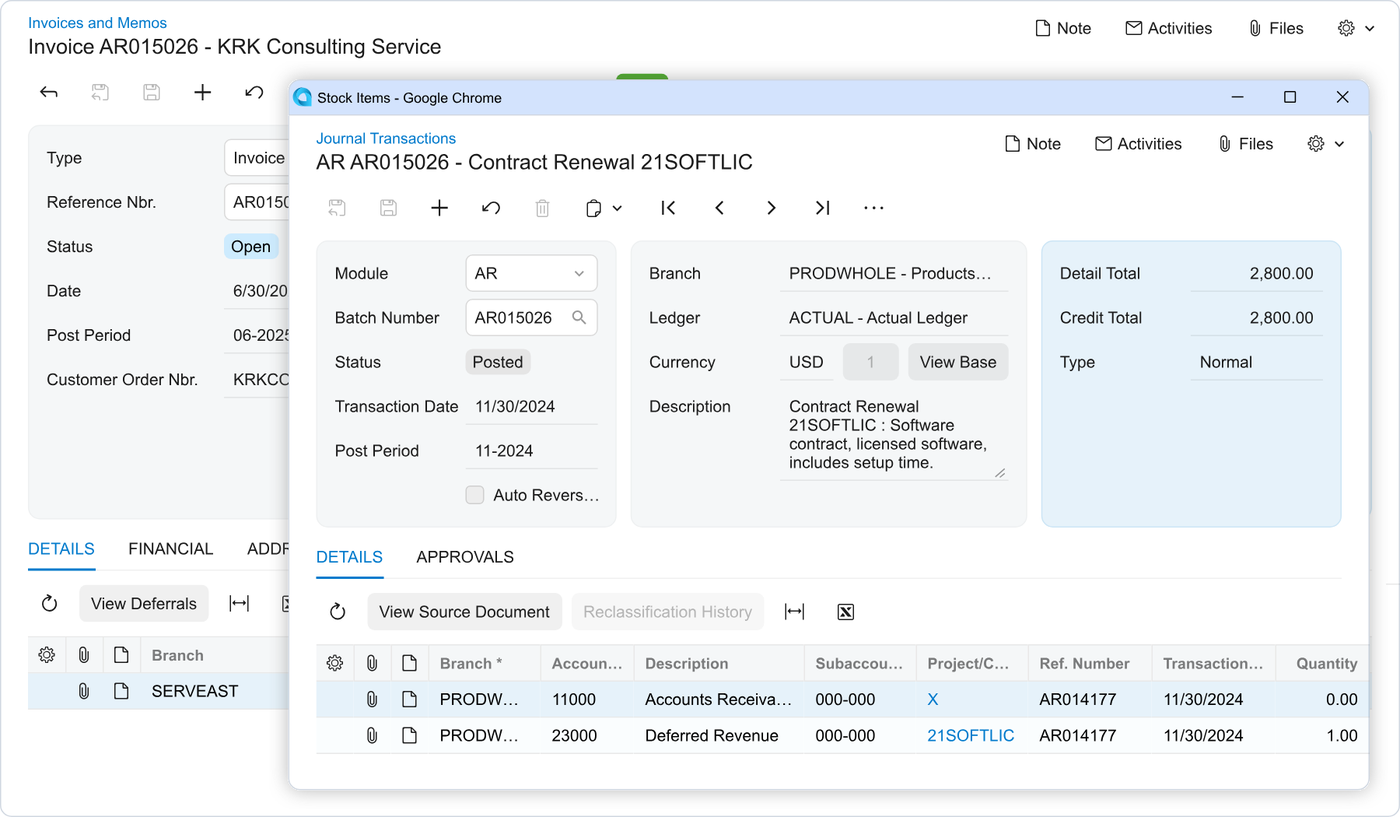
How intercompany works: Acumatica says it creates due-to and due-from entries automatically between related companies, with counterpart documents such as a sales order generated from a purchase order. A partner write-up describes the setup: switch on the Inter-Branch Transactions feature, create a due-to and a due-from account, and define mapping rules for each originating branch. A bill can assign each line to a different branch, and the system posts the balancing entries on release. Per a solved community answer, the balancing entries are netted by branch pair within a batch rather than created per line. Acumatica states there is no limit on related companies in one environment.
Limits: the vendor says intercompany transactions drop out of consolidated reports automatically, but Acumatica's public pages do not document how. They describe no matching screen or intercompany approval either.
- You expect to add companies and want pricing that does not scale per user
- You will work with a partner who sets up the branch mapping rules
- You need the elimination method documented before you buy
- You want a USD figure before the demo: Acumatica quotes by the applications you implement rather than by seats
- Users like
- Ease of use, customization, features (G2 top positive themes)
- Users dislike
- Missing features, learning curve, difficult or complex setup (G2 top negative themes)
- Source: G2, 2,055 reviews
How it works in practice
G2 reviewers rate Acumatica 4.4 out of 5 from about 2,050 reviews and praise ease of use and customization. They name missing features and a difficult setup.
- Starting price
- Custom quote, resource-based licensing
- Pricing basis
- Mainly number of applications implemented, not user seats; no published USD prices
- G2 average implementation time
- 7 months (user-reported average)
- G2 average ROI time
- 16 months (user-reported average)
- Period statuses
- Inactive, Open, Closed, Locked
- Intercompany booking
- Vendor says due-to and due-from entries are created automatically between related companies; setup uses an Inter-Branch feature, two accounts and mapping rules
- Entities
- Unlimited related companies in one environment, per the vendor
- Booking
- Due-to and due-from entries between related companies
- Price
- Quote, based on applications and usage, not user seats
Microsoft Dynamics 365 Business Central
Microsoft Dynamics 365 Business Central
Business Central is Microsoft's cloud ERP with a general ledger, dimension-based analysis, bank reconciliation and multi-company consolidation, tied closely to Excel, Outlook, Teams and Power BI. It is sold and supported through Microsoft partners, so implementation is a project rather than a self-serve signup.
Business Central fits a Microsoft-centered group that wants intercompany between separate companies at a published per-user price.
Team it fits: a small or midsize group on Microsoft where each entity keeps its own company, sometimes in a separate database or country.
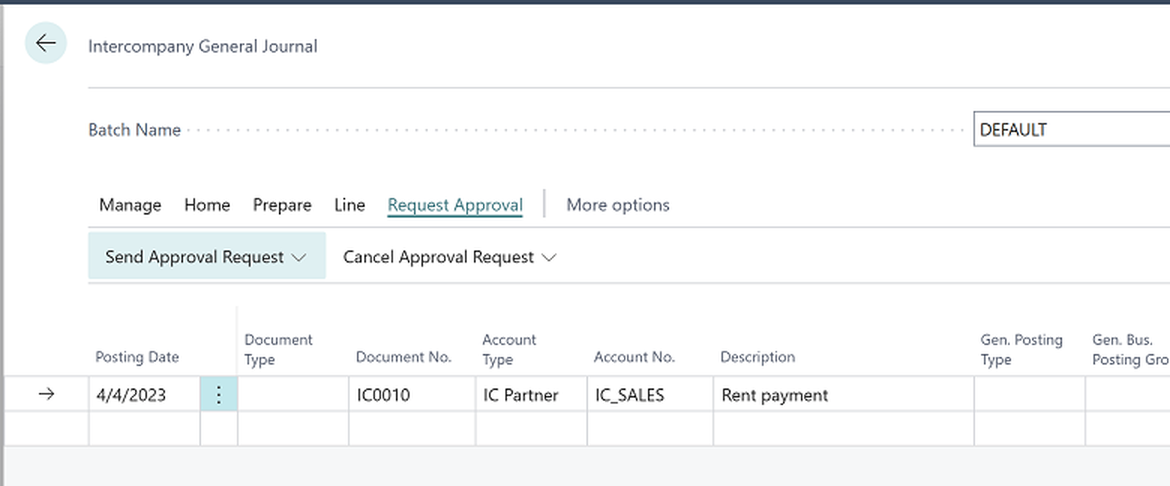
How intercompany works: you assign an intercompany partner code to a customer or vendor. From then on, an order or invoice with that partner creates a corresponding document in the partner company, and the journal lines balance both companies' books. Partner companies can use different currencies, charts of accounts and dimensions. Transactions land in an inbox where the receiver can accept, reject or cancel them. Each company maps its accounts and dimensions to a shared intercompany chart of accounts, in both directions.
Limits: Microsoft states that processing consolidation eliminations is a manual process: you find the duplicate transactions, enter journal lines and preview the elimination report. The intercompany general journal has no currency and converts at the current rate. The Intercompany Transactions report supports reconciliation, but Microsoft documents no automatic matching.
- Your entities run in separate companies or databases and need an accept and reject step
- You want a per-user price on a vendor page
- You want eliminations created automatically
- You need automatic matching of intercompany balances
- Users like
- ease of use and customization, Microsoft integration and financial control
- Users dislike
- steep learning curve, missing features that need paid add-ons and license cost for smaller companies
- Source: G2, 918 reviews
How it works in practice
G2 reviewers rate Business Central 4.0 out of 5 from about 900 reviews and praise ease of use and Microsoft integration. They name a steep learning curve and license cost for smaller companies.
- Starting price
- Essentials $80, Premium $110, Team Members $8 per user per month, paid yearly (USD, informational; bought through Microsoft or a partner)
- Billing term
- Paid yearly, per user per month
- Cheapest seat
- Team Members at $8 per user per month with limited access (read data, approve workflows, update select information)
- Manufacturing and service
- Premium adds enhanced service management and manufacturing on top of Essentials
- Free trial
- 30 days
- Dimensions
- 2 global (filters) and 8 shortcut (journal and ledger fields); default dimensions per account and Code Mandatory rules
- Recurring journals
- Fixed, Variable, Balance, reversing variants and Balance by Dimension; allocations by percentage
- Period control
- Allow Posting From/To dates per company and per user; closing a year does not stop posting into it
- Consolidation
- Container company; eliminations are manual journal lines
- Audit
- Change Log for chosen tables; Microsoft advises against logging ledger entries
- Fixed assets: depreciation methods
- Straight-Line, DB1, DB2, DB1/SL, DB2/SL, Half-Year Convention, Manual and User-defined; no built-in MACRS
- Fixed assets: books
- Unlimited depreciation books per asset, for example one for tax and one for internal reporting
- Fixed assets: workflow
- Calculate Depreciation batch job fills the FA G/L journal and you post it; disposal posts through the FA G/L journal; maintenance and insurance tracking are native
- Intercompany booking
- IC partner codes create a matching document in the partner company, with an inbox and outbox to accept or reject
- Intercompany eliminations
- Microsoft states consolidation eliminations are a manual process; the Intercompany Transactions report supports reconciliation
- Booking
- IC partner codes create a matching document in the partner company
- Eliminations
- Manual, per Microsoft
- Price
- $80 Essentials, $110 Premium, $8 Team Members per user per month, billed yearly
Microsoft Dynamics 365 Finance
Microsoft Dynamics 365 Finance
Dynamics 365 Finance is Microsoft's enterprise finance application for multi-entity accounting, with intercompany accounting, consolidation with elimination rules, and a period close workspace with task dependencies. Segregation of duties rules are enforced when security roles are created and assigned.
Dynamics 365 Finance fits a larger group that wants entity pairs to post both sides and eliminations to run by rule.
Team it fits: a large or fast-growing group with a finance team that will configure entity pairs, an elimination legal entity and consolidation with a partner.
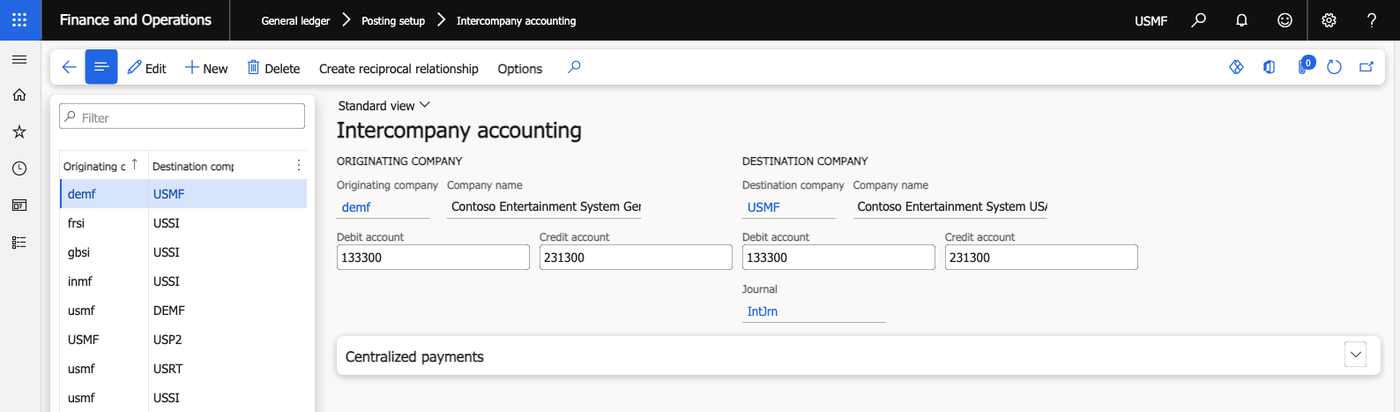
How intercompany works: an administrator defines legal-entity pairs with a due-from account, a due-to account and a journal name for the destination company. One posting then creates vouchers in both companies at once, and a Related vouchers button traces the pair. Microsoft recommends separate due-to and due-from main accounts per company, which makes reconciliation and elimination simpler. Eliminations are a separate step: rules in the Consolidations module post to an elimination legal entity, by net change or by a fixed amount.
Limits: a pair works in one direction only, so you create a reciprocal pair if either company can originate a transaction. Intercompany setup does not eliminate anything by itself. Microsoft's pages do not describe an intercompany balance matching tool or entity limits.
- You want rule-based eliminations into a dedicated elimination entity
- You have a team that can own entity pairs and journal setup
- You need a lightweight setup for a few entities
- You need a matching tool for intercompany balances
How it works in practice
G2 shows no rating we could cite for Dynamics 365 Finance on its own.
- Starting price
- $210 per user per month for Finance and $300 for Finance Premium, paid yearly (Microsoft list price, informational)
- List price
- $210 per user per month, paid yearly; Premium tier $300 (Microsoft pricing page)
- Intercompany
- Intercompany journals for daily, vendor invoice and payment journals and ledger allocations, set up as pairs of legal entities with Due to and Due from accounts
- Consolidation
- Consolidate online, Financial reporting, or both; supports multiple charts of accounts, different fiscal calendars and multiple reporting currencies
- Eliminations
- Elimination rules in the Consolidations module
- Currency translation
- Translates from each source company's accounting currency to the consolidation company's currency; currency revaluation still has to be run when rates change
- Period close
- Financial period close workspace with its own calendars, templates, closing roles, task dependencies and attachments; the schedule can be locked when the close is complete
- Period control
- Ledger periods can be set to On hold, restricted to a user group, or Permanently closed; Microsoft advises against Permanently closed because it cannot be reopened
- Segregation of duties
- Rules are enforced automatically when roles are created or assigned; conflicts are logged and overrides require a reason
- Audit
- Completed close tasks record time and user identifier; consolidation keeps dimensions and accounts for audit; Microsoft markets built-in audit trails and documentation
- Intercompany booking
- Legal-entity pairs with due-from and due-to accounts; one posting creates vouchers in both companies
- Intercompany eliminations
- Elimination rules in the Consolidations module post to an elimination legal entity; intercompany setup alone does not eliminate
- Booking
- Entity pairs post vouchers in both companies
- Price
- $210 Finance, $300 Finance Premium per user per month, paid yearly
Intercompany in lighter multi-entity books
The four tools below replace an entry-level ledger rather than a full ERP. They cost less to set up, and they leave more of the intercompany work, especially eliminations, to a person.
Intuit Enterprise Suite
Intuit Enterprise Suite
Intuit Enterprise Suite is Intuit's multi-entity ERP for QuickBooks-sized groups that have outgrown a single company file. Intuit lists multi-entity management, intercompany workflows and consolidated reporting without extra modules, and bundles payroll, payments and onboarding.
Intuit Enterprise Suite fits a QuickBooks team that has outgrown one company file and wants intercompany with an approval step.
Team it fits: a US group moving from QuickBooks to a multi-entity ledger where the parent company manages the setup.
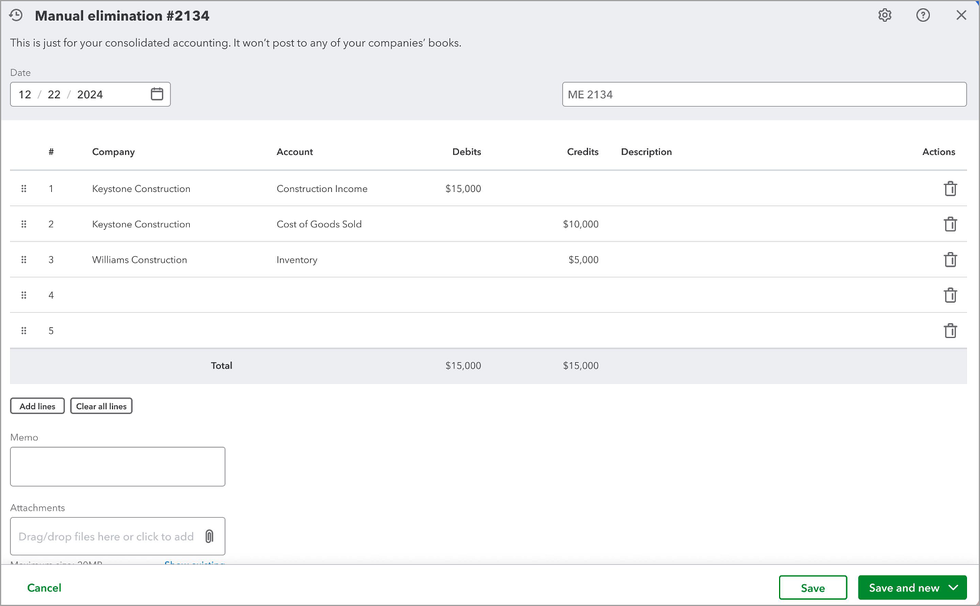
How intercompany works: from the parent company you map a due-to and a due-from account for each pair of companies before the first transaction. The selling company then creates an invoice to an intercompany customer, and a matching bill appears in the receiving company with the amounts and dimensions filled in. The receiving company's AP manager reviews the bill before it posts. Intercompany journal entries let one entry post to every selected company. Intuit says transaction-level eliminations are now generated at the point of recording, while its help center describes eliminating the full balances of accounts used only for intercompany.
Limits: the two elimination descriptions differ, so ask which one applies to your account. Intuit's help pages describe no cross-currency intercompany, mismatch report or multilateral netting.
- You are on QuickBooks and want the parent to manage the mapping
- You want the receiving company to approve each linked bill
- You have entities outside the US or need documented cross-currency handling
- You want a fixed price as you grow: Intuit quotes a custom bundle and charges extra entities, dimensions and users separately
- Users like
- ease of use, time savings and multi-entity features
- Users dislike
- slow report loading and features that feel overwhelming for simple tasks
- Source: G2, 68 reviews
How it works in practice
G2 reviewers rate Intuit Enterprise Suite 4.5 out of 5 from 68 reviews and praise ease of use and time savings. They name slow report loading.
- Starting price
- Quote only (custom bundle after a discovery call); Intuit publishes no list price
- Entities
- Intuit states no maximum; very complex global deployments are discussed with Intuit
- Eliminations
- Transaction-level at recording, per Intuit's release notes
- Setup
- Intuit says 90% of customers go live in under 30 days, based on adoption of one feature (April 2026)
- Included
- HR, payroll, payments, AI data cleanup and guided onboarding per Intuit
- Extra charges
- Additional entities, dimensions and users are charged separately per Intuit's partner discount terms
- Intercompany booking
- Parent maps due-to and due-from accounts per company pair; an intercompany invoice creates a linked bill in the receiving company for approval
- Booking
- Invoice creates a linked bill that the receiver approves
- Price
- Quote only; Intuit publishes no list price
Gravity
Gravity
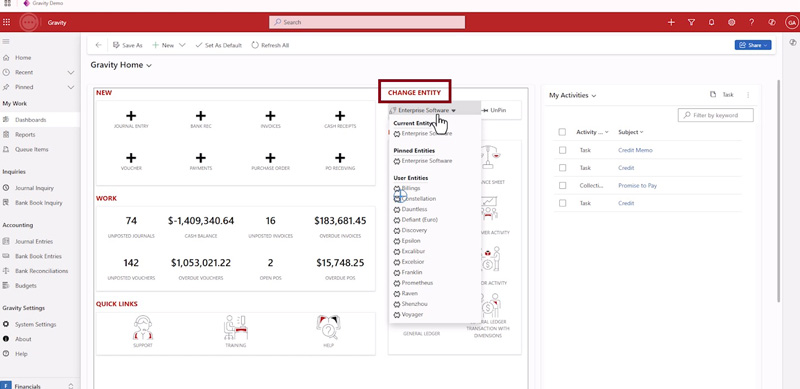
Gravity is a multi-entity accounting system built on Microsoft Power Apps. Several companies live in one database, an admin-authorized user can move between entities without logging out, and the income statement can be run across all entities or by entity group.
Gravity fits a team that enters one bill and splits it across entities in a single database.
Team it fits: a small group or family office on the Microsoft Power Platform that records costs once and allocates them to entities.
How intercompany works: all entities live in one database. You enter a vendor bill, assign each voucher line to a legal entity, and Gravity creates the due-to and due-from entries, according to Gravity's own guide. Allocation groups support percentage-based and statistical splits across companies and dimensions, with recurring schedules. Gravity says eliminations happen in the same database as the originating transaction.
Limits: Gravity's public pages do not state how eliminations work, how exchange differences on intercompany entries are handled, or whether intercompany entries need approval. Multi-currency is a separate module. Implementation is priced separately.
- You split costs across entities from one bill and want a published price
- You already run on the Microsoft Power Platform
- You need the elimination method documented
- You need multi-currency without a separate module
- Users like
- ease of use and responsive support
- Users dislike
- reporting (prebuilt reports time out when switching entities)
- Source: G2, 41 reviews
How it works in practice
G2 reviewers rate Gravity 4.5 out of 5 from 41 reviews and praise ease of use and support. They name reporting, including prebuilt reports that time out when switching entities.
- Starting price
- Starter from $375 per month for the first user, $275 per additional user, $100 per month per 5-entity pack (annual subscription, USD)
- Pricing
- Starter $375/mo first user (includes Power Apps license), $275 each additional user, 5-Pack Multi-Entity Module $100/mo
- Platform
- Built on Microsoft Power Platform
- Intercompany
- One journal entry can distribute costs across entities; guide lists automatic due-to and due-from balancing
- Consolidation
- Income statement across all entities or by entity group with drill-down
- Integrations
- Bill.com, Plaid, Salesforce, Dynamics 365 CRM, open API
- Intercompany booking
- Assign voucher lines to entities and Gravity creates the due-to and due-from entries
- Intercompany pricing
- 5-pack multi-entity module $100 a month
- Booking
- Voucher lines assigned to entities create due-to and due-from entries
- Price
- $375 a month for the first user, $275 per extra user, $100 a month per 5-entity pack
- Eliminations
- Vendor says in the same database; method not documented
SoftLedger
SoftLedger
SoftLedger is a multi-entity general ledger with its own crypto transaction table, so cost basis runs and crypto journals land in the same financial reports as fiat. Its help docs show fair value entries as a manual export and reversing journal.
SoftLedger fits a lean finance team that wants entity-based pricing and mirrored journal lines.
Team it fits: a finance team with a handful of entities that wants a cloud ledger and real-time consolidation without an ERP project.
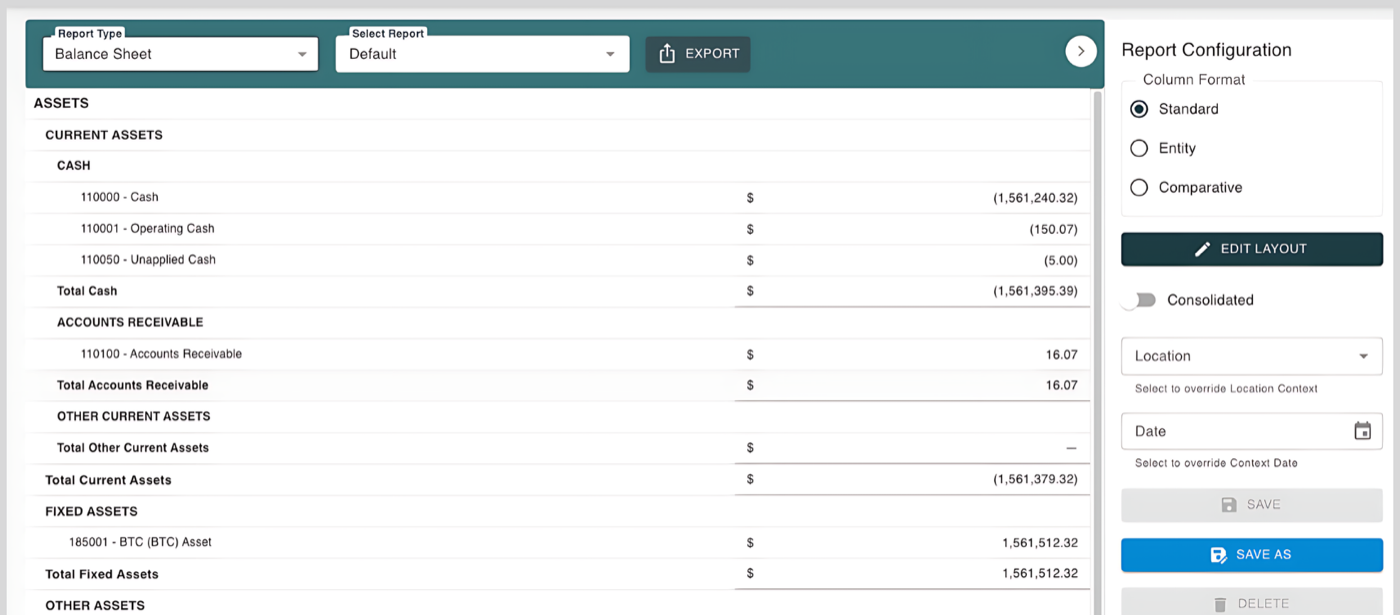
How intercompany works: a journal with a Location and an IC Location creates offsetting lines on both entities' ledgers, using default intercompany accounts set per ledger account. Bills and invoices with an intercompany location generate an intercompany document journal that lands in a drafts list and must be posted by a user. Eliminations are a separate setting under System, applied at the shared parent and shown in an elimination column. When entities report in different currencies, an end-of-period elimination entry trues up exchange-rate differences against a clearing account, and the period will not close without that account.
Limits: SoftLedger's help center describes no matching tool, netting or approval step for intercompany entries. Whether intercompany is included on the Starter plan is not stated on the plan table.
- You want a price tied to entity count on the vendor site
- You accept posting intercompany bill drafts yourself
- You need approvals or matching on intercompany entries
- You have more than 10 entities and a tight budget
- Users like
- ease of use, support and real-time consolidation
- Users dislike
- limited workflow and report customization, occasional intercompany glitches
- Source: G2, 54 reviews
How it works in practice
G2 reviewers rate SoftLedger 4.6 out of 5 from 54 reviews and praise ease of use and support. They name limited workflow and report customization and occasional intercompany glitches.
- Starting price
- Starter $300 a month (up to 3 entities), Standard $750 (up to 10), Plus $1,125 (unlimited), Enterprise custom; billed annually
- Intercompany booking
- A journal with a Location and an IC Location creates mirrored lines; bill and invoice intercompany entries are drafts a user posts
- Intercompany eliminations
- Separate setting applied at the parent; a clearing account trues up exchange-rate differences
- Plans
- Starter $300 a month, up to 3 entities; Standard $750, up to 10; Plus $1,125, unlimited
- Booking
- IC Location on a journal mirrors the lines on both entities
- Eliminations
- Separate switch, applied at the parent
Odoo Accounting
Odoo Accounting
Odoo sells accounting as one app in a modular ERP, priced per user. Its documentation covers bank reconciliation with auto-matching and lock dates, including a Hard Lock date that cannot be reversed.
Odoo fits a group where goods and documents move between companies in one database and eliminations stay manual.
Team it fits: a product-based group that already runs Odoo and wants the counterpart document created in the other company.
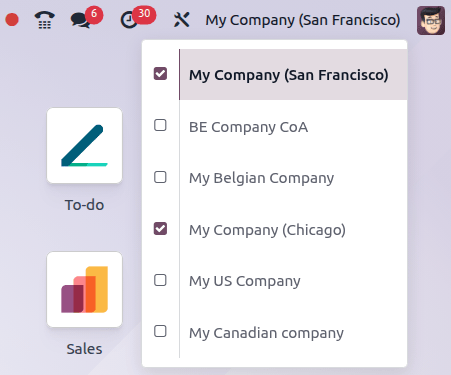
How intercompany works: each company has switches under Inter-Company Transactions. When a company confirms an invoice, a vendor bill is created in the selected company. A confirmed purchase order creates a draft sales order, a confirmed sales order creates a draft purchase order, and stock moves can synchronize. An optional validate setting posts the generated records automatically. The consolidation documentation describes multi-ledger adjustments and currency translation.
Limits: Odoo's documentation describes no due-to and due-from account mapping and no automatic elimination of intercompany balances. Multi-company needs the Custom plan, and enabling it on Standard triggers an upgrade. Odoo lists euro prices only.
- Goods and stock move between your companies and you want documents mirrored
- You already use other Odoo apps
- You need automatic eliminations
- You need a US dollar price: Odoo charges in euros, EUR 44.90 per user per month for the Custom plan that multi-company needs
- Users like
- not available (aggregate summary figure only)
- Users dislike
- not found
- Source: G2, 78 reviews
How it works in practice
G2 reviewers rate Odoo Accounting 4.3 out of 5 from about 78 reviews.
- Starting price
- EUR 24.90 per user per month (Standard) and EUR 44.90 (Custom); One App Free EUR 0; multi-company needs Custom; Odoo lists euro prices only, so no USD price
- Lock dates
- Lock date plus an irreversible Hard Lock date
- Bank feeds
- Plaid in the US and Canada
- QuickBooks import
- Third-party paid importer (EUR 95.70), no official tool found
- Analytic plans
- Plans group analytic accounts such as project or department; applicability Optional, Mandatory or Unavailable per document type; distribution models split automatically
- Period control
- Lock Everything date plus an irreversible Hard Lock date; only Accounting administrators can create exceptions
- Multi-company
- Custom plan; inter-company transactions can auto-create bills and orders
- Reports
- Custom reports through the report editor, which needs developer mode
- Bank sync
- Third-party providers (Plaid for US and Canada); needs an Enterprise subscription
- Fixed assets: depreciation methods
- Straight Line, Declining, and Declining then Straight Line; one depreciation board per asset
- Fixed assets: workflow
- Assets come from vendor bills or asset models; depreciation entries are created in draft and posted automatically, checked once a day; Sell or Dispose generates the gain or loss entries
- Fixed assets: MACRS
- Not native; a third-party US tax-books module lists MACRS at EUR 119.85
- Intercompany booking
- Per-company switches create the counterpart vendor bill, sales order, purchase order or stock move in the other company
- Intercompany eliminations
- Docs describe no automatic elimination of intercompany balances
- Booking
- Counterpart bill, order or stock move created in the other company
- Price
- Custom EUR 44.90 per user per month; One App Free allows multiple companies
- Eliminations
- None described in the documentation
Intercompany matching on top of your ERP
BlackLine
BlackLine
BlackLine is a cloud financial close and consolidation suite with separate modules for task management, account reconciliations, transaction matching, journal entry, reporting and analysis, consolidation and compliance. Its Verity AI layer adds agents such as Verity Prepare for reconciliation prep and Verity Flux for variance analysis.
BlackLine fits a larger group that already runs one or more ERPs and needs matching, netting and settlement across entities.
Team it fits: a corporate accounting team with many entities, several ERPs and a shared services group that settles balances.
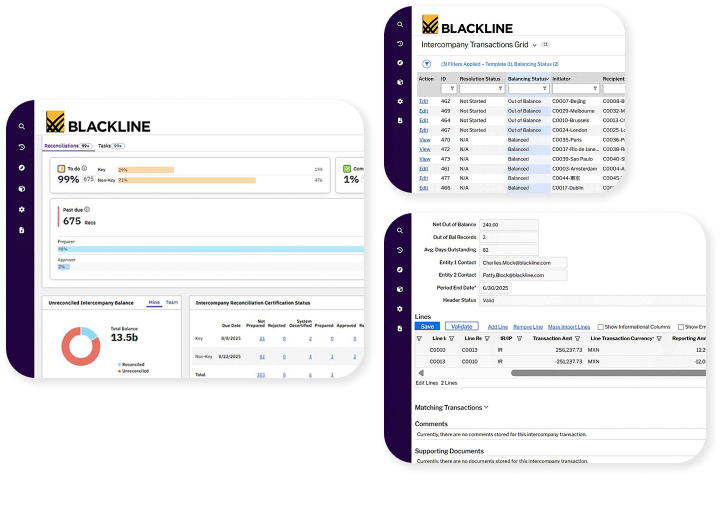
How intercompany works: BlackLine is not a ledger. Its intercompany products sit on top of your ERPs in three parts. Create handles allocations, cross-charges, transfer pricing and invoicing, and applies indirect taxes such as VAT. Balance and Resolve keeps a virtual subledger of intercompany transactions, matches them by rule across entities and currencies, and routes exceptions through approval workflows. Net and Settle runs bilateral or multilateral netting and produces payment instructions in SWIFT and ACH formats. BlackLine also lists intercompany lending and cash pooling.
Limits: BlackLine's intercompany pages do not describe eliminations, which belong to its separately sold Consolidation product. BlackLine publishes no price. Vendr's buyer data puts the median whole-platform contract at $40,125 a year, with a range of $13,154 to $101,000, and says implementation services can equal or exceed the first-year subscription.
- You run several ERPs and need one place to match and net balances
- You settle intercompany balances in cash and want payment instructions generated
- You are looking for a ledger or for eliminations in the same tool
- Your group has fewer than a handful of entities on one ledger
- Users like
- Centralizes close activities and automates reconciliations, cutting manual work
- Users dislike
- Steep learning curve and complex implementation and configuration
- Source: G2, 1,073 reviews
How it works in practice
G2 lists 4 reviews of BlackLine Intercompany, rated 4.4 out of 5, too few to draw a conclusion.
- Starting price
- Price not published (quote only)
- Close modules
- Task Management, Account Reconciliations, Transaction Matching, Journal Entry, Reporting and Analysis, Consolidation
- ERPs named by BlackLine
- SAP, Oracle, NetSuite
- AI
- Verity Prepare drafts reconciliations, Verity Flux supports variance analysis
- Intercompany products
- Create, Balance and Resolve, and Net and Settle sit on top of one or more ERPs
- Intercompany matching
- Rules-based matching in a virtual subledger across entities and currencies
- Role
- Layer on top of one or more ERPs, not a ledger
- Matching
- Rules-based matching in a virtual subledger
- Price
- Quote only
What does intercompany accounting software cost?
Intercompany accounting software costs from $300 a month to quote-only contracts that vendors negotiate by entity and user count. Four tools publish a dollar price: SoftLedger, Gravity, Business Central and Dynamics 365 Finance. Odoo publishes euro prices. Sage Intacct, NetSuite, Acumatica, Intuit Enterprise Suite and BlackLine sell by quote. Implementation services come on top at most of them.
- A few entities on a small budget with a price on the websiteSoftLedger from $300 a month for up to 3 entities, or Gravity from $375 a month
- Microsoft shops that want a per-user priceBusiness Central at $80 or $110 per user per month, or Dynamics 365 Finance at $210
- Intercompany orders between subsidiaries with an elimination runNetSuite OneWorld (quote)
- Several base currencies in one ledgerSage Intacct (quote), plus the paid Consolidation module for eliminations
- QuickBooks team that outgrew one company fileIntuit Enterprise Suite (quote)
- Matching and netting across several ERPsBlackLine (quote)
Month-end intercompany close checklist
Intercompany balances are one of the last items to settle in a close, because they need two entities to agree. Run the same steps every month, whichever tool you pick.
- Entity accountantsPost all intercompany invoices, journals and allocations in both entities Business days 1 to 2
- Entity accountantsCompare due from and due to for every entity pair and list differences Business day 3
- Entity accountantsResolve each difference, such as timing, currency or a missing mirror entry Business days 3 to 4
- ReviewerConfirm every pair agrees and attach the pair-by-pair balance report Business day 5
- Group controllerRun the elimination, review the elimination journal and check the group balance sheet Business day 6
- Group controllerLock the period in every entity Business day 6
The tools above book the entries and, in some cases, eliminate them. None of them is built to show which close task is still waiting for a sign-off. For the full close see our month-end close checklist, the month-end close process and our guide to financial close software. If your ledger is still being chosen, the general ledger software and ERP accounting software guides cover that side.
Our own product tracks the close task, not the entries. A close template can hold a task such as "Intercompany balances confirmed" with a preparer, a reviewer and the evidence each must attach, so the balance report for each pair has an owner and a sign-off.
FAQ
How does an intercompany account work?
An intercompany account works as a receivable or a payable that each entity keeps against the other entity. If Entity A pays a $12,000 invoice for Entity B, A records $12,000 due from B and B records $12,000 due to A. The two balances must agree each month and are eliminated when the group consolidates.
What is the difference between intercompany transactions and eliminations?
An intercompany transaction is the booking between two entities, with an entry on each side. An elimination is the consolidation step that cancels the matching receivable and payable so the group does not show money it owes itself. Sage Intacct and NetSuite run eliminations in their consolidation or close steps, Dynamics 365 Finance uses elimination rules, and Microsoft calls Business Central eliminations a manual process.
Do I need a separate tool to reconcile intercompany balances?
You do not always need a separate tool to reconcile intercompany balances. NetSuite has an Intercompany Reconciliation Report and Business Central has an Intercompany Transactions report. A separate layer such as BlackLine makes sense when several ERPs or many currencies are involved, because it matches balances by rule across systems.
Which tools book both sides of an intercompany entry automatically?
Sage Intacct adds the offsetting entries in each affected entity from one inter-entity journal. Dynamics 365 Finance posts vouchers in both companies from one posting. Business Central creates a matching document in the partner company, and SoftLedger mirrors journal lines across entities, although its bill and invoice entries are drafts that a user posts.
What does intercompany accounting software cost?
Intercompany accounting software costs from $300 a month. SoftLedger starts at $300 a month for up to 3 entities, Gravity at $375 a month, Business Central at $80 per user per month and Dynamics 365 Finance at $210 per user per month. Sage Intacct, NetSuite, Acumatica, Intuit Enterprise Suite and BlackLine sell by quote.
Can a small group handle intercompany in a spreadsheet?
A small group can handle intercompany in a spreadsheet for two or three entities with a few transactions a month, if one person owns the pair-by-pair balance check each close. Once transactions are frequent or entities use different currencies, a ledger that posts both sides removes the most common error, a missing mirror entry.