The best general ledger software for most small finance teams is the cloud accounting package that already holds their books: QuickBooks Online, Xero or Zoho Books. Teams that need dimension reporting, several legal entities or tighter close controls move up to Sage Intacct, Oracle NetSuite or Microsoft Dynamics 365 Business Central, and a micro business with no budget can start on Wave's free plan.
We compared eight tools by what happens inside the ledger, not by how long the feature list is: how the chart of accounts is limited, what a manual journal entry can do, how departments or projects are tracked, whether the tool handles more than one entity, how a past period is locked and what the audit trail records. The text says where a figure comes from a summary or a third party.
- general ledger tools compared
- 8
- show no price in the vendor sources (Sage Intacct and NetSuite are quote-only)
- 2 of 8
- accounts allowed in QuickBooks Online on every plan below Advanced
- 250
Our picks by situation
The best general ledger software for a single company with an outside accountant is usually QuickBooks Online or Xero, and the choice comes down to the controls you need. The picks below name one tool per situation and the limit to check first.
 Best for one company with an outside CPAQuickBooks OnlinePlus at $140 a month includes classes and locations (40 combined). QuickBooks has a closing date with an Exceptions to Closing Date report, and plans below Advanced cap the chart of accounts at 250 accounts.
 Best for lock-date control without per-user feesXeroTwo lock-date types and tracking categories from $27 a month, with no per-user fee on the pricing page. Multi-currency needs the $97 Established plan.
 Best low-cost ledger with a version-compare audit trailZoho BooksTransaction locking per module from the $20 Standard plan, reverse journals with a reverse date and a version-compare audit trail report that only admins can open.
 Best for dimension-heavy reporting at a published priceMicrosoft Dynamics 365 Business CentralTwo global and eight shortcut dimensions on every ledger line, recurring journals with allocations and reversals, from $80 per user per month.
 Best for multi-entity books with entity-level closeSage IntacctDimensions on every line, inter-entity journal lines that balance both sides and a close-books permission that can lock one entity or all. Quote only.
 Best free ledger for a micro businessWaveDouble-entry journal transactions at $0 on Starter. We found no period lock and no audit trail.
 For the review after the ledgerThe Finance LeadNot a ledger. It tracks who reviewed and signed off each close task, with the evidence, once the ledger is chosen.
General ledger software compared
General ledger software costs between $0 a month on Wave Starter and $340 a month on QuickBooks Online Advanced at list rates, while Business Central charges $80 or $110 per user and we found no published price for Sage Intacct or NetSuite. The table orders the tools from free and single-entity to quote-only multi-entity systems. Where a vendor publishes no price, the cell says quote and we don't repeat third-party estimates.
| Tool | Type of tool | What the ledger gives you | Pricing (USD) | G2 rating |
|---|---|---|---|---|
| Wave | Free bookkeeping ledger | Journal transactions, no period lock found | Free; Pro $19/mo | 4.3 (327) |
| Zoho Books | Low-cost cloud accounting | Recurring and reverse journals, lock per module, audit trail report | From $20/mo, billed monthly | 4.4 (327) |
| Xero | Cloud accounting | Two lock-date types, two tracking categories | $27, $59 or $97/mo | 4.4 (1,849) |
| QuickBooks Online | Cloud accounting | Closing date, 250-account cap below Advanced | $38 to $340/mo | 4.0 (3,900) |
 Odoo Accounting | Modular ERP with an accounting app | Analytic plans, Hard Lock date, multi-company on Custom | From EUR 19.90 per user (euros only) | 4.3 (77) |
| Microsoft Dynamics 365 Business Central | Cloud ERP for small and midsize companies | 2 global and 8 shortcut dimensions, recurring journals, manual eliminations | $80 or $110 per user/mo | 4.0 (895) |
| Sage Intacct | Mid-market cloud financials | Dimensions on every line, entity-level close and lock | Quote | 4.3 (4,283) |
 Oracle NetSuite | Cloud ERP with financials | Subsidiary-level period locks, automated elimination journals | Quote | 4.1 (4,831) |
| The Finance Lead Our product | Month-end close checklists | Tracks close tasks, evidence and preparer/reviewer sign-off | Team $39/month (up to 8 team members), Plus $79/month (no member limit, read-only MCP server); card required at checkout | No reviews yet |
Prices checked on vendor pages on November 4, 2026; list rates, before introductory discounts. Odoo lists euro prices only. G2 ratings and counts are summary figures and vary by snapshot.
What is general ledger software?
General ledger software is the part of an accounting system that records every financial transaction as balanced debits and credits against a chart of accounts and produces the trial balance that financial statements are built from. Fixed assets add a subledger of their own, and our guide to fixed asset accounting software compares nine tools by register and depreciation methods. In practice nobody buys a ledger on its own. Invoicing, bills, bank feeds and reports post into it, and the ledger is where a controller checks that the numbers agree and then locks the period.
What does a general ledger do in accounting?
A general ledger does three jobs: it stores every transaction as balanced debits and credits, it groups the lines by account and it feeds the trial balance and the financial statements. It doesn't decide whether a transaction is correct, so a review step still has to happen before the period is locked.
Four pieces decide how useful a ledger is to a finance team. The chart of accounts is the list of accounts that transactions post to. A journal entry is a manual posting for things no invoice or bill creates, such as accruals and corrections. Dimensions (called classes, locations, tracking categories or analytic plans, depending on the tool) tag each line with a department, project or entity. The period close controls who can still post into a month after it has been reviewed. The tools below differ most on those four, which is why we judge them there.
How we compared general ledger software
We read the published vendor pricing, feature and help pages, used third-party help where a vendor page was not available, and took review scores from G2 summary figures. Seven mechanics decide whether a ledger holds up at month end.
- We check the chart of accounts for its structure, any account cap and how a chart is imported.
- We check manual journal entries for attachments, recurring and reversing entries, allocations and approvals.
- We check dimensions for classes, departments or projects on each line and for the plan that unlocks them.
- We check entities and currencies for more than one company in one ledger, intercompany lines and foreign currency.
- We check the period close for a lock date or close action and for who can override it.
- We check the audit trail for what is logged, who can see it and which plan includes it.
- We check bank feeds for how bank lines reach the ledger for reconciliation.
"Not found" in this article means we found no statement on the published vendor pages, not that the feature is missing. Where a cell rests on a third party or a user community, the text says so.
Single-entity ledgers for small teams
If one company, one outside accountant and a few people in the books describe your team, the four tools in this group are enough. They differ in the controls around the ledger: whether a closed period stays closed, how a department is tagged and what the history of a change looks like.
Wave
Wave
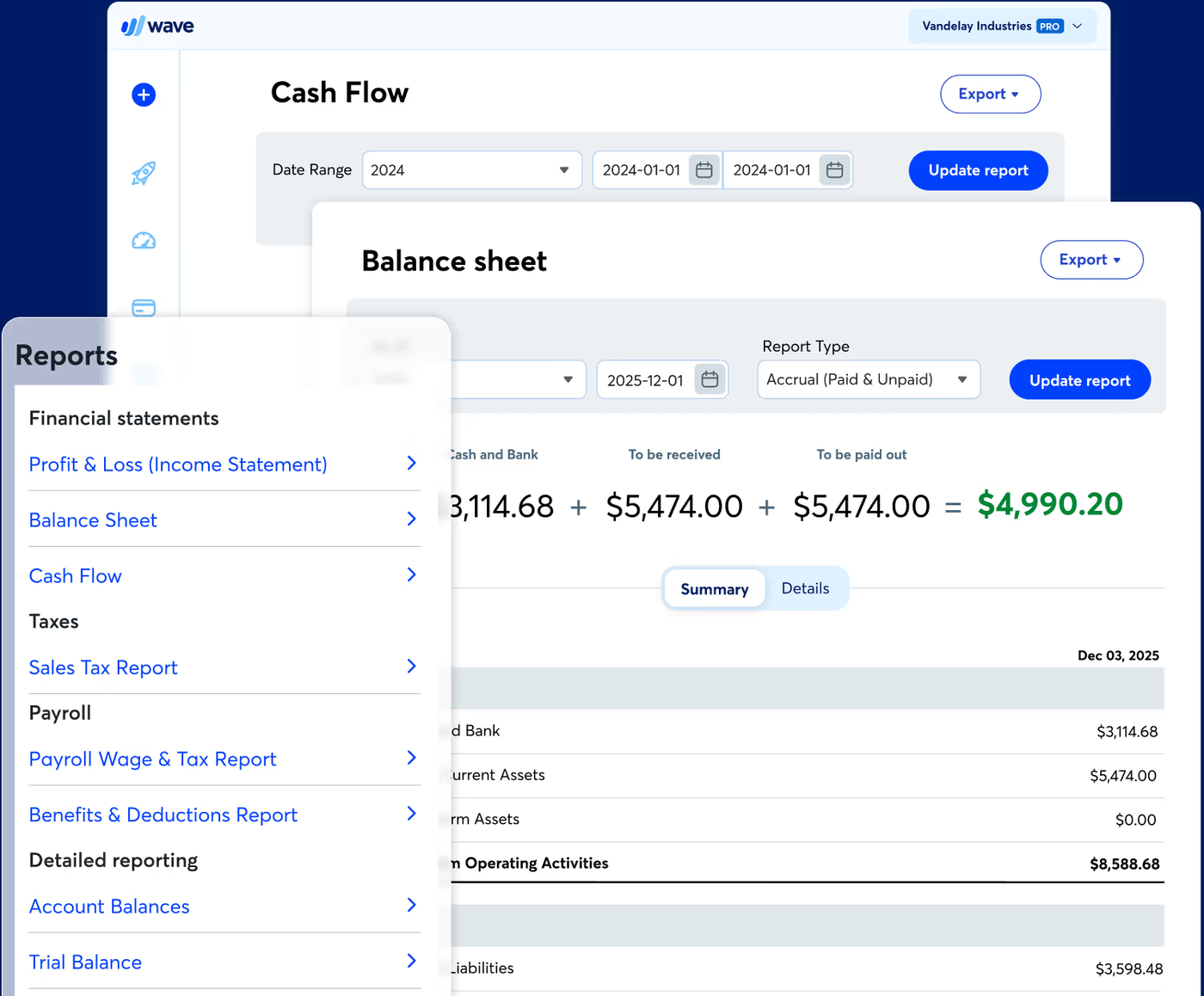
Wave's Starter plan is free and includes bookkeeping records, invoices and bills; automatic bank import and multiple users need Pro. Its ledger takes journal transactions and tracks foreign currency, but we found no period lock, audit trail, dimensions or multi-entity.
Wave fits a freelancer or micro business that wants real double-entry bookkeeping without a subscription and can work without a period lock.
What posting looks like: a journal transaction is recorded under Accounting, then Transactions, and it appears as one transaction whose debits and credits must match. Wave Connect supports bulk journal upload. We found no recurring or reversing journals, approvals or attachments on journals. Accounts are added by type, name and description, and Wave doesn't allow custom account types or subaccounts.
Closing a period: we found no lock function. A Wave community reply says there's no function to lock the balances of specific periods and no need to close the year, so treat past months as editable and keep review in a checklist.
Foreign currency and banks: foreign-currency invoices and bills are tracked in the business currency with gain or loss recorded, and Wave recommends periodic revaluation. Automatic bank import runs on Pro through Plaid and not all institutions are covered.
- you are a freelancer or micro business that wants real double-entry bookkeeping without a subscription
- you take card payments through your invoices and accept the processing fees
- you need a closing date or audit trail: we found neither on the published Wave pages
- you run more than one company: each business needs its own Wave account and Pro subscription
- Users like
- ease of use, free core features and simple invoicing
- Users dislike
- bank connection problems, limited support on the free plan and payment fees
- Source: G2, 327 reviews
Entities and API
Each business needs its own Wave account and Pro subscription, so there's no multi-entity setup. Wave describes a GraphQL API that it calls a work in progress, with endpoints for invoices, vendors, accounts and currencies.
- Starting price
- Starter $0; Pro $19 per month or $190 per year; card payments from 2.9% + $0.60 (Amex 3.4% + $0.60)
- Chart of accounts
- Add accounts by type, name and description; no subaccounts
- Journals
- Journal transaction under Accounting > Transactions; must balance; bulk upload through Wave Connect
- Foreign currency
- Foreign-currency invoices and bills tracked with gain or loss recorded; plan gate not found
- Period control
- No lock function found; a Wave community reply says there is none
- Bank feeds
- Automatic import on Pro via Plaid; not all institutions
- Dimensions
- Not found
- Period close
- No lock found
- Audit trail
- Not found
Zoho Books
Zoho Books
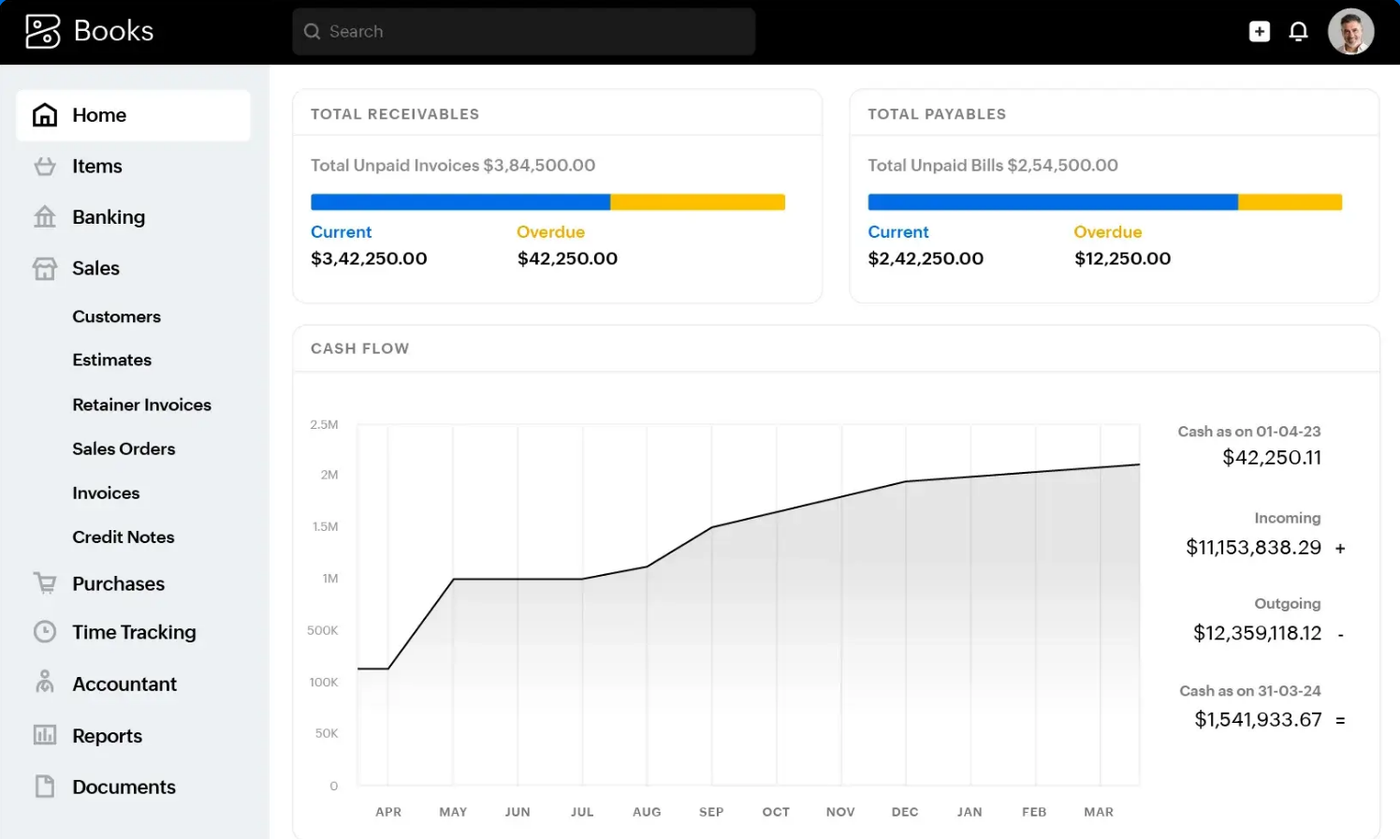
Zoho Books prices per organization with users included (Standard 3, Professional 5, Premium and Elite 10, Ultimate 15). Its ledger offers manual, recurring and reversing journals, lock dates per module and an admin-only audit trail report; classes and consolidation were not documented in the published vendor pages.
Zoho Books fits a small team that wants lock dates, reversing journals and an audit trail report at the lowest published monthly price in this list.
What posting looks like: manual journals sit under Accountant and can carry file attachments. Recurring journal profiles generate child journals as drafts or published entries, depending on a setting, and a reverse journal takes a reverse date and can optionally be published only on that date. Approvals run up to 10 levels but are early access through support.
Closing a period: transaction locking starts on Standard and can lock one module or all of them, with a reason. Entries dated exactly on the lock date stay editable, so Zoho's own guidance is to set the lock to the day after the last period end. Admins can unlock or partially unlock a date range. We found no password option.
Audit trail: the Activity Logs & Audit Trail report keeps a version for each change and lets you compare two versions with changes highlighted. Only admins can view it. We found no plan gate or retention period.
- you want a QuickBooks-style ledger at a lower and more predictable price, with users included in the plan
- you already run Zoho apps and want accounting in the same suite
- you need multi-entity consolidation: we found no consolidation feature on the published vendor pages
- you need approvals on journals today: Zoho lists them as early access through support
- Users like
- invoicing tools, cloud access and ease of use
- Users dislike
- limited customization and advanced analytics, subscription cost and slow support
- Source: G2, 327 reviews
Banks and API
Bank feeds start on Standard and keep up to a year of history through Plaid where available, and Capterra reviewers flag unreliable bank connectivity in review summaries. API access starts on Standard and includes endpoints for journals and transaction locking.
- Starting price
- Free $0; Standard $20, Professional $50, Premium $70, Elite $150, Ultimate $275 per month billed monthly (annual billing $15, $40, $60, $120, $240); extra users $3/month
- Transaction lock
- By module or all at once; transactions dated on the lock date can still be edited
- Feed history
- Up to one year via Plaid, subject to availability (Zoho blog, February 2, 2026); manual import of CSV, TSV, XLS, OFX, QIF and CAMT.053
- Users included
- Standard 3, Professional 5, Premium and Elite 10, Ultimate 15; extra users $3/month
- Journals
- Manual, recurring profiles and reverse journals with a reverse date; approvals (up to 10 levels) by request through support
- Period control
- Transaction locking from Standard, per module or all; admins can unlock; no password
- Audit trail
- Activity Logs & Audit Trail report with version compare; admin only
- Multi-currency
- From Professional
- Chart of accounts
- Optional unique codes up to 50 characters; CSV import up to 10 MB
- Dimensions
- Custom fields from Standard; classes not found
- Entities
- Separate organizations; consolidation not found
Xero
Xero
Xero is a cloud accounting ledger priced per plan with no per-user fee listed. Lock dates can only be set by the Advisor role, tracking categories carry two active dimensions, and multi-currency sits on the top Established plan.
Xero fits a team with several collaborators and an outside advisor that wants two kinds of lock date without paying per user.
What posting looks like: manual journals carry a narration and can auto-reverse on a date you choose. Repeating manual journals exist, but a community comment from December 2025 says auto-reverse isn't available on repeating ones, so test that before you rely on it for accruals. We found no native approval workflow for journals, and ApprovalMax, a third-party app, adds one.
Closing a period: Xero has two lock types. A lock date blocks everyone except the Advisor role, and an Advisor lock date blocks everyone including Advisors, according to a Dext help article. Only the Advisor role can set or change them. Community requests note that Advisors can't post a month-end journal after a lock without moving the date.
Dimensions and audit trail: tracking categories give two active dimensions with around 100 options each, according to community and third-party sources rather than an official page. History and Notes records changes to a record, and users describe the detail as limited.
- you have several collaborators and an outside advisor and want a lock date they cannot all override
- you want a published per-plan price with no per-user fee listed on the pricing page
- bank reconciliation matters: auto-reconcile is a $5 a month add-on on Early and included on Growing and Established
- you need multi-entity consolidation: we found no native feature and each organization is a separate ledger
- you need a detailed change history: Xero's History and Notes is described by users as limited
- Users like
- ease of use, invoicing and bank reconciliation
- Users dislike
- price increases, limited reporting customization and email-based support
- Source: G2, 1,849 reviews
Banks and payroll
Bank feeds are on every plan. The auto-reconcile feature costs $5 a month on Early and is included on Growing and Established. Payroll in the US is powered by Gusto.
- Starting price
- Early $27/mo, Growing $59/mo, Established $97/mo at US list rates (pricing page on 2026-11-04 showed introductory prices for the first 3 months)
- Lock dates
- A lock date blocks everyone except Advisors; an Advisor lock date blocks everyone including Advisors (per third-party help)
- Payroll
- Add-on, $36 per month plus $6 per employee
- Tracking
- Two active tracking categories (community and third-party sources, not an official page)
- Multi-currency
- Established plan only
- Auto-reconcile
- $5/mo add-on on Early; included on Growing and Established
- Journals
- Manual journals with auto-reversing date; native approval workflow not found
- Chart of accounts
- Codes up to 10 characters; CSV import; numeric cap not found
- Dimensions
- Two active tracking categories (third-party source)
- Entities
- Separate organizations; consolidation not found
QuickBooks Online
QuickBooks Online
QuickBooks Online is Intuit's cloud accounting ledger. The chart of accounts is capped at 250 accounts on every plan except Advanced, classes and locations are capped at 40 combined on Plus, and a closing date with an Exceptions to Closing Date report controls past periods.
QuickBooks Online fits a single company whose accountant already works in it and whose chart of accounts stays under 250 accounts.
What posting looks like: manual journal entries take a memo and attachments. Reversal is a manual reverse action that creates a new balancing entry, and we found no native auto-reverse date. One third-party guide describes recurring journals through a Make recurring button, which we could not confirm in Intuit's documentation. We found no approval workflow for journals. Bill approvals are separate and need Bill Pay Elite or Advanced.
Limits that bite: Simple Start, Essentials and Plus cap the chart of accounts at 250 accounts, and Advanced is unlimited, according to Intuit's usage limits page. Classes and locations aren't on Simple Start or Essentials, are capped at 40 combined on Plus and are unlimited on Advanced.
Closing a period: the closing date can carry a password, and only a primary or company admin can change either. Entries changed after the date show up in the Exceptions to Closing Date report. The date doesn't roll forward by itself, so someone has to move it each month. The audit log is admin only, can't be turned off and keeps two years of data per Intuit's help summary.
- your accountant or bookkeeper already runs the books in QuickBooks
- you have one company and need classes or locations for a handful of departments (Plus or Advanced)
- you want a published price and a ledger most CPAs know
- you run more than one legal entity: we found no native multi-entity or intercompany feature
- you need an approval workflow for manual journal entries: we found none, and bill approvals need Bill Pay Elite or Advanced
- Users like
- ease of use, cloud access and integrations
- Users dislike
- cost and repeated price increases, support quality and reports that need customization
- Source: G2, 3,900 reviews
Banks and Advanced extras
Bank connections are on every plan and reconciliation happens inside QuickBooks. Advanced adds custom user permissions, workflow automation and batch invoicing.
- Starting price
- Simple Start $38/mo; Essentials $85/mo; Plus $140/mo; Advanced $340/mo at US list rates (pricing page on 2026-11-04 showed 50% off for 3 months)
- Users per plan
- Simple Start 1, Essentials 3, Plus 5, Advanced 25 (plus accountant seats)
- Period control
- Closing date with optional password; only admins can change it
- Chart of accounts
- 250 accounts below Advanced; unlimited on Advanced
- Classes and locations
- Not on Simple Start or Essentials; 40 combined on Plus; unlimited on Advanced
- Audit log
- Admin only, cannot be turned off, two-year availability per Intuit help
- Journals
- Manual entries with memo and attachments; reverse action creates a new entry
- Dimensions
- Classes and locations, 40 combined on Plus
- Entities
- No native multi-entity found
- Users
- 1, 3, 5 or 25 by plan
Ledgers with dimensions for growing teams
When the question changes from "is the ledger correct" to "what did each department or project spend", dimensions matter more than the chart of accounts. The two tools in this group put analytic tags on every line and keep the ledger readable without a new account per department.
Odoo Accounting
Odoo Accounting
Odoo sells accounting as one app in a modular ERP, priced per user. Its documentation covers bank reconciliation with auto-matching and lock dates, including a Hard Lock date that cannot be reversed.
Odoo Accounting fits a company that already runs, or plans to run, other Odoo apps and wants analytic plans on the ledger without a separate system.
What posting looks like: miscellaneous journal entries handle manual postings, and a forum post describes a Reverse Automatically option with a reversal date, which we could not confirm on Odoo's own pages. We found no recurring journal feature, approval workflow or attachment detail in the published official documentation. Allocation works through analytic distribution models that split a line across analytic accounts automatically.
Dimensions: analytic plans group analytic accounts such as projects or departments, and each plan can be Optional, Mandatory or Unavailable by document type, account prefix, product category or company. A Mandatory plan blocks confirming an entry that lacks an analytic account from that plan.
Closing a period: a Lock Everything date blocks changes and new entries on or before it. A Hard Lock date can't be reversed. Only users with Administrator rights in the Accounting app can create exceptions, for themselves or everyone, for a set time and with an optional reason, and the exceptions are logged in the chatter of the company record.
- you want accounting, inventory and other business apps in one system and have someone to configure it
- you want the option to self-host or to customize the system
- you want a published USD price: Odoo lists euro prices only
- you want a ready-made US accounting setup with an official QuickBooks import: we found none
- Users like
- not available (aggregate summary figure only)
- Users dislike
- not found
- Source: G2, 77 reviews
Price, banks and reports
Odoo lists euro prices only, so we give no dollar price. Bank synchronization uses third-party providers, lists Plaid for the US and Canada and needs an Enterprise subscription. Custom reports go through a report editor that requires developer mode. Partner blogs, which aren't neutral, estimate 3 to 8 weeks for an accounting-focused small setup.
- Starting price
- EUR 19.90 per user per month (Standard) and EUR 35.90 (Custom); One App Free EUR 0; multi-company needs Custom; Odoo lists euro prices only, so no USD price
- Lock dates
- Lock date plus an irreversible Hard Lock date
- Analytic plans
- Plans group analytic accounts such as project or department; applicability Optional, Mandatory or Unavailable per document type; distribution models split automatically
- Period control
- Lock Everything date plus an irreversible Hard Lock date; only Accounting administrators can create exceptions
- Multi-company
- Custom plan; inter-company transactions can auto-create bills and orders
- Reports
- Custom reports through the report editor, which needs developer mode
- Bank sync
- Third-party providers (Plaid for US and Canada); needs an Enterprise subscription
- Chart of accounts
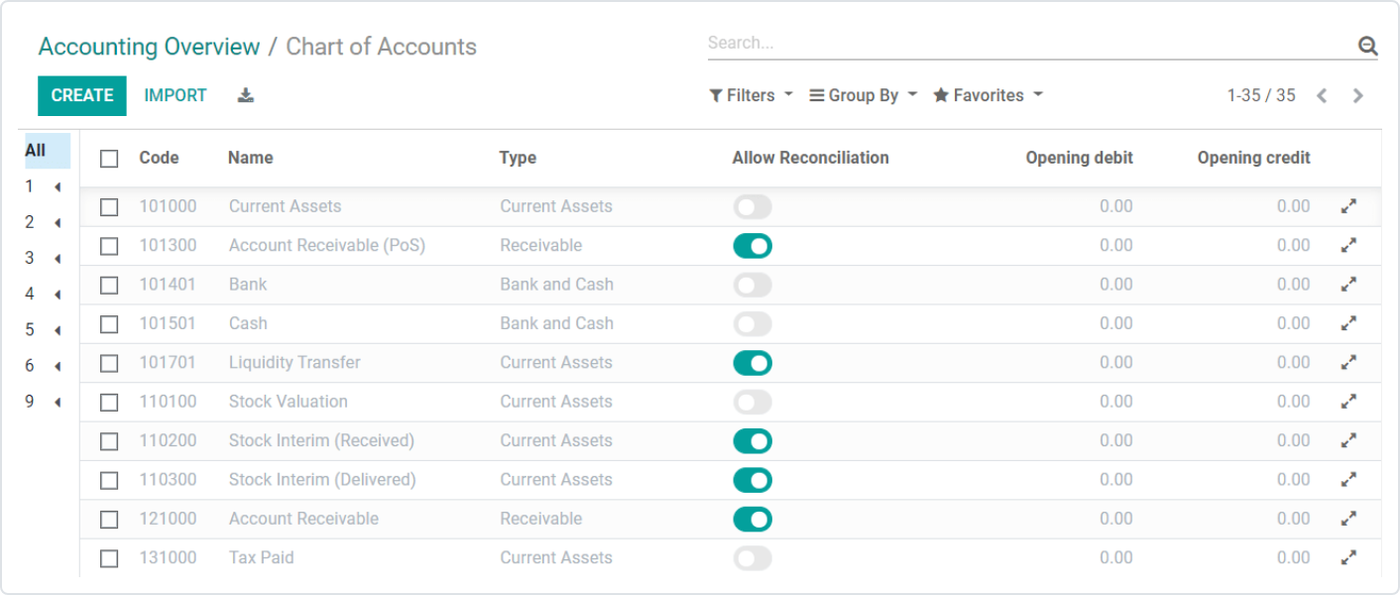
- Code and name; groups assigned by code prefix; localization installs a preconfigured chart
- Dimensions
- Analytic plans, Optional, Mandatory or Unavailable
- Entities
- Multi-company on Custom; inter-company transactions can auto-create bills and orders
- Audit trail
- Lock exceptions logged; dedicated audit log not found
Microsoft Dynamics 365 Business Central
Microsoft Dynamics 365 Business Central
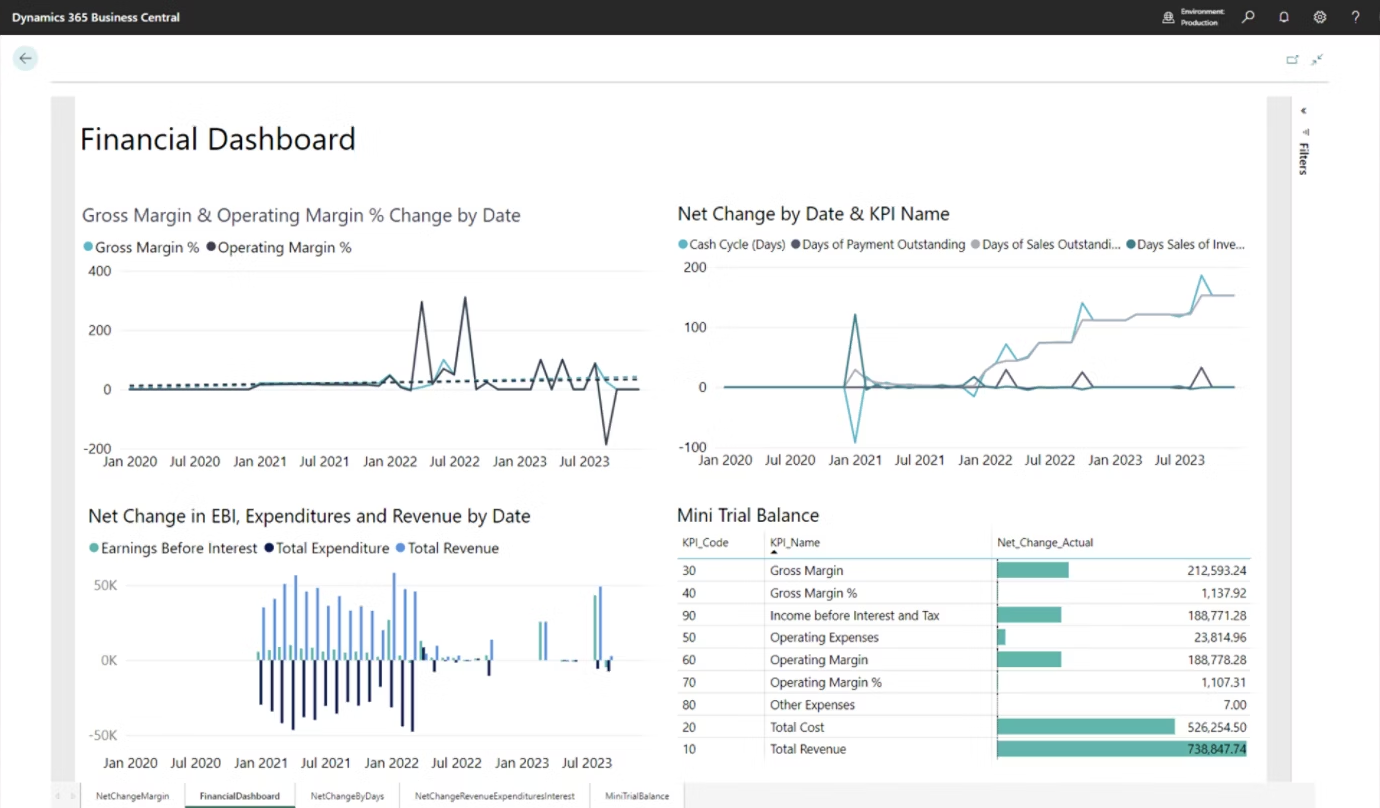
Business Central is Microsoft's cloud ERP with a general ledger, dimension-based analysis, bank reconciliation and multi-company consolidation, tied closely to Excel, Outlook, Teams and Power BI. It is sold and supported through Microsoft partners, so implementation is a project rather than a self-serve signup.
Business Central fits a small or midsize company that wants a documented dimension model and recurring journals with allocations, and can budget for a Microsoft partner.
What posting looks like: general journals use templates and batches. Recurring journals offer Fixed, Variable and Balance methods, reversing variants of each and Balance by Dimension, with a frequency set by a date formula, an expiration date and allocations by percentage on the lines. Reverse Transaction on a posted entry works once per entry.
Dimensions: every ledger entry can carry two global dimensions, which act as filters, and eight shortcut dimensions that appear as fields in journals and ledgers. Default dimensions per account, Code Mandatory rules and blocked dimension combinations enforce the model. Microsoft warns that changing global or shortcut dimensions after posting rewrites posted entries and can lock tables.
Closing a period: accounting periods only matter for closing the income statement. Posting is controlled by Allow Posting From and To dates in General Ledger Setup and per user. Close Year marks periods as closed and date locked and can't be reopened, but the documentation says posting into a closed year is still allowed within the allowed posting range, so the posting dates are the real control.
- You report by department, project or entity and want dimensions on every journal and document line instead of a sprawling chart of accounts.
- Your team already lives in Excel, Outlook and Teams, and you have a partner budget for implementation and training.
- You need a self-serve tool live in days with no partner, or you only need bookkeeping and invoicing that QuickBooks already covers.
- You expect hard period close and fully automated consolidation eliminations out of the box (periods are controlled by posting-date ranges and eliminations are manual).
- Users like
- ease of use and customization, Microsoft integration and financial control
- Users dislike
- steep learning curve, missing features that need paid add-ons and license cost for smaller companies
- Source: G2, 895 reviews
Reports, banks and rollout
Financial reports are built from row and column definitions without a developer. Microsoft documents a Yodlee bank feed for the US and Canada but says it's looking at offering it again, so check availability. Partner blogs estimate 2 to 3 months for a simple single-entity finance rollout, which is a vendor-biased figure and not Microsoft's.
- Starting price
- Essentials $80, Premium $110, Team Members $8 per user per month, paid yearly (USD, informational; bought through Microsoft or a partner)
- Billing term
- Paid yearly, per user per month
- Cheapest seat
- Team Members at $8 per user per month with limited access (read data, approve workflows, update select information)
- Dimensions
- 2 global and 8 shortcut dimensions
- Recurring journals
- Fixed, Variable, Balance, reversing variants and Balance by Dimension; allocations by percentage
- Period control
- Allow Posting From/To dates per company and per user; closing a year does not stop posting into it
- Consolidation
- Container company; eliminations are manual journal lines
- Audit
- Change Log for chosen tables; Microsoft advises against logging ledger entries
- Chart of accounts
- Posting, Heading, Total and Begin/End-Total accounts; standard chart included
- Entities
- Consolidation into a container company; eliminations are manual journal lines
- Audit trail
- Change Log for chosen tables; Microsoft advises against logging ledger entries
Multi-entity financial systems
Two legal entities that lend to each other change what a ledger has to do. Intercompany balances, consolidation and a close that can lock one entity without locking the rest are where the small-business ledgers above stop and the two systems below begin.
Sage Intacct
Sage Intacct
Sage Intacct is a cloud financial system for scaling and mid-sized companies. Entities share one login, reporting runs on dimensions such as location and department, and books close period by period so nothing can be posted into an older period.
Sage Intacct fits a finance team with several entities and departments that needs dimension reporting and a close it can lock per entity.
What posting looks like: a journal entry can be posted, saved as a draft or submitted for approval if approvals are enabled. It must balance to post, accepts attachments, and line allocations spread amounts across departments and locations. An optional reversal date creates the automatic reversal, and recurring entries run on a schedule with an optional reversing schedule.
Dimensions and entities: every line can carry standard dimensions such as location, department, project, customer, vendor, employee and item, plus user-defined dimensions. In a shared multi-entity company, an inter-entity journal line picks a source and target entity and Intacct creates the balancing entries in both entities' journals. Consolidation and eliminations belong to a separate Global Consolidations module, according to Sage's datasheet and partner sources.
Closing a period: a user with the Close books permission closes books to the end of a selected period, which blocks postings dated earlier in every application. AP, AR, Expenses and Cash Management can then be reopened individually, and closed statutory periods can be locked so they can't be reopened. At the top level you can close or lock all entities, one entity or an entity group. The Standard Audit Trail logs creating, modifying, deleting and printing, per record and company-wide through an Audit History report.
- you run several entities or need reporting by department and location that QuickBooks classes cannot give you
- you want a controlled close with books that cannot be posted to once closed
- you are a small team on a small budget: we found no published price, so budget for a quote and a partner-led implementation
- you need consolidation on day one: it is a separate module, so confirm what your quote includes
- Users like
- ease of use and reporting
- Users dislike
- steep learning curve, limited customization and missing features
- Source: G2, 4,283 reviews
Price and bank feeds
Sage publishes no plan names or prices. Bank feeds need Cash Management and come in three tiers: standard, premium through AccessPay with bank and AccessPay fees, and custom through SIG with a Sage fee.
- Starting price
- Quote only; Sage publishes no plan names or prices
- Dimensions
- Standard plus user-defined; cap not found
- Journals
- Draft, submit for approval, attachments, allocations and automatic reversal
- Period control
- Close books by period with a Close books permission; closed statutory periods can be locked
- Entities
- Shared multi-entity company; consolidation in a separate module
- Audit trail
- Standard Audit Trail with Audit History report
- Chart of accounts
- Single add or CSV import; account cap not found
Oracle NetSuite
Oracle NetSuite
NetSuite is a cloud ERP: financials, inventory, order management and multi-subsidiary accounting in OneWorld. Accounting periods can be locked per subsidiary, and a separate permission lets selected users override a locked period.
NetSuite fits a growing group with subsidiaries and foreign currencies that needs intercompany journals and elimination handled in the ledger, and can fund a long implementation.
What posting looks like: journal entries come from the UI (up to 1,000 lines), a CSV import or a copy of an existing entry. A reversal date creates a reversing entry that stays linked to the original and uses its exchange rate. Recurring entries use memorized transactions. Approval runs either through a Require Approvals on Journal Entries preference or a SuiteFlow workflow.
Entities: in OneWorld, subsidiaries are the primary classification. Intercompany journal entries post between two subsidiaries, advanced intercompany journals allow several receiving subsidiaries with Auto Balance, and Automated Intercompany Management generates elimination journals during period close. Departments, Classes and Locations come with custom segments.
Closing a period: accounting periods can be locked to AP, AR and payroll and to GL-impacting transactions as a pre-close step in a Period Close Checklist, then closed. A closed period accepts no new posting transactions or GL-impacting edits. In OneWorld the lock is per subsidiary, set by users with period-close permission at the parent level. A separate Override Period Restrictions permission lets selected users post into a locked period. System Notes record changes to period lock status.
- you are outgrowing QuickBooks on entities or currencies and want one ERP for finance and operations
- you need period locks and role-based separation of duties for audit
- you are a small team that needs a ledger and a close checklist: a full OneWorld rollout is a long project
- you need a published price to compare: we found none
- Users like
- ease of use for reporting and navigation, customization
- Users dislike
- learning curve and outdated interface
- Source: G2, 4,831 reviews
Price and open questions
Oracle publishes no list prices. Third-party estimates conflict, so we don't quote them. Sources disagree on the subsidiary limit and the number of supported currencies, so confirm both in a demo. Groups that outgrow these tools can compare larger systems in our guide to enterprise accounting software.
- Starting price
- Quote only; NetSuite publishes no list prices
- Period lock
- Per subsidiary in OneWorld; Override Period Restrictions permission
- Journals
- 1,000 lines per entry; reversal date links the reversal to the original; approval by preference or SuiteFlow workflow
- Period control
- Lock AP, AR and GL postings per period, per subsidiary in OneWorld; Override Period Restrictions permission
- Entities
- OneWorld subsidiaries with automated elimination journals
- Classifications
- Departments, Classes and Locations plus custom segments
- Audit
- System Notes record period lock changes; record-level coverage not separately verified
- Chart of accounts
- Optional account numbers up to 60 characters; CSV import
- Dimensions
- Departments, Classes, Locations and custom segments
- Audit trail
- System Notes on period locks; wider coverage not separately verified
How a journal entry moves through each ledger
A journal entry for a month-end accrual shows where the tools differ. Someone drafts the entry, someone else approves it, the entry reverses on the first day of the next period and the month is locked. The three steps below show which tools own each one.
- Step 1Post the entry
- QuickBooks Online
- Zoho Books
- Microsoft Dynamics 365 Business Central
Breaks when a recurring accrual is posted twice because nobody knows whether the template already ran - Step 2Approve and reverse
- Sage Intacct
- Oracle NetSuite
- Zoho Books
Breaks when an accrual is approved but the reversal date is blank, so the expense sits in two periods - Step 3Lock the period
- Xero
- Odoo Accounting
- Oracle NetSuite
Breaks when the lock date is set but an admin moves it back and nobody records why - After the lockReview and sign off
- The Finance Lead
Tracks who prepared and who reviewed each ledger task, and where the evidence sits
How do you lock a closed period in accounting software?
You lock a closed period by setting a lock date, closing date or period status in the ledger, so that postings dated before it are blocked for most users. QuickBooks Online uses a closing date with an optional password, Zoho Books locks transactions per module, Xero has a lock date and an Advisor lock date, and NetSuite locks accounting periods per subsidiary. A lock only helps if someone owns the override: most tools in this list let an admin or advisor move the date, so record who changed it and why. Odoo's Hard Lock and Sage Intacct's statutory lock are the exceptions that can't be reopened.
The ledger mechanics that separate these tools
The table compares the five mechanics that differ most. Read it as a floor, not a score.
| Tool | Chart of accounts | Dimensions | Multiple entities | Period close | Audit trail |
|---|---|---|---|---|---|
| Wave | Types only, no subaccounts | Not found | Separate accounts | No lock found | Not found |
| Zoho Books | Optional codes, CSV import | Custom fields; classes not found | Separate organizations | Lock per module | Version-compare report, admin only |
| Xero | Codes, CSV import | Two tracking categories (community sources) | Separate organizations | Two lock-date types (third-party help) | Limited per users |
| QuickBooks Online | 250 accounts below Advanced | 40 classes and locations on Plus | Not found | Closing date with password | Admin only, two years |
| Odoo Accounting | Code prefix groups | Analytic plans | Multi-company on Custom | Lock and Hard Lock dates | Lock exceptions logged |
| Business Central | Posting and total accounts | 2 global, 8 shortcut | Container company, manual eliminations | Posting date ranges | Change Log for chosen tables |
| Sage Intacct | CSV import | Standard plus user-defined | Shared company, inter-entity lines | Close books and statutory lock | Standard Audit Trail |
| Oracle NetSuite | Optional numbers, CSV import | Departments, Classes, Locations, segments | OneWorld subsidiaries | Period lock per subsidiary | System Notes |
"Not found" means we found no statement on the published vendor pages. Vendors' own demos settle each cell, and a trial with your own chart of accounts settles it faster.
How to choose general ledger software
To choose general ledger software, start with the control that failed your last audit or your last close, not with the feature list. The table maps common needs to the smallest tool that covers them, and it answers three questions: how big the company is, whether you need several entities or currencies and whether you want a ledger inside an accounting package or inside an ERP.
- One company, one accountant, no budgetWave on the free plan, knowing that we found no period lock or audit trail
- One company that needs a lock date and an outside CPAQuickBooks Online Plus or Xero, and check the 250-account cap or the two tracking categories first
- Lowest monthly price with locking and an audit trail reportZoho Books Standard or Professional, and ask support about journal approvals
- Departments or projects on every line without new accountsBusiness Central at $80 per user or Odoo Accounting with analytic plans
- Foreign currency on a small ledgerXero Established or Zoho Books Professional; both gate multi-currency by plan
- Several legal entities with intercompany linesSage Intacct or NetSuite OneWorld, with a demo that runs your intercompany case
Company size sets the first filter. A solo owner or micro business can run on Wave or a single QuickBooks Online company, while an accounting team of 2 to 8 people usually needs lock dates and separate preparer and reviewer roles, which puts QuickBooks Online Plus (5 users), Xero and Zoho Books Professional (5 users) on the shortlist. Teams that report by department or entity outgrow those and look at Business Central, Sage Intacct or NetSuite.
Multi-entity and multi-currency needs narrow the list fast. Wave, Zoho Books, Xero and QuickBooks Online run one organization per ledger and we found no native consolidation in them, Odoo needs its Custom plan for multi-company, and Sage Intacct and NetSuite document inter-entity and intercompany journals.
A standalone ledger is rarely the right choice. The tools here sit inside accounting packages or ERPs rather than selling a ledger alone, so the real choice is accounting package or ERP: pick the package while one entity and a handful of dimensions cover your reporting, and the ERP when they stop doing so.
Three checks settle most decisions.
- Check how many entities post to the books. Anything above one makes Wave, Zoho Books, Xero and QuickBooks Online the wrong shortlist, because each of them runs one organization or company file per ledger.
- Check who may post into a closed month. If the answer is "only the controller, with a reason", compare lock mechanics first: password, role, per-module lock or posting date range.
- Check how long you can spend on the switch. We found no vendor-stated setup time for the self-serve tools, while Business Central is sold through Microsoft or its partners and the multi-entity systems are usually partner projects. A clean chart of accounts makes any migration easier.
Where the month-end review fits
None of these ledgers prove that a second person reviewed the accruals, the bank reconciliations and the intercompany balances before the books closed. That step lives in a checklist: assign each task to a preparer and a reviewer, attach the evidence and lock the period only when every task is approved. Our month-end close checklist lists the standard tasks, and the financial close software guide covers the suites that automate them.
The Finance Lead is a small tool for exactly that step. It runs recurring close checklists for accounting teams of 2 to 8, with a link or note of evidence per task and preparer and reviewer sign-off. It doesn't touch your ledger or your bank data, so it sits beside the software above, not in place of it.
Frequently asked questions
What are the top 3 accounting software options?
The top 3 accounting software options depend on team size, so no single ranking fits every team. Among the small-business ledgers in this list, QuickBooks Online, Xero and Zoho Books are the three small-business ledgers here with several published USD monthly tiers, starting at $38, $27 and $20 on list rates. For teams with several entities, Sage Intacct, Oracle NetSuite and Business Central are the three we compared, and the first two are quote-only.
How do I get a general ledger from QuickBooks Online?
Go to Reports, open the For my accountant section, select General Ledger, set the report period and run the report. Intuit says large reports can fail to display on screen, and exporting to Excel from the More actions menu or the export icon usually fixes it. A community answer from 2025 notes the report has no built-in monthly subtotals, so add them in Excel.
Is there a cheaper alternative to QuickBooks?
Xero starts at $27 a month on list rates against $38 for QuickBooks Online Simple Start, and Zoho Books starts at $20 billed monthly or $15 billed annually. Wave's Starter plan is free. Each of them differs on period locks, dimensions and audit trail, so compare those before you compare the price. Introductory discounts change often and aren't included in these figures.
Is there free general ledger software?
Wave's Starter plan is free and includes bookkeeping records, invoices and bills, but we found no period lock or audit trail. Zoho Books lists a Free plan, and Odoo lists a One App Free plan priced at EUR 0. Free plans limit users, bank feeds or apps, so check the limit that matters to you before you migrate.
Do I need a standalone general ledger or an accounting suite?
The tools here sit inside accounting packages or ERPs rather than selling a ledger alone. A standalone ledger only makes sense when another system already handles invoicing and payables, and in that case the integration and posting rules matter more than the ledger's own features.