
Accounts receivable automation software takes over the repeatable steps between sending an invoice and closing it: reminders, payment collection, payment matching and the escalation of accounts that go quiet. Most small teams get the first of those jobs, automatic reminders, inside the ledger they already run. The tools below are for the point where chasing, matching or customer payments take real hours every week. Chaser and Kolleno publish a price, and the other six are quote-only.
We compared eight tools and sorted them by the automated job each one does best: reminders and dunning, cash application with collections intelligence, and customer portals with payments. For each tool the sources are the pricing page where one exists, a product page, a documentation or help page and a review source. Prices as of November 2026.
- AR automation tools compared
- 8
- publish a plan price (Chaser and Kolleno)
- 2 of 8
- cheapest published plan we found (Chaser Compact, per month)
- $259
Our picks by automated job
The best accounts receivable automation software depends on which job eats your week. If it is chasing late invoices, start with a reminder tool. If it is matching payments, look at the cash application tools. If customers ask where to pay, look at portals.
 Best published price for automated chasingChaserEmail, SMS, automated calls and letters on a schedule from $259 a month, with annual billing taking 10% off.
 Best for a small team that wants a published per-user priceKollenoBusiness Pay lists collections, a payment portal and QuickBooks, Xero and Sage Intacct connections from $545 per user per month. Cash application sits on the quote-only Enterprise tier.
 Best for growing from reminders to rules and agentsUpflowEvery plan includes reminders. Smart Rules and the Collections Agent start on Scale, and the Cash Application Agent starts on Accelerate.
 Best for dunning campaigns plus payment matching on NetSuite or Sage IntacctTesorioMulti-step campaigns by invoice age and a Cash Application Agent that posts matches to the ERP, sold on a custom quote.
 Best for chasing and payments in one platformInvoicedSmart Chasing cadences, AI payment matching and a self-serve portal, with native NetSuite, Dynamics 365, Sage Intacct, QuickBooks and Xero syncs.
 Our product · for the step after collectionsThe Finance LeadTracks the month-end aging review, its evidence and sign-off. It does not chase customers.
Accounts receivable automation software compared
| Tool | Strongest job | What it automates | Pricing (USD) | G2 rating |
|---|---|---|---|---|
| Chaser | Receivables follow-up layer for your ledger | Automated reminders by email, SMS, call and letter on invoices synced from your ledger, plus a payment portal | Compact $259, Core $779, Complete $1,169 per month (annual billing is 10% off); Custom is quote-only | 4.3 (G2, 68) |
| Kolleno | Collections and cash application for mid-market | Reminder sequences, payment matching and a customer payment portal, posted back to your ERP | Business Pay $545 to $650 and Business Plus $995 to $1,245 per user per month (the pricing page shows no currency code); Enterprise tiers are quote-only | 4.9 (118) |
| Upflow | Collections and cash application platform | Collections workflows, branded payment portal and cash application synced to your ERP | Quote only on all five plans (Starter, Grow, Scale, Accelerate, Entreprise); Upflow Payments is an add-on with card 3.5% + $0.30, ACH 0.8% capped at $5 and a $390 monthly platform fee | 4.8 (G2, 230) |
| Tesorio | AI order-to-cash / AR automation | Dunning campaigns by invoice age, an AI collections agent and cash application posted to the ERP | Quote only: annual platform fee plus an add-on cost per AI agent; no public price and no free trial | 4.7 (248) |
 Quadient AR Automation | Enterprise AR automation | Reminders, credit, disputes, payments and cash application with predictive scoring | Quote only; the vendor says all packages include unlimited users and unlimited workflows | 4.4 (156) |
 HighRadius | Enterprise order-to-cash suite | Collections, cash application, credit, e-invoicing and deductions on one suite, connected to 50+ ERPs | Quote only; the homepage describes outcome-based pricing with $0 implementation, no fee until go-live and a gain share afterwards (percentage not published) | 4.3 (G2 Accounts Receivables, 237) |
| Invoiced | AR automation and invoice-to-cash | Chasing cadences, AI payment matching, a customer portal and payments in one platform | Quote only after a demo; no public prices | 4.5 (418) |
 Versapay | Order-to-cash platform with a customer portal | Collections, cash application, customer portal and B2B payments connected to your ERP | Not published; the site offers Talk with an expert and an interactive demo | 4.1 (G2, 95) |
| The Finance Lead Our product | Month-end close checklists | Tracks close tasks, evidence and preparer/reviewer sign-off | Team $39/month (up to 8 team members), Plus $79/month (no member limit, read-only MCP server); card required at checkout | No reviews yet |
Prices read from vendor pages between October 30 and November 5, 2026. Review scores are G2 figures read on the dates in each tool entry.
What does accounts receivable automation software automate?
Accounts receivable automation software runs the repeatable steps of getting paid on rules instead of by hand. It sends invoices, reminds customers on a schedule, takes payments, matches each payment to the right invoice and flags the accounts that need a person. It sits next to your ledger and reads open invoices from it.
Five jobs make up most of the category, and the tools in this list do different subsets of them.
| Job | What the software does | Typical trigger | Tools here that list it |
|---|---|---|---|
| Invoice delivery | Sends the invoice by email, portal or print and tracks delivery | Invoice approved | Quadient AR, Versapay, Invoiced |
| Reminders and dunning | Sends a sequence of messages by days to due date or days past due | Due date passes | Chaser, Kolleno, Upflow, Tesorio, Quadient AR, Invoiced, HighRadius, Versapay |
| Payment collection | Gives customers a place to pay by card or bank transfer | Customer opens the link | Chaser, Kolleno, Upflow, Invoiced, Versapay, Tesorio |
| Cash application | Matches incoming payments to open invoices and posts them to the ERP | Payment lands in the bank | Kolleno, Upflow, Tesorio, Quadient AR, HighRadius, Invoiced, Versapay |
| Escalation and disputes | Assigns an owner, logs a promise to pay or a dispute | Invoice reaches an age or amount | Tesorio, Quadient AR, Chaser, Versapay, HighRadius |
How does accounts receivable automation work?
The software connects to your accounting system or ERP, pulls open invoices and customer contacts, and applies rules to each invoice. A rule might say: three days before the due date send a friendly reminder, five days after it send a past-due notice, and after thirty-five days assign the account to a named owner. Tesorio's product demo shows a similar nine-step campaign running by invoice age. When a payment arrives, the matching engine compares it with open invoices and posts the match back to the ledger.
What still needs a person?
Accounts receivable automation chases and matches, and it does not settle arguments. A customer who disputes a price, a purchase order that does not match the invoice, a credit decision and a call to a long-time customer who has gone quiet all stay with a person. The tools in this list route those cases to an owner with the history attached. Matching also leaves exceptions: Tesorio's materials say its agent flags matches it is not confident in for review, and Kolleno's scoring engine labels matches as perfect or suggested so someone can confirm the second kind.
How we compared accounts receivable automation tools
We picked tools that automate at least reminders and one more receivables job, and left out ledger-only invoicing, which our accounts receivable software guide covers. For each tool the sources are the pricing page where one exists, a feature page, a documentation or help page and G2. For some tools only the G2 rating is publicly available, not the review text, and each entry says which. Vendor percentages for lower days sales outstanding or higher auto-match rates are the vendors' own claims, and we label them as such or leave them out.
Tools that automate reminders and dunning
Chaser, Kolleno and Upflow put the chasing first. Chaser and Kolleno list prices, and Upflow is quote-only.
Chaser
Chaser
Chaser syncs open invoices from QuickBooks Online, Xero, Sage Intacct or NetSuite and chases them by email, SMS, automated call and letter on schedules you set. It adds a payment portal, payment plans, late fees, disputes and credit monitoring. Compact caps at 4 users, 4 schedules and 30 templates; Core and Complete remove those caps.
Chaser fits a team on QuickBooks Online, Xero, Sage Intacct or NetSuite whose main pain is writing and sending chase messages, and who wants a flat monthly price.
What it automates: reminders by email, SMS, automated phone call and letter, run on schedules you set per customer group. The homepage also lists an AI email generator, recommended chasing times, disputes and credit monitoring.
How it connects: invoices sync from the integrations on its list, including QuickBooks Online, Xero, NetSuite, Sage Intacct and Dynamics 365 Business Central. Chaser Pay adds a payment portal, payment plans, early payment discounts and late fees.
Plan gating: Compact at $259 a month allows 4 users, 4 schedules, 30 templates and 100 SMS and 100 call credits. Core at $779 and Complete at $1,169 lift those caps and add multi-entity and call recording. Extra SMS and call credits are billed by usage.
Limits: Chaser's help pages say instant bank transfer works only between UK bank accounts, so US teams rely on cards and standard bank transfer. We did not find whether payments write back to the ledger for Sage Intacct and NetSuite.
- You want multi-channel dunning with a published monthly price
- You run Xero, QuickBooks Online, Sage Intacct or NetSuite and want one list of who owes what
- You want a low-cost start: Compact has tight caps and no multi-entity
- You need cash application: we found no automated payment matching on its pages
- Users like
- Automation takes the effort out of chasing, integrates well with accounting software, ease of use
- Users dislike
- Limited customization for specific workflows (one recurring theme found)
- Source: G2, 68 reviews
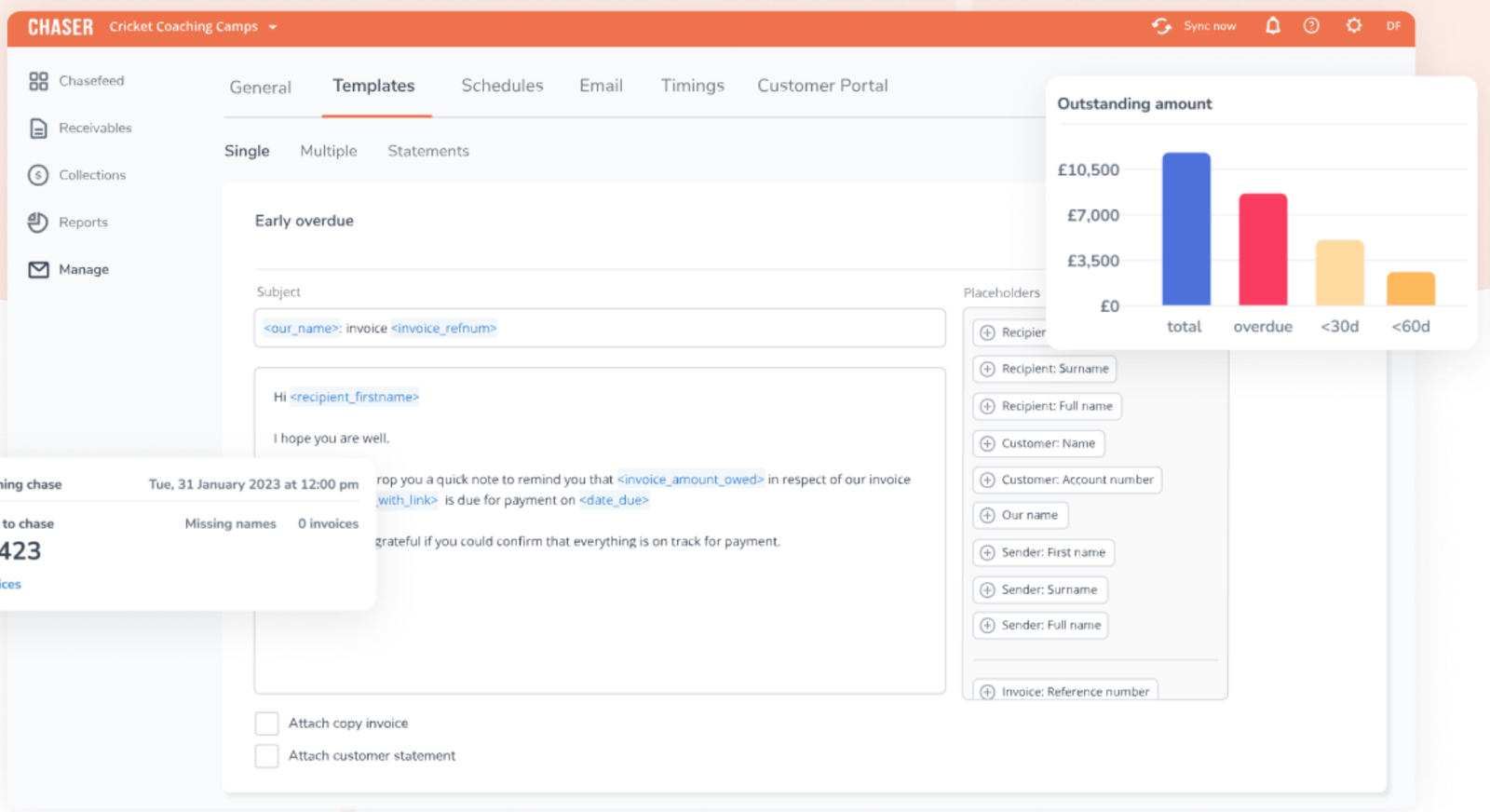
How it works in practice
These are the USD prices on Chaser's detailed pricing page, read on October 30, 2026, and annual billing takes 10% off. The G2 figure is 4.3 from about 68 reviews. The recurring complaint we found was limited workflow customization.
- Starting price
- Compact $259, Core $779, Complete $1,169 per month (annual billing is 10% off); Custom is quote-only
- Compact
- 4 users, 30 templates, 4 schedules, 100 SMS and 100 call credits a month, no multi-entity, no call recording
- Core and Complete
- Unlimited users, templates and schedules; multi-entity and call recording
- AR forecast
- Paid add-on ($11 a month) on Compact and Core, included on Complete
- Integrations
- QuickBooks Online, Xero, NetSuite, Sage Intacct, Dynamics 365 Business Central, others
- Chaser Care
- Outsourced credit-control specialist, from $1,199 a month on top of Compact
- Plans
- Compact $259, Core $779, Complete $1,169 per month
- Compact limits
- 4 users, 4 schedules, 30 templates
Kolleno
Kolleno
Kolleno automates the order-to-cash cycle with AI agents that run collections follow-ups, match incoming payments to invoices and post them to the ERP. It also adds a branded customer payment portal, dispute tracking and cash flow forecasting.
Kolleno fits a small finance team on Xero, QuickBooks or Sage Intacct that wants automated follow-ups and a payment portal at a published per-user price, with a path to AI agents and cash application as it grows.
What it automates: follow-up sequences that vary by customer type or status, a communications timeline per account with owners and notes, automatic escalation of overdue tasks and a cash flow forecast based on predicted payment dates. The vendor says its AI agents set tone, language and escalation triggers for the follow-ups.
Plan gating: Business Pay lists Xero, QuickBooks and Sage Intacct connections, a payment portal, payment links and a collections inbox for companies under 1M GBP in turnover and under 100 invoices. Business Plus adds workflow automation, reporting, 3 hours of onboarding and AI agent support. Auto reconciliation, which is cash application, appears on the Enterprise tier together with the NetSuite, Business Central, SAP and Oracle Fusion connections. SMS and call quotas run from 100 each on Business Pay to 600 each on Enterprise Plus.
Cash application: a scoring engine rates each transaction as a perfect or suggested match, and users confirm one-to-one, one-to-many and many-to-one matches. The vendor says matched payments post to the ERP and close the invoice.
Portal: customers see invoices and statements, credit notes and saved payment methods, and can pay by card or direct debit through Stripe, Adyen, GoCardless or Blink.
Limits: the prices carry a dollar sign with no currency code, and the plan size bands are in pounds, so ask which currency you are billed in.
- You are a small team that wants a published per-user price for collections and a payment portal
- You want collections and cash application in one tool and can move to the Enterprise tier when volume grows
- You need cash application on the entry plan: it is listed on Enterprise
- You want deep dashboard customization: reviewers call it limited
- Users like
- Ease of use, collections efficiency, time savings, responsive support
- Users dislike
- Limited dashboard customization and room to improve onboarding
- Source: G2, 118 reviews

How it works in practice
Pricing and features were read on Kolleno's site and public help centre on November 5, 2026. The page does not say which billing term each price refers to. The G2 rating is 4.9 from 118 reviews, and the visible reviews are tagged as incentivized and invited by the vendor. Reviewers praise ease of use and responsive support and mention limited dashboard customization.
- Starting price
- Business Pay $545 to $650 and Business Plus $995 to $1,245 per user per month (the pricing page shows no currency code); Enterprise tiers are quote-only
- Reminders
- AI agent follow-up sequences with configurable tone, language and escalation
- Cash application
- Enterprise tier and above
- Integrations
- NetSuite, Business Central, SAP, Xero, QuickBooks, Sage Intacct, open API
- Customer portal
- Branded portal with statements, credit notes and saved payment methods
- Payments
- Stripe, Adyen, GoCardless and Blink gateways, recurring and multi-currency
- Setup
- Vendor says go-live in as little as 30 days
- Plans
- Business Pay $545 to $650, Business Plus $995 to $1,245 per user per month
Upflow
Upflow
Upflow runs collections from a synced invoice list with email, SMS, call and letter reminders, a branded customer portal and, on higher plans, rules, AI agents and cash application. Plans are sized by annual invoiced revenue, from up to $10M on Starter to over $100M on Entreprise. NetSuite, Sage Intacct, QuickBooks Online and Xero are on the homepage integration list.
Upflow fits a team that wants collections to run from a live invoice list and expects to move from reminders to rules, a branded portal and cash application as invoice volume grows.
What it automates: Starter, the entry plan, includes unlimited seats and reminders by email, SMS, call and letter. Scale adds a Smart Rules engine and a Collections Agent, and the homepage says the agent can run anywhere from suggestion-only to fully autonomous. Accelerate adds a Cash Application Agent.
How it is sized: the five plans are tiered by annual invoiced revenue, from up to $10M on Starter to over $100M on Entreprise, with a yearly invoice cap on each.
Portal and payments: Grow adds branded customer portals. Upflow Payments is an add-on at 3.5% plus $0.30 per card payment and 0.8% capped at $5 for ACH, with a $390 monthly platform fee on plans that include it.
Sync: Sage Intacct's documentation says the sync runs every two hours and that payments collected through Upflow are written back.
Limits: we did not find the QuickBooks Online or Xero sync depth, and the vendor figures for lower days sales outstanding and auto-match rates are the vendor's own.
- You want to grow from reminders to rules and AI agents on one platform
- You run NetSuite, Sage Intacct, QuickBooks Online or Xero and want a two-way receivables sync
- You want payments included in the plan: all five Upflow plans are quoted, and Upflow Payments adds 3.5% + $0.30 per card payment plus a $390 monthly platform fee
- You need cash application on a lower plan: it starts on Accelerate
- Users like
- Ease of use, real-time receivables visibility, reminder automation
- Users dislike
- Limited customization of reports and email templates; setup may need extra resources
- Source: G2, 230 reviews
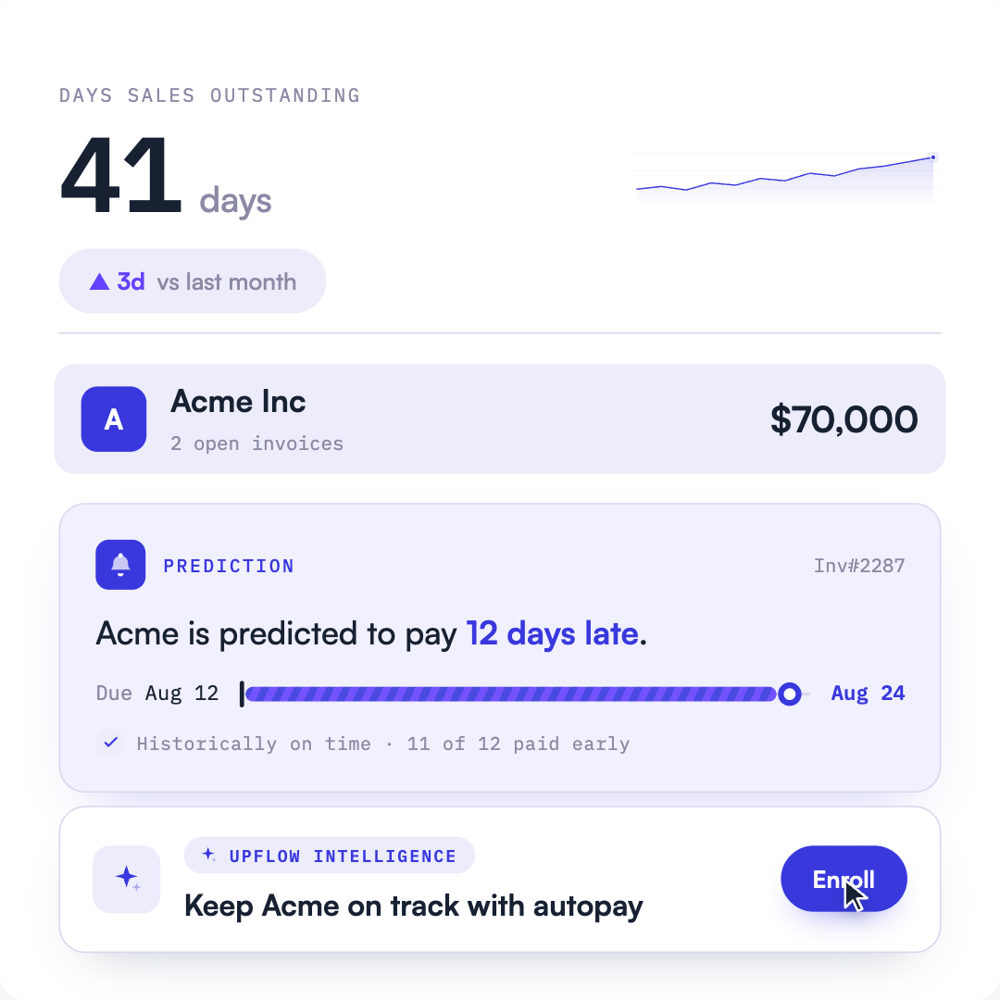
How it works in practice
Pricing and features were read on Upflow's pricing page and homepage on October 30, 2026. The G2 rating is 4.8 from about 230 reviews. Reviewers praise ease of use and visibility, and the complaints are limited customization of reports and email templates.
- Starting price
- Quote only on all five plans (Starter, Grow, Scale, Accelerate, Entreprise); Upflow Payments is an add-on with card 3.5% + $0.30, ACH 0.8% capped at $5 and a $390 monthly platform fee
- Starter
- Up to $10M invoiced a year; unlimited seats; email, SMS, call and letter reminders
- Grow
- Adds branded portals, Slack, REST API, multi-entity dashboards
- Scale
- Adds Smart Rules, Collections Agent, HubSpot sync
- Accelerate
- Adds Cash Application Agent, Salesforce sync, SSO
- Payments add-on
- Cards 3.5% + $0.30; ACH 0.8% capped at $5; $390 a month platform fee
- Sizing
- Starter up to $10M invoiced a year, Entreprise over $100M
- Cash application
- Accelerate and above
Tools that also automate cash application and forecasting
Cash application is the job where automation saves the most hours once invoices arrive in volume, because each payment has to be matched to one or many invoices. These three pair it with prediction. None publishes a price.
Tesorio
Tesorio
Tesorio automates collections with multi-step dunning campaigns triggered by invoice age, plus an AI agent that drafts follow-ups and logs payment promises. Its cash application agent matches incoming payments to open invoices and posts them to the ERP, flagging exceptions for review.
Tesorio fits a finance team on NetSuite or Sage Intacct whose collectors spend most of the week on manual follow-ups and remittance matching, and that can fund a custom-priced contract.
What it automates: multi-step dunning campaigns timed by days past due, invoice amount, customer tier or ERP fields. The product demo shows a nine-step campaign: a friendly reminder three days before due, a past-due notice at five days, a tag and a named owner at 35 days, and a final notice at 45 days. Disputed and payment-plan accounts can be excluded, and paid invoices drop out of sequences.
AI agents: a Collections Agent drafts personalized follow-ups and logs payment promises. A Cash Application Agent matches payments from bank files, lockbox PDFs and remittance emails, handles partial and multi-entity payments and flags low-confidence matches. A Supplier Portals Agent submits invoices to portals such as Coupa and Ariba.
Forecasting: invoice-level predicted pay dates feed an AR forecast.
Integrations: NetSuite, Sage Intacct, QuickBooks Online, Salesforce and Slack are named on the product page.
Limits: pricing is an annual platform fee plus an add-on cost per AI agent, and the vendor's page states both a 95% and a 90% auto-match rate, so treat both as vendor claims.
- You run NetSuite or Sage Intacct and want dunning campaigns and cash application in one platform
- You want invoice-level predicted pay dates next to your collections work
- You want a single subscription fee: Tesorio charges an annual platform fee plus an add-on per AI agent, by quote and with no free trial
- You are a small team that needs simple reminders: this is an order-to-cash platform
- Users like
- Ease of use and automation, with collections efficiency and team visibility
- Users dislike
- Some reviewers cite sync issues and features that need improvement
- Source: G2, 248 reviews
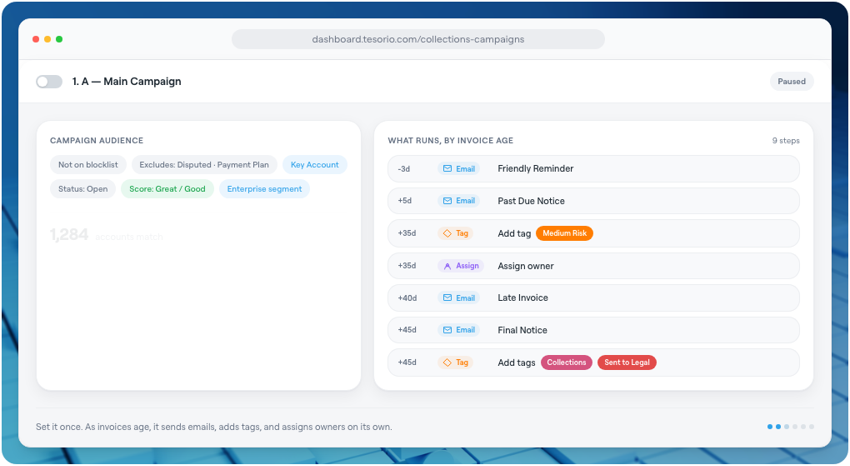
How it works in practice
Features were read on Tesorio's AR and collections page and public help center on November 5, 2026. The G2 rating is 4.7 from 248 reviews, and the full review text is not publicly available. A G2 comparison summary lists ease of use and automation as the top praise and sync issues among the complaints.
- Starting price
- Quote only: annual platform fee plus an add-on cost per AI agent; no public price and no free trial
- Reminders
- Multi-step dunning by days past due, amount or customer tier; emails, tags and owner assignment
- Cash application
- AI agent posting to the ERP
- Integrations
- NetSuite, Sage Intacct, QuickBooks Online, Salesforce, Slack, Dynamics 365
- Customer portal
- Pay by ACH or card, set promise-to-pay dates, resolve disputes (vendor claim)
- Forecasting
- Invoice-level predicted pay dates and AR forecast
- Pricing model
- Annual platform fee plus per-agent add-ons
Quadient AR Automation
Quadient AR Automation
Quadient AR Automation (formerly YayPay) automates the credit-to-cash cycle with rule-based reminders and escalations, invoice delivery, a customer payment portal, dispute tracking and automated cash application. Predictive AI scores payer behavior, prioritizes collections and forecasts cash, and it syncs with major ERPs.
Quadient AR Automation, formerly YayPay, fits a B2B finance team with high invoice volume that wants credit, collections, disputes, payments and cash application on one platform without per-user pricing.
What it automates: the vendor lists five blocks: credit management, collection processes, dispute management, customer payments and cash application. Triggers send reminders and handle escalation on your rules, and invoices go out by email, portal, SMS, fax or print with delivery tracking.
Prediction: the vendor says its AI predicts payment behavior, prioritizes collections, forecasts cash and reads inbound customer emails to prepare AR actions for review.
Integrations: SAP, Microsoft, Sage, Acumatica, NetSuite, Oracle E-Business Suite, Infor, Workday, Salesforce, IFS, Zuora and QuickBooks, with multi-ERP and multi-subsidiary setups.
Cost and timing: the pricing page lists no price and asks for a form. The vendor says every package includes unlimited users and unlimited workflows and fits B2B companies above about 7.8M GBP in yearly revenue. It also states an average implementation of 72 days.
Limits: AR documentation sits behind a login and is not public.
- You want credit, disputes, collections and cash application in one system and many ERP connectors
- You do not want to pay per user
- You want to be live within a few weeks: Quadient quotes every package and puts the average implementation at 72 days
- You are a small team: the vendor targets companies above about 7.8M GBP in yearly revenue
- Users like
- Customizable automated reminders, a single email and communication history per customer, and an easy customer portal with card and ACH payments
- Users dislike
- Interface can feel clunky with too many steps, slow performance, and gaps such as no automatic payment receipts
- Source: G2, 156 reviews
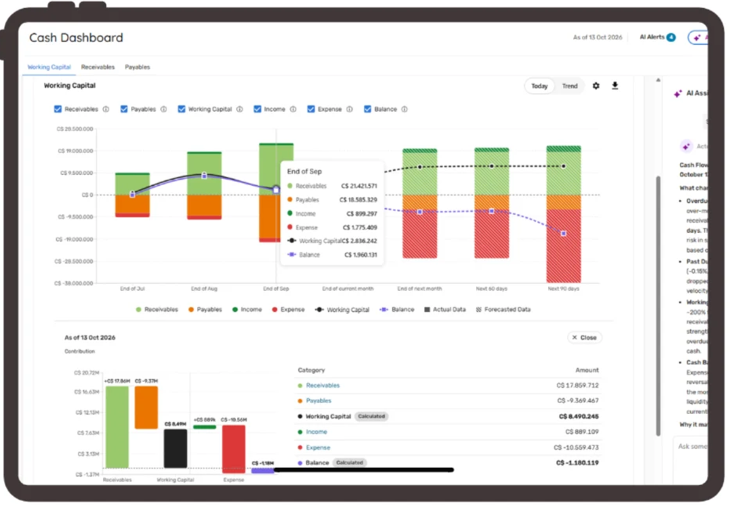
How it works in practice
Features were read on Quadient's AR automation pages on November 5, 2026. The G2 rating is 4.4 from 156 reviews, and the themes below come from the first eight reviews. Reviewers praise customizable reminders and an easy portal, and they cite a clunky interface, slow performance and no automatic payment receipts.
- Starting price
- Quote only; the vendor says all packages include unlimited users and unlimited workflows
- Reminders
- Rule-based reminders and escalation workflows (vendor claim)
- Cash application
- Automated payment matching and ERP posting (vendor claim)
- Integrations
- SAP, Microsoft, Sage, Acumatica, NetSuite, Oracle EBS, Infor, Workday, Salesforce, IFS, Zuora, QuickBooks
- Customer portal
- Self-service payments and scheduled payments (vendor claim)
- Predictive analytics
- Payment behavior prediction and cash forecasting, up to 94% accuracy (vendor claim)
- Implementation
- 72 days on average (vendor)
- Pricing model
- Quote, unlimited users and workflows (vendor)
HighRadius
HighRadius
HighRadius sells receivables as modules: Collections Management with a prioritized worklist and dunning emails with payment links, Cash Application, Credit Management, e-invoicing (EIPP) and Deductions. It lists 50+ ERP integrations, with SAP, NetSuite, Microsoft Dynamics and Sage Intacct out of the box and QuickBooks through an API. The vendor states implementation takes 3 to 6 months.
HighRadius fits a team with dedicated collectors and a cash application group that wants a prioritized worklist and AI matching in one suite.
What it automates: HighRadius sells modules: Collections Management, Cash Application, Credit Management, e-invoicing and Deductions. Its collections page describes a prioritized worklist, dunning emails with payment links, in-app calls, an AR email inbox and invoice upload to AP portals, where it cites more than 600.
Integrations: the vendor lists 50+ ERP integrations, with SAP, Oracle NetSuite, Microsoft Dynamics and Sage Intacct out of the box and QuickBooks through an API.
Cost and timing: the price is a quote. The homepage describes outcome-based pricing with no implementation fee, nothing owed until go-live and a gain share afterwards, and it does not state the percentage. The vendor states implementation takes 3 to 6 months.
Limits: the claims of 20% lower past-due balances and 30% higher collector productivity are the vendor's own, and G2 review text is not publicly available. There is no product screenshot for this tool.
- You have a dedicated collections and cash application team
- You run SAP, NetSuite, Dynamics or Sage Intacct and want an out-of-the-box connector
- You are a team of 2 to 8 on QuickBooks Online or Xero: QuickBooks connects through an API and the rollout is 3 to 6 months
- You want a fixed fee: HighRadius charges nothing until go-live, then takes a gain share whose percentage it does not disclose
- Users like
- Ease of use (8.4 on G2)
- Users dislike
- No complaint themes are quoted because G2 review text is not publicly available
- Source: G2 Accounts Receivables, 237 reviews
How it works in practice
Features were read on HighRadius's site on October 30, 2026. The G2 rating of 4.3 from 237 reviews is for the Accounts Receivables product.
- Starting price
- Quote only; the homepage describes outcome-based pricing with $0 implementation, no fee until go-live and a gain share afterwards (percentage not published)
- Modules
- Collections, Cash Application, Credit, e-invoicing, Deductions
- ERPs
- 50+; SAP, Oracle NetSuite, Microsoft Dynamics and Sage Intacct out of the box; QuickBooks via API
- AP portals
- Collections page cites 600+ portals for invoice upload
- Implementation
- 3 to 6 months (vendor statement)
Platforms with customer portals and payments
A portal lets customers see open invoices, pay and raise a dispute in one place, which cuts the emails that pass between your team and theirs. Both tools below combine one with automated collections. Neither publishes a price.
Invoiced
Invoiced
Invoiced by Flywire automates the invoice-to-cash cycle with Smart Chasing collection cadences, an Automation Builder for custom workflows, and CashMatch AI for matching incoming payments to open invoices. It adds a self-serve customer portal, built-in payments and ERP syncing so finance teams spend less time on manual follow-up and reconciliation.
Invoiced, which Flywire acquired in 2024, fits a mid-sized or large B2B finance team that chases many invoices across channels and wants a customer portal with AutoPay on the same platform.
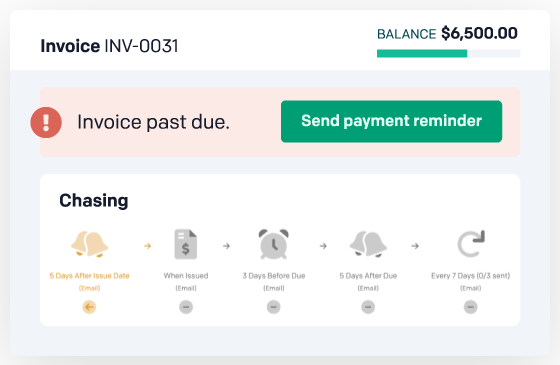
What it automates: Smart Chasing runs follow-up cadences across email, letter, phone and more, at account level, invoice level or both. An Automation Builder creates workflows from a scheduled or event-based trigger, and an AR inbox ties threaded customer conversations to invoices and tasks.
Cash application: CashMatch AI matches ACH, wire, check, virtual card and remittance payments to open invoices, according to the vendor.
Portal and payments: customers pay, set up AutoPay and download receipts and statements in a self-serve portal. Payments run on Flywire infrastructure, with direct debit, cards and virtual cards.
Integrations: native syncs with NetSuite, Dynamics 365, Sage Intacct, QuickBooks, Xero and Workday Finance, plus 1,000+ systems through the API.
Limits: there is no public price, the public documentation home has no collections or cash application text, and some G2 reviewers report sync issues that caused double payments.
- You want chasing, payment matching and a customer portal in one platform
- You run NetSuite, Dynamics 365, Sage Intacct, QuickBooks or Xero and want a native sync
- You want a self-serve signup: Invoiced shares a quote only after a demo
- You have low invoice volume: the vendor targets mid-sized and large finance teams
- Users like
- Ease of use, time-saving interface, detailed customer records and useful integrations
- Users dislike
- Slow or inconsistent support, sync issues causing double payments, and a price increase
- Source: G2, 418 reviews
How it works in practice
Features were read on Invoiced's collections and pricing pages on November 5, 2026, and the pricing page only offers a demo. The G2 rating is 4.5 from 418 reviews. Reviewers praise ease of use and integrations, and they cite slow support, sync problems and a price increase.
- Starting price
- Quote only after a demo; no public prices
- Reminders
- Smart Chasing cadences across email, letter and phone, at account or invoice level
- Cash application
- CashMatch AI matches ACH, wire, check, virtual card and remittance payments to invoices
- Integrations
- Native NetSuite, Dynamics 365, Sage Intacct, QuickBooks, Xero, Workday Finance; 1,000+ via API
- Customer portal
- Self-serve portal for payments, AutoPay, receipts and statements
- Payments
- ACH, SEPA, Bacs, cards and virtual cards on Flywire
- Workflows
- Automation Builder with scheduled or event triggers
Versapay
Versapay
Versapay is a unified receivables platform covering invoicing, collections with risk ranking, AI cash application, a branded customer portal with dispute handling and B2B payments by ACH, card and wire. Native ERP connectors are NetSuite, Sage Intacct and two Dynamics 365 products; other ERPs connect through APIs or flat files. The FAQ calls it a top choice for midmarket finance teams.
Versapay fits a midmarket team in manufacturing, wholesale distribution or professional services that wants customers to view, pay and dispute invoices in one portal.
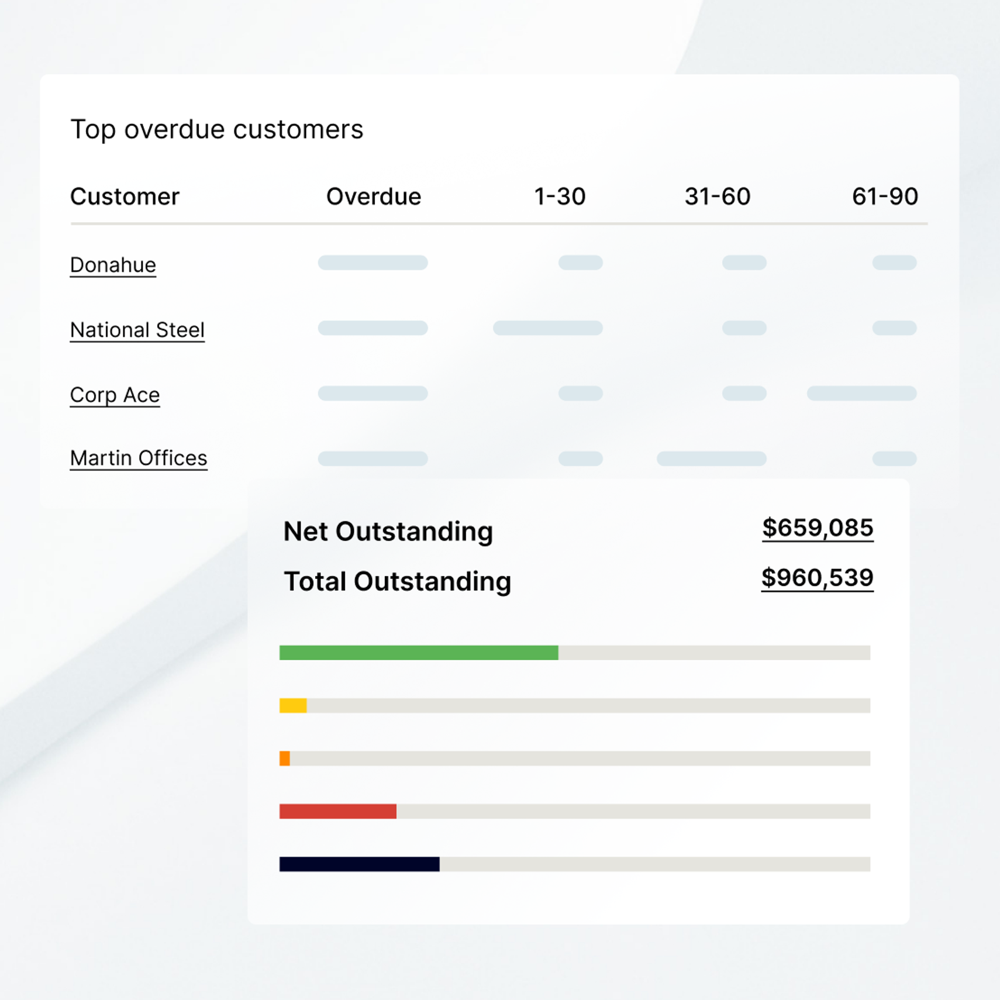
What it automates: one platform for invoicing, collections, cash application, payments and reporting. Collections ranks accounts by risk and predicts delinquencies, and cash application uses AI to match payments to open invoices.
Portal and payments: the digital invoicing portal lets customers see invoices, pay, check history and resolve disputes. B2B payments cover ACH, card and wire with fraud monitoring and early-payment discount options.
ERPs: native connectors are NetSuite, Sage Intacct and two Dynamics 365 products. The integrations page also says it works with JD Edwards, SAP, IBM, Epicor and Yardi, and offers open APIs or flat files for any other ERP.
Limits: pricing is not published, the help center is mostly payer-facing, and we did not verify how deep the SAP connection goes.
- Your customers should pay and raise disputes in a portal
- You run NetSuite, Sage Intacct or Dynamics 365 and want native connectors
- You want a price without a sales call: Versapay routes buyers to Talk with an expert or an interactive demo
- You need a fast, light setup or an ERP outside its native list
- Users like
- Ease of use, easy payments
- Users dislike
- Payment issues, customer support, difficult initial setup
- Source: G2, 95 reviews
How it works in practice
Features were read on Versapay's site on October 30, 2026. The G2 rating is 4.1 from about 95 reviews. Reviewers praise ease of use and easy payments, and they cite payment issues, support and a difficult initial setup.
- Starting price
- Not published; the site offers Talk with an expert and an interactive demo
- Native ERPs
- NetSuite, Sage Intacct, Dynamics 365 Business Central and Finance
- Payments
- ACH, card and wire
- Verticals named
- Manufacturing, wholesale distribution, professional services
Which automated job each tool covers
Invoice-to-cash has four stretches where automation can take over: reminders, collection, matching and exceptions. A smaller tool that covers your two painful stretches beats a platform that covers all four.
- Step 1Remind and chase
- Chaser
- Kolleno
- Upflow
Breaks when reminders stop because nobody owns the account list - Step 2Collect the payment
- Invoiced
- Versapay
Breaks when a customer cannot find the invoice and pays late - Step 3Match and post
- Tesorio
- Quadient AR Automation
- HighRadius
Breaks when a payment with no reference sits unapplied - Step 4Review and sign off
- The Finance Lead
Tracks who tied out the aging report and where the evidence sits
How to choose accounts receivable automation software
Start with the job that costs you hours, not the feature list.
- Writing chase emails takes a day a week. A reminder tool pays for itself first. Chaser and Kolleno publish prices, and Upflow includes reminders on every plan.
- You match payments by hand. Cash application is the job with the clearest hours saved. Upflow lists it from Accelerate, Kolleno from Enterprise, and Tesorio, Quadient AR, HighRadius, Invoiced and Versapay list it as part of the platform.
- Customers ask where and how to pay. Look at the portal: Kolleno, Upflow (from Grow), Invoiced and Versapay list one, and Chaser adds one through Chaser Pay.
- Your ERP is NetSuite, Sage Intacct or Dynamics 365. Check native connectors first. Tesorio, Invoiced and Versapay name all or most of them.
- You cannot get a price. Six of the eight tools are quote-only. Ask each for the price at your invoice volume, the payment fees and the contract term in writing.
- Automated chasing at a published monthly priceChaser
- A published per-user price for collections and a payment portalKolleno (Business Pay)
- Chasing that grows into rules and a cash application agentUpflow
- Dunning campaigns by invoice age plus payment matching on NetSuite or Sage IntacctTesorio
- Credit, disputes and cash application without per-user pricingQuadient AR Automation
- A prioritized worklist for a dedicated collections teamHighRadius
- Chasing cadences and a self-serve payment portal in one platformInvoiced
- A customer portal with disputes on NetSuite, Sage Intacct or Dynamics 365Versapay
What to measure after switching on automation
Measuring AR automation takes two numbers, picked before go-live and read monthly. Days sales outstanding shows whether chasing is working, and the share of payments applied without a person shows whether matching is. Vendors publish their own percentages for both, and none of those transfers to your invoices, so your own before and after is the only number worth quoting internally. Also count the open exceptions each month: disputes, unapplied payments and accounts with no owner.
Review the aging report before the books close
Automation collects cash, and it does not close the period. At month end someone still has to tie the aging report to the receivables balance in the ledger, review the allowance for doubtful accounts and attach the evidence. None of the tools above runs that step, and most teams keep it in a spreadsheet and chase it by email. Our month-end close checklist lists where it sits in the close, and financial close software covers the tools that run the close itself. The Finance Lead tracks those close tasks, the evidence behind them and the preparer and reviewer sign-off. It does not send invoices, chase customers or touch your ledger.
FAQ
What is accounts receivable automation?
Accounts receivable automation uses software rules to run the repeatable steps of getting paid: sending invoices, reminding customers, taking payments, matching each payment to an invoice and routing exceptions to a person. It connects to your accounting system or ERP and reads open invoices from it.
What is the best accounts receivable automation software?
No single tool is best for every team. Chaser and Kolleno publish prices and suit smaller teams that mainly need automated chasing. Upflow, Tesorio, Quadient AR Automation and Invoiced suit teams with larger invoice volumes, and HighRadius and Versapay suit midmarket and enterprise receivables departments. All of those except Chaser and Kolleno are quote-only.
Is there free accounts receivable automation software?
None of the eight tools here advertises a free plan on the published vendor pages. The cheapest published plan is Chaser Compact at $259 a month. For one entity on QuickBooks Online or Xero, the reminders built into the accounting system are the lowest-cost place to start.
Can accounts receivable be fully automated?
Accounts receivable cannot be fully automated. Reminders, payment collection and most payment matching can run on rules, but disputes, credit decisions and calls to key customers still need a person. The tools here route those cases to an owner with the history attached.
What is the best AR software for a small business?
For a small team, start with the invoice reminders in your accounting system. If chasing still takes hours a week, Chaser lists a published monthly price and Kolleno lists a published per-user price, and both connect to QuickBooks and Xero.
How long does it take to implement AR automation?
Implementing AR automation takes between 30 days and 6 months by vendor statements. Kolleno says go-live can take as little as 30 days, Quadient states an average of 72 days and HighRadius states 3 to 6 months. G2 buyer data for several tools shows averages near one to three months. Ask each vendor for the timeline at your ERP and invoice volume.