For an on-chain startup or fund on QuickBooks or Xero, the best crypto accounting software to start with is Alloy Crypto (Integral): its help docs show journal bundling by hour, day or month and a one-way push to the ledger. A larger company closing in SAP, Oracle or NetSuite should look at Lukka first.
Crypto tax software and crypto accounting software are different products. Crypto tax software produces Form 8949 for a return. Crypto accounting software produces journal entries, balances by wallet and a roll-forward for a controller and an auditor. We compared seven tools on the second job: how activity reaches the general ledger, what the vendor documents about the close, and where its public material stops. This isn't a complete market list, and several crypto subledgers aren't covered here.
- crypto accounting and tax tools compared
- 8
- publishes a USD price for a plan with ledger sync (Request Finance)
- 1 of 8
- clearly state a SOC 1 Type 2 report
- 3 of 8
Our picks by situation
Alloy Crypto is listed first and fits web3 teams that want bundled journals, and the other picks cover the cases where it doesn't: bigger ERPs, stablecoin payments, or replacing the ledger itself. Each pick names the limit to check first.
 For bundled journals plus bill payAlloy Crypto (Integral)Help docs show journal bundling by hour, day or month and a one-way push to the ledger. Check first: the move to the Alloy Crypto name is unexplained.
 For institutions on SAP, Oracle or NetSuiteLukka Enterprise Data SaaSReconciled journal entries by API or SFTP and SOC 1 and SOC 2 Type II reports. We found no small-team plan and no public docs on the close.
 If you would replace the ledger itselfSoftLedgerCrypto and fiat in one multi-entity GL with period locks. Fair value is documented as a manual reversing journal, and crypto sits on the quote-only Enterprise plan.
 For stablecoin bills and payrollRequest FinanceApprovals and bill sync to QuickBooks Online or Xero at $300 a month. It isn't a lot-level subledger on its current pages.
Crypto accounting software compared
Only Request Finance publishes a USD price for a plan with ledger sync, on the vendors' public pages, so budget for a sales conversation with the others. The table shows what each tool is and how it reaches the ledger, which is the real difference between them.
| Tool | Type of tool | How it reaches the ledger | Pricing (USD) | Review score |
|---|---|---|---|---|
| Alloy Crypto (Integral) | Crypto bookkeeping and bill pay for web3 teams | One-way push of journal entries to QuickBooks, Xero or NetSuite, per transaction or bundled | Not published; book a demo | No reviews yet |
| Lukka Enterprise Data SaaS | Institutional digital asset data platform with an accounting layer | Journal entries and reports delivered to the GL by API or SFTP; SAP, Oracle, Geneva and NetSuite named | Not published; contact sales | No reviews yet |
 CoinTracker Enterprise | Crypto subledger from a consumer crypto tax brand | Rules-based journal mapping synced to the ERP (vendor claim; posting detail not public) | Enterprise: no public price, demo booking. Consumer tax plans are a separate product | 5.0 (1) |
 Ledgible | Digital asset accounting, tax and information reporting | Daily QuickBooks Online sync per a 2022 guide; Xero setup documented; NetSuite through an OFX bank import per its help center | Enterprise Accounting is custom priced by users, connections, wallets, transactions and GL integrations, with a 30-day free trial | 4.4 (Trustpilot, 32) |
| SoftLedger | General ledger with a native crypto module | Is the ledger: crypto transactions become journals inside SoftLedger | Digital Assets is listed only on the quote-only Enterprise plan; non-crypto plans start at $300 a month, billed annually | 4.6 (48) |
| Request Finance | Stablecoin and fiat business account with AP, invoicing and payroll | Bills sync to QuickBooks Online and Xero from the Growth plan; NetSuite on Enterprise | Free invoicing, Starter $50/mo, Growth $300/mo (QuickBooks Online and Xero), Pro $600/mo, Enterprise quote | 4.7 (Capterra, 47) |
 ZenLedger | Crypto tax software with a free tax professional suite | No ledger sync found: tax forms and reports only | Silver $49, Gold $199, Platinum $399 a year; free multi-client suite for tax professionals | 2.5 (Trustpilot, 93) |
 The Finance Lead Our product | Month-end close checklists | Tracks close tasks, evidence and preparer/reviewer sign-off | Team $39/month (up to 8 team members), Plus $79/month (no member limit, read-only MCP server); card required at checkout | No reviews yet |
Prices and review figures read 2026-11-05. Review scores are the publicly listed figures, and samples of 1 or 2 reviews carry no weight.
What is crypto accounting software?
Crypto accounting software turns wallet, exchange and custodian activity into classified transactions, cost-basis lots and journal entries for a general ledger. Most tools work as a subledger: detail stays in the crypto system and summarized or transaction-level journals post to QuickBooks, Xero, NetSuite or another ERP. A general ledger can't do this alone, because it has no idea what a liquidity pool deposit or a bridge is. If you are still choosing that ledger, our guide to general ledger software covers it.
Crypto accounting software vs crypto tax software
Crypto tax software answers what a taxpayer owes for the year, while crypto accounting software answers what the books should show at each month end. A tax tool can give you a correct Form 8949 and still leave a controller without a balance by wallet at period end or a journal that ties to the trial balance. Some tools sell both, while ZenLedger stays on the tax side.
Why fair value changed the job
FASB's ASU 2023-08 requires in-scope crypto assets to be measured at fair value each reporting period, with gains and losses in net income. It applies to fiscal years beginning after December 15, 2024, including interim periods, so a calendar-year company is under it for 2025. Remeasurement makes reliable period-end pricing a recurring need, and the standard also asks for a rollforward at annual reporting periods, which many controllers would rather keep monthly than rebuild at year end. Among these vendors' public pages, only CoinTracker Enterprise names the standard for its own product. Ask every vendor to show you the report itself.
How a crypto transaction reaches the general ledger
A crypto transaction reaches the general ledger in four steps: import, classification, a cost-basis run and a journal entry. The tools below handle these differently, and each step has its own way of failing at month end.
- Step 1Import
- Alloy Crypto (Integral)
- Lukka Enterprise Data SaaS
Breaks when a wallet or custodian is missing, so balances look right and aren't - Step 2Classify
- Alloy Crypto (Integral)
- CoinTracker Enterprise
Breaks when a rule catches new transactions, and last month's stay uncategorized - Step 3Calculate basis
- SoftLedger
- Alloy Crypto (Integral)
Breaks when a transfer isn't matched, so basis resets and a false gain appears - Step 4Post the journal
- Alloy Crypto (Integral)
- Ledgible
Breaks when data changes after the sync and the ledger keeps the old entry - After the syncReview and sign off
- The Finance Lead
Tracked in the close checklist, where a second person signs off before the period locks
What the journal entry for a token swap looks like
A swap of one token for another is a disposal and an acquisition in one on-chain transaction, so it needs at least three lines, plus more for gas. This is why a plain bank-feed import fails: the ledger sees one transaction hash and has no accounts, basis or gain to book. The table shows the lines a good sync has to produce.
| Line | Debit or credit | Where the amount comes from |
|---|---|---|
| Digital asset received | Debit | Fair value at the time of the swap |
| Digital asset given up | Credit | Carrying value of the lots consumed |
| Realized gain or loss | Credit or debit | The difference, from the lot calculation |
| Network fee (gas) | Debit, with a credit to the gas token | Fair value of the gas spent, treated per your policy, and the gas token's own disposal can add a gain or loss |
Ask a vendor to show this exact swap in their journal preview. You'll see whether it posts per transaction or as a rollup, and whether the transaction hash travels with the entry. If you match crypto balances alongside bank accounts, our account reconciliation software guide covers the fiat side.
How we chose and ordered these tools
We included tools that sell a path from crypto activity to a general ledger, plus tax and payment tools that buyers often compare them with. The list order isn't a score, and being listed first isn't a test result, because we read vendor material and didn't run these products. Each entry says what we couldn't find. Six points separate these tools, and the list below says what we looked for on each one.
- Named ledgers matter because a logo on a page isn't a connector, so we looked for a setup guide or help article.
- A sync can post summary or transaction-level journals, and some entries stay manual.
- Tools differ on cost-basis methods, on wallet-by-wallet or universal tracking and on whether lots are visible.
- A useful roll-forward shows opening balance, additions, disposals, gains and closing balance by asset.
- A period lock also has to say what happens to late imports.
- SOC 2 covers security, while SOC 1 Type 2 covers controls over financial reporting and is the one external auditors usually ask for.
What does Taxbit do, and why isn't it listed?
Taxbit now describes itself as regulatory reporting infrastructure, with tax documentation, TIN matching, cost basis and information reporting across 1099-DA, CARF and DAC8. Its site no longer shows the corporate accounting suite it sold after buying Tactic in 2023: the old pages return a 404, and we found no discontinuation notice. It fits a broker or exchange that files forms at scale, and we found nothing on its current pages for a controller who needs journal entries in an ERP, so it isn't one of the eight.
Best crypto accounting software for on-chain startups and funds
Each entry in this list leads with how journals reach the ledger, then where the documented controls stop. Vendor claims are labeled, and "not found" means the vendor does not document it in its public material.
Alloy Crypto (Integral)
Alloy Crypto is what integral.xyz now redirects to, with no public rebrand announcement we could find. Its help center, still under the Integral name, shows how rules, cost basis policies and journal bundling work.
Alloy Crypto suits web3 teams on QuickBooks Online or Xero that want rule-based bookkeeping with bill pay, if they're comfortable asking hard questions about the vendor first.
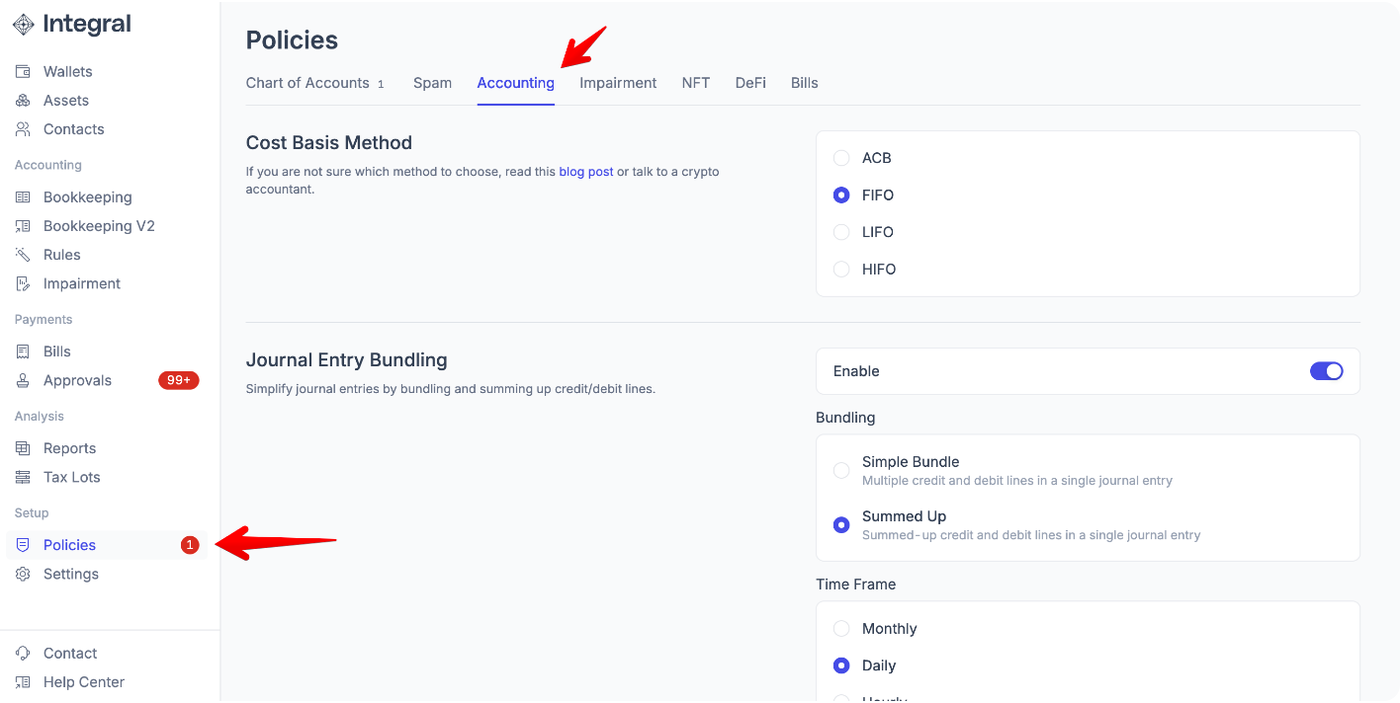
How journals reach the ledger: reviewed items post as journal entries in a one-way push, and the help docs say edits in the ERP aren't imported, so the crypto tool stays the source of truth. QuickBooks Online and Xero connect by OAuth, and NetSuite by credentials. Journal Entry Bundling offers a simple bundle or summed-up lines, on monthly, daily or hourly time frames, so you pick your own posting grain. The help center shows more of this than most vendors in this list.
Basis and close: the Policies screen offers FIFO, ACB, LIFO and HIFO, and account-scoped FIFO applies per wallet for organizations opted in to the safe harbor. A method change takes 24 to 48 hours to recalculate lots. We found no lock inside the tool: help text says ERP closure dates block a sync, and tells you to finish crypto syncing before closing the period. An impairment policy appears in the app, and we couldn't confirm a fair value setting or find a roll-forward report.
Vendor questions: integral.xyz now redirects to alloycrypto.com, a domain registered on October 23, 2026, the security page uses the Alloy Crypto name, and the help center still says Integral. We found no announcement explaining the change, and the newest changelog entry is from April 2026. Security wording is "SOC2 audited" with no type stated. We found no reviews we could use, and the vendor claims to classify over 90% of transactions automatically.
- You are a web3 team on QuickBooks Online or Xero and want rule-based categorization with bundled journal entries pushed on a schedule (nightly or monthly, per a 2023 post)
- You want bill pay with approval thresholds in the same tool as bookkeeping and tax lots
- You need clear evidence of vendor continuity: the rebrand is unexplained, the alloycrypto.com domain was registered in October 2026 and the newest changelog entry is from April 2026
- You need Form 8949 or 1099-DA output, a SOC 1 report or a stated SOC 2 type: we found none
Coverage and bill pay
Custodians and safes listed include Gnosis Safe, Squads, Anchorage, Fireblocks, Coinbase Custody, Fordefi and BitGo. Bill pay imports invoices from email, Slack, Discord or an invoice link, with configurable approval thresholds. We found no Form 8949 or 1099-DA output.
- Starting price
- Not published; book a demo
- Ledgers
- QuickBooks Online, Xero, NetSuite; Sage listed without docs
- Posting
- One-way push, bundled or per transaction
- SOC
- "SOC2 audited", type not stated
Crypto subledgers and ledgers for larger finance teams
Tools in this group are aimed at companies with a controller, an external auditor and an ERP, and they take more sales time to evaluate.
Lukka Enterprise Data SaaS
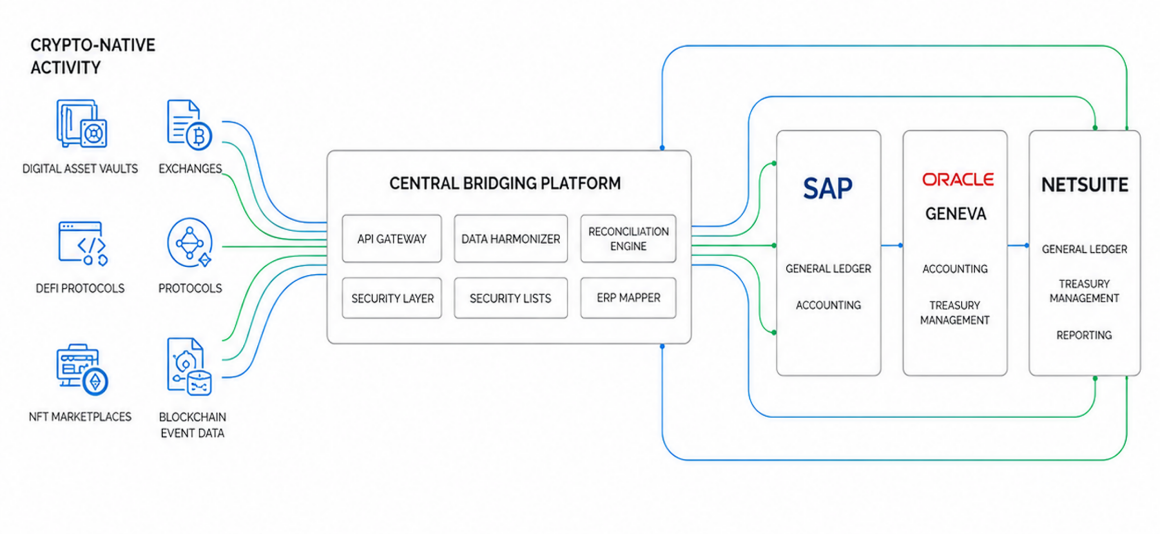
Lukka sells a unified data, accounting and reporting platform for institutions, delivering reconciled journal entries by API or SFTP. No public docs show how posting, locks or roll-forwards work.
Lukka suits institutions with heavy volumes across exchanges, custodians and on-chain sources, and we found no plan or self-serve path for a small team.
How journals reach the ledger: the product page lists reconciled journal entry generation and GL integrations naming SAP, Oracle, Geneva and NetSuite, delivered by API, SFTP or into data lakes. Lukka's public pages name no QuickBooks, Xero or Sage Intacct connector, and nothing on summary or transaction-level posting.
What the vendor describes: a reconciliation framework that matches on-chain and off-chain positions and compares snapshot balances with computed balances, entity-level rollups, role-based permissions, 100+ preconfigured reports, and impairment and mark-to-market adjustments. It says it's built to align with GAAP and IFRS, and Form 8949, 1099-DA and CARF outputs are listed. Cost-basis lists differ across its pages: one has FIFO, LIFO and specific ID, and another has FIFO, LIFO, HIFO, weighted average and custom.
Limits: we found no public docs on period locks or a roll-forward, and no review data at all (G2 shows no reviews). The site now leads with data and pricing products rather than a crypto accounting brand, so ask how much of the roadmap serves accounting. Its trust center says it obtains SOC 1 and SOC 2 Type II reports annually, while the home page wording adds Type I, so request the current reports.
- You run institutional volumes across exchanges, custodians, prime brokers and on-chain sources and close in SAP, Oracle, Geneva or NetSuite
- You also need fair value pricing data and want SOC 1 and SOC 2 Type II reports the vendor says it obtains annually
- You are a small accounting team wanting a self-serve tool with published pricing and public help docs: we found neither
- You close in QuickBooks, Xero or Sage Intacct: Lukka's public pages name none
Company and pricing data
Lukka announced the acquisition of PEER DATA on June 4, 2026. It also sells fair value pricing data under the Lukka Prime name.
- Starting price
- Not published; contact sales
- Ledgers
- SAP, Oracle, Geneva, NetSuite
- SOC
- SOC 1 and SOC 2 Type II, annually, per its trust center
- Delivery
- API, SFTP or data lake
CoinTracker Enterprise
CoinTracker Enterprise is the B2B subledger from the company best known for its consumer tax app, launched in beta in 2024 with automated categorization and account mapping. Public documentation is thin: the help content we found covers the consumer tax product.
CoinTracker Enterprise may suit a smaller crypto-native team on QuickBooks Online or Xero, going by one G2 review and vendor testimonials, but expect to verify most mechanics in a demo.
How journals reach the ledger: you assign a transaction type to an account once, and the journal-entry mapping applies to past and future transactions, per the vendor's blog. The Enterprise page says it syncs with QuickBooks, NetSuite, Sage and Xero. We found no help article showing the setup, or whether entries post as summaries or per transaction.
What the vendor claims: 500+ wallet and exchange integrations on the Enterprise page including Anchorage, BitGo, Coinbase Prime and Fireblocks, support for one million crypto transactions a year, and adherence to ASU 2023-08. The Enterprise page says "SOC 2 certified", while a blog post says "SOC-1 and SOC-2 Type II compliant", which leaves it unclear whether Type II applies to both.
What we couldn't verify: cost-basis methods for Enterprise, roll-forward, reconciliation, period locks, multi-entity and user roles. CoinTracker's help content covers the consumer product, and the single G2 reviewer asked for read-only access for team members. Don't assume the consumer plans give you any of this: they have no ERP sync or entity features on the pricing page.
- You want rules-based account mapping across wallets, custodians (Anchorage, BitGo, Coinbase Prime, Fireblocks) and DeFi with a dedicated account manager (vendor claims)
- You are a smaller crypto-native team on QuickBooks Online or Xero that accepts validating the workflow in a demo
- You need public proof of period locks, multi-entity consolidation, user roles or a roll-forward report: we found none for Enterprise
- You only need a personal Form 8949: the consumer plans are the product for that
- Users like
- classification rules cut line-by-line work, from one small-business reviewer
- Users dislike
- that reviewer asked for read-only access for team members
- Source: G2, 1 reviews
- Starting price
- Enterprise: no public price, demo booking. Consumer tax plans are a separate product
- Ledgers
- QuickBooks, NetSuite, Sage, Xero (vendor claim)
- SOC
- "SOC 2 certified"; a blog says SOC-1 and SOC-2 Type II
Ledgible
Ledgible, operated by Verady, Inc., is a reporting-only digital asset platform covering accounting, professional tax and tax information reporting. Its accounting product maps wallets to GL accounts and posts daily summary or transaction entries, but public material on GAAP reporting, reconciliation and close controls is thin.
Ledgible suits QuickBooks Online teams who need both a long SOC history and tax information reporting, more than deep close tooling.
How journals reach the ledger: wallet-specific mappings override default asset, income, expense, fee and suspense accounts. On QuickBooks Online the sync runs daily in Summary mode, which posts one rollup per mapped account per day, or Transaction mode, which posts each transaction. That guide dates from 2022, so confirm it. A help result warns that QuickBooks Online imports only up to two decimals and drops smaller amounts without warning, which could matter for small amounts, so test it. A Xero setup article exists. The vendor calls NetSuite a certified integration, while help text describes an OFX file through NetSuite's bank import, so ask which one you'd get.
Controls: Ledgible states it's been SOC 1 Type 2 and SOC 2 Type 2 certified since 2019, with reports on a six-month cadence. It's reporting only and can't trade or move funds, which simplifies the risk review. We found no public roll-forward report, period lock, reconciliation report or claim of ASU 2023-08 support. A December 2023 post explains the standard without claiming it's supported.
Tax side: the platform generates Form 8949, 1099 and Schedule D output that imports into UltraTax CS, CCH Axcess, Lacerte, ProConnect, Drake and TurboTax. A September 2025 partnership with Thomson Reuters ONESOURCE targets Form 1099-DA for brokers. Its Trustpilot reviews are mostly about the tax product, with only two in the last 12 months.
- Your auditors need SOC 1 and SOC 2 Type 2 from the vendor: Ledgible states both since 2019
- Your finance team on QuickBooks Online also works with tax preparers or needs 1099-DA and CARF data next to accounting
- You need documented ASU 2023-08 reporting, a roll-forward report or period locks: we found none in public product material
- You run NetSuite and want direct journal posting: help text describes an OFX file through NetSuite's bank import, though the vendor calls it a certified integration
- Users like
- named support staff, quick replies and simple wallet connection
- Users dislike
- slow tickets and no phone or email support, in one 1-star review from February 2025
- Source: Trustpilot, 32 reviews
- Starting price
- Enterprise Accounting is custom priced by users, connections, wallets, transactions and GL integrations, with a 30-day free trial
- Ledgers
- QuickBooks Online, Xero; NetSuite via OFX import per help text; Advent Geneva and FIS products also named
- SOC
- SOC 1 Type 2 and SOC 2 Type 2 since 2019 (vendor)
SoftLedger
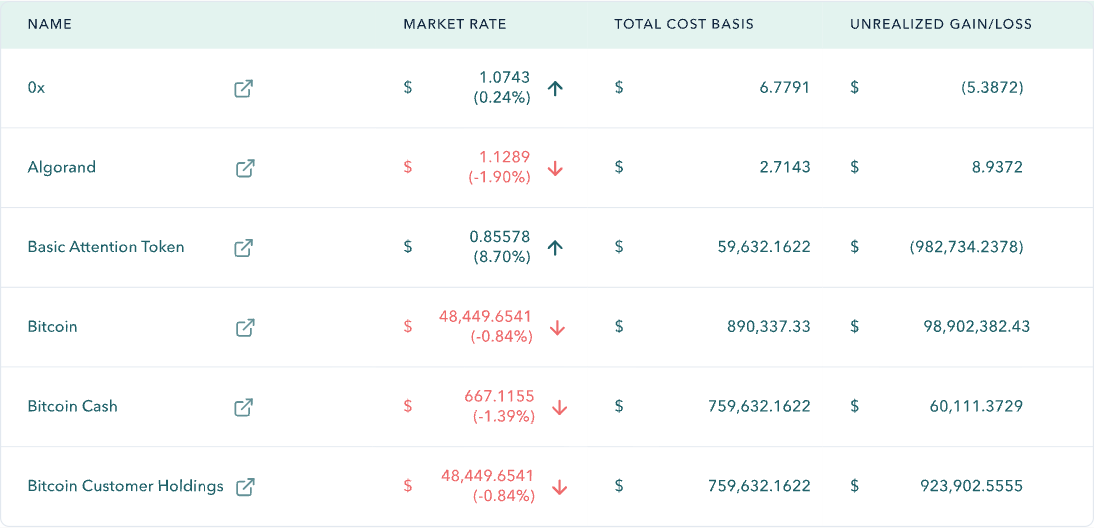
SoftLedger is a multi-entity general ledger with its own crypto transaction table, so cost basis runs and crypto journals land in the same financial reports as fiat. Its help docs show fair value entries as a manual export and reversing journal.
SoftLedger suits a company ready to replace its general ledger so crypto and fiat live in one set of books.
How journals reach the ledger: they're already there. Create Crypto Journals turns transactions into entries in the financial reports, and a Journal Current column shows a green check or a red X when a journal has gone stale and needs a rerun. Run Cost Basis is a background job that works oldest to newest, and cost layers open to show source, date, amount picked and basis. The vendor also says a module can run as a subledger, with journals brought into your ERP.
Limits for a controller: the pricing page lists Digital Assets only on quote-only Enterprise. Docs and the API describe FIFO, while marketing also says specific identification. A help example from 2022 shows fair value as a manual process: export unused cost layers, calculate book and fair value per layer, and post a reversing journal, though the vendor also claims automatic tracking of unrealized gains and losses. We found no roll-forward report, ASU 2023-08 reference or native rules engine, and categorizing leans on partner tools.
Close: period locks run per module in chronological order, and locking crypto stops new crypto journals and freezes those transactions, per its help pages. New users start with no roles, restricted by location, module and preparer or reviewer status.
- You want crypto and fiat in one multi-entity ledger and would rather replace the GL than feed one from a subledger
- Your controller wants period locks that freeze crypto transactions, inside the ledger vendor's own product
- You are staying on NetSuite, Sage Intacct or QuickBooks and want a named connector: none is documented publicly
- You need automated fair value remeasurement and a roll-forward out of the box: the docs show a manual reversing journal and we found no roll-forward report
- Users like
- responsive support and multi-entity consolidation and reporting
- Users dislike
- crypto module rigidity and limited customization, in reviews described as dated and sparse
- Source: G2, 48 reviews
Non-crypto plans
Published non-crypto plans are Starter at $300 a month with up to 3 entities, Standard at $750 with up to 10, and Plus at $1,125 with unlimited entities, all on annual contracts. They don't include the crypto module.
- Starting price
- Digital Assets is listed only on the quote-only Enterprise plan; non-crypto plans start at $300 a month, billed annually
- Is the ledger
- Yes, multi-entity GL with AP and AR
- SOC
- SOC 1 Type 2 (Armanino, announced 2021); SOC 2 Type 2 per its Trust Center
- Connectors
- No named QuickBooks, Xero or Intacct connector found
Payment and tax tools that crypto teams compare
Tools in this group don't aim to be a controller's subledger, and they fit when payments or tax forms are the real job.
Request Finance
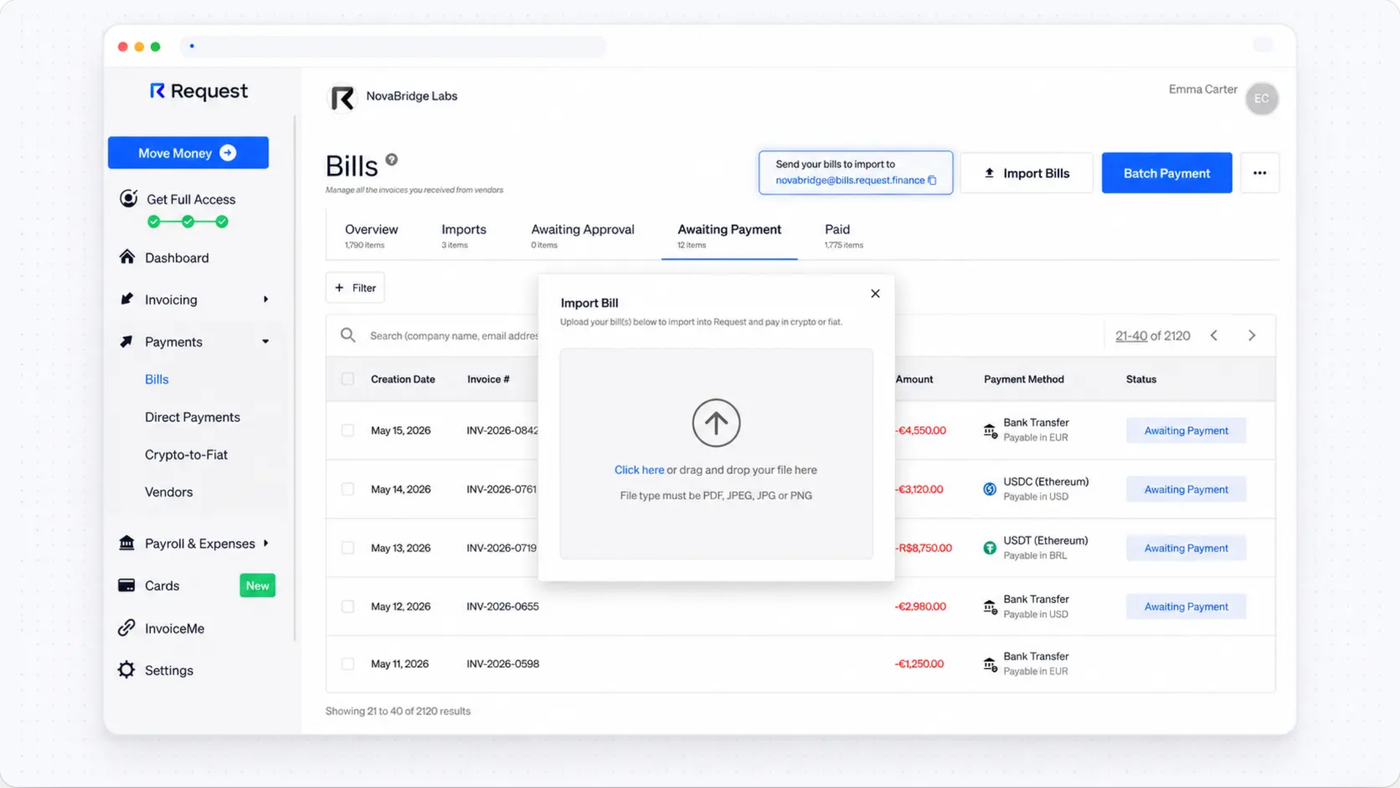
Request Finance is a business account for invoicing, bill approval, payroll and payouts in stablecoins and fiat. It handles the payment side and isn't presented as a lot-level subledger on its current pages.
Request Finance suits teams whose crypto activity is mostly stablecoin bills and payroll, where the problem is approvals and a paper trail before the ledger.
How records reach the ledger: bills sync to QuickBooks Online and Xero on the Growth and Pro plans, and NetSuite is on Enterprise only. A help result says crypto-bill gains or losses go in a separate journal entry, and bill payments keep the fiat amount from bill creation so the AP balance reduces correctly. Approval rules can be set by amount, vendor or entity from Growth up.
Where it stops: current product pages don't mention cost basis or journal entries beyond bills. Request Finance bought Consola Finance in 2025 and sold it as Request Accounting, with cost-basis methods described in older posts, but the accounting page now returns a 404 and we found no announcement either way. Ask whether it's still sold. We found no ASU 2023-08 reporting, roll-forward, period lock or tax forms. Most of its Capterra reviews date from 2023, and some came from vendor invitations with a small incentive. The site says "SOC 2 Type 1 audited", a point-in-time report, and we found no Type 2 or SOC 1.
- You pay vendors, contractors or payroll in stablecoins and want invoices, approvals and a paper trail before records reach QuickBooks Online or Xero
- Your crypto activity is mainly stablecoin payments on one entity
- You need wallet-wide lot-level cost basis, ASU 2023-08 fair value or a roll-forward: current product pages don't show them
- You need more than a point-in-time control report: the site says SOC 2 Type 1 audited, and we found no Type 2 or SOC 1
- Users like
- easy recurring invoices and USDT and USDC invoicing, mostly in reviews from 2023
- Users dislike
- price increases and fees, and requests for more stablecoin networks
- Source: Capterra, 47 reviews
- Starting price
- Free invoicing, Starter $50/mo, Growth $300/mo (QuickBooks Online and Xero), Pro $600/mo, Enterprise quote
- Ledgers
- QuickBooks Online and Xero on Growth and Pro; NetSuite on Enterprise
- Entities
- 1 up to Growth, 3 on Pro, more on Enterprise
- SOC
- SOC 2 Type 1
ZenLedger
ZenLedger turns exchange and wallet data into Form 8949, Schedule D and Schedule 1 output, with a free multi-client dashboard for CPAs. We found no general ledger integration on its own pages.
ZenLedger suits CPAs and tax preparers who need crypto forms for clients, and it isn't a tool for a monthly close.
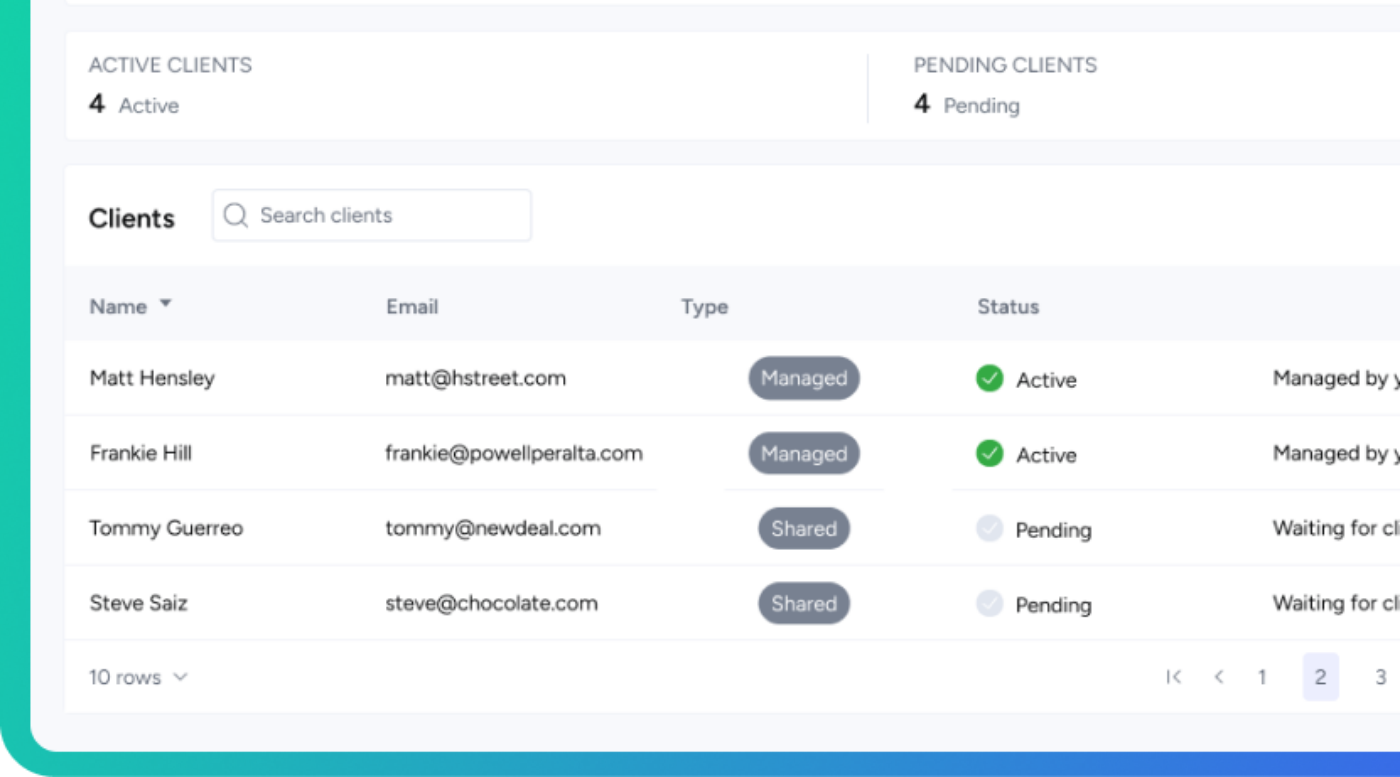
What it does: it imports exchange and wallet data and produces Form 8949, Schedule D and Schedule 1, with direct integration to TurboTax and TaxAct. Tax professionals get a multi-client dashboard at no cost, and clients pay or the professional bills them. Methods are FIFO, LIFO, HIFO and average cost, with HIFO the default on new accounts.
Why it's in this list: buyers often compare it with the subledgers above, but it documents no QuickBooks, Xero, NetSuite or other ledger integration on its own pages, and no ASU 2023-08 reporting, roll-forward or period lock. An Audit Trail Report and an End-of-Year Valuation Report are aimed at tax and valuation work. Use it next to a ledger workflow rather than as one.
Reviews and security: Trustpilot showed 2.5 from 93 reviews, the lowest score in this list, with complaints about support and charges after cancelling reported in a third-party summary. Its security page says the program follows the SOC 2 framework, and other pages show a Type 2 badge, with no auditor or period named.
- You are a CPA or tax preparer who needs a free multi-client dashboard and Form 8949 output
- You need year-end crypto tax forms and bookkeeping happens somewhere else
- You need journal entries posted to QuickBooks, Xero, NetSuite or Sage Intacct: we found no such integration on its pages
- Users like
- importing exchange and wallet data and the downloadable forms, per a third-party summary
- Users dislike
- slow support, charges after cancelling and DeFi miscalculations, per a third-party summary
- Source: Trustpilot, 93 reviews
- Starting price
- Silver $49, Gold $199, Platinum $399 a year; free multi-client suite for tax professionals
- Ledgers
- None found
- Tax pros
- Free multi-client dashboard
- SOC
- SOC 2 framework; Type 2 badge on other pages
Close-readiness matrix
No tool in this list publicly documents all of a named ledger list, a roll-forward and a period lock, so a controller should treat each cell as a demo question. The matrix shows what the vendors document publicly as of 2026-11-05. "Not found" doesn't mean the feature is missing, only that the vendor doesn't document it publicly.
| Tool | Ledgers named | Roll-forward | Period lock | SOC report stated |
|---|---|---|---|---|
| Alloy Crypto (Integral) | QuickBooks Online, Xero, NetSuite | Not found | In the ERP, none found in the tool | "SOC2 audited", type not stated |
| Lukka | SAP, Oracle, Geneva, NetSuite | Not found | Not found | SOC 1 and SOC 2 Type II |
| CoinTracker Enterprise | QuickBooks, NetSuite, Sage, Xero | Not found | Not found | "SOC 2 certified"; blog says SOC-1 and SOC-2 Type II |
| Ledgible | QuickBooks Online, Xero; NetSuite by OFX file | Not found | Not found | SOC 1 and SOC 2 Type 2 |
| SoftLedger | Is the ledger | Not found | Yes, per its help pages | SOC 1 Type 2 (2021), SOC 2 Type 2 per its public material |
| Request Finance | QuickBooks Online, Xero; NetSuite on Enterprise | Not found | Not found | SOC 2 Type 1 |
| ZenLedger | None found | Not found | Not found | SOC 2 Type 2 badge |
Which crypto accounting tools connect to NetSuite?
Crypto accounting software that connects to NetSuite here means Lukka, Alloy Crypto and CoinTracker Enterprise, going by vendor pages, with the depth unproven for all three in public docs. Alloy Crypto documents a connection by NetSuite credentials, and Lukka names NetSuite among its GL integrations. Request Finance limits NetSuite to its Enterprise plan, and Ledgible's help text describes an OFX file through NetSuite's bank import.
Does your auditor need SOC 1 or SOC 2?
Your auditor usually wants a SOC 1 Type 2 when a vendor's system feeds your financial reporting, because it tests controls over that processing across a period. SOC 2 addresses security and availability. Three tools here clearly state a SOC 1 Type 2: Lukka, Ledgible and SoftLedger, though SoftLedger's announcement dates from 2021, so ask for the current report. Our guide to SOX compliance software covers the wider controls question.
What crypto accounting software costs
Crypto accounting software rarely has a public business price: Request Finance is the only one here with a published USD plan that includes ledger sync, at $300 a month, and that sync covers bills. ZenLedger publishes tax plans, which show how transaction count drives cost, but it doesn't say that a business workspace pays the same. Third-party sites quote figures for some of these tools, and we couldn't confirm them on the vendors' pages, so we leave them out. Ask for pricing against three numbers: transactions per year, entities and connected ledgers.
Is there free crypto accounting software?
We found no free plan that's clearly built for closing books, and the free tiers we read about are mostly for checking data or invoicing. Ledgible offers a 30-day free trial on Enterprise Accounting, Request Finance has a free invoicing plan with CSV export, and ZenLedger's dashboard is free to tax professionals.
Which crypto accounting software fits your team
The right crypto accounting software depends on your ledger, your audit and how much DeFi you run. Find your situation below, and if nothing fits exactly, go with the row closest to your ERP, since replacing that is the costliest change.
- Web3 team that wants bundled journals and bill payAlloy Crypto, after asking about the rebrand
- Institution on SAP, Oracle or NetSuiteLukka
- Auditors ask for SOC 1 Type 2 and you stay on QuickBooks OnlineLedgible
- You want crypto and fiat in one ledger and can migrateSoftLedger
- Mostly stablecoin bills and payrollRequest Finance
- CPA firm that only needs tax formsZenLedger
What to test in a trial or demo
A demo of crypto accounting software should run on your real transactions instead of a vendor's sample data. Three tests expose many of the gaps. First, take one ugly transaction, such as an LP deposit or a bridge with gas paid in a different token, and follow it from the wallet to the journal line. Second, change a classification after the sync and see whether the ledger entry updates, duplicates or goes stale. Third, request a month-end pack with balances by wallet, a roll-forward by asset and the period lock, then try to edit a locked transaction.
Where the close evidence goes
A subledger gets the numbers into the ledger, and the sign-off that a second person reviewed them usually lives in your month-end close checklist, with a preparer, a reviewer and the evidence attached. That's what our own product does, and it doesn't touch ledgers or bank data.
Frequently asked questions
What is the best crypto accounting software?
The best crypto accounting software depends on your ledger. For on-chain startups and funds on QuickBooks or Xero, start with Alloy Crypto and verify its roll-forward and SOC report in a walkthrough. Institutions on SAP, Oracle or NetSuite should look at Lukka, and QuickBooks Online teams whose auditors want SOC 1 Type 2 at Ledgible.
Can QuickBooks handle crypto accounting on its own?
QuickBooks can hold the journal entries, but it can't read wallets, track cost-basis lots or classify DeFi activity. Companies use a crypto subledger for that and sync journals into QuickBooks. Alloy Crypto, CoinTracker Enterprise and Ledgible all describe a QuickBooks sync.
Do I need crypto accounting software if I have a crypto CPA?
Below a few wallets and a low transaction count, a CPA with a tax tool and manual journals can be enough. Once you have DeFi positions, several entities or an audit, the CPA still needs clean lots, balances by wallet and a roll-forward, and that's what this software should produce. It supports the CPA's work and doesn't replace it.
How does ASU 2023-08 affect crypto accounting software?
ASU 2023-08 requires in-scope crypto assets at fair value each reporting period, with changes in net income, for fiscal years beginning after December 15, 2024, and it asks for a rollforward at annual reporting periods. Your tool needs reliable period-end prices and those gains and losses. Ask each vendor to show that report, since most tools here don't describe it publicly.