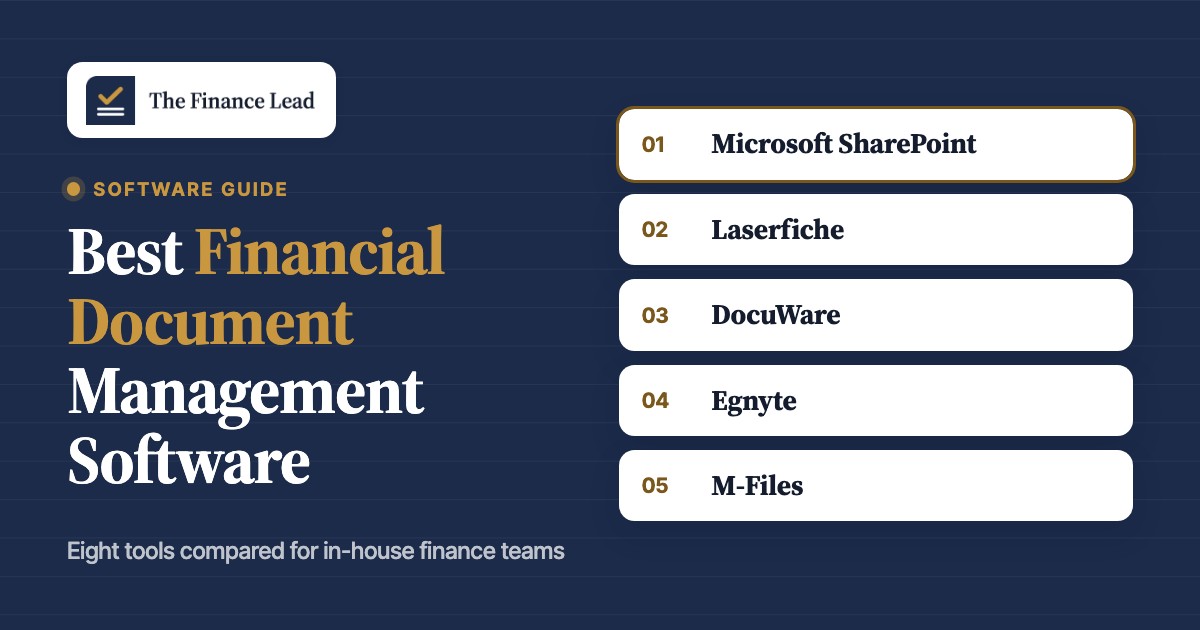
Financial document management software stores the documents a finance team has to produce later, such as invoices, contracts, bank statements and audit evidence, and controls who can see them, who approved them and how long they stay. For an in-house team of 2 to 8 accountants, Microsoft SharePoint is the practical starting point if you already run Microsoft 365, Egnyte and Box suit teams that share folders with auditors, and Laserfiche and DocuWare are the two here with invoice capture and approval workflows built into the product. M-Files and Hyland OnBase are for finance teams that file by metadata or tie documents to an ERP, and SmartVault is built for accounting firms and their clients rather than for an in-house team.
We compared eight tools and grouped them by what kind of system they are, because that decides what you have to add around them. Six of the eight publish a plan price, and this page gives the basis for each. We read each vendor's pricing, product and integration pages and checked G2 ratings in November 2026. We did not run these products, and vendors paid nothing for a place on the list. Our own product tracks month-end close tasks and stores no files, so it appears only as a marked row.
- document management tools compared
- 8
- publish a plan price; DocuWare gives only a range and Hyland OnBase is quote only
- 6 of 8
- name QuickBooks, Xero or NetSuite among their connectors (DocuWare, SmartVault, Box)
- 3 of 8
- published seat prices per user per month in USD, billed annually (M-Files lists euros)
- $7 to $93
What is financial document management software?
Financial document management software is a document management system (DMS, also called an electronic document management system or EDMS) set up for finance documents. It does four jobs: it captures a document (a scan, an emailed invoice, an upload), files it with enough data to find it again (vendor, date, amount, document type), routes it for approval or signature, and keeps it under a retention rule with a log of who touched it.
Three kinds of product sell under that name, and they differ in what you have to add around them.
- Cloud file platforms with finance controls are Box, Egnyte and Microsoft SharePoint, which start as shared storage and add retention, approvals and e-signature in higher tiers or add-ons.
- Content services platforms with workflow are M-Files, Laserfiche, DocuWare and Hyland OnBase, where capture, metadata, approvals and records management are the product and most are sold through a vendor or partner.
- Client portals for accounting firms are represented here by SmartVault, which exists to exchange documents with clients rather than to run an in-house payables file.
For finance, the provenance of a document matters as much as its content: who uploaded it, which version the approver saw and when it was disposed of. Financial document management software keeps that record tamper evident, so workpapers handed to an auditor keep their original timestamps.
Provenance is what separates financial document management software from a shared drive. A DMS isn't accounting software. It holds the invoice and its approval trail, but the ledger still lives in QuickBooks, NetSuite, Sage Intacct or Xero. What links the two is the connector, and that is where these tools differ most.
Our picks by situation
Start with the system you already pay for, then add capture or retention only where a gap shows up. These are the best fits by situation for a team of 2 to 8 people.
 Best if the team already runs Microsoft 365Microsoft SharePointDocument libraries come with Business Basic at $7 per user per month, with Purview retention labels. Invoice extraction is billed separately at $0.01 per page.
 Best for invoice capture and records in one systemLaserficheSmart Fields extract line items, and PO matching and approvals run without code. Professional is $73 per user per month with a 5 seat minimum.
 Best for an AP invoice workflow with QuickBooks or SageDocuWareOCR, AI extraction, 3-way matching and approvals sit in one workflow. Pricing is quote only, with a vendor-stated range of $30 to $125+ per user per month.
 Best for retention policies at a mid-tier priceEgnyteLifecycle policies start at Enterprise Lite, $39 per user per month billed annually. The $22 Business plan has none.
 Best for sharing close folders with auditorsBoxUnlimited external collaborators come with Business Plus at $25 per user per month. Retention needs the Governance add-on.
 Best for filing by metadata instead of foldersM-FilesOne invoice appears under vendor, project and purchase order without copies. Essentials is EUR 65 per user per month.
 Best for an accounting firm exchanging files with clientsSmartVaultA branded client portal with unlimited clients on every plan, from $65 per user per month.
Financial document management software compared
The table doesn't rank anything by quality, but it shows what each system is, what it hands you, how it is priced and how G2 reviewers rate it.
| Tool | Type of system | What it gives your finance team | Pricing | G2 rating |
|---|---|---|---|---|
| Microsoft SharePoint | Microsoft 365 document library | Finance libraries with Purview retention labels | Included in Microsoft 365 Business plans (Business Basic $7 per user/month, billed annually); document AI is pay-as-you-go: $0.01 per page for prebuilt models, e-signature $2 per request | 4.0 (9,001) |
| Box | Cloud content platform | Shared finance folders with e-signature and retention add-ons | Business $15, Business Plus $25, Enterprise $35 per user/month billed annually (minimum 3 seats); Enterprise Advanced quote only | 4.2 (5,380) |
| Egnyte | Cloud content platform | Finance folders with lifecycle policies from the mid tier | Business $22, Enterprise Lite $39, Elite $48 per user/month billed annually; Ultimate quote only | 4.4 (1,188) |
| M-Files | Metadata-based content platform | Files invoices and contracts by metadata instead of folders | Essentials EUR 65 per user/month (no USD price listed); Enterprise quote only; billed annually | 4.4 (273) |
| Laserfiche | Content services platform | Invoice capture, PO matching and records management | Professional $73 per user/month (minimum 5 seats) and Business $93 (minimum 25 seats), billed annually; implementation fees not included | 4.7 (1,250) |
| DocuWare | Document management with AP workflow | Invoice capture, matching and approval in one workflow | Quote only; the vendor FAQ says Cloud typically costs $30 to $125+ per user per month, by tier and user type | 4.4 (251) |
 Hyland OnBase | Enterprise content services | Documents tied to ERP records in large finance operations | Quote only (demo or sales contact; no plans or trial shown) | 4.4 (328) |
| SmartVault | Client portal for accounting firms | Branded client portal and e-signature for firms and their clients | Business Pro $65, Accounting Pro $65, Accounting Unlimited $85 per user/month billed annually (minimum 2 to 3 users) | 4.3 (103) |
 The Finance Lead Our product | Month-end close checklists | Tracks close tasks, evidence and preparer/reviewer sign-off | Team $39/month (up to 8 team members), Plus $79/month (no member limit, read-only MCP server); card required at checkout | No reviews yet |
Prices are billed annually where the vendor offers a choice, checked on November 22, 2026. G2 ratings and review counts were read on G2 in November 2026. box.com shows euro prices from Germany (EUR 13.50, 22.50 and 31.50 billed annually); the dollar figures for Box are list prices from a secondary source.
How to choose financial document management software
Six checks separate these tools. Run them in this order, because the first two decide whether a tool is a candidate at all.
- Capture and extraction. Does the product read an invoice and fill in vendor, date and amount, or does someone type them? DocuWare and Laserfiche do this inside the product. Box, M-Files and SharePoint reach it through an add-on, a partner or per-page billing. Document capture partners for M-Files include EzeScan, AncoraDocs and BayMDM, and Aino agents handle document classification inside the product. For paper, ask whether document scanners and barcodes are supported, since a financial document scanned with a barcode sheet can be filed without typing, and barcodes cut manual indexing. Duplicates are a common failure in document management software: a duplicate invoice filed twice can be paid twice, so ask how duplicates are flagged.
- Connector to your accounting system. If your ledger is QuickBooks, NetSuite, Sage Intacct or Xero, check the named connector list before anything else. Only DocuWare, SmartVault and Box name one of those among the eight.
- Retention and legal hold. Check which plan includes retention policies. They are in Laserfiche Business, Egnyte Enterprise Lite and a Box add-on, and they are a Purview feature in SharePoint.
- Audit trail. Version history is common. A log you can show an auditor for the whole period isn't: SharePoint keeps 180 days in Audit (Standard) and up to 10 years in Audit (Premium), and M-Files limits its extended audit log to Enterprise.
- Approvals and signature. Approval routing and e-signature are plan features, not defaults. Document approvers and preparers need separate roles, because a financial document that skips its approvers breaks segregation of duties. Box Sign allows unlimited requests from Business up, Egnyte e-signature starts at Elite, and SharePoint bills $2 per signature request.
- Price basis. Per user, per page, per tier or by quote lead to different bills for the same team. Ask for the price at your user count and for the implementation fee in the same quote.
File platforms with finance controls
Box, Egnyte and SharePoint are the lowest entry prices on this list. A finance team uses them as the shared home for close folders, contracts and audit files, and adds retention and approvals from higher plans.
Microsoft SharePoint
Microsoft SharePoint
Document libraries inside Microsoft 365 with versioning, content approval and Purview retention labels. Invoice and contract extraction runs as pay-as-you-go document processing billed through Azure.
SharePoint is the document library most finance teams already have through Microsoft 365, so the question isn't which product to buy but which finance controls you switch on.
How it handles an invoice: a library holds the files, versioning keeps earlier copies, and content approval can hold a document until a reviewer accepts it. Prebuilt document models extract fields from invoices, contracts and receipts. The invoice model is described for sales invoices and reads customer name, due date and amount due, so check it against your supplier invoices before you rely on it.
What the bill covers: seats come with the Microsoft 365 plan, from Business Basic at $7 per user per month billed annually. Document AI is separate pay-as-you-go billing through an Azure subscription: $0.01 per page for prebuilt models, $0.001 per page for OCR and $2 per e-signature request.
Retention and audit: Purview retention policies and labels cover records and regulatory records. Audit (Standard) keeps 180 days of activity, and Audit (Premium) keeps up to 10 years with additional licensing.
- your finance team already works in Microsoft 365 and wants retention labels, including record and regulatory-record labels, on invoices and contracts
- you want invoice and contract extraction billed per page ($0.01 for prebuilt models) rather than per seat
- you need an audit log older than 180 days: Audit (Premium) keeps up to 10 years and needs extra licensing
- you want a ready-made accounting connector: Microsoft names Dynamics 365 but no QuickBooks, NetSuite or Sage Intacct link
- Users like
- ease of use, Microsoft integrations, easy file sharing
- Users dislike
- difficulty understanding the product, difficult setup, not user-friendly
- Source: G2, 9,001 reviews, November 2026
How it works in practice
G2 reviewers praise ease of use and Microsoft integrations and report difficulty understanding the product and a difficult setup. Microsoft names Dynamics 365 as a finance connector but no QuickBooks, NetSuite or Sage Intacct link, so ledger links need a third party or custom work.
- Starting price
- Included in Microsoft 365 Business plans (Business Basic $7 per user/month, billed annually); document AI is pay-as-you-go: $0.01 per page for prebuilt models, e-signature $2 per request
- Retention
- Purview retention policies and labels
- E-signature
- $2 per request, pay-as-you-go
- ERP connectors
- Dynamics 365 named; QuickBooks, NetSuite and Sage Intacct not named
- Certifications
- ISO 27001, SOC 1, 2 and 3, FedRAMP (Microsoft-wide)
- Seat price
- Business Basic $7 per user per month, billed annually
- Invoice extraction
- $0.01 per page, prebuilt model
- Audit log
- 180 days standard, up to 10 years premium
Box
Box
A cloud content platform with folder permissions, version history and audit logs. Box Sign handles e-signature, and retention policies come from the separate Box Governance add-on.
Box is the cleanest way to give an auditor or a bank a controlled folder, because outside people are first-class users and every action lands in the audit log.
How it handles an invoice: Box files documents in folders with permissions, keeps versions and logs every action. Box Extract can pull fields such as names, dates and amounts into metadata with confidence scores, but it is listed only under Enterprise Advanced, which is quote only, and it uses Box AI units.
Sharing with outsiders: unlimited external collaborators come with Business Plus at $25 per user per month. On Business at $15, each external collaborator takes a paid seat. Business also caps a file upload at 5 GB and API calls at 50,000 a month.
Signature and retention: Box Sign allows unlimited signature requests on Business and above. Retention policies, event-based retention and legal holds sit in the separately priced Box Governance add-on.
- you share close and audit folders with auditors or banks: Business Plus allows unlimited external collaborators, while on Business each one takes a paid seat
- you sign vendor contracts inside the document system: Box Sign allows unlimited signature requests on Business and above
- you need retention schedules or legal holds: they sit in the separately priced Box Governance add-on, not in a plan card
- you need invoice field extraction: Box Extract is listed only under Enterprise Advanced, which is quote only and uses Box AI units
- Users like
- ease of use, enterprise-grade security, easy sharing
- Users dislike
- slow performance, cost, storage limits
- Source: G2, 5,380 reviews, November 2026
How it works in practice
G2 reviewers praise ease of use, security and sharing, and raise slow performance and cost. NetSuite is the only accounting connector named; QuickBooks, Sage Intacct and Xero are not.
- Starting price
- Business $15, Business Plus $25, Enterprise $35 per user/month billed annually (minimum 3 seats); Enterprise Advanced quote only
- Retention
- Box Governance add-on
- E-signature
- Box Sign, unlimited on Business and above
- ERP connectors
- Oracle NetSuite and Workday named; QuickBooks, Sage Intacct and Xero not named
- Certifications
- SOC 1 and 2, FedRAMP Moderate and High, HIPAA
- Plans
- Business $15, Business Plus $25, Enterprise $35 per user per month, billed annually, 3 seat minimum
- Named ERP link
- Oracle NetSuite and Workday
Egnyte
Egnyte
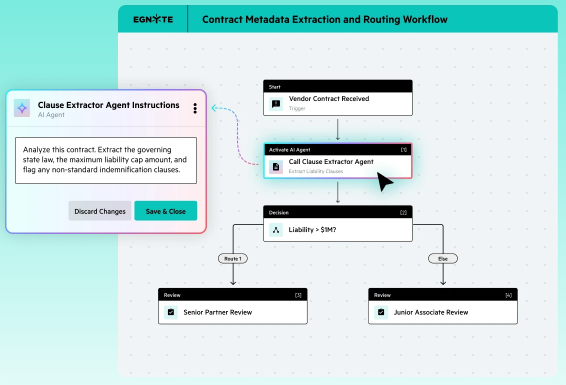
A cloud file platform with version history, access tracking and real-time audit logs. Content lifecycle policies start at Enterprise Lite, and AI search and e-signature start at Elite.
Egnyte is the file platform to look at when retention is the reason you are shopping, because lifecycle policies start at the middle tier instead of an add-on.
How it handles an invoice: documents sit in permissioned folders with automatic version history, user access tracking and real-time audit logs. Standard review and approve workflows are included, advanced multi-step workflows start at Enterprise Lite, and AI workflows start at Elite.
Retention: content lifecycle policies to retain, archive and delete start at Enterprise Lite at $39 per user per month, billed annually. The $22 Business plan has no lifecycle policies, advanced workflows, e-signature or AI Search, and it caps at 100 users.
Search and classification: AI Search in plain language starts at Elite at $48. Classification that recognizes invoices and contracts, and bulk metadata extraction, are Ultimate only, which is quote only.
- you want retention, archive and delete policies without a separate add-on: they start at Enterprise Lite at $39
- you want to search finance files in plain language: AI Search is included from Elite at $48
- on the Business plan you get no retention policies, advanced workflows or e-signature, so $22 does not buy a finance setup
- invoice and contract type classification and bulk metadata extraction are Ultimate only, which is quote only
- Users like
- a user-friendly interface, easy access to files, sharing and security
- Users dislike
- cost, file management challenges, limited features
- Source: G2, 1,188 reviews, November 2026
How it works in practice
G2 reviewers like the user-friendly interface, easy file access, sharing and security, and mention cost and file management challenges. Egnyte names Microsoft 365, Google Workspace, Salesforce and DocuSign connectors, with no QuickBooks, NetSuite, Sage Intacct or Xero.
- Starting price
- Business $22, Enterprise Lite $39, Elite $48 per user/month billed annually; Ultimate quote only
- Retention
- Lifecycle policies from Enterprise Lite
- E-signature
- Elite and up
- ERP connectors
- Microsoft 365, Google Workspace, Salesforce named; QuickBooks, NetSuite, Sage Intacct and Xero not named
- Certifications
- ISO 27001, SOC 1 and 2 Type 2, FINRA and HIPAA compliant storage
- Plans
- Business $22, Enterprise Lite $39, Elite $48 per user per month, billed annually
- Business plan limit
- 100 users
Content services platforms with workflow
M-Files, Laserfiche, DocuWare and Hyland OnBase treat capture, filing and approval as the product. They fit a finance team that wants the invoice or contract to move through steps inside the document system, and they usually involve a partner or vendor for setup.
Laserfiche
Laserfiche
A content services platform with AI data extraction (Smart Fields) with line-item support, PO matching, no-code approval workflows and records lifecycle management with legal holds.
Laserfiche puts invoice capture, purchase order matching and records management in one product, and it's the only tool here that publishes seat prices for a workflow platform.
How it handles an invoice: documents arrive by bulk import, scan or email, and Smart Fields extract data including line items and handwriting. Invoices can be matched to purchase orders, and no-code workflows route them for approval. Smart Fields run on AI units, capped at 1,000 a year on Professional.
Retention and audit: records lifecycle management, retention schedules and legal holds are included from the Business tier and are an add-on on Professional. An advanced audit trail is included, and a Vault add-on provides non-rewritable storage.
Price: Professional is $73 per user per month with a 5 seat minimum, and Business is $93 with a 25 seat minimum, both billed annually. Implementation and professional services are not included.
- you want invoice capture with line-item extraction, PO matching and no-code approvals inside the document system
- you need retention schedules and legal holds: records lifecycle management is included from the Business tier
- a team of 5 lands on Professional, where records lifecycle is an add-on and AI units are capped at 1,000 a year
- no QuickBooks, Xero, Sage Intacct or NetSuite connector is listed; Microsoft 365, Dynamics 365 and Salesforce are
- Users like
- ease of use, process automation, easy training
- Users dislike
- a challenging learning curve, missing features
- Source: G2, 1,250 reviews, November 2026
How it works in practice
G2 reviewers praise ease of use, process automation and easy training, and report a challenging learning curve and missing features. Laserfiche lists Microsoft 365, Dynamics 365 and Salesforce connectors but no QuickBooks, Xero, Sage Intacct or NetSuite connector.
- Starting price
- Professional $73 per user/month (minimum 5 seats) and Business $93 (minimum 25 seats), billed annually; implementation fees not included
- Retention
- Records lifecycle and legal holds from Business
- E-signature
- DocuSign add-on
- ERP connectors
- Dynamics 365, Salesforce (add-on), Microsoft 365; QuickBooks, Xero, Sage Intacct, NetSuite not named
- Certifications
- SOC 2 Type 2, ISO 27001, HIPAA
- Plans
- Professional $73 (5 seats), Business $93 (25 seats) per user per month, billed annually
DocuWare
DocuWare
A document management system with OCR and AI extraction of company, amounts and line items, 3-way and multi-way matching, approval workflows and an audit trail on every invoice step.
DocuWare is built around the accounts payable invoice, so it suits a team whose pile of paper is mostly supplier invoices that need matching and approval, although it's a quote only purchase.
How it handles an invoice: OCR with AI extracts company, amounts and item data, and generative extraction covers other document types. Invoices run through approval workflows with 3-way and multi-way matching, and every step lands in an audit trail. DocuWare says it can enforce retention policies but describes no retention periods.
Connectors: SAP, Sage, QuickBooks, Oracle, Infor, Dynamics 365 Business Central, Outlook, Teams and SharePoint are named, and an iPaaS connector reaches more than 1,000 other cloud apps. NetSuite, Xero and Sage Intacct are not named.
Price: quote only. DocuWare's FAQ says Cloud typically costs $30 to $125+ per user per month, depending on one of four tiers, on Full Named versus Workflow users, and on storage. There is a demo and no free trial.
- you process AP invoices and want OCR, AI extraction, 3-way matching and approvals in the same system as the archive
- you run SAP, Sage, QuickBooks or Dynamics 365 Business Central: all four are named connectors
- you need to see per-seat pricing before a sales call: DocuWare states only a range and sells by tier, storage and user type (Full Named or Workflow)
- you need NetSuite, Xero or Sage Intacct links: they are not named, and an iPaaS connector covers other cloud apps
- Users like
- ease of use, integrations, automation
- Users dislike
- a challenging learning curve, complex customization, missing features
- Source: G2, 251 reviews, November 2026
How it works in practice
G2 reviewers praise ease of use, integrations and automation, and name a challenging learning curve and complex customization.
- Starting price
- Quote only; the vendor FAQ says Cloud typically costs $30 to $125+ per user per month, by tier and user type
- Retention
- Retention policies enforceable, no periods described
- E-signature
- Listed as a product highlight
- ERP connectors
- SAP, Sage, QuickBooks, Oracle, Infor, Dynamics 365 Business Central
- Certifications
- SOC 2, ISO 27001, ISO 9001
- Price range stated
- $30 to $125+ per user per month
- Matching
- 3-way and multi-way
M-Files
M-Files
A document platform that files by metadata (vendor, project, document type) instead of folders, with graphical workflows, approvals and version control in both plans.
M-Files drops the folder tree: you describe a document (vendor, project, type) and it appears wherever that description applies.
How it handles an invoice: an invoice is filed by its metadata, so the same record shows under the vendor, the project and the purchase order without copies. Graphical workflows, approvals, version control and lifecycle management are in both Essentials and Enterprise.
What is Enterprise only: the extended audit log, external collaboration and Aino AI agents for metadata extraction and classification. Native AP invoice capture is not on the plan page, and partner add-ons such as EzeScan, AncoraDocs and BayMDM cover it.
Price: Essentials is EUR 65 per user per month with no USD price listed, and Enterprise is quoted by users, compliance needs, external collaboration, AI use and document volume. Billing is typically annual and there is a demo, not a free trial.
- you want one invoice to show up under vendor, project and purchase order without keeping copies in several folders
- your team runs Microsoft 365, Salesforce or SAP: all three are named connectors, and workflows and approvals are in both plans
- you need the extended audit log or AI classification (Aino): both are Enterprise only, which is quote only
- you need native AP invoice capture: M-Files points to partner add-ons such as EzeScan, and no QuickBooks, Xero or NetSuite connector is named
- Users like
- a user-friendly interface, easy access from anywhere, organization by metadata
- Users dislike
- a steep learning curve, required training, slow performance
- Source: G2, 273 reviews, November 2026
How it works in practice
G2 reviewers praise a user-friendly interface, easy access and organization by metadata, and cite a steep learning curve, required training and slow performance. QuickBooks, Xero and NetSuite are not on the integrations page.
- Starting price
- Essentials EUR 65 per user/month (no USD price listed); Enterprise quote only; billed annually
- Retention
- Lifecycle management in both plans
- E-signature
- Adobe Sign and DocuSign connectors
- ERP connectors
- SAP, Salesforce and Microsoft 365 named; QuickBooks, Xero and NetSuite not named
- Certifications
- ISO 27001:2022, ISAE 3000, SOX 404 statement
- Essentials
- EUR 65 per user per month
- Named connectors
- Microsoft 365, Salesforce, SAP, Google Workspace, Adobe Sign, DocuSign
- Compliance statements
- ISO 27001:2022, SOX 404
Hyland OnBase
Hyland OnBase
An enterprise content platform with retention and records management, audit trails, version control and configurable workflows. AP invoice capture comes from Hyland IDP for AP Invoices, sold alongside it.
OnBase is the enterprise option: documents attach to records in the ERP, and the sale is a conversation rather than a price page.
How it handles an invoice: OnBase lists retention and records management, audit trails, version control and configurable workflows and approvals. AI invoice capture comes from Hyland IDP for AP Invoices, which Hyland names as a separate product, along with OCR and handwriting recognition.
Connectors: SAP S/4HANA, Microsoft Dynamics, Oracle JD Edwards, Oracle E-Business Suite, Infor, Deltek, SharePoint, DocuSign and Salesforce are named, and Hyland claims more than 500 connections.
Price: no plans, prices or free trial are shown, only a demo or a contact with an expert. Hyland states ISO 27001, SOC 2 and HITRUST for specific offerings, not for OnBase as a whole.
- you run SAP S/4HANA, Oracle JD Edwards, Infor or Microsoft Dynamics and want documents attached to ERP records
- you need AP invoice capture: Hyland IDP for AP Invoices adds AI capture and validation
- you are a team of 2 to 8: OnBase is sold through a demo or sales contact with no plan tiers or trial shown
- you need a QuickBooks, NetSuite or Sage Intacct connector: none is named, and invoice capture is a separate Hyland product
- Users like
- ease of use, document management, integrations
- Users dislike
- missing features, update issues, poor customer support
- Source: G2, 328 reviews, November 2026
How it works in practice
G2 reviewers praise ease of use, document management and integrations, and report missing features, update issues and poor customer support.
- Starting price
- Quote only (demo or sales contact; no plans or trial shown)
- Retention
- Retention and records management
- E-signature
- DocuSign integration
- ERP connectors
- SAP S/4HANA, Dynamics, JD Edwards, Oracle E-Business Suite, Infor, Deltek
- Certifications
- ISO 27001, SOC 2 for specific offerings
- Pricing
- Quote only, demo led
- ERP links
- SAP S/4HANA, Dynamics, JD Edwards, Oracle EBS, Infor
- Invoice capture
- Hyland IDP for AP Invoices, separate product
A client portal for accounting firms
SmartVault is on this list because it ranks among document tools for accountants. Read it as a tool for firms and their clients, but don't expect it to run an in-house payables file.
SmartVault
SmartVault
A document portal built for accounting firms and their clients: branded client portal with unlimited clients, DocuSign-based e-signature, activity logs and workflow automation for folders and alerts.
SmartVault is a client portal first: an accounting firm gives each client a branded space to upload, sign and download.
How it works: the branded portal allows unlimited clients on all plans. E-signature is DocuSign based with knowledge based authentication, and workflow automation creates folders, routes files and sends alerts. Activity logs record every user action.
Plans: Business Pro is $65 per user per month billed annually with a 3 user minimum, Accounting Pro is $65 with a 2 user minimum, and Accounting Unlimited is $85. Unlimited e-signatures and file retention sit in Accounting Unlimited, and the pricing table marks file retention as coming in Q1 2027.
Connectors: QuickBooks, Xero, FreshBooks, Hubdoc, Lacerte, ProSeries, UltraTax and CCH Axcess are named, and they are gated to Accounting Pro. Security statements include SOC 2 Type 2, ISO 27001 and IRS Publication 4557.
- you share documents with outside clients through a branded portal: unlimited clients on every plan
- your tax stack is CCH Axcess, Lacerte, ProSeries or UltraTax: connectors are named, along with QuickBooks and Xero
- you need AP invoice capture: none is described, the product is built for firms and their clients
- file retention is marked coming Q1 2027, and unlimited e-signatures are in Accounting Unlimited at $85
- Users like
- ease of use, easy uploads, secure sharing (3 to 4 mentions each)
- Users dislike
- limited customization and price (2 to 3 mentions each)
- Source: G2, 103 reviews, November 2026
How it works in practice
G2 reviewers praise ease of use, easy uploads and secure sharing, and a few mention limited customization and price. No AP invoice capture is described.
- Starting price
- Business Pro $65, Accounting Pro $65, Accounting Unlimited $85 per user/month billed annually (minimum 2 to 3 users)
- Retention
- Coming Q1 2027
- E-signature
- DocuSign-based, unlimited in Accounting Unlimited
- ERP connectors
- QuickBooks, Xero, FreshBooks, CCH Axcess, Lacerte, UltraTax; NetSuite not named
- Certifications
- SOC 2 Type 2, ISO 27001, IRS Pub 4557
- Plans
- $65 and $85 per user per month, billed annually
- Built for
- Accounting firms and their clients
What happens to a financial document, step by step
Five steps cover most finance documents, and each tool covers a different subset. The last line of each column is the failure to watch for.
- Step 1Capture
- DocuWare
- Laserfiche
- Microsoft SharePoint
Check the invoice model reads your supplier invoices, not only sales invoices - Step 2File
- M-Files
- Box
- Egnyte
Check one record, not copies in three folders - Step 3Approve
- DocuWare
- Laserfiche
- M-Files
Check approver and preparer are different people - Step 4Retain
- Laserfiche
- Egnyte
- Microsoft SharePoint
- Box
Check the retention rule is on your plan, not a quoted add-on - Step 5Produce for audit
- Box
- Microsoft SharePoint
Check the audit log covers the whole audit period
How long should finance documents be kept?
The IRS ties the answer to the period of limitations for a return, and the periods differ by situation. Check them against your state rules and your auditor before you set a retention rule in any of these tools.
| Record situation | Keep for | Source |
|---|---|---|
| Records for a return, the general case | 3 years from the filing date | IRS guidance on how long to keep records |
| Employment tax records | At least 4 years after the tax is due or paid | IRS, same page |
| Income left off a return that is more than 25% of gross income shown | 6 years | IRS, same page |
| Loss from worthless securities or a bad debt deduction | 7 years | IRS, same page |
| No return filed, or a fraudulent return | Indefinitely | IRS, same page |
| Audit and review records held by an auditor of an issuer | 7 years after the audit or review ends | SEC Regulation S-X, Rule 2-06 |
The SEC rule binds the accountant who audits an issuer, not the company being audited. A company's own rule should cover at least the longest period that applies to its records, and a legal hold overrides any schedule, so check that your tool can suspend deletion. Document provenance, meaning who uploaded a file and which version an approver saw, is what auditors test, so check that provenance and timestamps survive a move between libraries, and keep workpapers in the same document system as the evidence. Purview labels turn a document into a record in SharePoint, and Governance does the same for a Box document. A legal hold freezes document deletion until counsel releases it, and a frozen document keeps its approval trail. Document disposition needs a named custodian for each record series, and those custodians should be set before you configure Purview, Laserfiche or Egnyte policies. Good document management software also handles disposition, the scheduled deletion at the end of a retention period, and names a custodian for each record series. That is why retention sits third in the criteria: Laserfiche includes holds from the Business tier, Box needs the Governance add-on, and Egnyte starts lifecycle policies at Enterprise Lite.
Where month-end close evidence lives
A document system answers where the file is. The month-end close asks a different question: for this period, which tasks are done, who reviewed them and which evidence is missing. Keep the files in your document system and keep the checklist elsewhere. Our month-end close checklist lists the evidence a close usually needs, and the financial close software roundup covers tools that run it. If your documents feed invoice processing or payables, see invoice processing software and accounts payable software, and for controls testing see SOX compliance software.
Which tool fits your team?
Pick by the system you run and the document that hurts most.
- Your team lives in Microsoft 365 and the job is retention and a shared home for filesSharePoint, with Purview retention labels
- Most documents are supplier invoices that need matching and approvalDocuWare, or Laserfiche if retention and legal hold matter as much
- You share close and audit folders with outside auditorsBox on Business Plus, or Egnyte from Enterprise Lite if retention is the priority
- You file by vendor, project and purchase order and want no folder treeM-Files
- You run SAP, Oracle JD Edwards or Infor and want documents tied to ERP recordsHyland OnBase, or DocuWare if a quote in a range is enough to start
- You are an accounting firm exchanging files with clientsSmartVault
What is financial document management software?
Financial document management software is a document management system used for finance documents such as invoices, contracts, bank statements and audit evidence. It captures and files each document, routes it for approval or signature, applies a retention rule and logs who accessed it. It does not post transactions or replace the accounting system.
What is an example of an EDMS?
An electronic document management system (EDMS) is the same category as a DMS. Laserfiche, M-Files, DocuWare and Hyland OnBase are examples on this page, and Box, Egnyte and Microsoft SharePoint are file platforms that add document management features.
What software do accounting firms use for client documents?
SmartVault is built for that job, with a branded client portal, e-signature and connectors to tax software such as CCH Axcess, Lacerte, ProSeries and UltraTax. Firms also use general platforms such as Box, Egnyte and SharePoint.
Can document management software read invoices automatically?
Some can. DocuWare and Laserfiche extract invoice data and match it to purchase orders inside the product. SharePoint has a prebuilt model billed at $0.01 per page, Box lists Box Extract under Enterprise Advanced, and M-Files points to partner add-ons.
How long should finance documents be kept?
Retention depends on the record. The IRS lists 3 years for most return records, 4 years for employment tax records, 6 years in the case of income left off a return and 7 years for some bad debt or securities losses. Auditors of SEC issuers keep their audit records for 7 years. Confirm your own rule with your auditor.
Does a document management system replace accounting software?
No. It stores the invoice, contract or statement and the approval trail. The ledger stays in your accounting system, and the connector decides how the two link.