
Financial performance management software connects budgeting, forecasting, consolidation, close management and management reporting on one finance data model, so the plan and the actuals sit next to each other and the variance is visible the day the books close. Analysts and vendors also call it corporate performance management (CPM), enterprise performance management (EPM) or, when the focus is planning, FP&A software. OneStream, Planful and Prophix One lead with consolidation and close. Anaplan and Workday Adaptive Planning lead with planning. Vena, Cube and Datarails keep Excel as the front end.
We compared eight platforms and grouped them by the module each one leads with, because that decides which tools can solve your problem. We read vendor pricing, feature and help pages for each tool in November 2026. Review ratings and themes are per G2, as of November 2026. We read vendor material and did not run these products, and none of the vendors paid for a placement. Our own product tracks the month-end close and does not plan or consolidate, so it appears only as a marked row.
- performance management platforms compared
- 8
- platforms that publish a price
- 0
- platforms that keep Excel as the front end
- 3
- G2 rating range across the eight
- 4.3 to 4.6
What is financial performance management software?
Financial performance management software is a platform that plans, consolidates and reports a company's financials on one data model, so that budgets, forecasts and actuals are compared in the same place. It sits on top of your general ledger or ERP. It doesn't replace the ledger, and it doesn't post transactions.
Four jobs separate it from a spreadsheet and from the ledger underneath.
- Planning and forecasting. Budgets and rolling forecasts are built from drivers such as headcount, price or volume, and scenarios let you test a best and a worst case rather than a single outcome.
- Consolidation. Entities, currencies and intercompany balances roll up into group statements, with eliminations, currency translation and minority interest handled by rules instead of by hand.
- Close management. Close task lists, balance sheet reconciliations and sign-offs tell the controller which part of the books is still open.
- Reporting and analysis. Board packs, variance reports and dashboards read from the same model, so a number changed in the plan changes everywhere.
No single platform in this guide is best at all four, but each one is clearly strongest at one. Consolidation-led suites such as OneStream are strongest on the group close. Planning-led platforms such as Anaplan are strongest on models and scenarios. Excel-led tools such as Vena are strongest where the finance team already lives in spreadsheets. If you only need the forecast, our guide to financial forecasting software covers lighter tools, and our guide to financial consolidation software covers the group close in depth.
Our picks by situation
Start from the module that hurts most today, then check your ERP.
 Best for a multi-entity group where consolidation is the hard partOneStreamConsolidation, account reconciliations, transaction matching and planning on one data model, sold as an enterprise project.
 Best for an upper mid-market team that wants close, consolidation and planning togetherPlanfulEliminations and minority interest next to rolling forecasts, without running an enterprise suite.
 Best for a team that wants to buy the modules one at a timeProphix OnePlanning is the base, with close management and consolidation as separately priced modules.
 Best for planning across finance, sales and supply chainAnaplanOne calculation engine for scenarios on large data volumes, connected to NetSuite, SAP and Snowflake.
 Best for driver-based planning with scenario depthWorkday Adaptive PlanningUnlimited what-if scenarios and Monte Carlo simulations, with Excel reports that refresh from the model.
 Best for a team that wants the model to stay in ExcelVenaExcel-native planning with a central database underneath and a long list of ledger connectors.
 Best for planning in Excel or Google SheetsCubeTwo-way sync with both spreadsheets and plans priced by legal-entity count.
 Best for monthly report packs built from mapped ledger dataDatarailsExcel and PowerPoint packs fed from a central database, with consolidation and a month-end close add-on.
Financial performance management software compared
| Tool | Type | Lead module | Price (USD) | G2 rating |
|---|---|---|---|---|
| OneStream | Enterprise CPM platform with close and consolidation | Consolidation and reporting, with recs and matching on the same data | Price not published (quote only) | 4.6 (161) |
| Planful | Mid-market CPM platform with close, consolidation and planning | Multi-entity consolidation with eliminations and minority interest, next to planning and reporting | Price not published (quote only); G2 lists "Contact Us" | 4.3 (489) |
| Prophix One | FP&A suite with close and consolidation modules | Consolidation and intercompany, with reconciliation as a module | Price not published (quote only); AWS Marketplace lists $50,000 per 12-month unit for Close Management | 4.4 (223) |
| Anaplan | Enterprise connected planning platform | Rolling forecasts and scenario models across finance, sales and supply chain | Quote only: Anaplan publishes no plan names or prices | 4.6 (461) |
| Workday Adaptive Planning | Cloud planning platform for mid-market and enterprise finance teams | Driver-based budgets, forecasts and scenarios with Excel reporting through OfficeConnect | Quote only: Workday publishes no prices for Adaptive Planning | 4.3 (350) |
| Vena | Excel-native FP&A and corporate performance management | Driver-based budgets and rolling forecasts built in Excel on a central database | Quote only: Professional and Complete plans with add-ons such as Vena AI at extra cost; Vena publishes no prices | 4.5 (366) |
| Cube | Spreadsheet-native FP&A for planning, forecasting and consolidation | Driver-based forecast edited in Excel or Google Sheets on a governed data model | Quote only: Bronze (1 legal entity), Silver (up to 10), Gold (up to 50) and Strategic (50 or more); Cube publishes no prices | 4.5 (122) |
| Datarails | Excel-based reporting and FP&A platform | Mapped ledger data feeding Excel and PowerPoint report packs, with consolidation | Quote only (three tiers: Professional 2 users and 1 integration, Premium 5 users and 2 integrations, Expert 15 users plus 50 viewers and 3 integrations) | 4.6 (392) |
 The Finance Lead Our product | Month-end close checklists | Tracks close tasks, evidence and preparer/reviewer sign-off | Team $39/month (up to 8 team members), Plus $79/month (no member limit, read-only MCP server); card required at checkout | No reviews yet |
Prices read from vendor pages in October and November 2026. Quote means the vendor publishes no price.
The platforms cover different modules, so a table of features hides more than it shows. This table lists what each vendor states for the four jobs.
| Tool | Planning | Consolidation | Close management | Excel link |
|---|---|---|---|---|
| OneStream | Yes | Yes, with eliminations and currency translation | Yes: Task Manager, account reconciliations, transaction matching | Import and export of reconciliation inventory |
| Planful | Yes | Yes, with eliminations and minority interest | Yes | Spotlight for Microsoft 365 |
| Prophix One | Yes | Separate module | Separate Close Management module | Microsoft 365 add-in |
| Anaplan | Yes | Not stated | Not stated | Not stated |
| Workday Adaptive Planning | Yes | Not stated | Not stated | OfficeConnect for Excel |
| Vena | Yes | Yes | Not stated | Excel-native |
| Cube | Yes | Yes | Not stated | Two-way sync with Excel and Google Sheets |
| Datarails | Yes | Yes, with eliminations | Month-End Close add-on | Excel-native |
The ledger decides which of these tools can work for you at all, so check it before you compare features.
| Tool | ERPs listed by the vendor |
|---|---|
| OneStream | SAP, Oracle, Microsoft Dynamics, Infor and open GL or ERP connections |
| Planful | NetSuite, QuickBooks, Sage Intacct, SAP, Oracle, Dynamics 365, Acumatica |
| Prophix One | NetSuite, SAP, Oracle, Dynamics 365, Workday, Sage Intacct, Epicor, Acumatica |
| Anaplan | NetSuite, SAP, Salesforce and data warehouses such as Snowflake |
| Workday Adaptive Planning | NetSuite, Sage Intacct, Dynamics GP, Workday |
| Vena | Business Central, NetSuite, Sage Intacct, QuickBooks, SAP, Acumatica, Xero, Dynamics 365 Finance and Operations |
| Cube | NetSuite, Sage Intacct, QuickBooks, SAP, Business Central |
| Datarails | NetSuite, Sage Intacct, Business Central, QuickBooks, Xero, Dynamics 365, SAP Business One, Acumatica |
How do you choose financial performance management software?
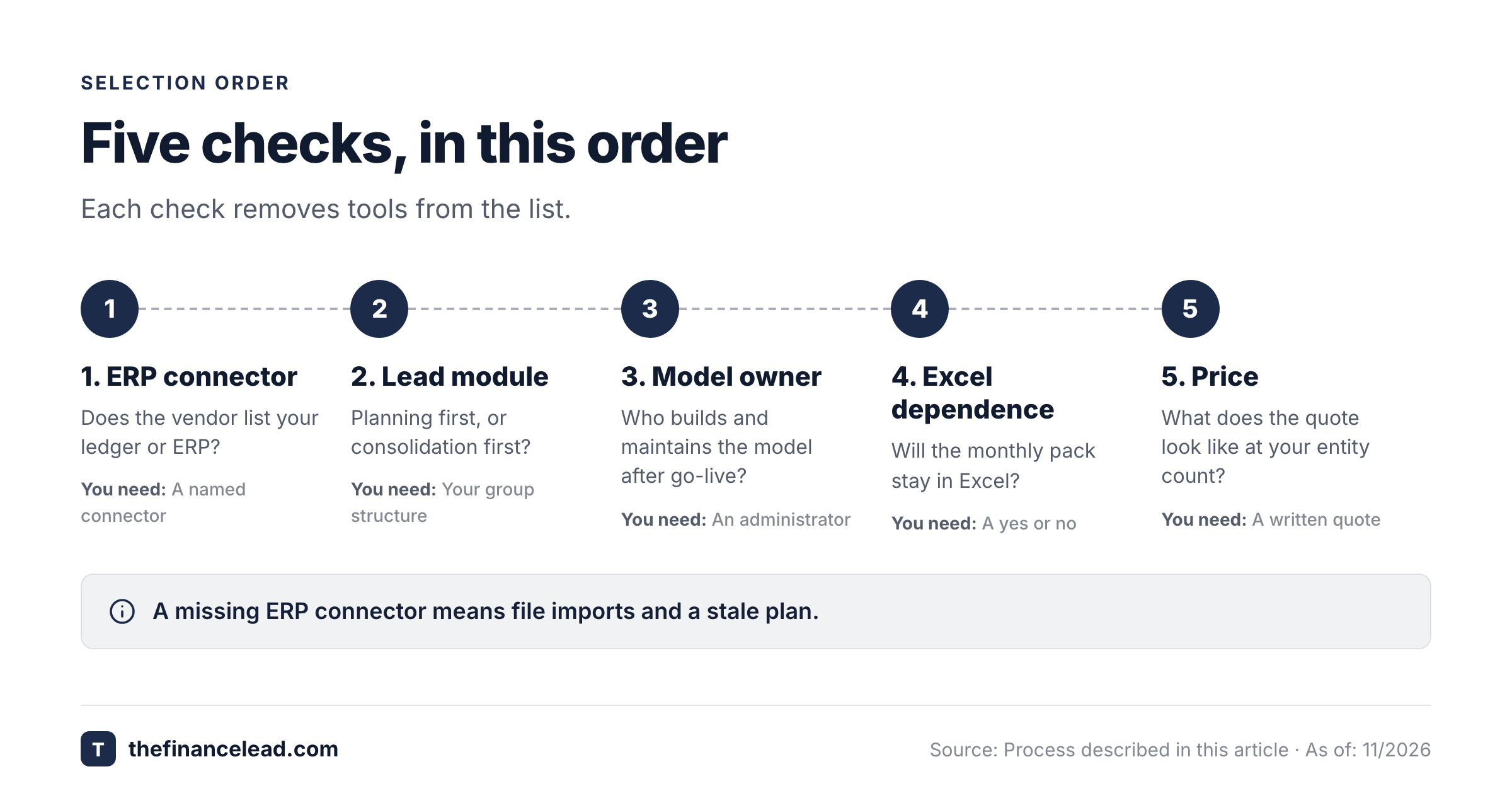
Choose in this order, because each step removes tools from the list, and don't start with features.
- ERP connector. If the vendor does not list your ledger, you load files, and a plan built on monthly file imports goes stale. OneStream names no QuickBooks, Xero or Sage Intacct connector, and Workday Adaptive Planning lists neither QuickBooks nor Xero.
- Planning or consolidation first. A team with one entity and a forecasting problem should start from the planning-led or Excel-led tools. A group with several entities and currencies should start from the consolidation-led tools, because rebuilding eliminations and currency translation in a planning model is the expensive mistake.
- Who owns the model. Planning platforms need an owner who can configure rules and dimensions. G2 reviewers of OneStream, Planful, Prophix One and Vena all name a learning curve, so budget for an administrator or a partner.
- Excel dependence. If the monthly pack lives in Excel and will keep living there, Vena, Cube and Datarails keep it there. If you want to leave spreadsheets, Anaplan and OneStream are built for that.
- Price transparency. None of the eight publishes a price. Plan on a demo, a quote and a quote that moves with entities, users and modules.
Then ask each vendor the questions that decide the project.
- Which of our ERPs do you connect to, and is the sync native or a file import?
- Which modules are in the quote, and which are separate purchases?
- Does consolidation handle our eliminations, currencies and ownership structure out of the box?
- Who builds and maintains the model, and what does that cost after go-live?
- How long did a company of our size take to go live, and who on our side did the work?
- What is the price for our entity count and user count in USD, and what are the add-ons?
Consolidation-led platforms
OneStream, Planful and Prophix One start from the group close: trial balances in, eliminations and currency translation run, statements out. Planning sits on the same data.
OneStream
OneStream suits a multi-entity, multi-currency group that treats consolidation as the hardest part of the close. It runs consolidation, account reconciliations, transaction matching, journal entries, reporting and planning in one application on a single data model. OneStream says it was named a Leader in the 2026 Gartner Magic Quadrant for Financial Close and Consolidation Solutions.
OneStream
OneStream is an enterprise CPM platform that runs consolidation, account reconciliations, transaction matching, journal entries, reporting and planning in one application on a single data model. It says it was named a Leader in the 2026 Gartner Magic Quadrant for Financial Close and Consolidation Solutions (report dated 9 March 2026).
OneStream suits a group where consolidation is the hardest part of the close and one platform should replace several finance tools.
Team it fits: a controller and a central finance team on SAP, Oracle, Microsoft Dynamics or Infor, with an administrator or a partner to configure workflows and business rules.
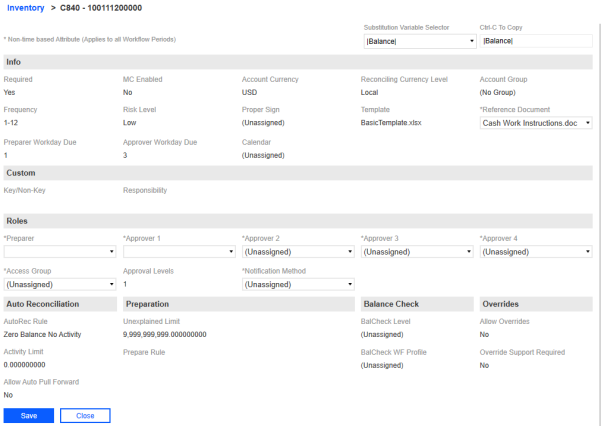
How it works: trial balances load once from the ERP through prebuilt connectors, with drill-back to the source transactions, and the same data feeds reconciliation, close, consolidation and reporting. Task Manager ties close tasks to workflows and enforces segregation of duties, so one user cannot both complete and approve a task in the same month. In Account Reconciliations an administrator runs Discover to build the reconciliation inventory from general ledger accounts, assigns risk levels, and sets a preparer and up to four approvers per reconciliation. Consolidation then runs intercompany eliminations and currency translation under US GAAP and IFRS.
Limits: pricing is quote only, the vendor documents no implementation timeline, and ease of setup is its lowest G2 sub-score.
- You run a multi-entity, multi-currency group with intercompany eliminations, currency translation and acquisitions
- You want one platform for close, consolidation, reporting and planning instead of several tools
- You run SAP, Oracle, Dynamics or Infor and have an administrator or partner to configure rules
- You are a team of 2 to 15 on QuickBooks Online, Xero or Sage Intacct: OneStream names none of them as connectors and is sold as an enterprise project
- You want a tool your accountants can configure themselves within weeks
- You need a published price or a short trial before you decide
- Users like
- One platform for consolidation, planning and reporting; strong business rules, governance and support
- Users dislike
- Steep learning curve and harder setup (ease of setup is the lowest sub-score)
- Source: G2, 161 reviews
How it works in practice
G2 reviewers rate OneStream 4.6 from 161 reviews. Praise centers on one platform for consolidation, planning and reporting, plus strong business rules, governance and support. The recurring complaint is a steep learning curve and harder setup.
- Starting price
- Price not published (quote only)
- Gartner
- Leader, 2026 Magic Quadrant for Financial Close and Consolidation Solutions, per OneStream
- Close modules
- Consolidation, account reconciliations, transaction matching, journal entry manager, task manager
- ERPs named
- SAP, Oracle, Microsoft Dynamics, Infor
- Connectors
- 250 or more systems claimed by OneStream
Planful
Planful suits an upper mid-market company with several legal entities that wants planning, close and consolidation connected without running an enterprise suite. Its own guide describes it for companies with sub-consolidations and says it was named a Challenger in the 2026 Gartner Magic Quadrant for Financial Close and Consolidation Solutions.
Planful
Planful combines financial close, multi-entity consolidation, planning, budgeting and reporting in one platform. Its own guide positions it for upper mid-market companies with several legal entities and sub-consolidations, and says it was named a Challenger in the 2026 Gartner Magic Quadrant for Financial Close and Consolidation Solutions.
Planful fits an upper mid-market team that wants close, consolidation and planning on one platform.
Team it fits: a controller and an FP&A team on NetSuite, QuickBooks, Sage Intacct, SAP, Oracle or Dynamics 365 with several entities.
How it works: consolidation handles multiple entities with automated intercompany eliminations and minority interest calculations. On the planning side Planful lists rolling forecasts, driver-based cash flow forecasting where you adjust drivers such as headcount, capex and payment terms, and scenarios. An AI planner builds account-level forecasts from closed actuals, although writing scenarios back to the plan is marked as coming soon. Excel is covered through Spotlight for Microsoft 365.
Limits: pricing is quote only and implementation time is not stated. Reviewers name manual data entry during setup and slower processing on large datasets.
- You have several legal entities and want eliminations, minority interest and planning on one platform
- Your controller wants close, consolidation and budgeting connected without an enterprise EPM suite
- You are a small team on one or two entities: pricing is quote only and the platform is built for upper mid-market complexity
- You need the deepest consolidation rules for very large groups: Planful's own guide points that segment to OneStream
- Users like
- Broad close, consolidation and planning coverage
- Users dislike
- Learning curve (one Capterra reviewer titles a 3.0 review "Effective but Gruesome to Learn")
- Source: G2, 489 reviews

How it works in practice
G2 reviewers rate Planful 4.3 from 489 reviews and Capterra reviewers 4.4. Praise centers on broad close, consolidation and planning coverage and an approachable interface. Complaints name the learning curve and setup effort.
- Starting price
- Price not published (quote only); G2 lists "Contact Us"
- Consolidation
- Multi-entity consolidation with automated intercompany eliminations and minority interest calculations (Planful)
- Gartner
- Challenger, 2026 Magic Quadrant for Financial Close and Consolidation Solutions (Planful blog)
- G2 consolidation score
- 8.4 from 98 reviews
- Forecast method
- Rolling forecasts, driver-based cash flow forecasting and scenarios; Excel through Spotlight for Microsoft 365 (Planful)
- Ledgers
- NetSuite, QuickBooks, Sage Intacct, SAP, Oracle, Dynamics 365, Acumatica
- Trial
- Demo; Capterra lists no free trial
- Customers
- More than 1,400 per Capterra
- Capterra rating
- 4.4 from 87 reviews
Prophix One
Prophix One is built around budgeting and planning, with close management and financial consolidation as separately priced modules. That structure lets a team start with planning and add the close or the group consolidation later.
Prophix One
Prophix One is a cloud financial performance platform built around budgeting and planning, with separately priced modules for close management (account reconciliation, close tasks, audit trail), financial consolidation and intercompany. The close work sits in the Close Management module (Account Reconciliation, generally available since September 2024) plus the Financial Consolidation module for multi-entity groups.
Prophix One fits a team that wants planning first and the close and consolidation modules added when the group grows.
Team it fits: a finance team on NetSuite, SAP, Oracle, Dynamics 365, Workday, Sage Intacct or Epicor that wants one platform instead of separate close and FP&A tools.
How it works: trial balances flow from the ERP on a scheduled import aligned to the close calendar, using the same integration framework as the planning side. Preparers work balance sheet reconciliations in templates configured by account type, with required fields and a documentation checklist, and a reconciliation that nets to zero triggers an approval request. A command center shows completed, in-review and overdue work by period and entity. For groups, the Financial Consolidation module runs intercompany matching and eliminations, currency translation and ownership calculations. A one-click close package exports reconciliations, support and sign-offs to Excel for the auditor.
Limits: pricing is quote only. Prophix's AWS Marketplace listing shows 12-month prices per unit of $100,000 for FP&A, $50,000 for Close Management and $60,000 for Financial Consolidation, and the unit is not defined there.
- You want consolidation, intercompany eliminations and statutory reporting next to budgeting and forecasting
- You already use Prophix for planning and want to add reconciliation and close tracking on the same integration
- You are a small single-entity team that only needs statements from QuickBooks Online or Xero: setup is services-led and G2 users report about four months to implement
- You only need a close checklist and reconciliations: close is one module of a broader suite
- You want transparent self-serve pricing or a free trial
- Users like
- Ease of use, flexible reporting and responsive support
- Users dislike
- Steep learning curve for advanced features and slow performance or report load times
- Source: G2, 223 reviews

How it works in practice
G2 reviewers rate Prophix 4.4 from 223 reviews. Praise centers on ease of use, flexible reporting and responsive support. Complaints name a steep learning curve for advanced features and slow report load times.
- Starting price
- Price not published (quote only); AWS Marketplace lists $50,000 per 12-month unit for Close Management
- Close module
- Close Management (account reconciliation, generally available since September 2024) plus Financial Consolidation
- ERPs named
- NetSuite, SAP, Oracle, Dynamics 365, Workday, Sage Intacct, Epicor, Acumatica
- Auditor package
- One-click close package export to Excel
- Customers
- More than 3,000 per Prophix
- AWS Marketplace list price
- $50,000 per 12 months for Close Management
- Go-live example
- Automated consolidation across 8 foreign subsidiaries in 60 days (Prophix customer story)
Planning-led platforms
Anaplan and Workday Adaptive Planning start from the model. Consolidation and close aren't what they lead with, so check each against your group structure before you shortlist them.
Anaplan
Anaplan models planning, budgeting and rolling forecasts on one calculation engine and serves finance, sales and supply chain teams from the same platform. That breadth is the reason to pick it. It's also why a finance-only team can find it more than it needs.
Anaplan
Anaplan is an enterprise platform that models planning, budgeting and rolling forecasts in one calculation engine, with scenario modeling and connectors to NetSuite, SAP, Salesforce and data warehouses such as Snowflake. It serves finance, sales and supply chain planning.
Anaplan fits an enterprise that plans across finance, sales and operations in one model and has a team to own the platform.
Team it fits: a large finance organization on NetSuite or SAP that shares planning data with sales and supply chain.
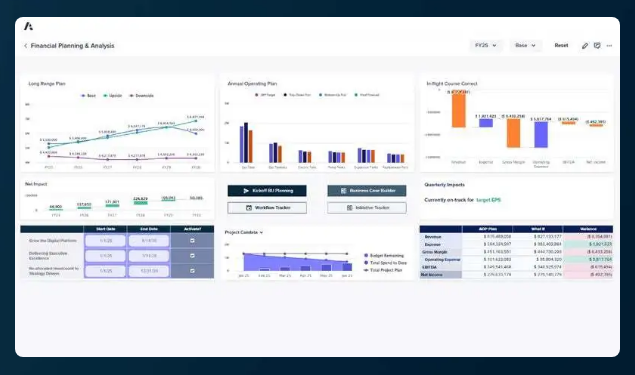
How it works: Anaplan lists rolling forecasting and AI-driven scenario modeling on its finance planning solution, and it runs on a calculation engine built for large data volumes. Data arrives through Data Orchestrator, CloudWorks, Anaplan Connect and transactional and bulk APIs, with connectors named for NetSuite, SAP, Salesforce, Snowflake and Informatica.
Limits: Anaplan publishes no plan names or prices and offers a demo rather than a trial. It states no consolidation or close module on its finance page, and it lists no QuickBooks, Xero or Sage Intacct connector.
- You plan across finance, sales and operations in one model and have a team that can own the platform
- You run SAP or NetSuite and need several scenarios on large data volumes
- You are a small finance team: the positioning is enterprise and the price is a quote
- You need a consolidation and close module from the same vendor: none is stated on its finance page
- You run QuickBooks, Xero or Sage Intacct: no connector is listed
- Users like
- Flexibility and real-time collaborative planning
- Users dislike
- Steep learning curve and heavy implementation
- Source: G2, 461 reviews
How it works in practice
G2 reviewers rate Anaplan 4.6 from 461 reviews. Praise centers on flexibility and real-time collaborative planning. The recurring complaint is a steep learning curve and a heavy implementation.
- Starting price
- Quote only: Anaplan publishes no plan names or prices
- Forecast method
- Rolling forecasting and AI-driven scenario modeling listed (Anaplan)
- Ledgers
- NetSuite shown in the connection dashboard; SAP, Salesforce, Snowflake and Informatica also listed
- Data tools
- Data Orchestrator, CloudWorks, Anaplan Connect and APIs
- Trial
- Demo only
- Customers
- More than 2,800 brands per Anaplan
Workday Adaptive Planning
Workday Adaptive Planning builds driver-based budgets and forecasts, runs unlimited what-if scenarios and Monte Carlo simulations, and unifies plans and actuals in one model. Workday describes it as a Leader in the 2025 Gartner Magic Quadrant for Financial Planning Software.
Workday Adaptive Planning
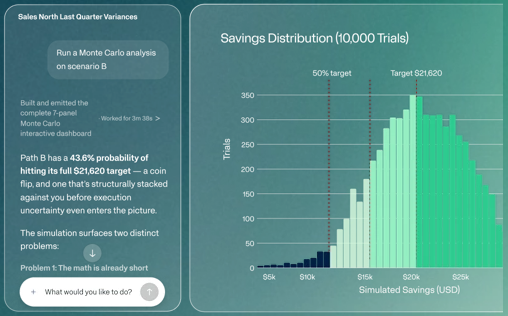
Adaptive Planning builds driver-based budgets and forecasts, runs unlimited what-if scenarios and Monte Carlo simulations, and unifies plans and actuals in one model. OfficeConnect links existing Excel reports to Adaptive data with a one-click refresh.
Workday Adaptive Planning fits a mid-market or enterprise team that wants driver-based planning with deep scenario work and Excel reports that refresh.
Team it fits: a finance team on NetSuite, Sage Intacct, Dynamics GP or Workday that builds budgets from drivers and reports in Excel.
How it works: plans, actuals and operational data sit in one model, and drivers move the budget and forecast lines. Scenarios are personal or shareable, and Monte Carlo simulations test ranges instead of single outcomes. OfficeConnect links existing Excel reports to Adaptive data with a one-click refresh, and the technical requirements limit it to Windows, so Mac users get no refresh.
Limits: Workday publishes no prices, and its data-source documentation lists no QuickBooks or Xero connector. It states no consolidation or close module on the pages for this product.
- Your ledger is NetSuite, Sage Intacct or Dynamics GP and you want driver-based planning with scenario depth
- Your team builds reports in Excel and wants them to refresh from the planning model
- You run QuickBooks or Xero: neither is listed as a data source
- You are a small team: G2 reviewers describe steep pricing for smaller companies and time-consuming customization
- You need consolidation and close in the same product
- Users like
- Integrations and real-time forecasting
- Users dislike
- Difficult customization and steep pricing for smaller companies
- Source: G2, 350 reviews
How it works in practice
G2 reviewers rate Workday Adaptive Planning 4.3 from 350 reviews. Praise centers on integrations and real-time forecasting. Complaints name difficult customization and steep pricing for smaller companies.
- Starting price
- Quote only: Workday publishes no prices for Adaptive Planning
- Forecast method
- Driver-based budgets, unlimited what-if scenarios, Monte Carlo simulations (Workday)
- Spreadsheets
- OfficeConnect for Excel, Windows only
- Ledgers
- NetSuite, Sage Intacct, Microsoft Dynamics GP, Workday; Salesforce, JDBC and spreadsheets as other sources
- Trial
- Free trial and demo offered on the overview page
- Gartner
- Leader, 2025 Magic Quadrant for Financial Planning Software, per Workday
Excel-led platforms
These three keep Excel, and in Cube's case Google Sheets, as the place where people work, with a central database underneath that holds the actuals and the rules.
Vena
Vena runs budgeting, rolling forecasts and what-if scenarios inside Excel, backed by a central database that holds actuals from the ERP. It describes itself as an Excel-native platform for budgeting, forecasting, consolidation and reporting.
Vena
Vena runs budgeting, rolling forecasts and what-if scenarios inside Excel, backed by a central database that holds actuals from the ERP. Forecasts are connected to drivers for revenue, costs, headcount and cash flow.
Vena fits a finance team that works in Excel and wants controlled, multi-user planning with variance reporting against actuals.
Team it fits: a mid-market finance team on Business Central, NetSuite, Sage Intacct, QuickBooks, Acumatica or SAP that already builds its models in Excel.
How it works: forecasts connect to the drivers behind revenue, costs, headcount and cash flow, actuals refresh from the ERP into the central database, and scenarios are compared side by side. The vendor lists Excel only, so Google Sheets users shouldn't assume support.
Limits: Vena publishes two plans, Professional and Complete, with no prices, and add-ons such as Vena AI are licensed separately. The AI planning agent is a separate license, but the scenario agent is still marked as coming soon. There is a demo but no free trial.
- Your finance team works in Excel and wants controlled, multi-user planning with variance reporting against actuals
- Your ledger is Business Central, NetSuite, Sage Intacct, QuickBooks, Acumatica or SAP
- You want a published price: both plans are quote only and AI features need a separate license
- You want to avoid a heavy Excel dependency or need Google Sheets
- Users like
- Excel integration, reporting and support
- Users dislike
- Learning curve and heavy reliance on Excel as the main interface
- Source: G2, 366 reviews

How it works in practice
G2 reviewers rate Vena 4.5 from 366 reviews. Praise centers on Excel integration, reporting and support. Complaints name the learning curve and heavy reliance on Excel as the main interface.
- Starting price
- Quote only: Professional and Complete plans with add-ons such as Vena AI at extra cost; Vena publishes no prices
- Forecast method
- Driver-based rolling forecasts, what-if scenarios, budget, forecast and actuals comparison (Vena)
- Spreadsheets
- Excel-native; Google Sheets not stated
- Ledgers
- Business Central, NetSuite, Sage Intacct, QuickBooks, SAP, Acumatica, Xero, Dynamics 365 Finance & Operations
- AI
- Planning Agent on a separate Vena AI license
- Trial
- Demo; no free trial listed
- Plans
- Professional and Complete, quote only
Cube
Cube keeps Excel or Google Sheets as the front end and syncs edits both ways to a central model that holds actuals from the ledger. Budgets and rolling forecasts are tied to drivers, and scenarios can use global or scenario-specific drivers.
Cube
Cube keeps Excel or Google Sheets as the front end and syncs edits both ways to a central model that holds actuals from the ledger. Budgets and rolling forecasts are tied to drivers, and scenarios can use global or scenario-specific drivers.
Cube fits a team that plans in Excel or Google Sheets and wants one governed model behind the spreadsheets.
Team it fits: a growing company on NetSuite, Sage Intacct, QuickBooks or Business Central with several legal entities.
How it works: people edit in the spreadsheet and the edits flow back to the Cube model, which also fetches actuals against every driver so the plan can be adjusted. Plans are sold by legal-entity count: Bronze covers one legal entity, Silver up to 10, Gold up to 50 and Strategic 50 or more. Onboarding includes training hours, from 4 on Bronze to 12 on Silver and Gold, and the pricing page links a free trial and a demo request.
Limits: Cube publishes no prices. A three-statement model out of the box is not confirmed by the vendor, and G2 reviewers describe clunky workflows in places and a finicky Excel integration.
- Your team plans in Excel or Google Sheets and wants one governed model behind the spreadsheets
- You run NetSuite, Sage Intacct, QuickBooks or Business Central and several legal entities
- You want a price on the website: every plan is quoted by legal-entity count
- You need a three-statement model out of the box: the vendor does not confirm one
- Users like
- Excel-native planning, flexibility and the support team
- Users dislike
- Clunky workflows in places and finicky Excel integration
- Source: G2, 122 reviews
How it works in practice
G2 reviewers rate Cube 4.5 from 122 reviews. Praise centers on Excel-native planning, flexibility and the support team. The recurring complaint is clunky workflows and a finicky Excel integration.
- Starting price
- Quote only: Bronze (1 legal entity), Silver (up to 10), Gold (up to 50) and Strategic (50 or more); Cube publishes no prices
- Forecast method
- Driver-based, rolling forecast, scenario planning, cash flow forecasting listed (Cube)
- Spreadsheets
- Two-way sync with Excel and Google Sheets
- Ledgers
- NetSuite, Sage Intacct, QuickBooks, SAP, Dynamics 365 Business Central, Rillet, Campfire
- Pricing basis
- Plan by legal-entity count
- Trial
- Free trial link and demo request on the pricing page
Datarails
Datarails keeps Excel as the working tool and connects it to a central database fed from ERPs and accounting systems. It builds P&L, balance sheet and cash flow reports for Excel, PDF and PowerPoint, and consolidates entities with currency translation and intercompany eliminations.
Datarails
Datarails keeps Excel as the working tool and connects it to a central database fed from ERPs and accounting systems. It builds P&L, balance sheet and cash flow reports for Excel, PDF and PowerPoint, and consolidates entities with currency translation and intercompany eliminations.
Datarails fits a team that builds the monthly pack in Excel and wants it fed from mapped ledger data instead of copy and paste.
Team it fits: a finance team on NetSuite, Sage Intacct, Business Central or QuickBooks that consolidates several entities and currencies.
How it works: ledger data is mapped into a central database, reports export to Excel, PDF, dashboards and PowerPoint, and consolidation covers multiple entities, multiple currencies, intercompany eliminations and several charts of accounts. Rolling forecasts and scenarios run in Excel models, while cash forecasting is a separate Cash add-on and a Month-End Close add-on is sold on top.
Limits: every tier is quote only. The tiers are Professional with 2 users and 1 integration, Premium with 5 users and 2 integrations, and Expert with 15 users, 50 viewers and 3 integrations. Datarails quotes 4 to 6 weeks to implement, while G2 users report about four months.
- Your team builds the monthly pack in Excel and wants it fed from mapped ledger data
- You consolidate several entities and currencies on NetSuite, Sage Intacct, Business Central or QuickBooks
- You want a published price: every tier is a quote
- You are a single-entity team with simple reports: setup and the learning curve are heavy for that job
- Users like
- Ease of use, reporting efficiency and Excel integration
- Users dislike
- Learning curve, setup effort and missing features
- Source: G2, 392 reviews

How it works in practice
G2 reviewers rate Datarails 4.6 from 392 reviews. Praise centers on ease of use, reporting efficiency and Excel integration. Complaints name the learning curve, setup effort and missing features.
- Starting price
- Quote only (three tiers: Professional 2 users and 1 integration, Premium 5 users and 2 integrations, Expert 15 users plus 50 viewers and 3 integrations)
- Export
- Excel, PDF, dashboard and PowerPoint
- Consolidation
- Multi-entity, multi-currency, intercompany eliminations, multiple charts of accounts
- Integrations
- More than 600 per Datarails
- Implementation
- 4 to 6 weeks per Datarails; about 4 months per G2 users
- Docs
- No public help center found
- Forecast method
- Rolling forecasts and scenarios in Excel models; cash forecasting in the separate Cash add-on (Datarails)
- Ledgers
- NetSuite, Sage Intacct, Business Central, QuickBooks, Xero, Dynamics 365, SAP Business One, Acumatica and others
- Trial
- Demo only
How does the monthly performance cycle run?
Performance management is a monthly loop, and each step depends on the one before it. The tools differ in how much of the loop they cover, but the order doesn't change.
- AccountantFinish accruals, reconciliations and adjusting entries and lock the period Business days 1 to 4
- ReviewerReview the trial balance and sign off the close Business day 5
- ControllerLoad the closed trial balance into the platform and run consolidation, eliminations and currency translation Business day 5
- FP&ACompare actuals with budget and forecast and explain the variances Business day 6
- FP&ARoll the forecast forward one month and update drivers and scenarios Business day 7
- CFOApprove the report pack and share it with the board or lenders Business day 8
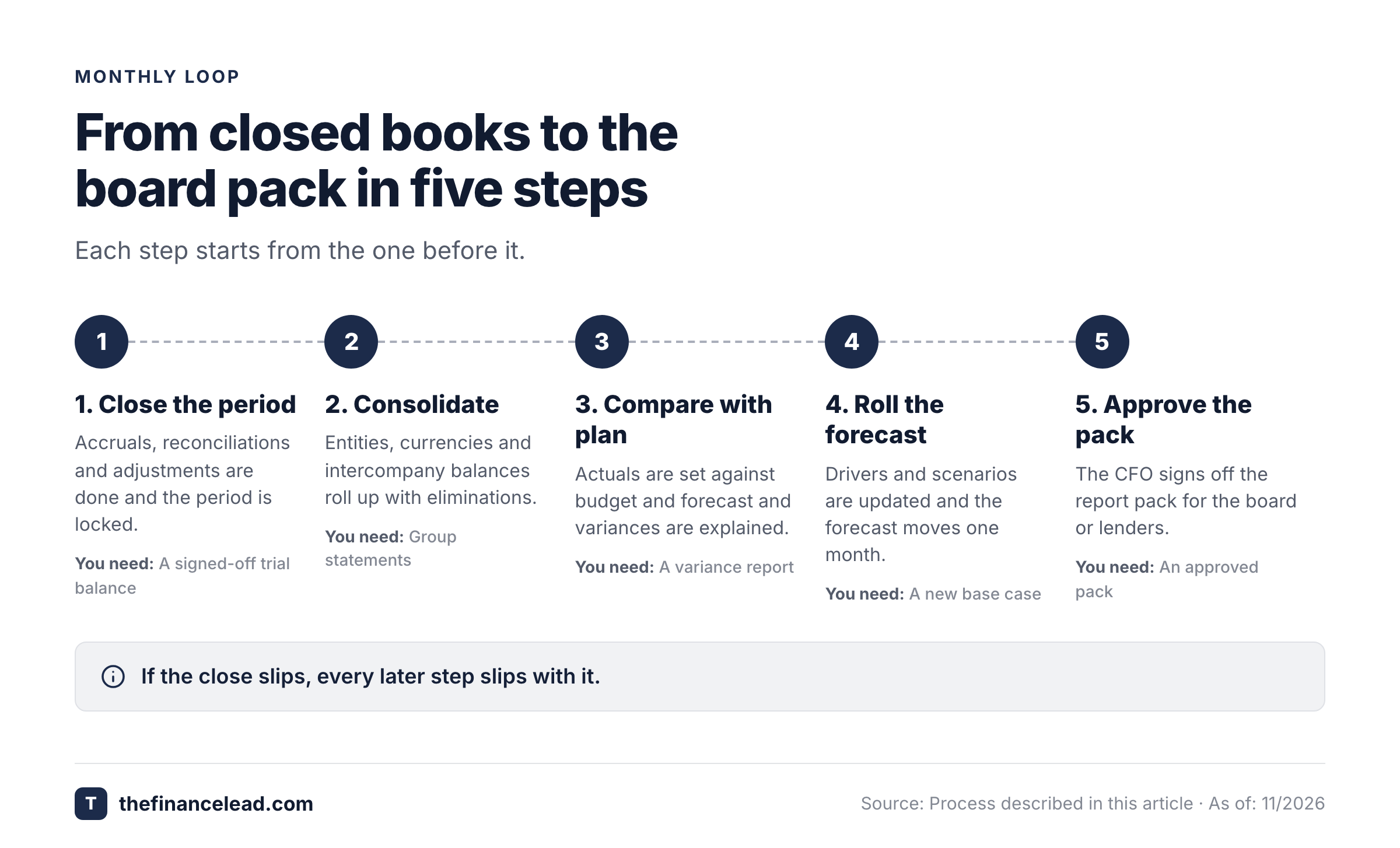
The cycle only works if the first two rows finish on time, and that's the part no planning platform can speed up. For the benchmark, see our guide to days to close and our month-end close calendar.
What does financial performance management software cost?
Financial performance management software has no published price on any of the eight platforms. Every vendor sells by demo and quote, and the quote doesn't stay fixed: it moves with entities, users and modules. Cube prices by legal-entity count, Datarails by user and integration tier, Vena by plan and add-on, and Prophix One by module. The only public figure in this guide comes from a marketplace listing: Prophix One lists $50,000 for Close Management, $60,000 for Financial Consolidation and $100,000 for FP&A per 12-month unit on AWS Marketplace, and the unit is not defined there.
- Consolidation of several entities and currencies is the hardest jobOneStream, Planful or Prophix One
- Planning across finance, sales and supply chain on large dataAnaplan
- Driver-based planning with Monte Carlo scenarios on NetSuite or Sage IntacctWorkday Adaptive Planning
- The model and the monthly pack stay in ExcelVena or Datarails
- Plans in Excel or Google Sheets across several legal entitiesCube
- A forecast for one company on QuickBooks or Xero with a published priceA lighter forecasting tool, see our forecasting guide
Where does the month-end close fit?
Every platform above starts from a closed ledger, not from a live one. If accruals, depreciation or reconciliations are still open when the trial balance loads, the plan is compared with numbers that will change. See our month-end close process and month-end close checklist for the close itself, and our guide to financial close software for the tools that run it. If your reporting layer is the gap, our guide to financial reporting software covers it.
Planning platforms don't show which close task is still waiting for a sign-off. Our product tracks that part of the close, so the actuals the plan starts from have an owner, a reviewer and their evidence.
FAQ
What is financial performance management software?
Financial performance management software is a platform that plans, consolidates and reports a company's financials on one data model, so budgets, forecasts and actuals are compared in the same place. Vendors also call it corporate performance management, enterprise performance management or FP&A software.
What are some examples of financial performance management software?
Examples include OneStream, Planful and Prophix One, which lead with consolidation and close. Anaplan and Workday Adaptive Planning lead with planning. Vena, Cube and Datarails keep Excel or Google Sheets as the front end. None of them publishes a price.
What is the best performance management software for small companies?
A company with one entity on QuickBooks or Xero rarely needs a full platform, though the lighter tools still help. Cube sells a plan for one legal entity and Datarails an entry tier for 2 users, but both are quoted. Lighter forecasting tools that publish a price are covered in our financial forecasting software guide.
Can ChatGPT do financial analysis?
ChatGPT and similar chat assistants can summarize an exported report, draft variance commentary and check a formula. It doesn't hold your consolidation rules, your approved plan or an audit trail, so treat its output as a draft that a person reviews against the ledger.
How long does implementation take?
Implementation time is rarely published by vendors. Datarails quotes 4 to 6 weeks, while G2 users of Datarails and Prophix One report about four months. Prophix describes a customer that automated consolidation across 8 foreign subsidiaries in 60 days.
Is performance management software the same as an ERP?
No, performance management software is not an ERP. The ERP or general ledger records the transactions. Performance management software reads the closed numbers from it and adds planning, consolidation and reporting on top.