Xero's a strong cloud accounting choice for a small business that wants bank feeds, collaborative bookkeeping and clear financial reports without paying for every additional user. It's less convincing when the finance team needs complex group reporting or a documented approval trail for the entire monthly close. This Xero review focuses on what a controller can actually use, where the handoffs get messy and which US plan makes sense.
The core distinction is simple: Xero records and reports financial transactions. A controller still needs a process to prove that each reconciliation was reviewed, every exception was resolved and the close was authorized. That's a workflow question, not merely a software-feature question.
- Best fit: small and growing businesses with an accountant or bookkeeper sharing one cloud ledger.
- Main strengths: bank reconciliation, unlimited users and a broad app ecosystem.
- Main trade-offs: Early plan transaction caps, support by case and callback rather than an inbound phone line, and add-on costs.
- Close verdict: useful reconciliation and audit evidence, but don't confuse a ledger lock with preparer and reviewer sign-off.
Is Xero worth it for a small finance team?
Xero's worth considering when several people need to work in the books and the company doesn't require an enterprise consolidation system. No per-user license fees means a controller can grant access based on the job, rather than rationing logins. That's especially helpful when an external accountant needs visibility alongside an internal bookkeeper.
The product's strongest operational fit is a recurring routine: capture bills, reconcile bank activity, inspect reports and investigate exceptions. The flow's easy to understand, but the quality of the close still depends on the team's chart of accounts, review habits and supporting documents.
| What works well | What deserves scrutiny |
|---|---|
| Bank feeds and transaction matching reduce repetitive bookkeeping. | A feed connection isn't proof that a statement balance agrees to the ledger. |
| Multiple users can access the books without per-seat license charges. | Roles still need deliberate design, especially for posting and period controls. |
| Invoicing, bills and reports share the accounting record. | A third-party integration can introduce timing and mapping exceptions. |
| Reconcile period provides a bank reconciliation record. | The overall close still needs task ownership, evidence and review. |
| A large app ecosystem can extend the workflow. | Each extra app needs a data owner and a failure-recovery plan. |
Our assessment: Xero is a sensible accounting system for a business that wants reliable routine bookkeeping and doesn't need an elaborate ERP. It isn't a substitute for a close calendar, reconciliation policy or independent approval. If you only send a handful of invoices a month, a full accounting system may be more than you need.
How much does Xero cost in the US?
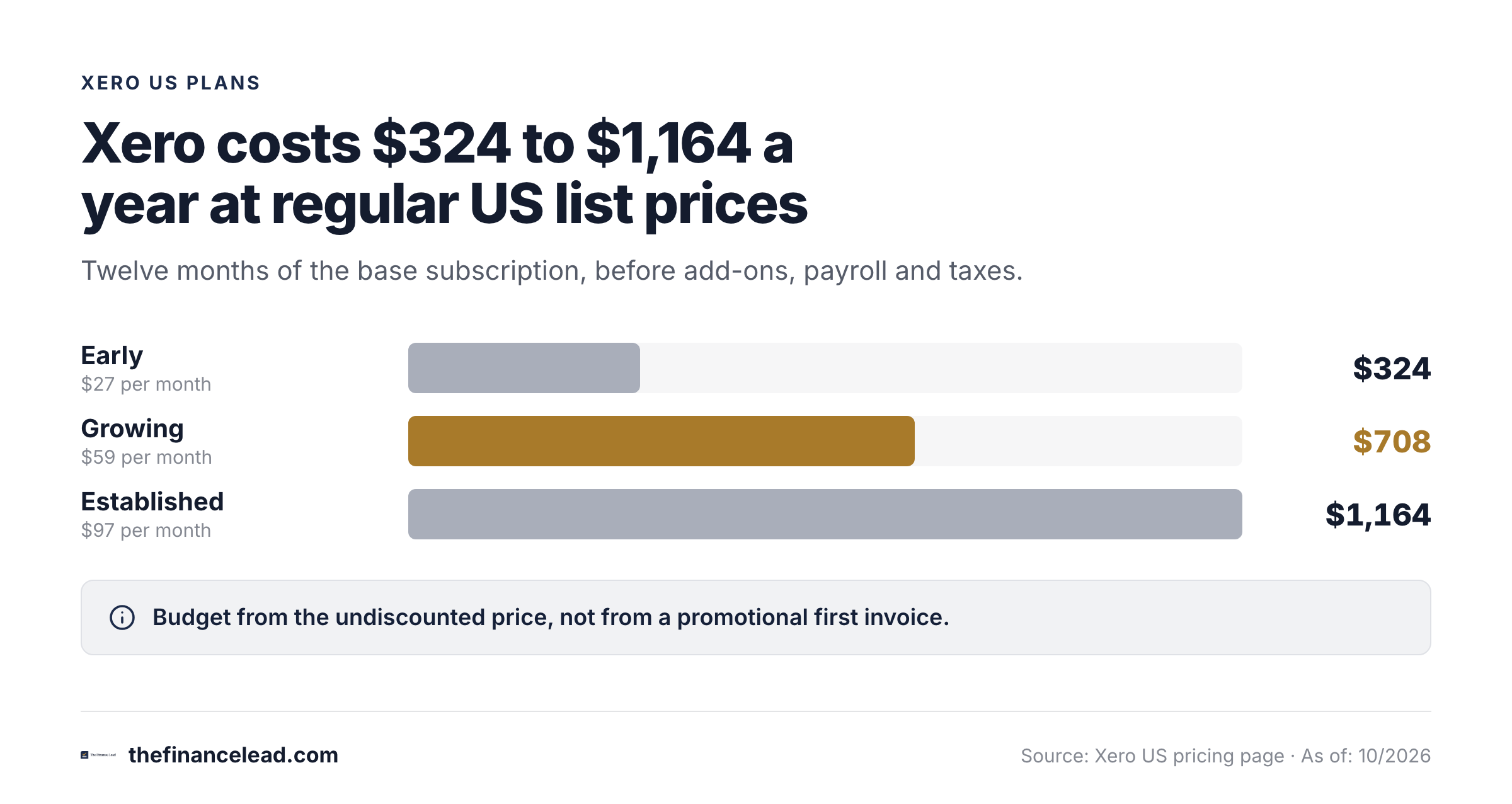
Xero's regular US subscription prices are $27 per month for Early, $59 for Growing and $97 for Established, checked October 29, 2026. These are base-plan prices before taxes, optional add-ons and any temporary new-customer promotion. The current offer can change, so budget from the undiscounted recurring price.
- Early$27 /month
- 20 invoices and 5 bills
- Bank reconciliation
- Smart Document Capture
- Basic financial reporting
- Growing$59 /monthBest baseline for active books
- Invoices and bills without Early's caps
- Automated bill entry
- Auto-reconcile transactions
- Custom performance dashboards
- Established$97 /month
- Multiple currencies
- Project time and cost tracking
- Employee expenses and mileage
- Advanced financial analytics
Regular US monthly subscription prices checked October 29, 2026. Promotions, payroll, optional add-ons and payment fees are separate.
Early allows 20 invoices and five bills. That's a workable entry point for a very small operation, but a growing accounts payable queue can exhaust the bill allowance quickly. Counting invoices alone isn't enough. Check both incoming supplier bills and outgoing customer invoices over a normal month and a peak month.
Growing's the practical starting point for many finance teams. It removes the restrictive entry-tier invoicing and bill volumes, adds automated bill entry and includes auto-reconcile transactions. You'll still need someone to inspect exceptions and confirm that transactions landed in the intended accounts.
Established's a more specific purchase. Its multiple-currency capability, project time and cost tracking, employee expense and mileage claims and deeper analytics matter when the business actually uses those workflows. Don't upgrade just because the name sounds more scalable.
At regular list price, a full twelve-month subscription is $324 for Early, $708 for Growing and $1,164 for Established. If the business uses payroll, optional inventory tools or payment services, add those separately to the model. Xero lists Payroll powered by Gusto and Inventory Plus as optional products on applicable plan cards.
For plan changes, transaction limits and renewal details, see our Xero pricing guide. It's more useful to model a normal operating year than to compare a temporary promotional first invoice.
What can Xero do well in everyday accounting?
Bank reconciliation and exception handling
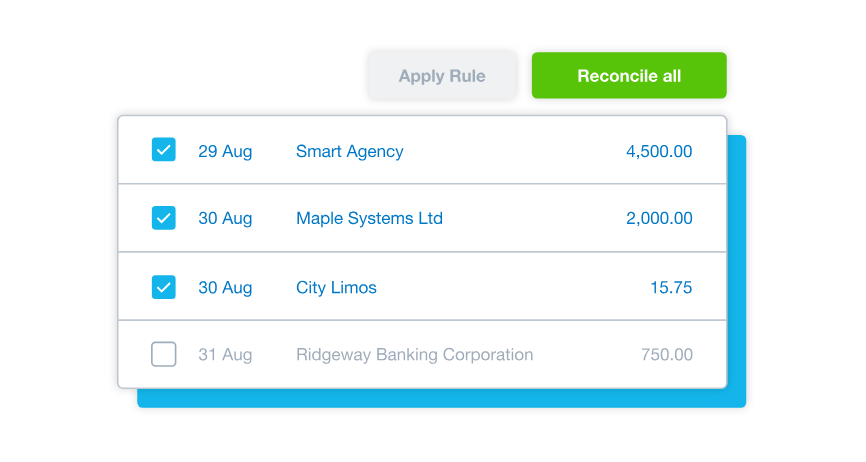
Xero brings bank activity into the accounting workflow so users can match and categorize transactions. The valuable part for a controller isn't just faster matching. It's the ability to identify an unexplained difference, trace it to the underlying record and keep a consistent reconciliation process.
Xero's optional reconcile period workflow lets a user define a period, compare the bank statement with accounting transactions, save a balanced period and create a reconciliation report. It also creates a clearer boundary between continuous transaction matching and a period-end check.

There's one caveat. A reconciled transaction can still be categorized incorrectly, and a correct bank balance doesn't establish that revenue, accruals or liabilities are complete. Your reviewer should check unusual reconciling items, late imports, duplicate entries and changes after the reporting cut-off.
Invoices, bills and document capture
Xero combines customer invoices, supplier bills and Smart Document Capture in the same accounting environment. That helps the bookkeeper move from a supporting document to the related transaction without maintaining a separate master spreadsheet. The finance team can then review aging and outstanding items from the ledger.
Still, capture isn't approval. Before treating a bill as ready for payment or a period as ready for close, define who confirms the vendor, amount, accounting code and supporting evidence. When an invoice comes from another application, reconcile the handoff against the source system rather than assuming every sync succeeded.
Reporting, management review and drill-down
Xero provides financial reports and performance views, including cash flow forecasts that differ by plan. Early lists a 30-day cash flow forecast, Growing lists a 60-day forecast and Established lists a 180-day forecast. These are product features, not guarantees that the underlying forecast is accurate.
For a monthly reporting pack, start with the trial balance, profit and loss statement and balance sheet. Compare them to the prior close and explain material movements. A forecast's helpful for management, but it shouldn't replace a reconciliation or a documented review of unusual journal activity.
The practical test's whether your controller can reproduce a report with the same period, accounting basis and filters next month. If the report requires repeated spreadsheet repair, write that down as an implementation cost. If a team needs a specialized consolidated pack, test the exact output before buying rather than assuming the default report builder covers it.
Roles, access and accountant collaboration
Unlimited users is a pricing advantage, but access still needs discipline. A preparer should have the permissions needed to enter and reconcile transactions. The reviewer should be able to inspect reports and supporting records without being forced to share the preparer's login.
Xero documents distinct user roles and report permissions. Because permission combinations vary, test a real preparer and a real reviewer account in a trial organization. Verify who can post a manual journal, change financial settings, export reports and adjust a lock date. A role label by itself isn't an internal control.
Project costs, currencies and inventory
Established includes project time and cost tracking and multiple currencies. Those capabilities can be useful when jobs or international transactions drive management reporting. They aren't a reason to treat Xero as a full project portfolio or multinational consolidation platform.
Inventory's another boundary. Basic item tracking and an optional Inventory Plus offering may be sufficient for a straightforward operation. If your business has multiple warehouses, manufacturing work in progress or complex costing, test a representative month of stock movements and valuation adjustments.
How does Xero handle month-end close?
Xero supports important accounting controls inside the ledger, but month-end close is broader than the ledger. A credible close needs evidence that the preparer completed each task and a different person reviewed it. That means the workflow must cover documents and decisions as well as account balances.
Confirm source feeds and cut-off
Identify the last expected bank, card, payroll and billing imports. Log missing feeds and late transactions before reporting.
Reconcile cash and control accounts
Compare statements and subledgers with the general ledger. Save the reconciliation report and note unresolved items.
Post and review adjustments
Document accruals, deferrals, depreciation and correcting journals with a reason and supporting calculation.
Review financial statements
Re-run the trial balance and financial statements after adjustments. Explain unexpected movements and check period consistency.
Approve the close and protect the period
Capture preparer evidence, independent reviewer approval and exception decisions before applying the agreed lock date.
Xero's reconcile period is useful for the bank-specific part of this sequence. Xero also documents lock dates intended to prevent edits to past transactions, although a user with the advisor role can change or remove those dates. That distinction matters: a period lock helps protect the ledger after review, but it doesn't prove the review happened.
Xero's History and notes report is designed to show changes to transactions and related activity. It shows changes to records, not who approved a close or what happened in connected apps, so a controller shouldn't treat it as a complete review record. Keep source documents and the signed review trail in the close file as well.
A small finance team can manage this with a carefully controlled month-end close checklist. If work repeatedly slips because the reviewer doesn't know what is ready, use a dedicated close tracker alongside Xero rather than trying to make bank reconciliation carry the entire sign-off process.
- Bank statements agree to the reconciled ledger balances.
- Unreconciled and duplicate bank items have named owners.
- AP and AR aging tie to control accounts.
- Accrual and deferral journals have supporting schedules.
- A reviewer can reproduce the reporting pack.
- Late entries and reopened periods are logged as exceptions.
- Preparer and reviewer approval is retained outside the transaction entry itself.
Where does Xero fall short?
The biggest weaknesses show up when a finance team asks the product to behave like a close-management system or a complex ERP.
Entry-tier volume limits. Early's invoice and bill caps can make it unsuitable even for a company with a modest headcount. The relevant metric is document volume, not the number of people employed.
Support expectations. Xero offers free online support 24/7. It doesn't provide a standard inbound support phone line, although users can request a callback. That may be fine for routine bookkeeping questions, but a controller with a blocked bank-feed issue should define an escalation plan before a critical deadline.
Reporting customization. Standard financial reports can cover routine needs, yet specialized board packs and unusual segment analysis deserve a trial. A finance team should test the exact report, including export format and drill-down, instead of relying on a broad claim about reporting capability.
Integration dependencies. A broad app marketplace is useful, but a connected app can fail or map data unexpectedly. TrustRadius reviewers have described occasional bank auto-reconciliation errors and broken external syncs. Treat those as reported experiences, not proof that every customer will encounter them.
Multiple organizations. A controller managing several legal entities should test access switching, reporting alignment and consolidated outputs. Separate organizations don't automatically produce group-level close evidence. If consolidated financial statements are mandatory, verify the complete workflow and any add-on before purchase.
Approval evidence. A transaction history or lock date isn't the same thing as a task-level sign-off. If the auditor asks who reviewed the bank reconciliation, when they approved it and which evidence they saw, make sure your process can answer without reconstructing emails.
What do real Xero reviewers say?
TrustRadius displayed 8.5 out of 10 from 887 reviews and ratings when checked October 29, 2026. That's a snapshot of a review platform, not our own test score. Its current review summary emphasizes straightforward bank reconciliation and a user-friendly interface, while noting reporting customization, inventory and integration complaints.
The themes match the trade-offs above: daily reconciliation is easy, while reporting depth and integrations are where complaints cluster.
For the original user feedback, read Xero reviews on TrustRadius. Review platforms include incentivized feedback, and comments from other countries can describe payroll or tax workflows that don't apply to a US subscription. Don't use an isolated complaint as a product-wide finding.
Who should choose Xero, and who should look elsewhere?
Xero fits best when the team needs a collaborative cloud ledger, routine bank reconciliation and financial reports. It's a weaker fit when the buying requirement is really group consolidation, complex inventory costing or a formally managed close across many preparers and reviewers.
- Low-volume invoicing and bookkeepingConsider Early only after checking both document caps.
- Recurring bills, invoices and a shared finance workflowStart the evaluation with Growing.
- Multiple currencies, project costing or employee expensesTest Established with actual transactions.
- Complex group consolidation or manufacturing accountingRun a proof of concept and compare specialist systems.
- Evidence collection and independent close approvalKeep Xero as the ledger and add a separate close process.
QuickBooks Online is the obvious comparison for many US buyers, but the choice isn't just a feature count. Ask which system your accountant knows, whether required reports are reproducible and which subscription supports the right users and controls. Our QuickBooks vs Xero comparison covers the buying differences, while the QuickBooks Online review evaluates that alternative from a controller's perspective.
A controller shouldn't migrate only to save a little on the base subscription. The cost of changing the chart of accounts, training staff and validating opening balances can outweigh a small monthly difference. Complete the first close under the new system before treating the migration as finished.
How should you test Xero before committing?
Don't make the purchase decision from a clean demo company. Use a representative sample of the transactions that normally cause trouble: a late bank feed, a customer credit note, a partially paid bill, a manual accrual and a report that the CFO expects every month.
- Confirm the regular US subscription rate and add-ons in checkout.
- Count invoices and bills in both an ordinary and peak month.
- Connect a real bank feed and reconcile a full statement period.
- Test a duplicate, a missing line and a late correction.
- Verify preparer and reviewer roles using separate logins.
- Export the financial statements and supporting reconciliation records.
- Check the actual approval evidence required by your auditor.
- Reproduce the management reporting pack without spreadsheet rework.
- Confirm which apps own each import and how failed syncs are recovered.
- Document conversion balances before switching off the old system.
If you're migrating from QuickBooks, Xero describes a conversion path with partner tools and CSV imports. That can help, but you still need to reconcile the opening trial balance, outstanding receivables, outstanding payables and bank balances. A migration's complete only when the numbers agree and the team can explain differences.
Where should the close sign-off live?
Keep the accounting record in Xero and track close readiness separately when you need clear accountability. We built The Finance Lead for that second job, so weigh this section accordingly. It focuses on recurring close tasks, evidence links or notes per task, preparer and reviewer sign-off and an activity trail of every submission and approval. It doesn't reconcile bank accounts, post journals, connect to your ledger or replace Xero. That's why the tools can serve different parts of the same workflow.
A simple boundary works: Xero answers what is in the books. The close checklist answers what has been checked, by whom and with which proof. That separation is useful even when the finance team is small.
Frequently asked questions about Xero
Is Xero good for small businesses?
Yes, especially when a small business wants bank reconciliation, invoices, bills and shared access to its books. Check the document limits and the reports you actually need.
Does Xero charge per user?
Xero's US pricing page says there are no per-user license fees. You should still assign the right permissions to each user.
What is the difference between Xero Early and Growing?
Early limits invoice and bill volumes. Growing removes those entry-tier constraints and adds more automation and dashboard capabilities.
Can Xero close the books at month end?
Xero supports reconciliation, reporting and period controls, but a complete close also requires supporting evidence, exception decisions and independent approval.
Does Xero have phone support?
Xero provides online case support and can arrange callbacks. It doesn't offer a standard inbound support phone number.
Is Xero better than QuickBooks Online?
Which one wins depends on accountant familiarity, required controls, reports, user access and integrations. Compare both systems using the same real transactions.